Update "Secure Boot Allowed Key Exchange Key (KEK)" - Causing Problems


Jgreg7

Member
Local time
4:52 AM
Posts
2
OS
Windows 11 pro
Secure Boot Allowed Key Exchange Key (KEK) Update, installed 2/9/2026 seems to be causing problems with my browser. Since this install, the browser is redirecting to the wrong Microsoft SSO site instead of the site I want (My work site).

I have two Microsoft accounts: My work account for the company I work for, and a personal 365 account. Both have exchange e-mail, which I log into at the same time.

On Firefox - When I try to log into my work account, it now redirects me to my personal account. I am unable to access my work account as the redirect is very persistent.

I am able to access my work account on Chrome.

How do I uninstall the "Secure Boot Allowed Key Exchange Key (KEK) Update"
 
Windows Build/Version
Version 25H2 (Os Build 26200.7705)

My Computer

System One

  • OS
    Windows 11 pro
    Computer type
    Laptop
    Manufacturer/Model
    Dell Vostro 7620
    CPU
    12th Generation Intel(R) Core(TM) i7-12700H
    Motherboard
    Dell
    Memory
    16GB DDR5, 1x 8GB onboard + 1x SoDIMM 8GB
    Graphics Card(s)
    NVIDIA(R) GeForce RTX(TM) 3050 Ti 4GB GDDR6
    Monitor(s) Displays
    Dual, 27 "
    Screen Resolution
    2560 x 1440
    Hard Drives
    2 TB SSD
    PSU
    Laptop - 130W, Dell Dock Model WD19TB - 180W
    Keyboard
    External, bluetooth
    Mouse
    External, bluetooth
    Internet Speed
    950 Mbps Down, 43Mbps Up
    Browser
    Firefox, Chrome
    Antivirus
    McAfee Small Business Security

Secure Boot Allowed Key Exchange Key (KEK) Update, installed 2/9/2026 seems to be causing problems with my browser. Since this install, the browser is redirecting to the wrong Microsoft SSO site instead of the site I want (My work site).

I have two Microsoft accounts: My work account for the company I work for, and a personal 365 account. Both have exchange e-mail, which I log into at the same time.

On Firefox - When I try to log into my work account, it now redirects me to my personal account. I am unable to access my work account as the redirect is very persistent.

I am able to access my work account on Chrome.

How do I uninstall the "Secure Boot Allowed Key Exchange Key (KEK) Update"
Well, there's lots of people that know more, but to answer your question. Boot into the BIOS and go to the Secure Boot section, once there, Reset Factory Keys. Was the BIOS recently updated, it may have updated the KEK key at the same time? I'm having a hard time comprehending how the KEK key is related to your inability to sign into the MS work account.
 
Last edited:

My Computer

System One

  • OS
    Windows 11
Did you try clearing the cache and temporary files in Firefox?
 

My Computers

System One System Two

  • OS
    Windows 11 (up to date)
    Computer type
    PC/Desktop
    Manufacturer/Model
    Custom
    CPU
    Intel i5 12400
    Motherboard
    Gigabyte Z690 UA
    Memory
    Corsair Vengeance LPX 16GB
    Graphics Card(s)
    On Board the Z690
    Sound Card
    On Board
    Monitor(s) Displays
    43" Samsung tu7000
    Screen Resolution
    2560 x 1440
    Hard Drives
    SAMSUNG SSD 1TB NVMe M.2
    PSU
    Thermaltake smart 500w 80+
    Case
    LIAN LANCOOL_205M
    Cooling
    Bunch of fans . . . :o) (lights dont work)
    Keyboard
    Unicomp: Ultra Classic White Buckling Spring USB
    Mouse
    M510
    Internet Speed
    50mbps on Ethernet
    Browser
    Fire Fox
    Antivirus
    Windows
    Other Info
    Love this computer but I still prefer Win-7 like I love my old Lazy Boy Recliner . . . it just feels better.
  • Operating System
    WIN-7-64BIT and Win-11 pro for testing on unsupported hardware
    Computer type
    PC/Desktop
    Manufacturer/Model
    Home built
    CPU
    i5-3570K CPU @ 3.40GHz, 3801 Mhz, 4 Core(s), 4 Logical Processor(s)
    Motherboard
    GA-Z77-HD3
    Memory
    16 GB - Crucial Ballistick 4GB PC3-14900 DDR3-1333 MHz
    Graphics card(s)
    NVIDIA GeForce GTX 1050
    Sound Card
    On Board
    Monitor(s) Displays
    ASUS VP278
    Screen Resolution
    1920 x 1080
    Hard Drives
    4 - internal Samsung 2.5" SSD, 1 WD HDD 7200 and some external drives
    PSU
    EVGA 550w
    Case
    Old Gygabyte Tower
    Cooling
    Yes
    Keyboard
    Unicomp - UNIOP4A USB (like the old IBM Model H that I started with)
    Mouse
    M510
    Internet Speed
    50mbps
    Browser
    Firefox
    Antivirus
    Windows
    Other Info
    The only thing it lack is USB-3.2 on the front face but it has 3.0 on the back
Eh... without knowing more about their system, I would not recommend reseting the secure boot keys to default. This could make his system unable to boot without disabling secure boot.
 

My Computer

System One

  • OS
    Windows 11 25H2
    Computer type
    PC/Desktop
    Manufacturer/Model
    EVGA home brew
    CPU
    Broadwell-e 6850K 4.5ghz @1.36v
    Motherboard
    EVGA X99 FTW K
    Memory
    32GB Corsair LPM 3600 C16
    Graphics Card(s)
    EVGA RTX 3080Ti FTW
    Sound Card
    Asus Centurion true 7.1 headset. (5 speakers in each earpeice)
    Monitor(s) Displays
    LG C4 55"
    Screen Resolution
    4K 144hz
    Hard Drives
    Various models of SSDs ~10TB No HDDs installed.
    PSU
    be quiet! BN516 Straight Power 12-1000w 80 Plus Platinum
    Case
    Corsair 780T modified to dual 200mm intake fans
    Cooling
    Corsair H110i
    Keyboard
    Corsair K95 Platinum
    Mouse
    Corsair M65 RGB Elite
    Internet Speed
    50Mbs
Clearing the cache did not work. I uninstalled Firefox and reinstalled it, now it works.
Thank you for the suggestion.
 

My Computer

System One

  • OS
    Windows 11 pro
    Computer type
    Laptop
    Manufacturer/Model
    Dell Vostro 7620
    CPU
    12th Generation Intel(R) Core(TM) i7-12700H
    Motherboard
    Dell
    Memory
    16GB DDR5, 1x 8GB onboard + 1x SoDIMM 8GB
    Graphics Card(s)
    NVIDIA(R) GeForce RTX(TM) 3050 Ti 4GB GDDR6
    Monitor(s) Displays
    Dual, 27 "
    Screen Resolution
    2560 x 1440
    Hard Drives
    2 TB SSD
    PSU
    Laptop - 130W, Dell Dock Model WD19TB - 180W
    Keyboard
    External, bluetooth
    Mouse
    External, bluetooth
    Internet Speed
    950 Mbps Down, 43Mbps Up
    Browser
    Firefox, Chrome
    Antivirus
    McAfee Small Business Security
Clearing the cache did not work. I uninstalled Firefox and reinstalled it, now it works.
Thank you for the suggestion.
Great . . . There may have been other things you could have tried with Firefox but the big hammer approach worked.
 

My Computers

System One System Two

  • OS
    Windows 11 (up to date)
    Computer type
    PC/Desktop
    Manufacturer/Model
    Custom
    CPU
    Intel i5 12400
    Motherboard
    Gigabyte Z690 UA
    Memory
    Corsair Vengeance LPX 16GB
    Graphics Card(s)
    On Board the Z690
    Sound Card
    On Board
    Monitor(s) Displays
    43" Samsung tu7000
    Screen Resolution
    2560 x 1440
    Hard Drives
    SAMSUNG SSD 1TB NVMe M.2
    PSU
    Thermaltake smart 500w 80+
    Case
    LIAN LANCOOL_205M
    Cooling
    Bunch of fans . . . :o) (lights dont work)
    Keyboard
    Unicomp: Ultra Classic White Buckling Spring USB
    Mouse
    M510
    Internet Speed
    50mbps on Ethernet
    Browser
    Fire Fox
    Antivirus
    Windows
    Other Info
    Love this computer but I still prefer Win-7 like I love my old Lazy Boy Recliner . . . it just feels better.
  • Operating System
    WIN-7-64BIT and Win-11 pro for testing on unsupported hardware
    Computer type
    PC/Desktop
    Manufacturer/Model
    Home built
    CPU
    i5-3570K CPU @ 3.40GHz, 3801 Mhz, 4 Core(s), 4 Logical Processor(s)
    Motherboard
    GA-Z77-HD3
    Memory
    16 GB - Crucial Ballistick 4GB PC3-14900 DDR3-1333 MHz
    Graphics card(s)
    NVIDIA GeForce GTX 1050
    Sound Card
    On Board
    Monitor(s) Displays
    ASUS VP278
    Screen Resolution
    1920 x 1080
    Hard Drives
    4 - internal Samsung 2.5" SSD, 1 WD HDD 7200 and some external drives
    PSU
    EVGA 550w
    Case
    Old Gygabyte Tower
    Cooling
    Yes
    Keyboard
    Unicomp - UNIOP4A USB (like the old IBM Model H that I started with)
    Mouse
    M510
    Internet Speed
    50mbps
    Browser
    Firefox
    Antivirus
    Windows
    Other Info
    The only thing it lack is USB-3.2 on the front face but it has 3.0 on the back
MS is planning a mandatory Secure Boot update for all supported PC's in mid-2026. This KEK update is to make the transition smoother on older PC's, which did not install or get a BIOS firmware update for Secure Boot.

This update is a pre-requisite step to allow newer Secure Boot CA 2023 certificates to be installed in BIOS, before canceling the older CA 2011 certificates.

At this stage, the addition of KEK CA 2023 will not impact Windows, or your ability to boot in Secure Boot mode. The new KEK works in parallel with the existing KEK already in your BIOS. The message is actually a good sign that your PC will not have any unexpected problems later this year.
 

My Computer

System One

  • OS
    Windows 7
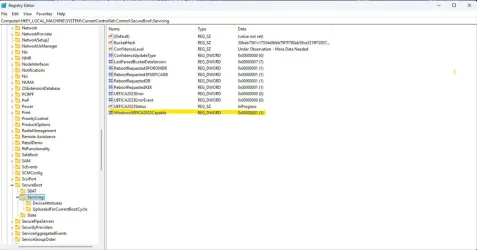
Is this another way of checking if the secure boot update has occurred?
I went to the registry editor and in the field "WindowsUEFICA2023Capable the data was originally all zeros, after installing the "Secure Boot Allowed Key Exchange Key (KEK) Update" the value has now changed to 1.Screenshot-2026-03-05-091105.webp
 

My Computer

System One

  • OS
    Windows 11
    Computer type
    PC/Desktop
    Manufacturer/Model
    Home built
    CPU
    Intel i5 9400
    Motherboard
    Gigabyte B365M D3SH WIFI
    Memory
    16GB tforce
    Graphics Card(s)
    GeForce GTX950 SSC
    Monitor(s) Displays
    View Sonic VX 3216 32" curved screen
    Screen Resolution
    1920 x 1080
    Hard Drives
    Crucial 250GB, Western Digital 6TB
    PSU
    MSI MAG A1000GL PCIE5
    Cooling
    standard Intel fan
    Keyboard
    Microsoft 3000 version 2
    Mouse
    Microsoft 3000
    Internet Speed
    symmetrical 50Mb fiber feed
    Browser
    Edge and Chrome
    Antivirus
    using Windows Defender
You could determine your current status by reading several reg keys, but isn't it simpler to use a UEFI check script?
garlin's PowerShell scripts for updating Secure Boot CA 2023

In this case, the Secure Boot task has successfully applied the KEK CA 2023, Windows UEFI CA 2023, MS UEFI CA 2023, and Option ROM certs but is awaiting a future reboot so Windows can take advantage of those changes.

After that step, Windows can safely switch to the new boot manager (only after confirming the CA 2023 certs are in place), so eventually yet another reboot will take WindowsUEFICA2023Capable to 2 (completed).
 

My Computer

System One

  • OS
    Windows 7
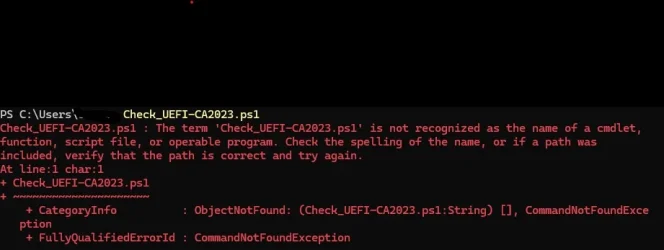
garlin I had tried to use the script, but unless I'm doing something wrong (not unusual for me) this is what my response is.
That's' why I tried by way of the registry.

Also,UEFI Screenshot 2026-03-06 093252.webp I wonder how long it will be before the WindowsUEFICA2023Capable to 2 might take place?
 

My Computer

System One

  • OS
    Windows 11
    Computer type
    PC/Desktop
    Manufacturer/Model
    Home built
    CPU
    Intel i5 9400
    Motherboard
    Gigabyte B365M D3SH WIFI
    Memory
    16GB tforce
    Graphics Card(s)
    GeForce GTX950 SSC
    Monitor(s) Displays
    View Sonic VX 3216 32" curved screen
    Screen Resolution
    1920 x 1080
    Hard Drives
    Crucial 250GB, Western Digital 6TB
    PSU
    MSI MAG A1000GL PCIE5
    Cooling
    standard Intel fan
    Keyboard
    Microsoft 3000 version 2
    Mouse
    Microsoft 3000
    Internet Speed
    symmetrical 50Mb fiber feed
    Browser
    Edge and Chrome
    Antivirus
    using Windows Defender
For security reasons, PowerShell won't run a script unless you provide a path (folder) in the command line. CMD doesn't force you to do that.

You have to put a ".\" in front of the script's filename if the script is in your current folder.
Code:
.\Check_UEFI-CA20231.ps1

Or use the full pathname.
Code:
C:\Users\Smalltown\Downloads\Check_UEFI-CA20231.ps1
 

My Computer

System One

  • OS
    Windows 7
Back
Top Bottom