Solved Update to Win 11 But...


flhthemi

Well-known member
Member
Local time
7:12 PM
Posts
191
OS
Windows 11 Pro 23H2
Ok I have one PC left with Windows 10. I want to bring it to Windows 11 23H2 because of networking issues that MS created in 24H that continue to plague my network.
This PC can run Windows 11. I have an install USB for 23H2.

Here are my concerns:
1) There is NO recovery partition on my Win 10 disk
2) This PC dual boots with EasyBCD and BIOS had to have fastboot option turned OFF

So....if I just boot from the USB and update the proper drive will it work????
 
Last edited:

My Computer

System One

  • OS
    Windows 11 Pro 23H2
    Computer type
    PC/Desktop
    Manufacturer/Model
    MinisForum
    CPU
    Intel(R) Core(TM) i9-12900HK
    Memory
    32gb
    Graphics Card(s)
    Intel(R) Iris(R) Xe Graphics
    Sound Card
    Realtek 888
    Monitor(s) Displays
    Acer
    Screen Resolution
    1920x1080
    Hard Drives
    1TB SSD
    Keyboard
    Logitech
    Mouse
    Logitech MX Master 2X
    Internet Speed
    1GB
    Browser
    Firefox
    Antivirus
    Windows Defender
You can do an in place upgrade. If your PC doesn't support POPCNT and SSE 4.2, 23H2 is the last version you can run on old hardware. Best wishes.
 

My Computers

System One System Two

  • OS
    Windows 11 Education For 25H2
    Computer type
    Laptop
    Manufacturer/Model
    HP ZBook G2
    CPU
    Intel® Core i7 5500u
    Motherboard
    HP
    Memory
    8 GB
    Graphics Card(s)
    Intel HD Family Graphics 5500 AMD Firepro 4150M
    Sound Card
    Realtek High Audio
    Hard Drives
    1 TB SSD
    Mouse
    HP USB Mouse
    Antivirus
    Windows Defender
  • Operating System
    Windows 11 Pro For Workstations 25H2
    Computer type
    Laptop
    Manufacturer/Model
    HP Zbook G4
    CPU
    Xeon 1535m v6
    Motherboard
    HP
    Memory
    32 GB
    Graphics card(s)
    AMD Quadro Pro 4100
    Sound Card
    Bang and Olufson Audio
    Hard Drives
    1TB SSD
    Mouse
    HP USB Mouse
    Antivirus
    Windows Defender
You can do an in place upgrade. If your PC doesn't support POPCNT and SSE 4.2, 23H2 is the last version you can run on old hardware. Best wishes.
This PC does support Windows 11. Pretty sure it's new enough to handle the rest as well as it's a dual boot with Windows 11 now. Only reason I'm gonna update the Win 10 on it is because I don't want to have to reinstall all that software...like mainly BlueStacks 5. I run the StarMaker apk on it and they don't like me using an emulator and Windows. So I just don't want to mess that up and no be able to get into StarMaker.

Thanks for the info (y)
 

My Computer

System One

  • OS
    Windows 11 Pro 23H2
    Computer type
    PC/Desktop
    Manufacturer/Model
    MinisForum
    CPU
    Intel(R) Core(TM) i9-12900HK
    Memory
    32gb
    Graphics Card(s)
    Intel(R) Iris(R) Xe Graphics
    Sound Card
    Realtek 888
    Monitor(s) Displays
    Acer
    Screen Resolution
    1920x1080
    Hard Drives
    1TB SSD
    Keyboard
    Logitech
    Mouse
    Logitech MX Master 2X
    Internet Speed
    1GB
    Browser
    Firefox
    Antivirus
    Windows Defender
Ahhh...but now I wonder if I should remove the boot entries from easybcd before I run the setup?
 

My Computer

System One

  • OS
    Windows 11 Pro 23H2
    Computer type
    PC/Desktop
    Manufacturer/Model
    MinisForum
    CPU
    Intel(R) Core(TM) i9-12900HK
    Memory
    32gb
    Graphics Card(s)
    Intel(R) Iris(R) Xe Graphics
    Sound Card
    Realtek 888
    Monitor(s) Displays
    Acer
    Screen Resolution
    1920x1080
    Hard Drives
    1TB SSD
    Keyboard
    Logitech
    Mouse
    Logitech MX Master 2X
    Internet Speed
    1GB
    Browser
    Firefox
    Antivirus
    Windows Defender
Well It's done and all seems well and I didn't remove EasyBCD to do it. I did have to delete the entries after 11 installed and then add them back. She's dual booting just fine on 23H2!
 

My Computer

System One

  • OS
    Windows 11 Pro 23H2
    Computer type
    PC/Desktop
    Manufacturer/Model
    MinisForum
    CPU
    Intel(R) Core(TM) i9-12900HK
    Memory
    32gb
    Graphics Card(s)
    Intel(R) Iris(R) Xe Graphics
    Sound Card
    Realtek 888
    Monitor(s) Displays
    Acer
    Screen Resolution
    1920x1080
    Hard Drives
    1TB SSD
    Keyboard
    Logitech
    Mouse
    Logitech MX Master 2X
    Internet Speed
    1GB
    Browser
    Firefox
    Antivirus
    Windows Defender
Most likely your Windows 10 installation is Legacy BIOS (MBR). To upgrade that to Windows 11 you would have to bypass compatibility check because official Windows 11 requirements are for UEFI boot (GPT). What is your CPU? Anything like Intel Core 2 Duo or equivalent AMD doesn't have SSE4.2 instructions, so it can run up to Windows 11 23H2. If it is at least 1st generation Intel Core-i3 or equivalent AMD, you can upgrade to 24H2 and 25H2 and 26H2 when the respective Enablement Package will be available this October. Of course not intermediate versions are necessary. You can download the 25H2 (or 26H2 ISO this October) and upgrade directly from Windows 10 or Windows 11 23H2. You can verify with the CPU-Z utility if your CPU has SSE4.2
 

My Computers

System One System Two

  • OS
    Windows 11 Pro 23H2 (5699), 25H2 (8457)
    Computer type
    Laptop
    Manufacturer/Model
    Acer Extensa 5630EZ
    CPU
    Mobile DualCore Intel Core 2 Duo T7250, 2000 MHz
    Motherboard
    Acer Extensa 5630
    Memory
    4GB
    Graphics Card(s)
    Mobile Intel(R) GMA 4500M (Mobile 4 series)
    Sound Card
    Realtek ALC268 @ Intel 82801IB ICH9 - High Definition Audio Controller
    Monitor(s) Displays
    1
    Screen Resolution
    1280x800
    Hard Drives
    Samsung SSD 850 EVO 250GB SATA Device (250 GB, SATA-III)
    Internet Speed
    VDSL 50 Mbps
    Browser
    MICROSOFT EDGE
    Antivirus
    WINDOWS DEFENDER
    Other Info
    Legacy MBR installation, no TPM, no Secure Boot, no WDDM 2.0 graphics drivers, no SSE4.2, cannot get more unsupported ;) This is only my test laptop. I had installed Windows 11 here before upgrading my main PC. For my main PC I use everyday see my 2nd system specs.
  • Operating System
    Windows 11 Pro v25H2 (build 26200.8457)
    Computer type
    PC/Desktop
    Manufacturer/Model
    Custom-built PC
    CPU
    Intel Core-i7 3770 3.40GHz s1155 (3rd generation)
    Motherboard
    Asus P8H61 s1155 ATX
    Memory
    2x Kingston Hyper-X Blu 8GB DDR3-1600
    Graphics card(s)
    GIGABYTE GeForce RTX 3050 WINDFORCE OC V2 6GB (GV-N3050WF2OCV2-6GD)
    Sound Card
    Realtek HD audio (ALC887)
    Monitor(s) Displays
    Sony Bravia KDL-19L4000 19" LCD TV via VGA
    Screen Resolution
    1440x900 32-bit 60Hz
    Hard Drives
    WD Blue SA510 2.5 1000GB SSD as system disk, Western Digital Caviar Purple 4TB SATA III (WD40PURZ) as second
    PSU
    Thermaltake Litepower RGB 550W Full Wired
    Case
    SUPERCASE MIDI-TOWER
    Cooling
    Deepcool Gamma Archer CPU cooler, 1x 8cm fan at the back
    Keyboard
    Mitsumi 101-key PS/2
    Mouse
    Sunnyline OptiEye PS/2
    Internet Speed
    100Mbps
    Browser
    Microsoft Edge, Mozilla Firefox
    Antivirus
    Microsoft Windows Defender
    Other Info
    Legacy BIOS (MBR) installation, no TPM, no Secure Boot, WDDM 3.0 graphics drivers, WEI score 7.4
This particular PC does meet the requirements for Windows 11....it's only about a year old. I've just been using Win 10 because I didn't want to run the risk of BlueStacks getting messed up. But it's all good it's running just fine on 23H2 and I'm only staying on it because of my PC not showing up in my network on 24H and 25H.
 

My Computer

System One

  • OS
    Windows 11 Pro 23H2
    Computer type
    PC/Desktop
    Manufacturer/Model
    MinisForum
    CPU
    Intel(R) Core(TM) i9-12900HK
    Memory
    32gb
    Graphics Card(s)
    Intel(R) Iris(R) Xe Graphics
    Sound Card
    Realtek 888
    Monitor(s) Displays
    Acer
    Screen Resolution
    1920x1080
    Hard Drives
    1TB SSD
    Keyboard
    Logitech
    Mouse
    Logitech MX Master 2X
    Internet Speed
    1GB
    Browser
    Firefox
    Antivirus
    Windows Defender
This particular PC does meet the requirements for Windows 11....it's only about a year old. I've just been using Win 10 because I didn't want to run the risk of BlueStacks getting messed up. But it's all good it's running just fine on 23H2 and I'm only staying on it because of my PC not showing up in my network on 24H and 25H.
You are being short sighted. I have 3 laptop computers and 3 desktop computers. 3 have Windows 10 and 3 have Windows 11. All versions of Windows are up to date with Windows 11 being 25H2 (OS build 26200.8457).

Most computers only occasionally show up in Network. That is no problem because I use network shortcuts to each one. These always work.
 

My Computers

System One System Two

  • OS
    Windows 11 Pro 25H2 (26200.6901)
    Computer type
    Laptop
    Manufacturer/Model
    ASUS TUF Gaming A15 (2022)
    CPU
    AMD Ryzen 7 6800H with Radeon 680M GPU (486MB RAM)
    Memory
    Crucial DDR5-4800 (2400MHz) 32GB (2 x 16GB)
    Graphics Card(s)
    NVIDIA RTX 3060 Laptop (6GB RAM)
    Sound Card
    n/a
    Monitor(s) Displays
    15.6-inch
    Screen Resolution
    1920x1080 300Hz
    Hard Drives
    2 x Samsung 990 Evo Plus (2TB M.2 NVME SSD)
    PSU
    n/a
    Mouse
    Wireless Mouse M510
    Internet Speed
    2100Mbps/300Mbps
    Browser
    Firefox
    Antivirus
    Malwarebytes
  • Operating System
    Windows 11 Pro 25H2 (26200.8246)
    Computer type
    PC/Desktop
    Manufacturer/Model
    Custom build
    CPU
    AMD Ryzen 7 5700X3D
    Motherboard
    ASUS ROG Strix B550-F Gaming WiFi II
    Memory
    G.SKILL Flare X 32GB (2x16GB) DDR4
    Graphics card(s)
    ASUS ROG-STRIX-RTX3060TI-08G-V2-GAMING (RTX 3060-Ti, 8GB RAM)
    Monitor(s) Displays
    Samsung G50D IPS 27"
    Screen Resolution
    1440p/180Hz
    Hard Drives
    SAMSUNG 990 EVO Plus (2TB] M.2 NVME SSD
    SAMSUNG 990 EVO Plus (4TB) M.2 NVME SSD
    PSU
    Corsair RM750x (750 watts)
    Case
    Cooler Master MasterCase 5
    Cooling
    Scythe Mugen 6
    Keyboard
    Logitech K520 (MK540 keyboard/mouse combo)
    Mouse
    Logitech M310 (MK540 keyboard/mouse combo)
    Internet Speed
    2100 Mbps down / 300 Mbps up
    Browser
    Firefox, Edge, Chrome
    Antivirus
    Malwarebytes (Premium)
    Other Info
    ASUS Blu-ray Burner BW-16D1HT (SATA) || Western Digital Easystore 20TB USB 3.0 external hard drive used with Acronis True Image 2025 backup software || HP OfficeJet Pro 6975 Printer/Scanner
This particular PC does meet the requirements for Windows 11....it's only about a year old. I've just been using Win 10 because I didn't want to run the risk of BlueStacks getting messed up. But it's all good it's running just fine on 23H2 and I'm only staying on it because of my PC not showing up in my network on 24H and 25H.
This is a known bug, see this thread:

Also sometimes the respective service that advertises the shared resources on the network is not running, so the computer is not visible when searching, but you can connect using its IP address like \\192.168.xxx.xxx or its network name \\pc_net_name. If you start the service (I don't remember how it is called), then it is visible in the network when searching.

PS: From your description, it might be a Windows 11 compliant PC, but the Windows 10 installation is Legacy, not UEFI, so to upgrade it directly you must bypass compatibility check. Otherwise you have to clean install Windows 11 in UEFI mode.
 

My Computers

System One System Two

  • OS
    Windows 11 Pro 23H2 (5699), 25H2 (8457)
    Computer type
    Laptop
    Manufacturer/Model
    Acer Extensa 5630EZ
    CPU
    Mobile DualCore Intel Core 2 Duo T7250, 2000 MHz
    Motherboard
    Acer Extensa 5630
    Memory
    4GB
    Graphics Card(s)
    Mobile Intel(R) GMA 4500M (Mobile 4 series)
    Sound Card
    Realtek ALC268 @ Intel 82801IB ICH9 - High Definition Audio Controller
    Monitor(s) Displays
    1
    Screen Resolution
    1280x800
    Hard Drives
    Samsung SSD 850 EVO 250GB SATA Device (250 GB, SATA-III)
    Internet Speed
    VDSL 50 Mbps
    Browser
    MICROSOFT EDGE
    Antivirus
    WINDOWS DEFENDER
    Other Info
    Legacy MBR installation, no TPM, no Secure Boot, no WDDM 2.0 graphics drivers, no SSE4.2, cannot get more unsupported ;) This is only my test laptop. I had installed Windows 11 here before upgrading my main PC. For my main PC I use everyday see my 2nd system specs.
  • Operating System
    Windows 11 Pro v25H2 (build 26200.8457)
    Computer type
    PC/Desktop
    Manufacturer/Model
    Custom-built PC
    CPU
    Intel Core-i7 3770 3.40GHz s1155 (3rd generation)
    Motherboard
    Asus P8H61 s1155 ATX
    Memory
    2x Kingston Hyper-X Blu 8GB DDR3-1600
    Graphics card(s)
    GIGABYTE GeForce RTX 3050 WINDFORCE OC V2 6GB (GV-N3050WF2OCV2-6GD)
    Sound Card
    Realtek HD audio (ALC887)
    Monitor(s) Displays
    Sony Bravia KDL-19L4000 19" LCD TV via VGA
    Screen Resolution
    1440x900 32-bit 60Hz
    Hard Drives
    WD Blue SA510 2.5 1000GB SSD as system disk, Western Digital Caviar Purple 4TB SATA III (WD40PURZ) as second
    PSU
    Thermaltake Litepower RGB 550W Full Wired
    Case
    SUPERCASE MIDI-TOWER
    Cooling
    Deepcool Gamma Archer CPU cooler, 1x 8cm fan at the back
    Keyboard
    Mitsumi 101-key PS/2
    Mouse
    Sunnyline OptiEye PS/2
    Internet Speed
    100Mbps
    Browser
    Microsoft Edge, Mozilla Firefox
    Antivirus
    Microsoft Windows Defender
    Other Info
    Legacy BIOS (MBR) installation, no TPM, no Secure Boot, WDDM 3.0 graphics drivers, WEI score 7.4
Ah but it IS compliant as it's already running Win11 23H2 and now is dual booting with the upgraded Win 10 drive. Working just fine network and all on 23H2. I have a non-compliant Zotac BI325 mini running it just fine too. NONE of my PCs (7) can see themselves in networking on 24H2 or 25H2. I keep updating them hoping for a fix. And yes I can access them using their \\computer_names. I've tried just about all the work arounds posted on this forum and none of them fixes the problem.

@MisterEd I have a wife. She is totally baffled with shortcuts. If one of them isn't online, of course it won't be accessible. I want my network to work like it's supposed to work so I don't have to keep explaining WHY it doesn't work. :-)
 

My Computer

System One

  • OS
    Windows 11 Pro 23H2
    Computer type
    PC/Desktop
    Manufacturer/Model
    MinisForum
    CPU
    Intel(R) Core(TM) i9-12900HK
    Memory
    32gb
    Graphics Card(s)
    Intel(R) Iris(R) Xe Graphics
    Sound Card
    Realtek 888
    Monitor(s) Displays
    Acer
    Screen Resolution
    1920x1080
    Hard Drives
    1TB SSD
    Keyboard
    Logitech
    Mouse
    Logitech MX Master 2X
    Internet Speed
    1GB
    Browser
    Firefox
    Antivirus
    Windows Defender
Have you tried the two commands on the link I posted?
 

My Computers

System One System Two

  • OS
    Windows 11 Pro 23H2 (5699), 25H2 (8457)
    Computer type
    Laptop
    Manufacturer/Model
    Acer Extensa 5630EZ
    CPU
    Mobile DualCore Intel Core 2 Duo T7250, 2000 MHz
    Motherboard
    Acer Extensa 5630
    Memory
    4GB
    Graphics Card(s)
    Mobile Intel(R) GMA 4500M (Mobile 4 series)
    Sound Card
    Realtek ALC268 @ Intel 82801IB ICH9 - High Definition Audio Controller
    Monitor(s) Displays
    1
    Screen Resolution
    1280x800
    Hard Drives
    Samsung SSD 850 EVO 250GB SATA Device (250 GB, SATA-III)
    Internet Speed
    VDSL 50 Mbps
    Browser
    MICROSOFT EDGE
    Antivirus
    WINDOWS DEFENDER
    Other Info
    Legacy MBR installation, no TPM, no Secure Boot, no WDDM 2.0 graphics drivers, no SSE4.2, cannot get more unsupported ;) This is only my test laptop. I had installed Windows 11 here before upgrading my main PC. For my main PC I use everyday see my 2nd system specs.
  • Operating System
    Windows 11 Pro v25H2 (build 26200.8457)
    Computer type
    PC/Desktop
    Manufacturer/Model
    Custom-built PC
    CPU
    Intel Core-i7 3770 3.40GHz s1155 (3rd generation)
    Motherboard
    Asus P8H61 s1155 ATX
    Memory
    2x Kingston Hyper-X Blu 8GB DDR3-1600
    Graphics card(s)
    GIGABYTE GeForce RTX 3050 WINDFORCE OC V2 6GB (GV-N3050WF2OCV2-6GD)
    Sound Card
    Realtek HD audio (ALC887)
    Monitor(s) Displays
    Sony Bravia KDL-19L4000 19" LCD TV via VGA
    Screen Resolution
    1440x900 32-bit 60Hz
    Hard Drives
    WD Blue SA510 2.5 1000GB SSD as system disk, Western Digital Caviar Purple 4TB SATA III (WD40PURZ) as second
    PSU
    Thermaltake Litepower RGB 550W Full Wired
    Case
    SUPERCASE MIDI-TOWER
    Cooling
    Deepcool Gamma Archer CPU cooler, 1x 8cm fan at the back
    Keyboard
    Mitsumi 101-key PS/2
    Mouse
    Sunnyline OptiEye PS/2
    Internet Speed
    100Mbps
    Browser
    Microsoft Edge, Mozilla Firefox
    Antivirus
    Microsoft Windows Defender
    Other Info
    Legacy BIOS (MBR) installation, no TPM, no Secure Boot, WDDM 3.0 graphics drivers, WEI score 7.4
Have you tried the two commands on the link I posted?
Yup set them with gpedit a while back...no joy. BUT...I went in to services and STOPPED Function Discovery Resource Publication then started it and I can see the PC I'm using in my network UNTIL I refresh explorer. This service is set to Automatic. So how does one fix that?

Just so you know...I'm doing this testing on my Zotac B320 mini PC as it is the ONLY PC I have running 25H2 and no it isn't compliant.
 

My Computer

System One

  • OS
    Windows 11 Pro 23H2
    Computer type
    PC/Desktop
    Manufacturer/Model
    MinisForum
    CPU
    Intel(R) Core(TM) i9-12900HK
    Memory
    32gb
    Graphics Card(s)
    Intel(R) Iris(R) Xe Graphics
    Sound Card
    Realtek 888
    Monitor(s) Displays
    Acer
    Screen Resolution
    1920x1080
    Hard Drives
    1TB SSD
    Keyboard
    Logitech
    Mouse
    Logitech MX Master 2X
    Internet Speed
    1GB
    Browser
    Firefox
    Antivirus
    Windows Defender
Yup set them with gpedit a while back...no joy. BUT...I went in to services and STOPPED Function Discovery Resource Publication then started it and I can see the PC I'm using in my network UNTIL I refresh explorer. This service is set to Automatic. So how does one fix that?

Just so you know...I'm doing this testing on my Zotac B320 mini PC as it is the ONLY PC I have running 25H2 and no it isn't compliant.
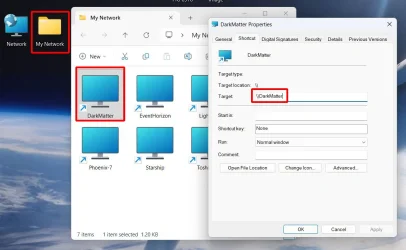
Even since Windows 10 was released over 10 years ago I have had problems with computers showing up in Network. Over the years numerous people say they have a fix for that. Some of these fixes seem to work at first but none are permanent solutions. For now I have given up on trying to make this work so have depended upon using Network shortcuts. Here is what I do:
1. On the desktop create a folder called "My Network"
2. Open this folder
3. In the folder I create a network shortcut to each computer in my network

Here is what that looks like on my laptop:

MyNetwork.webp

I only have to do this on one computer. I copy the "My Network" folder across the network to all the other computers so that it can be copied to their desktops.

Naturally, for this to work the other computer I want to connect to has to be turned on and not asleep. Otherwise, you get an error when you click on the network shortcut.

BTW, I also used to have other computer with older versions of Windows. I had a mixture of Windows XP, 7, 10 and 11. I could share files between all of them.
 

My Computers

System One System Two

  • OS
    Windows 11 Pro 25H2 (26200.6901)
    Computer type
    Laptop
    Manufacturer/Model
    ASUS TUF Gaming A15 (2022)
    CPU
    AMD Ryzen 7 6800H with Radeon 680M GPU (486MB RAM)
    Memory
    Crucial DDR5-4800 (2400MHz) 32GB (2 x 16GB)
    Graphics Card(s)
    NVIDIA RTX 3060 Laptop (6GB RAM)
    Sound Card
    n/a
    Monitor(s) Displays
    15.6-inch
    Screen Resolution
    1920x1080 300Hz
    Hard Drives
    2 x Samsung 990 Evo Plus (2TB M.2 NVME SSD)
    PSU
    n/a
    Mouse
    Wireless Mouse M510
    Internet Speed
    2100Mbps/300Mbps
    Browser
    Firefox
    Antivirus
    Malwarebytes
  • Operating System
    Windows 11 Pro 25H2 (26200.8246)
    Computer type
    PC/Desktop
    Manufacturer/Model
    Custom build
    CPU
    AMD Ryzen 7 5700X3D
    Motherboard
    ASUS ROG Strix B550-F Gaming WiFi II
    Memory
    G.SKILL Flare X 32GB (2x16GB) DDR4
    Graphics card(s)
    ASUS ROG-STRIX-RTX3060TI-08G-V2-GAMING (RTX 3060-Ti, 8GB RAM)
    Monitor(s) Displays
    Samsung G50D IPS 27"
    Screen Resolution
    1440p/180Hz
    Hard Drives
    SAMSUNG 990 EVO Plus (2TB] M.2 NVME SSD
    SAMSUNG 990 EVO Plus (4TB) M.2 NVME SSD
    PSU
    Corsair RM750x (750 watts)
    Case
    Cooler Master MasterCase 5
    Cooling
    Scythe Mugen 6
    Keyboard
    Logitech K520 (MK540 keyboard/mouse combo)
    Mouse
    Logitech M310 (MK540 keyboard/mouse combo)
    Internet Speed
    2100 Mbps down / 300 Mbps up
    Browser
    Firefox, Edge, Chrome
    Antivirus
    Malwarebytes (Premium)
    Other Info
    ASUS Blu-ray Burner BW-16D1HT (SATA) || Western Digital Easystore 20TB USB 3.0 external hard drive used with Acronis True Image 2025 backup software || HP OfficeJet Pro 6975 Printer/Scanner
Maybe this has to do with SMB 1.0 or 2.0. Old Windows use SMB 1.0 if you enable it in Windows Features, you might be visible on the network.

PS: I found this thread:

 
Last edited:

My Computers

System One System Two

  • OS
    Windows 11 Pro 23H2 (5699), 25H2 (8457)
    Computer type
    Laptop
    Manufacturer/Model
    Acer Extensa 5630EZ
    CPU
    Mobile DualCore Intel Core 2 Duo T7250, 2000 MHz
    Motherboard
    Acer Extensa 5630
    Memory
    4GB
    Graphics Card(s)
    Mobile Intel(R) GMA 4500M (Mobile 4 series)
    Sound Card
    Realtek ALC268 @ Intel 82801IB ICH9 - High Definition Audio Controller
    Monitor(s) Displays
    1
    Screen Resolution
    1280x800
    Hard Drives
    Samsung SSD 850 EVO 250GB SATA Device (250 GB, SATA-III)
    Internet Speed
    VDSL 50 Mbps
    Browser
    MICROSOFT EDGE
    Antivirus
    WINDOWS DEFENDER
    Other Info
    Legacy MBR installation, no TPM, no Secure Boot, no WDDM 2.0 graphics drivers, no SSE4.2, cannot get more unsupported ;) This is only my test laptop. I had installed Windows 11 here before upgrading my main PC. For my main PC I use everyday see my 2nd system specs.
  • Operating System
    Windows 11 Pro v25H2 (build 26200.8457)
    Computer type
    PC/Desktop
    Manufacturer/Model
    Custom-built PC
    CPU
    Intel Core-i7 3770 3.40GHz s1155 (3rd generation)
    Motherboard
    Asus P8H61 s1155 ATX
    Memory
    2x Kingston Hyper-X Blu 8GB DDR3-1600
    Graphics card(s)
    GIGABYTE GeForce RTX 3050 WINDFORCE OC V2 6GB (GV-N3050WF2OCV2-6GD)
    Sound Card
    Realtek HD audio (ALC887)
    Monitor(s) Displays
    Sony Bravia KDL-19L4000 19" LCD TV via VGA
    Screen Resolution
    1440x900 32-bit 60Hz
    Hard Drives
    WD Blue SA510 2.5 1000GB SSD as system disk, Western Digital Caviar Purple 4TB SATA III (WD40PURZ) as second
    PSU
    Thermaltake Litepower RGB 550W Full Wired
    Case
    SUPERCASE MIDI-TOWER
    Cooling
    Deepcool Gamma Archer CPU cooler, 1x 8cm fan at the back
    Keyboard
    Mitsumi 101-key PS/2
    Mouse
    Sunnyline OptiEye PS/2
    Internet Speed
    100Mbps
    Browser
    Microsoft Edge, Mozilla Firefox
    Antivirus
    Microsoft Windows Defender
    Other Info
    Legacy BIOS (MBR) installation, no TPM, no Secure Boot, WDDM 3.0 graphics drivers, WEI score 7.4

Latest Support Threads

Back
Top Bottom