Solved win 10 update says not compatible with win 11, but it is - help pls


Ok, attempted this and got this error :
Step 1 : booted to MCT win 10
Step 2 : Shift+F10 command prompt
Step 3 : mbr2gpt /validate
FAILED ??

1774814070456.webp
 

My Computer

System One

  • OS
    Win 11
    Computer type
    Laptop
    Manufacturer/Model
    HP
    CPU
    Athlon
    Memory
    4 gig
    Graphics Card(s)
    Radeon graphics 2.30
    Other Info
    Win 11 home 226213007
Please add WMIC:

DISM /Online /Add-Capability /CapabilityName:WMIC~~~~


Run > post share links


1) mbr2gpt.bat


2) diskparinfo.bat


3) tuneup_plus_log.bat


4) V2 log collector:


5) Disk management > widen columns so that characters are in full view (letters not cut off) > include all disk drives


My Computer

System One

  • OS
    Windows 10
    Computer type
    Laptop
    Manufacturer/Model
    HP
    CPU
    Intel(R) Core(TM) i7-4800MQ CPU @ 2.70GHz
    Motherboard
    Product : 190A Version : KBC Version 94.56
    Memory
    16 GB Total: Manufacturer : Samsung MemoryType : DDR3 FormFactor : SODIMM Capacity : 8GB Speed : 1600
    Graphics Card(s)
    NVIDIA Quadro K3100M; Intel(R) HD Graphics 4600
    Sound Card
    IDT High Definition Audio CODEC; PNP Device ID HDAUDIO\FUNC_01&VEN_111D&DEV_76E0
    Hard Drives
    Model Hitachi HTS727575A9E364
    Antivirus
    Microsoft Defender
    Other Info
    Mobile Workstation
You need to specify disk in the MBR2GPT command line. You can see all its options in the help article:
 

My Computer

System One

  • OS
    Windows 11 Pro 25H2
    Computer type
    Laptop
    Manufacturer/Model
    Lenovo Legion 5-15ARH05
    CPU
    AMD Rysen 5 4600H
    Memory
    32 GB (2 x 16 GB Samsung SO-DIMM DDR4-3200)
    Graphics Card(s)
    GeForce GTX 1650 Ti, 4 GB GDDR6
    Screen Resolution
    1920x1080
    Hard Drives
    SSD M.2 512 GB SAMSUNG MZALQ512; SSD M.2 1 TB Seagate FireCuda 530
    Mouse
    Logitech M650L in Bluetooth mode
The message: "Failed to retrieve geometry for disk -1"

Usually indicates that MBR2GPT could not identify a valid target disk, so it defaulted to an invalid index (-1).

You need to tell MBR2GPT which disk to use.

1. First, identify the disk:

diskpart
list disk
exit

2. Then run:

mbr2gpt /validate /disk:0

(or replace 0 with the correct disk number)

3. If validation succeeds:

mbr2gpt /convert /disk:0

(or replace 0 with the correct disk number)

mbr2gpt.webp

Edit:

I got the error "Failed to retrieve geometry for disk -1" in a virtual machine when I booted the Windows installation media in UEFI mode. When I booted the installation media in BIOS mode, there was no need to specify a disk number for the MBR2GPT commands.
 
Last edited:

My Computers

System One System Two

  • OS
    Windows 11 Pro
    Computer type
    PC/Desktop
    CPU
    AMD Ryzen 9 9950X3D
    Motherboard
    ASRock B650E Taichi Lite
    Memory
    Kingston FURY Beast 64GB (2x32GB) DDR5 6000MT/s
    Graphics Card(s)
    ASUS TUF Gaming Radeon RX 9070 OC Edition 16GB GDDR6
    Hard Drives
    Solidigm P44 Pro 2TB M.2 NVMe SSD
  • Operating System
    Windows 11 Home
    Computer type
    Laptop
    Manufacturer/Model
    Lenovo Legion Pro 7i Gen 10 16"
    CPU
    Intel Core Ultra 9 275HX
    Memory
    64GB (2x 32GB) DDR5-6400
    Graphics card(s)
    NVIDIA GeForce RTX 5080 16GB GDDR7 Laptop GPU
    Hard Drives
    2x 1TB M.2 NVMe SSD (SK Hynix)
You have more than one drive on the computer so, as already mentioned, you need to specify witch one you want to convert (that is drive 0, not drive 1)
Boot from a Win 11 installation drive and at the Windows Setup screen, press Shift+F10 simultaneously to open a command line prompt and type:

mbr2gpt /validate /disk:0
If validation succeeds: mbr2gpt /convert /disk:0
 

My Computers

System One System Two

  • OS
    Windows 11 Pro - Windows 7 HP 64 - Lubuntu
    Computer type
    PC/Desktop
    Manufacturer/Model
    custom build
    CPU
    i5 6600K - 800MHz to 4400MHz
    Motherboard
    GA-Z170-HD3P
    Memory
    4+4G GSkill DDR4 3000
    Graphics Card(s)
    IG - Intel 530
    Monitor(s) Displays
    Samsung 226BW
    Screen Resolution
    1680x1050
    Hard Drives
    (1) -1 SM951 – 128GB M.2 AHCI PCIe SSD drive for Win 11
    (2) -1 WD SATA 3 - 1T for Data
    (3) -1 WD SATA 3 - 1T for backup
    (4) -1 BX500 SSD - 256G for Windows 7 and Lubuntu
    PSU
    Thermaltake 450W TR2 gold
    Keyboard
    Old and good Chicony mechanical keyboard
    Mouse
    Logitech mX performance - 9 buttons (had to disable some)
    Internet Speed
    500 Mb/s
    Browser
    Firefox 64
  • Operating System
    Windows 11 Pro
    Computer type
    Laptop
    Manufacturer/Model
    Asus Q550LF
    CPU
    i7-4500U 800- 3000MHz
    Motherboard
    Asus Q550LF
    Memory
    (4+4)G DDR3 1600
    Graphics card(s)
    IG intel 4400 + NVIDIA GeForce GT 745M
    Sound Card
    Realtek
    Monitor(s) Displays
    LG Display LP156WF4-SPH1
    Screen Resolution
    1920 x 1080
    Hard Drives
    BX500 120G SSD for Windows and programs
    & 1T HDD for data
    Internet Speed
    500 Mb/s
    Browser
    Firefox 64
Ok, it seems like a success. Here is the updated screen during the mbr convert - however there is a FAILED section for the ReAgent and I am not sure what that means. Also, I did not switch anything in the BIOS after this, I just rebooted - was that correct?
1774899239318.webp
1774899251657.webp
However, it still says this in the updates area
1774899675815.webp
and I looked for updates and installed, still not meeting requirements?

1774900421954.webp
 
Last edited:

My Computer

System One

  • OS
    Win 11
    Computer type
    Laptop
    Manufacturer/Model
    HP
    CPU
    Athlon
    Memory
    4 gig
    Graphics Card(s)
    Radeon graphics 2.30
    Other Info
    Win 11 home 226213007
Your drive, for unknown reason, doesn't have the Recovery partition
Reagent refers to the WinRE environment (Recovery)
Lets create a Recovery partition so, on the Win 10 to Win 11 upgrade, it will be fixed.

Under Windows open a CMD window as administrator and type:

(you can copy and paste the commands below)
diskpart
select vol C
shrink desired=1000
create par prim
format quick FS=NTFS label=Recovery
set id=de94bba4-06d1-4d40-a16a-bfd50179d6ac
gpt attributes=0x8000000000000001
assign letter=R
exit

R:
MD R:\Recovery\WindowsRE
Reagentc /setreimage /path R:\Recovery\WindowsRE

When you do the upgrade to Win 11 it will set the WinRE environment on the Recovery partition created.

If you want to upgrade without waiting to WU offer you the upgrade, do a In Place Upgrade
- Download the Win 11 iso file using MCT
- Right click on the iso file and select Mount
- On the virtual ODD created, run Setup.exe
 
Last edited:

My Computers

System One System Two

  • OS
    Windows 11 Pro - Windows 7 HP 64 - Lubuntu
    Computer type
    PC/Desktop
    Manufacturer/Model
    custom build
    CPU
    i5 6600K - 800MHz to 4400MHz
    Motherboard
    GA-Z170-HD3P
    Memory
    4+4G GSkill DDR4 3000
    Graphics Card(s)
    IG - Intel 530
    Monitor(s) Displays
    Samsung 226BW
    Screen Resolution
    1680x1050
    Hard Drives
    (1) -1 SM951 – 128GB M.2 AHCI PCIe SSD drive for Win 11
    (2) -1 WD SATA 3 - 1T for Data
    (3) -1 WD SATA 3 - 1T for backup
    (4) -1 BX500 SSD - 256G for Windows 7 and Lubuntu
    PSU
    Thermaltake 450W TR2 gold
    Keyboard
    Old and good Chicony mechanical keyboard
    Mouse
    Logitech mX performance - 9 buttons (had to disable some)
    Internet Speed
    500 Mb/s
    Browser
    Firefox 64
  • Operating System
    Windows 11 Pro
    Computer type
    Laptop
    Manufacturer/Model
    Asus Q550LF
    CPU
    i7-4500U 800- 3000MHz
    Motherboard
    Asus Q550LF
    Memory
    (4+4)G DDR3 1600
    Graphics card(s)
    IG intel 4400 + NVIDIA GeForce GT 745M
    Sound Card
    Realtek
    Monitor(s) Displays
    LG Display LP156WF4-SPH1
    Screen Resolution
    1920 x 1080
    Hard Drives
    BX500 120G SSD for Windows and programs
    & 1T HDD for data
    Internet Speed
    500 Mb/s
    Browser
    Firefox 64
however there is a FAILED section for the ReAgent and I am not sure what that means.

"Failed to update ReAgent.xml, please try to manually disable and enable WinRE."

I have received this error every time I have run the mbr2gpt command.

If you want, you can run the following commands (as suggested in the error message):

reagentc /disable
reagentc /enable
reagentc /info

If the recovery environment status is still "Windows RE status: Disabled", the Windows 11 update will usually fix the recovery environment settings and create a recovery partition if one does not exist.

Also, I did not switch anything in the BIOS after this, I just rebooted - was that correct?

Yes, that was correct. However, if you want to enable Secure Boot, you must first disable CSM.

Windows 11 requires a system that is Secure Boot capable, but Secure Boot itself does not have to be turned on. On many systems, Secure Boot cannot be enabled until CSM is disabled, which forces the system to use UEFI mode only.

Since your Windows 10 is already on a GPT disk, you can safely disable CSM and switch to UEFI-only mode without losing access to your data or boot ability.

If you want to enable Secure Boot, you can do so either before or after the Windows 11 upgrade.

Gigabyte.webp
 

My Computers

System One System Two

  • OS
    Windows 11 Pro
    Computer type
    PC/Desktop
    CPU
    AMD Ryzen 9 9950X3D
    Motherboard
    ASRock B650E Taichi Lite
    Memory
    Kingston FURY Beast 64GB (2x32GB) DDR5 6000MT/s
    Graphics Card(s)
    ASUS TUF Gaming Radeon RX 9070 OC Edition 16GB GDDR6
    Hard Drives
    Solidigm P44 Pro 2TB M.2 NVMe SSD
  • Operating System
    Windows 11 Home
    Computer type
    Laptop
    Manufacturer/Model
    Lenovo Legion Pro 7i Gen 10 16"
    CPU
    Intel Core Ultra 9 275HX
    Memory
    64GB (2x 32GB) DDR5-6400
    Graphics card(s)
    NVIDIA GeForce RTX 5080 16GB GDDR7 Laptop GPU
    Hard Drives
    2x 1TB M.2 NVMe SSD (SK Hynix)
Ok, I did something I don't usually do - I didn't wait for responses and tried this out on my own. I found the files for updating to window 11 and let it do its thing from the win 10. After about 4 hours, I have successfully updated. There is an error for a driver somewhere that I will have to ferret out, but that is ok. Even though I was successful, I couldn't not have done it without this group. Thank you all. I am going to keep testing for the next few days and hopefully everything is the way it should be.
Thank you again!

PS : I didn't tackle the Reagent portion of the last two responses. Should I still?
 

My Computer

System One

  • OS
    Win 11
    Computer type
    Laptop
    Manufacturer/Model
    HP
    CPU
    Athlon
    Memory
    4 gig
    Graphics Card(s)
    Radeon graphics 2.30
    Other Info
    Win 11 home 226213007
PS : I didn't tackle the Reagent portion of the last two responses. Should I still?

Run the following command in an elevated Command Prompt:

reagentc /info

If it shows "Windows RE status: Enabled", your Windows Recovery Environment (WinRE) settings are OK, and no further action is needed.

reagentc.webp
 

My Computers

System One System Two

  • OS
    Windows 11 Pro
    Computer type
    PC/Desktop
    CPU
    AMD Ryzen 9 9950X3D
    Motherboard
    ASRock B650E Taichi Lite
    Memory
    Kingston FURY Beast 64GB (2x32GB) DDR5 6000MT/s
    Graphics Card(s)
    ASUS TUF Gaming Radeon RX 9070 OC Edition 16GB GDDR6
    Hard Drives
    Solidigm P44 Pro 2TB M.2 NVMe SSD
  • Operating System
    Windows 11 Home
    Computer type
    Laptop
    Manufacturer/Model
    Lenovo Legion Pro 7i Gen 10 16"
    CPU
    Intel Core Ultra 9 275HX
    Memory
    64GB (2x 32GB) DDR5-6400
    Graphics card(s)
    NVIDIA GeForce RTX 5080 16GB GDDR7 Laptop GPU
    Hard Drives
    2x 1TB M.2 NVMe SSD (SK Hynix)

My Computers

System One System Two

  • OS
    Windows 11 Pro - Windows 7 HP 64 - Lubuntu
    Computer type
    PC/Desktop
    Manufacturer/Model
    custom build
    CPU
    i5 6600K - 800MHz to 4400MHz
    Motherboard
    GA-Z170-HD3P
    Memory
    4+4G GSkill DDR4 3000
    Graphics Card(s)
    IG - Intel 530
    Monitor(s) Displays
    Samsung 226BW
    Screen Resolution
    1680x1050
    Hard Drives
    (1) -1 SM951 – 128GB M.2 AHCI PCIe SSD drive for Win 11
    (2) -1 WD SATA 3 - 1T for Data
    (3) -1 WD SATA 3 - 1T for backup
    (4) -1 BX500 SSD - 256G for Windows 7 and Lubuntu
    PSU
    Thermaltake 450W TR2 gold
    Keyboard
    Old and good Chicony mechanical keyboard
    Mouse
    Logitech mX performance - 9 buttons (had to disable some)
    Internet Speed
    500 Mb/s
    Browser
    Firefox 64
  • Operating System
    Windows 11 Pro
    Computer type
    Laptop
    Manufacturer/Model
    Asus Q550LF
    CPU
    i7-4500U 800- 3000MHz
    Motherboard
    Asus Q550LF
    Memory
    (4+4)G DDR3 1600
    Graphics card(s)
    IG intel 4400 + NVIDIA GeForce GT 745M
    Sound Card
    Realtek
    Monitor(s) Displays
    LG Display LP156WF4-SPH1
    Screen Resolution
    1920 x 1080
    Hard Drives
    BX500 120G SSD for Windows and programs
    & 1T HDD for data
    Internet Speed
    500 Mb/s
    Browser
    Firefox 64
Win 11 is running sluggish as well, not the pep that win 10 had - would that have anything to do with it?
 

My Computer

System One

  • OS
    Win 11
    Computer type
    Laptop
    Manufacturer/Model
    HP
    CPU
    Athlon
    Memory
    4 gig
    Graphics Card(s)
    Radeon graphics 2.30
    Other Info
    Win 11 home 226213007
Here is the first image
1775007929921.webp
 

My Computer

System One

  • OS
    Win 11
    Computer type
    Laptop
    Manufacturer/Model
    HP
    CPU
    Athlon
    Memory
    4 gig
    Graphics Card(s)
    Radeon graphics 2.30
    Other Info
    Win 11 home 226213007
And finally.
1775008281919.webp
 

Attachments

  • 1775008005920.webp
    1775008005920.webp
    93.2 KB · Views: 1

My Computer

System One

  • OS
    Win 11
    Computer type
    Laptop
    Manufacturer/Model
    HP
    CPU
    Athlon
    Memory
    4 gig
    Graphics Card(s)
    Radeon graphics 2.30
    Other Info
    Win 11 home 226213007
reagentc info.webp

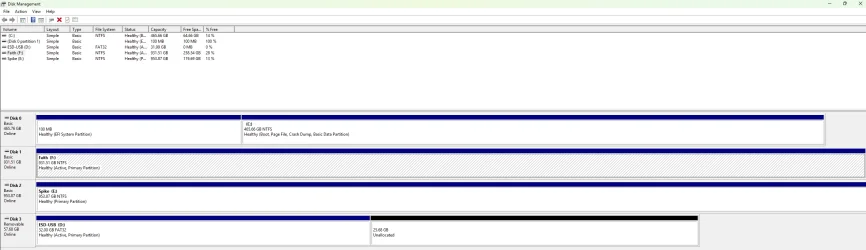
Disk Management.webp

Your reagentc /info screenshot shows that WinRE is enabled, and that Winre.wim is located on harddisk0\partition2. The WinRE version (10.0.26100.8031) is also up to date.

Your Disk Management screenshot shows that there is no separate recovery partition, which means WinRE is stored on the C: partition (C:\Recovery\WindowsRE).
 

My Computers

System One System Two

  • OS
    Windows 11 Pro
    Computer type
    PC/Desktop
    CPU
    AMD Ryzen 9 9950X3D
    Motherboard
    ASRock B650E Taichi Lite
    Memory
    Kingston FURY Beast 64GB (2x32GB) DDR5 6000MT/s
    Graphics Card(s)
    ASUS TUF Gaming Radeon RX 9070 OC Edition 16GB GDDR6
    Hard Drives
    Solidigm P44 Pro 2TB M.2 NVMe SSD
  • Operating System
    Windows 11 Home
    Computer type
    Laptop
    Manufacturer/Model
    Lenovo Legion Pro 7i Gen 10 16"
    CPU
    Intel Core Ultra 9 275HX
    Memory
    64GB (2x 32GB) DDR5-6400
    Graphics card(s)
    NVIDIA GeForce RTX 5080 16GB GDDR7 Laptop GPU
    Hard Drives
    2x 1TB M.2 NVMe SSD (SK Hynix)
You can create a Recovery partition as I instructed on post 47
Start disabling the recovery environment

Under Windows open a CMD window as administrator and type:

(you can copy and paste the commands below)
Reagentc /disable

diskpart
select vol C
shrink desired=1000
create par prim
format quick FS=NTFS label=Recovery
set id=de94bba4-06d1-4d40-a16a-bfd50179d6ac
gpt attributes=0x8000000000000001
assign letter=R
exit

R:
MD R:\Recovery\WindowsRE
Reagentc /setreimage /path R:\Recovery\WindowsRE
Reagentc /enable
Reagentc /info
 

My Computers

System One System Two

  • OS
    Windows 11 Pro - Windows 7 HP 64 - Lubuntu
    Computer type
    PC/Desktop
    Manufacturer/Model
    custom build
    CPU
    i5 6600K - 800MHz to 4400MHz
    Motherboard
    GA-Z170-HD3P
    Memory
    4+4G GSkill DDR4 3000
    Graphics Card(s)
    IG - Intel 530
    Monitor(s) Displays
    Samsung 226BW
    Screen Resolution
    1680x1050
    Hard Drives
    (1) -1 SM951 – 128GB M.2 AHCI PCIe SSD drive for Win 11
    (2) -1 WD SATA 3 - 1T for Data
    (3) -1 WD SATA 3 - 1T for backup
    (4) -1 BX500 SSD - 256G for Windows 7 and Lubuntu
    PSU
    Thermaltake 450W TR2 gold
    Keyboard
    Old and good Chicony mechanical keyboard
    Mouse
    Logitech mX performance - 9 buttons (had to disable some)
    Internet Speed
    500 Mb/s
    Browser
    Firefox 64
  • Operating System
    Windows 11 Pro
    Computer type
    Laptop
    Manufacturer/Model
    Asus Q550LF
    CPU
    i7-4500U 800- 3000MHz
    Motherboard
    Asus Q550LF
    Memory
    (4+4)G DDR3 1600
    Graphics card(s)
    IG intel 4400 + NVIDIA GeForce GT 745M
    Sound Card
    Realtek
    Monitor(s) Displays
    LG Display LP156WF4-SPH1
    Screen Resolution
    1920 x 1080
    Hard Drives
    BX500 120G SSD for Windows and programs
    & 1T HDD for data
    Internet Speed
    500 Mb/s
    Browser
    Firefox 64
Win 11 is running sluggish as well, not the pep that win 10 had - would that have anything to do with it?
It can be that it is running many updates so it gets slow

Open Device manager. Is there any yellow marks of missing drivers?
 

My Computers

System One System Two

  • OS
    Windows 11 Pro - Windows 7 HP 64 - Lubuntu
    Computer type
    PC/Desktop
    Manufacturer/Model
    custom build
    CPU
    i5 6600K - 800MHz to 4400MHz
    Motherboard
    GA-Z170-HD3P
    Memory
    4+4G GSkill DDR4 3000
    Graphics Card(s)
    IG - Intel 530
    Monitor(s) Displays
    Samsung 226BW
    Screen Resolution
    1680x1050
    Hard Drives
    (1) -1 SM951 – 128GB M.2 AHCI PCIe SSD drive for Win 11
    (2) -1 WD SATA 3 - 1T for Data
    (3) -1 WD SATA 3 - 1T for backup
    (4) -1 BX500 SSD - 256G for Windows 7 and Lubuntu
    PSU
    Thermaltake 450W TR2 gold
    Keyboard
    Old and good Chicony mechanical keyboard
    Mouse
    Logitech mX performance - 9 buttons (had to disable some)
    Internet Speed
    500 Mb/s
    Browser
    Firefox 64
  • Operating System
    Windows 11 Pro
    Computer type
    Laptop
    Manufacturer/Model
    Asus Q550LF
    CPU
    i7-4500U 800- 3000MHz
    Motherboard
    Asus Q550LF
    Memory
    (4+4)G DDR3 1600
    Graphics card(s)
    IG intel 4400 + NVIDIA GeForce GT 745M
    Sound Card
    Realtek
    Monitor(s) Displays
    LG Display LP156WF4-SPH1
    Screen Resolution
    1920 x 1080
    Hard Drives
    BX500 120G SSD for Windows and programs
    & 1T HDD for data
    Internet Speed
    500 Mb/s
    Browser
    Firefox 64
No yellow flags at all.
BTW, is there a safe way I can get it to look like Win 10 ?
 

My Computer

System One

  • OS
    Win 11
    Computer type
    Laptop
    Manufacturer/Model
    HP
    CPU
    Athlon
    Memory
    4 gig
    Graphics Card(s)
    Radeon graphics 2.30
    Other Info
    Win 11 home 226213007
BTW, is there a safe way I can get it to look like Win 10 ?
Yes
To send Start to the left, Open the settings. Open Personalization, then open Taskbar. Under Taskbar behavior change Taskbar alignment from Center to left.
To make task bar behave as Win 10 install Explorerpatcher . The download is here
To make Start look like Win 7 use Open Shell
 

My Computers

System One System Two

  • OS
    Windows 11 Pro - Windows 7 HP 64 - Lubuntu
    Computer type
    PC/Desktop
    Manufacturer/Model
    custom build
    CPU
    i5 6600K - 800MHz to 4400MHz
    Motherboard
    GA-Z170-HD3P
    Memory
    4+4G GSkill DDR4 3000
    Graphics Card(s)
    IG - Intel 530
    Monitor(s) Displays
    Samsung 226BW
    Screen Resolution
    1680x1050
    Hard Drives
    (1) -1 SM951 – 128GB M.2 AHCI PCIe SSD drive for Win 11
    (2) -1 WD SATA 3 - 1T for Data
    (3) -1 WD SATA 3 - 1T for backup
    (4) -1 BX500 SSD - 256G for Windows 7 and Lubuntu
    PSU
    Thermaltake 450W TR2 gold
    Keyboard
    Old and good Chicony mechanical keyboard
    Mouse
    Logitech mX performance - 9 buttons (had to disable some)
    Internet Speed
    500 Mb/s
    Browser
    Firefox 64
  • Operating System
    Windows 11 Pro
    Computer type
    Laptop
    Manufacturer/Model
    Asus Q550LF
    CPU
    i7-4500U 800- 3000MHz
    Motherboard
    Asus Q550LF
    Memory
    (4+4)G DDR3 1600
    Graphics card(s)
    IG intel 4400 + NVIDIA GeForce GT 745M
    Sound Card
    Realtek
    Monitor(s) Displays
    LG Display LP156WF4-SPH1
    Screen Resolution
    1920 x 1080
    Hard Drives
    BX500 120G SSD for Windows and programs
    & 1T HDD for data
    Internet Speed
    500 Mb/s
    Browser
    Firefox 64
Thank you, that worked.
 

My Computer

System One

  • OS
    Win 11
    Computer type
    Laptop
    Manufacturer/Model
    HP
    CPU
    Athlon
    Memory
    4 gig
    Graphics Card(s)
    Radeon graphics 2.30
    Other Info
    Win 11 home 226213007
Back
Top Bottom