Solved Updating Secure Boot on Alienware Aurora R7


My Computers

System One System Two

  • OS
    Windows 11 Pro build 26200.8524
    Computer type
    PC/Desktop
    Manufacturer/Model
    Home Built
    CPU
    Intel i7-4790
    Motherboard
    Asus H97 Pro Gamer with add-on TPM1.2 module
    Memory
    Teams DDR3-1600 4x4 GB
    Graphics Card(s)
    MSI Nvidia GeForce GTX 1050Ti
    Sound Card
    Realtek ALC1150
    Monitor(s) Displays
    Dell P2425D
    Screen Resolution
    2560 by 1440 pixels
    Hard Drives
    Corsair NVMe M.2 Core XT 1000 GB (Windows 11 v.25H2); Samsung SATA Evo 870 500 GB (Windows 11 v.25H2);
    PSU
    Corsair HX850
    Case
    Gigabyte Solo 210
    Cooling
    Zalman CNPS7X Tower
    Keyboard
    Microsoft AIO Wireless (includes touchpad)
    Mouse
    HP S1000 Plus Wireless
    Internet Speed
    500 Mb fiber optic
    Browser
    Chrome; MS Edge
    Antivirus
    Windows Defender
  • Operating System
    MacOS 12 Monterey
    Computer type
    Laptop
    Manufacturer/Model
    Apple Macbook Air
    CPU
    Intel Core i5
    Memory
    8 GB
    Graphics card(s)
    Intel integrated
    Screen Resolution
    1440 by 900 pixels
    Hard Drives
    128 GB
    Keyboard
    Built-in
    Mouse
    Microsoft Wireless
    Internet Speed
    802.11 ac
    Browser
    Chrome; Safari
    Antivirus
    N/A
Some motherboards may accept both .der and .crt files. Some only .crt or .der files.
 

My Computers

System One System Two

  • OS
    Windows 11 Pro build 26200.8524
    Computer type
    PC/Desktop
    Manufacturer/Model
    Home Built
    CPU
    Intel i7-4790
    Motherboard
    Asus H97 Pro Gamer with add-on TPM1.2 module
    Memory
    Teams DDR3-1600 4x4 GB
    Graphics Card(s)
    MSI Nvidia GeForce GTX 1050Ti
    Sound Card
    Realtek ALC1150
    Monitor(s) Displays
    Dell P2425D
    Screen Resolution
    2560 by 1440 pixels
    Hard Drives
    Corsair NVMe M.2 Core XT 1000 GB (Windows 11 v.25H2); Samsung SATA Evo 870 500 GB (Windows 11 v.25H2);
    PSU
    Corsair HX850
    Case
    Gigabyte Solo 210
    Cooling
    Zalman CNPS7X Tower
    Keyboard
    Microsoft AIO Wireless (includes touchpad)
    Mouse
    HP S1000 Plus Wireless
    Internet Speed
    500 Mb fiber optic
    Browser
    Chrome; MS Edge
    Antivirus
    Windows Defender
  • Operating System
    MacOS 12 Monterey
    Computer type
    Laptop
    Manufacturer/Model
    Apple Macbook Air
    CPU
    Intel Core i5
    Memory
    8 GB
    Graphics card(s)
    Intel integrated
    Screen Resolution
    1440 by 900 pixels
    Hard Drives
    128 GB
    Keyboard
    Built-in
    Mouse
    Microsoft Wireless
    Internet Speed
    802.11 ac
    Browser
    Chrome; Safari
    Antivirus
    N/A
Some motherboards may accept both .der and .crt files. Some only .crt or .der files.
Mine seems happy enough with .crt files.

I'm a bit nervous. I'm not often on this end of a support issue and I now realise how stressful it can be for the one being helped!

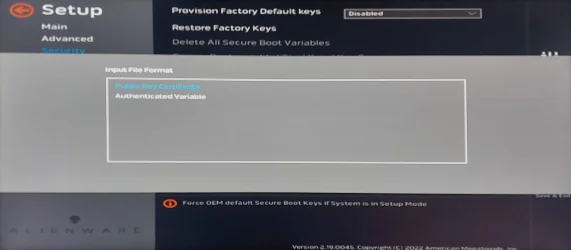
So - I choose "microsoft corporation kek 2k ca 2023.crt" from my USB drive...

Should I be choosing Public Key Certificate, Authenticated Variable, or both?

Cheers,

Cliff
 

Attachments

  • 07PublicOrAuthenticated.webp
    07PublicOrAuthenticated.webp
    322.9 KB · Views: 1

My Computer

System One

  • OS
    Windows 11 Pro
    Computer type
    PC/Desktop
    Manufacturer/Model
    Alienware Aurora R7
I am not aware of this question. @garlin is much more knowledgeable on this matter. What I can suggest is, choose one. If it is not accepted, repeat the procedure and move to the next choice.
 

My Computers

System One System Two

  • OS
    Windows 11 Pro build 26200.8524
    Computer type
    PC/Desktop
    Manufacturer/Model
    Home Built
    CPU
    Intel i7-4790
    Motherboard
    Asus H97 Pro Gamer with add-on TPM1.2 module
    Memory
    Teams DDR3-1600 4x4 GB
    Graphics Card(s)
    MSI Nvidia GeForce GTX 1050Ti
    Sound Card
    Realtek ALC1150
    Monitor(s) Displays
    Dell P2425D
    Screen Resolution
    2560 by 1440 pixels
    Hard Drives
    Corsair NVMe M.2 Core XT 1000 GB (Windows 11 v.25H2); Samsung SATA Evo 870 500 GB (Windows 11 v.25H2);
    PSU
    Corsair HX850
    Case
    Gigabyte Solo 210
    Cooling
    Zalman CNPS7X Tower
    Keyboard
    Microsoft AIO Wireless (includes touchpad)
    Mouse
    HP S1000 Plus Wireless
    Internet Speed
    500 Mb fiber optic
    Browser
    Chrome; MS Edge
    Antivirus
    Windows Defender
  • Operating System
    MacOS 12 Monterey
    Computer type
    Laptop
    Manufacturer/Model
    Apple Macbook Air
    CPU
    Intel Core i5
    Memory
    8 GB
    Graphics card(s)
    Intel integrated
    Screen Resolution
    1440 by 900 pixels
    Hard Drives
    128 GB
    Keyboard
    Built-in
    Mouse
    Microsoft Wireless
    Internet Speed
    802.11 ac
    Browser
    Chrome; Safari
    Antivirus
    N/A
You are omnipresent. You are like a one-man army in these certificate wars. You deserve a medal of honor from Microsoft and from individual PC makers, such as HP, Dell, etc..
 

My Computers

System One System Two

  • OS
    Windows 11 Pro build 26200.8524
    Computer type
    PC/Desktop
    Manufacturer/Model
    Home Built
    CPU
    Intel i7-4790
    Motherboard
    Asus H97 Pro Gamer with add-on TPM1.2 module
    Memory
    Teams DDR3-1600 4x4 GB
    Graphics Card(s)
    MSI Nvidia GeForce GTX 1050Ti
    Sound Card
    Realtek ALC1150
    Monitor(s) Displays
    Dell P2425D
    Screen Resolution
    2560 by 1440 pixels
    Hard Drives
    Corsair NVMe M.2 Core XT 1000 GB (Windows 11 v.25H2); Samsung SATA Evo 870 500 GB (Windows 11 v.25H2);
    PSU
    Corsair HX850
    Case
    Gigabyte Solo 210
    Cooling
    Zalman CNPS7X Tower
    Keyboard
    Microsoft AIO Wireless (includes touchpad)
    Mouse
    HP S1000 Plus Wireless
    Internet Speed
    500 Mb fiber optic
    Browser
    Chrome; MS Edge
    Antivirus
    Windows Defender
  • Operating System
    MacOS 12 Monterey
    Computer type
    Laptop
    Manufacturer/Model
    Apple Macbook Air
    CPU
    Intel Core i5
    Memory
    8 GB
    Graphics card(s)
    Intel integrated
    Screen Resolution
    1440 by 900 pixels
    Hard Drives
    128 GB
    Keyboard
    Built-in
    Mouse
    Microsoft Wireless
    Internet Speed
    802.11 ac
    Browser
    Chrome; Safari
    Antivirus
    N/A
You are omnipresent. You are like a one-man army in these certificate wars. You deserve a medal of honor from Microsoft and from individual PC makers, such as HP, Dell, etc..
Not to mention even individualer end users!

BRB
 

My Computer

System One

  • OS
    Windows 11 Pro
    Computer type
    PC/Desktop
    Manufacturer/Model
    Alienware Aurora R7
My update script will copy those files to your EFI volume.
garlin's PowerShell scripts for updating Secure Boot CA 2023

Code:
Update-UEFI.bat

Hi, I'd tried that previously but ran up against a problem where PowerShell was telling me that scripts are forbidden. Looking again, your batch files proved immensely helpful.

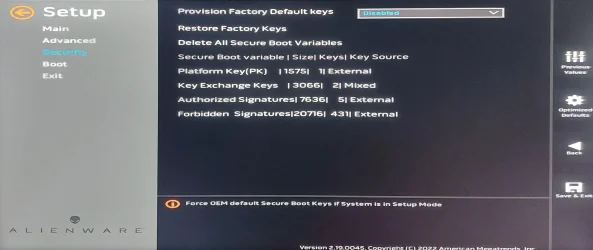
When updating via the BIOS I was choosing Public Keys but ending up with only the KEK populated. Using your scripts I've managed (yeah, like *I* did it) to make all of the fields populated.

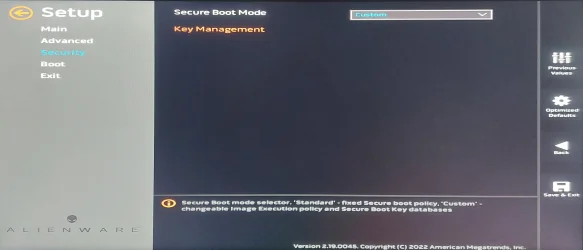
Assuming that all looks good - do I leave Secure Boot in "Custom" mode?

Cheers,

Cliff
 

Attachments

  • 08AllKeys.webp
    08AllKeys.webp
    653.3 KB · Views: 1
  • 09StickWithCustomQuery.webp
    09StickWithCustomQuery.webp
    463 KB · Views: 1

My Computer

System One

  • OS
    Windows 11 Pro
    Computer type
    PC/Desktop
    Manufacturer/Model
    Alienware Aurora R7
Now that you have two KEK's (CA 2011 + CA 2023), you're ready to roll. Leave the BIOS in Custom mode, it means don't enforce security checking that it's no longer the factory defaults.

Run the update batch file (it's just a fancy wrapper to run the PS scripts if you don't have an execution policy that allows scripts), and it should begin applying updates. When you're done, run the check script:
Code:
Check-UEFI.bat -Verbose
 

My Computer

System One

  • OS
    Windows 7
Now that you have two KEK's (CA 2011 + CA 2023), you're ready to roll. Leave the BIOS in Custom mode, it means don't enforce security checking that it's no longer the factory defaults.

Run the update batch file (it's just a fancy wrapper to run the PS scripts if you don't have an execution policy that allows scripts), and it should begin applying updates. When you're done, run the check script:
Code:
Check-UEFI.bat -Verbose

Scripts already run, BIOS values updated, running the Check-UEFI.bat - Verbose produces:

Code:
I:\Scripts>Check-UEFI.bat -Verbose
Windows PowerShell
Copyright (C) Microsoft Corporation. All rights reserved.

Install the latest PowerShell for new features and improvements! https://aka.ms/PSWindows

Windows 11 25H2 (26200.8655)

Secure Boot: ON
Virtualization Based Security: ON
BitLocker on (C:) OFF

BIOS Firmware
-------------
    Alienware Alienware Aurora R7
    Version: 1.0.26
    Date: 2022-01-19

Factory Default UEFI PK Cert
----------------------------
    Pegatron PK

UEFI PK Cert
------------
    Windows OEM Devices PK

Factory Default UEFI KEK Certs
------------------------------
    Microsoft Corporation KEK CA 2011

UEFI KEK Certs
--------------
    Microsoft Corporation KEK CA 2011
    Microsoft Corporation KEK 2K CA 2023

Factory Default UEFI DB Certs
-----------------------------
    Microsoft Corporation UEFI CA 2011
    Microsoft Windows Production PCA 2011

UEFI DB Certs
-------------
    Microsoft Corporation UEFI CA 2011
    Microsoft Windows Production PCA 2011
    Microsoft Option ROM UEFI CA 2023
    Microsoft UEFI CA 2023
    Windows UEFI CA 2023

Factory Default UEFI DBX Certs
------------------------------
    (NONE)
    EFI_CERT_SHA256_GUID Signatures: 77

UEFI DBX Certs
--------------
    (NONE)
    Windows BootMgr SVN is MISSING.
    EFI_CERT_SHA256_GUID Signatures: 431

UEFI Variables
--------------
    Credential Guard: ON
    SBAT (Linux only): sbat,1,2024010900 / shim,4 / grub,3 / grub.debian,4

EFI Files
---------
    Windows Boot Manager [Windows UEFI CA 2023] is ALLOWED.
        \\.\HarddiskVolume4\EFI\Microsoft\Boot\bootmgfw.efi
        File Version: 28000.342, SVN 9.0

    Registry: "WindowsUEFICA2023Capable" = 2
        [Windows UEFI CA 2023] in UEFI DB, and Windows starting from CA 2023 Boot Manager.

    [OPTIONAL] SkuSiPolicy.p7b (for VBS) is MISSING.
    NOT RECOMMENDED for dual-boot setups.


REQUIRED ACTION
===============
To REVOKE the [PCA 2011] cert, run the commands:

    reg add HKEY_LOCAL_MACHINE\SYSTEM\CurrentControlSet\Control\Secureboot /v AvailableUpdates /t REG_DWORD /d 0x282 /f
    powershell Start-ScheduledTask -TaskName "\Microsoft\Windows\PI\Secure-Boot-Update"

Aside from the phrase "NOT RECOMMENDED for dual-boot setups." (does that mean that "SkuSiPolicy.p7b" is not recommended for dual-boot, which I use(ish - Windows' own Boot Manager) or does it mean that it being MISSING is not recommended?


I SUSPECTED that "Custom" was the way to go, but I'm English. You can easily type/read the same sentence with two opposing meanings.


Anywho, MANY THANKS for your assist - I aim to try and DM the OP to bring him/her back here to rescue their Aurora R7.
 

My Computer

System One

  • OS
    Windows 11 Pro
    Computer type
    PC/Desktop
    Manufacturer/Model
    Alienware Aurora R7
This means, when you make a big update in oneWindows installation, the other Windows installation will not boot unless you disable secure boot. You disable secure boot, update the other installation and you re-enable secure boot. But updating your other Windows installation will not be as painful at all.
 

My Computers

System One System Two

  • OS
    Windows 11 Pro build 26200.8524
    Computer type
    PC/Desktop
    Manufacturer/Model
    Home Built
    CPU
    Intel i7-4790
    Motherboard
    Asus H97 Pro Gamer with add-on TPM1.2 module
    Memory
    Teams DDR3-1600 4x4 GB
    Graphics Card(s)
    MSI Nvidia GeForce GTX 1050Ti
    Sound Card
    Realtek ALC1150
    Monitor(s) Displays
    Dell P2425D
    Screen Resolution
    2560 by 1440 pixels
    Hard Drives
    Corsair NVMe M.2 Core XT 1000 GB (Windows 11 v.25H2); Samsung SATA Evo 870 500 GB (Windows 11 v.25H2);
    PSU
    Corsair HX850
    Case
    Gigabyte Solo 210
    Cooling
    Zalman CNPS7X Tower
    Keyboard
    Microsoft AIO Wireless (includes touchpad)
    Mouse
    HP S1000 Plus Wireless
    Internet Speed
    500 Mb fiber optic
    Browser
    Chrome; MS Edge
    Antivirus
    Windows Defender
  • Operating System
    MacOS 12 Monterey
    Computer type
    Laptop
    Manufacturer/Model
    Apple Macbook Air
    CPU
    Intel Core i5
    Memory
    8 GB
    Graphics card(s)
    Intel integrated
    Screen Resolution
    1440 by 900 pixels
    Hard Drives
    128 GB
    Keyboard
    Built-in
    Mouse
    Microsoft Wireless
    Internet Speed
    802.11 ac
    Browser
    Chrome; Safari
    Antivirus
    N/A
Aside from the phrase "NOT RECOMMENDED for dual-boot setups." (does that mean that "SkuSiPolicy.p7b" is not recommended for dual-boot, which I use(ish - Windows' own Boot Manager) or does it mean that it being MISSING is not recommended?

I SUSPECTED that "Custom" was the way to go, but I'm English. You can easily type/read the same sentence with two opposing meanings.
SkuSiPolicy is an additional security policy for Virtualization Based Security (VBS) which restricts the use of older winload.efi files. The Windows boot manager chains into winload.efi, which does the actual work of starting up Windows.

When you have a dual-boot setup, it's possible the other Windows doesn't get updated at the same time (or can't because it's entirely different Windows release like an Insider build). This means the SkuSiPolicy will block the other Windows from bootin. It's not guaranteed to happen, but I provide the warning so users don't get stuck when SkuSiPolicy is enforced.

Removing the policy file if it's deployed to the EFI is a relatively easy step.

You're squared away, except for the revocation. It's still optional for now, as MS hasn't announced when it becomes mandatory. You can wait, or do it yourself with the provided commands.
 

My Computer

System One

  • OS
    Windows 7
You're squared away, except for the revocation. It's still optional for now, as MS hasn't announced when it becomes mandatory. You can wait, or do it yourself with the provided commands.

Since a wise man once said:
The revocation of CA 2011 isn't expected to happen until early-mid 2026

and it's now sneaking up on mid June 2026, I've gone ahead with the revocation. Better that than an unpleasant surprise when I've forgotten all about this conversation.

Once again - gents, it's been a pleasure :D

Cheers,

Cliff
 

My Computer

System One

  • OS
    Windows 11 Pro
    Computer type
    PC/Desktop
    Manufacturer/Model
    Alienware Aurora R7
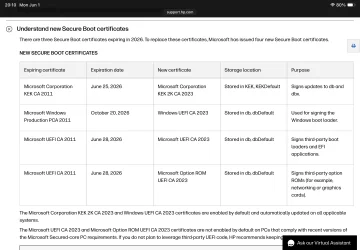
According to HP, revocation of PCA2011 will happen as of 20th of October 2026.

IMG_2374.webp
 

My Computers

System One System Two

  • OS
    Windows 11 Pro build 26200.8524
    Computer type
    PC/Desktop
    Manufacturer/Model
    Home Built
    CPU
    Intel i7-4790
    Motherboard
    Asus H97 Pro Gamer with add-on TPM1.2 module
    Memory
    Teams DDR3-1600 4x4 GB
    Graphics Card(s)
    MSI Nvidia GeForce GTX 1050Ti
    Sound Card
    Realtek ALC1150
    Monitor(s) Displays
    Dell P2425D
    Screen Resolution
    2560 by 1440 pixels
    Hard Drives
    Corsair NVMe M.2 Core XT 1000 GB (Windows 11 v.25H2); Samsung SATA Evo 870 500 GB (Windows 11 v.25H2);
    PSU
    Corsair HX850
    Case
    Gigabyte Solo 210
    Cooling
    Zalman CNPS7X Tower
    Keyboard
    Microsoft AIO Wireless (includes touchpad)
    Mouse
    HP S1000 Plus Wireless
    Internet Speed
    500 Mb fiber optic
    Browser
    Chrome; MS Edge
    Antivirus
    Windows Defender
  • Operating System
    MacOS 12 Monterey
    Computer type
    Laptop
    Manufacturer/Model
    Apple Macbook Air
    CPU
    Intel Core i5
    Memory
    8 GB
    Graphics card(s)
    Intel integrated
    Screen Resolution
    1440 by 900 pixels
    Hard Drives
    128 GB
    Keyboard
    Built-in
    Mouse
    Microsoft Wireless
    Internet Speed
    802.11 ac
    Browser
    Chrome; Safari
    Antivirus
    N/A
That's not revocation, that's expiration. Revocation is when you untrust a cert, whether it's expired or not.

After 2026-10-20, MS cannot sign a new boot manager file with PCA 2011. It can only be signed by Windows UEFI CA 2023, since no other DB cert is available for signing duties.
 

My Computer

System One

  • OS
    Windows 7
Sorry. I may have misconstrued the term expired with revoked. My apologies for my misleading interpretation.
 

My Computers

System One System Two

  • OS
    Windows 11 Pro build 26200.8524
    Computer type
    PC/Desktop
    Manufacturer/Model
    Home Built
    CPU
    Intel i7-4790
    Motherboard
    Asus H97 Pro Gamer with add-on TPM1.2 module
    Memory
    Teams DDR3-1600 4x4 GB
    Graphics Card(s)
    MSI Nvidia GeForce GTX 1050Ti
    Sound Card
    Realtek ALC1150
    Monitor(s) Displays
    Dell P2425D
    Screen Resolution
    2560 by 1440 pixels
    Hard Drives
    Corsair NVMe M.2 Core XT 1000 GB (Windows 11 v.25H2); Samsung SATA Evo 870 500 GB (Windows 11 v.25H2);
    PSU
    Corsair HX850
    Case
    Gigabyte Solo 210
    Cooling
    Zalman CNPS7X Tower
    Keyboard
    Microsoft AIO Wireless (includes touchpad)
    Mouse
    HP S1000 Plus Wireless
    Internet Speed
    500 Mb fiber optic
    Browser
    Chrome; MS Edge
    Antivirus
    Windows Defender
  • Operating System
    MacOS 12 Monterey
    Computer type
    Laptop
    Manufacturer/Model
    Apple Macbook Air
    CPU
    Intel Core i5
    Memory
    8 GB
    Graphics card(s)
    Intel integrated
    Screen Resolution
    1440 by 900 pixels
    Hard Drives
    128 GB
    Keyboard
    Built-in
    Mouse
    Microsoft Wireless
    Internet Speed
    802.11 ac
    Browser
    Chrome; Safari
    Antivirus
    N/A
Don't worry, it's a common misconception.

Unfortunately, users are fed a lot of unclear or inaccurate Secure Boot details from online sources. :(
 

My Computer

System One

  • OS
    Windows 7
Unfortunately, users are fed a lot of unclear or inaccurate Secure Boot details from online sources. :(

I hope you don't mind if I chime in here, because that described me. A few weeks ago, while checking BIOS settings to check on the expiring cert stuff, I messed something up with my old Dell laptop (system 1 in my config) so that it would not boot with SecureBoot turned on. After much bouncing around looking for answers in all the wrong places, I found these threads. It took a while to read through it all, but your clear advice and your scripts helped me get back on track and updated. All set now, including revoking the 2011 cert. Thanks again for all your work.
 
Last edited:

My Computers

System One System Two

  • OS
    Windows 11 Pro 25H2 26200.8655
    Computer type
    Laptop
    Manufacturer/Model
    Dell Inspiron 5570
    CPU
    Intel Core i5-8250U
    Memory
    16 GB
    Screen Resolution
    1920 x 1024
    Hard Drives
    Samsung SSD M.2 256GB
    Other Info
    Former Beta Machine, semi-retired
  • Operating System
    Windows 11 Pro 25H2 26200.8655
    Computer type
    PC/Desktop
    Manufacturer/Model
    Dell XPS 8940
    CPU
    i7-11700 2.50 GHz
    Memory
    16 GB
    Graphics card(s)
    NVIDIA GeForce GTX 1660 Super, Intel UHD 750
    Sound Card
    Realtek Audio
    Hard Drives
    C: 500 GB NVMe
    D: 1 TB Seagate
Sorry. I may have misconstrued the term expired with revoked. My apologies for my misleading interpretation.

It's a nice little forum this - a pity we can't export you people and paste you into... almost every other forum I've ever witnessed!

There's the English language inserting its way into the conversation again - expired is something done by others to "us" or "our", revoking is something we do to, again, remove access. But it's all very "point of view" stuff. Don't get me talking about French and whether table legs are male or female...

AH! THERE is the "Like" button!
 

My Computer

System One

  • OS
    Windows 11 Pro
    Computer type
    PC/Desktop
    Manufacturer/Model
    Alienware Aurora R7
Back
Top Bottom