Upgrade prompt during unattended install


Octopuss

Active member
Local time
11:21 PM
Posts
103
OS
Windows 11
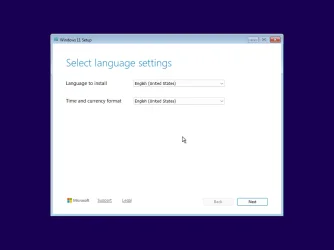
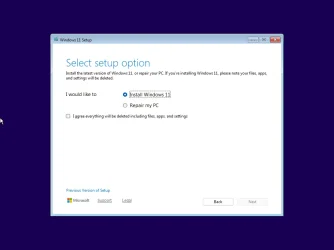
I am trying to move my unattended installation over to Win 11 and have run into an obstacle - I keep getting this prompt right after booting from an image:
1760633541316.webp

Does anyone know how can I bypass that? I presume it could be something to configure in the autounattended.xml file, but I have no damn idea, and I couldn't google up anything either.
 

My Computer My Computer

At a glance

Windows 11
OS
Windows 11
To prevent this message, you have two options:
  1. Switch to the legacy Setup client.
    Problems with 24H2 autounattend install with config set

  2. Use a <DiskConfiguration> which wipes the disk, using <WillWipeDisk>true</WillWipeDisk>
    24H2/25H2 Setup is detecting you have specific Windows temp folders leftover from a canceled clean install, or from an in-place upgrade.
 

My Computer My Computer

At a glance

Windows 7
OS
Windows 7
What's legacy setup client? I have never heard about that.

<WillWipeDisk>true</WillWipeDisk> is what I've been using for ten years across all Windows versions, so that's obviously not helping :(
 

My Computer My Computer

At a glance

Windows 11
OS
Windows 11
If you've been using unattended mode for 10 years, legacy Setup is what you're used to. 24H2/25H2 defaults to a new Setup client.
 

My Computer My Computer

At a glance

Windows 7
OS
Windows 7
What do you mean? It looks exactly the same 😮
 

My Computer My Computer

At a glance

Windows 11
OS
Windows 11
Have you tried running a clean 24H2/25H2 install without the unattended file?
 

My Computer My Computer

At a glance

Windows 7
OS
Windows 7
Oh. I don' think so. Let me see.

...
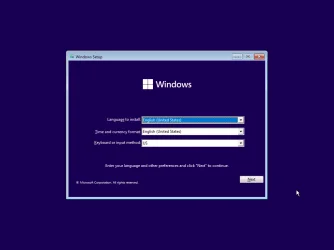
Hm, it looks exactly the same. I run it in a VM.
1760641143944.webp
 

My Computer My Computer

At a glance

Windows 11
OS
Windows 11
Totally the same Setup...
 

Attachments

  • Windows 11 x64-2025-10-16-12-19-07.webp
    Windows 11 x64-2025-10-16-12-19-07.webp
    14.7 KB · Views: 1
  • Windows 11 x64-2025-10-16-12-19-17.webp
    Windows 11 x64-2025-10-16-12-19-17.webp
    22.3 KB · Views: 1
  • Windows 11 x64-2025-10-16-12-19-54.webp
    Windows 11 x64-2025-10-16-12-19-54.webp
    17.9 KB · Views: 1

My Computer My Computer

At a glance

Windows 7
OS
Windows 7

My Computer My Computer

At a glance

Windows 11 Enterprise 25H2
OS
Windows 11 Enterprise 25H2
Back
Top Bottom