Upgrade prompt during unattended install


Octopuss

Member
Local time
8:27 AM
Posts
91
OS
Windows 11
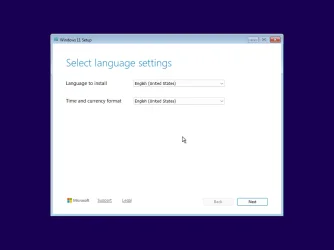
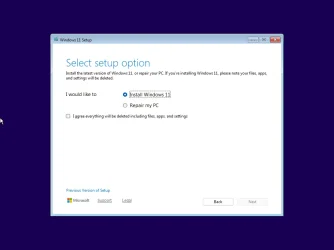
I am trying to move my unattended installation over to Win 11 and have run into an obstacle - I keep getting this prompt right after booting from an image:
1760633541316.webp

Does anyone know how can I bypass that? I presume it could be something to configure in the autounattended.xml file, but I have no damn idea, and I couldn't google up anything either.
 

My Computer

System One

  • OS
    Windows 11
To prevent this message, you have two options:
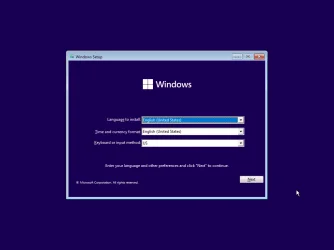
  1. Switch to the legacy Setup client.
    Problems with 24H2 autounattend install with config set

  2. Use a <DiskConfiguration> which wipes the disk, using <WillWipeDisk>true</WillWipeDisk>
    24H2/25H2 Setup is detecting you have specific Windows temp folders leftover from a canceled clean install, or from an in-place upgrade.
 

My Computer

System One

  • OS
    Windows 7
What's legacy setup client? I have never heard about that.

<WillWipeDisk>true</WillWipeDisk> is what I've been using for ten years across all Windows versions, so that's obviously not helping :(
 

My Computer

System One

  • OS
    Windows 11
If you've been using unattended mode for 10 years, legacy Setup is what you're used to. 24H2/25H2 defaults to a new Setup client.
 

My Computer

System One

  • OS
    Windows 7
Have you tried running a clean 24H2/25H2 install without the unattended file?
 

My Computer

System One

  • OS
    Windows 7
Oh. I don' think so. Let me see.

...
Hm, it looks exactly the same. I run it in a VM.
1760641143944.webp
 

My Computer

System One

  • OS
    Windows 11
Totally the same Setup...
 

Attachments

  • Windows 11 x64-2025-10-16-12-19-07.webp
    Windows 11 x64-2025-10-16-12-19-07.webp
    14.7 KB · Views: 1
  • Windows 11 x64-2025-10-16-12-19-17.webp
    Windows 11 x64-2025-10-16-12-19-17.webp
    22.3 KB · Views: 1
  • Windows 11 x64-2025-10-16-12-19-54.webp
    Windows 11 x64-2025-10-16-12-19-54.webp
    17.9 KB · Views: 1

My Computer

System One

  • OS
    Windows 7

My Computer

System One

  • OS
    Windows 11 Pro 25H2
    Computer type
    PC/Desktop
    Manufacturer/Model
    Intel NUC12WSHi7
    CPU
    12th Gen Core i7-1260P
    Motherboard
    NUC12WSBi7
    Memory
    64 GB Micron PC4-25600
    Graphics Card(s)
    Intel Iris Xe Graphics
    Sound Card
    on-board Realtek HD Audio
    Monitor(s) Displays
    Dell U3219Q
    Screen Resolution
    3840 x 2160
    Hard Drives
    Samsung SSD 990 PRO 1TB
    Crucial MX500 2 TB
    Antivirus
    Microsoft Defender
Back
Top Bottom