

I know it's a simple thing, but just happy to share my first attempt at upgrading from 16GB to 32GB was a success.
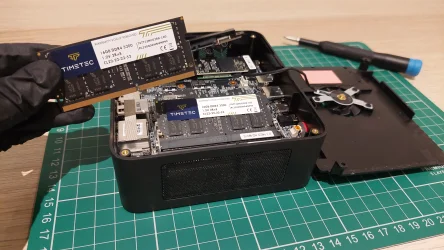
I have upgraded RAM on a miniPC before, but not on a laptop. I harvested the ones I previously installed on the miniPC:
Then installed them into the laptop:
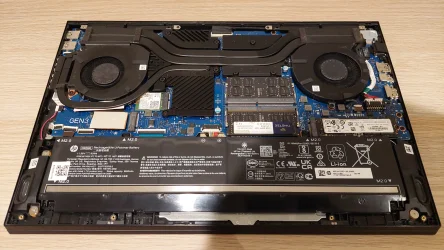
It shipped with 2 x 8GB DDR4-3200 (1Rx8) and was replaced with 2 x 16GB DDR4-3200 (2Rx8).
MiniPC gets the 16GB now since it's not been used for a while.
I have upgraded RAM on a miniPC before, but not on a laptop. I harvested the ones I previously installed on the miniPC:
Then installed them into the laptop:
It shipped with 2 x 8GB DDR4-3200 (1Rx8) and was replaced with 2 x 16GB DDR4-3200 (2Rx8).
MiniPC gets the 16GB now since it's not been used for a while.
My Computers
-
At a glance
Win11 Home 64-bit (25H2)i7-11800H16GB DDR4-3200 (2 x 8GB)RTX 3070 Laptop GPU (8GB GDDR6)- OS
- Win11 Home 64-bit (25H2)
- Computer type
- Laptop
- Manufacturer/Model
- HP OMEN 16-b0146TX (2021)
- CPU
- i7-11800H
- Motherboard
- HP 88F4
- Memory
- 16GB DDR4-3200 (2 x 8GB)
- Graphics Card(s)
- RTX 3070 Laptop GPU (8GB GDDR6)
- Monitor(s) Displays
- 16.1" IPS 144Hz
- Screen Resolution
- 1920 x 1080
- Hard Drives
- 1TB NVMe M.2 SSD
-
At a glance
Win11 Home 64-bit (25H2)R7-4800H16GB DDR4-3200 (2 x 8GB)RTX 1650 Ti Laptop GPU (4GB GDDR6)- Operating System
- Win11 Home 64-bit (25H2)
- Computer type
- Laptop
- Manufacturer/Model
- HP OMEN 15-en0012ax (2020)
- CPU
- R7-4800H
- Motherboard
- HP 8788
- Memory
- 16GB DDR4-3200 (2 x 8GB)
- Graphics card(s)
- RTX 1650 Ti Laptop GPU (4GB GDDR6)
- Monitor(s) Displays
- 15.6" IPS 60Hz
- Screen Resolution
- 1920 x 1080
- Hard Drives
- 512GB NVMe M.2 SSD






