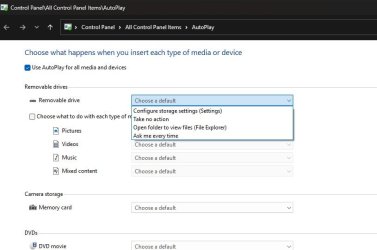
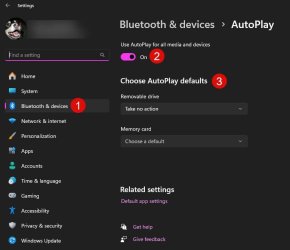
My main PC is an Asus Z490, Intel core i7 10700k running Windows 11 23h2 – build 22631.4037. I have 3 other PC’s all running the same PC build. My problem with my main PC is not able to see the content of external HDDs or USB files when I plug them in. I do not have this problem with any of the other three.
However, the device icon appears on the taskbar and I get an advice from ESET that a device has been added to the system. I am able to go into the File Manager and access the USB attachment but would like to really be able to use the facility of seeing the content of the USB attachment when I do attach it.
I have checked the “Device Manager” and the USB device appears in the Disk Drives. There are no warning flags appearing. I have deleted Device Manager the “Universal Serial Bus controller” in its entirety, rebooting and letting the system rebuild the USB files but no change. I have checked the Settings and made sure Autorun is turned on. I have used Safe Mode but no change.
To check that the problem was not with the MB/CPU, I have installed a fresh copy of Windows 11 and have no problem seeing USB on this copy. I am wondering if one of my TP programs might be interfering with the USB. I am not prepared to try a new build and adding programs to it, I can live with a work around but wonder if there might be a fix (Registry maybe). I have another PC running all of my programs (exact setup to my problem PC) without the USB problem.
When first setting up a PC and adding a USB, an advice appears asking how you would like to view the content of the USB. How can I get this to reappear?
However, the device icon appears on the taskbar and I get an advice from ESET that a device has been added to the system. I am able to go into the File Manager and access the USB attachment but would like to really be able to use the facility of seeing the content of the USB attachment when I do attach it.
I have checked the “Device Manager” and the USB device appears in the Disk Drives. There are no warning flags appearing. I have deleted Device Manager the “Universal Serial Bus controller” in its entirety, rebooting and letting the system rebuild the USB files but no change. I have checked the Settings and made sure Autorun is turned on. I have used Safe Mode but no change.
To check that the problem was not with the MB/CPU, I have installed a fresh copy of Windows 11 and have no problem seeing USB on this copy. I am wondering if one of my TP programs might be interfering with the USB. I am not prepared to try a new build and adding programs to it, I can live with a work around but wonder if there might be a fix (Registry maybe). I have another PC running all of my programs (exact setup to my problem PC) without the USB problem.
When first setting up a PC and adding a USB, an advice appears asking how you would like to view the content of the USB. How can I get this to reappear?
My Computers
-
At a glance
Windows 11 Pro 25H2 26200 current releasei7 11700KF32g DDR4 @3200Gigabyte RTX3060ti- OS
- Windows 11 Pro 25H2 26200 current release
- Computer type
- PC/Desktop
- Manufacturer/Model
- Home DIY
- CPU
- i7 11700KF
- Motherboard
- Gigabyte Z590 Aorus Elite AX
- Memory
- 32g DDR4 @3200
- Graphics Card(s)
- Gigabyte RTX3060ti
- Sound Card
- 0
- Monitor(s) Displays
- Samsung Syncmaster B2430HD
- Screen Resolution
- 1920 x 1080
- Hard Drives
- Samsung EVO 980 500G M.2
- PSU
- 600w EVGA
- Case
- Antec P280
- Cooling
- Coolmaster V6 GT
- Keyboard
- Logitech wireless K520r
- Mouse
- Logitech wirless M705
- Internet Speed
- Starlink 100mbps
- Browser
- Antivirus
- ESET
- Other Info
- Starlink
-
- Computer type
- PC/Desktop


 .
.