Use unique icon for each media file type while still associated with the UWP Media Player


drkh

Member
Member
Local time
2:40 AM
Posts
15
OS
Windows 11 Pro 24H2 build 26100.4349
Hi,

In Windows 11 Pro 24H2, I'd like to keep using the UWP Media Player to be the default program to open media files.

But can I change the icons of different media file types to be unique for each?

In the Registry, I find, every media file type, such as .mp3, actually has its own unique default icon assigned under the keys like WMP11.AssocFile.???, such as WMP11.AssocFile.MP3. But the icons of all the media file types are still the same as that of the UWP Media Player, and I can not change that.

Please help. Thanks.
 

My Computer

System One

  • OS
    Windows 11 Pro 24H2 build 26100.4349
    Computer type
    PC/Desktop
    Manufacturer/Model
    self-built in Oct. 2024
    CPU
    Intel Core i5-12600K
    Motherboard
    Gigabyte B760M GAMING X AX DDR4 v1.2
    Memory
    2 x ADATA XPG GAMMIX D10 DDR4 16GB
    Graphics Card(s)
    (iGPU) Intel UHD Graphics 770
    Sound Card
    onboard Realtek ALC897 audio codec
    Monitor(s) Displays
    SamSung S22D300NY LCD (D-Sub, 2015) + Biaze ZH10 HDMI to VGA converter
    Screen Resolution
    1280 x 720
    Hard Drives
    1 x WD_BLACK SN850X NVMe SSD 1TB
    2 x WD WD5003ABYX RE4 500G SATA2 (RAID 0)
    PSU
    FSP HEXA 85+ HA350 350W
    Case
    Cooler Master N400
    Cooling
    DeepCool AG400 Plus tower cooler, 4 x PWM case fan
    Keyboard
    Logitech Y-SM48
    Mouse
    Toshiba Pala-Chan
    Internet Speed
    522/263 Mbps
    Browser
    Vivaldi v7.5.3735.58 + MS Edge v137.0.3296.83 (updating disabled for both) + Google Chrome (auto-updated)
    Antivirus
    Windows Security
    Other Info
    Epson Expression Home XP-2101 inkjet printer
But can I change the icons of different media file types to be unique for each?
I don't think you can..., unless you can find the icon pointer files for UWP apps written up in some manifest somewhere...

9471.webp

It's easier to use a program that packs it's own dll's...

9472.webp

or, switch to WMP Legacy to use custom icons...

9473.webp
 

My Computers

System One System Two

  • OS
    Windows 11 Pro
    Computer type
    PC/Desktop
    Manufacturer/Model
    ASUS ROG Strix
  • Operating System
    Windows 11 Pro
    Computer type
    Laptop
    Manufacturer/Model
    ASUS VivoBook

My Computer

System One

  • OS
    Windows 11 Pro 24H2 build 26100.4349
    Computer type
    PC/Desktop
    Manufacturer/Model
    self-built in Oct. 2024
    CPU
    Intel Core i5-12600K
    Motherboard
    Gigabyte B760M GAMING X AX DDR4 v1.2
    Memory
    2 x ADATA XPG GAMMIX D10 DDR4 16GB
    Graphics Card(s)
    (iGPU) Intel UHD Graphics 770
    Sound Card
    onboard Realtek ALC897 audio codec
    Monitor(s) Displays
    SamSung S22D300NY LCD (D-Sub, 2015) + Biaze ZH10 HDMI to VGA converter
    Screen Resolution
    1280 x 720
    Hard Drives
    1 x WD_BLACK SN850X NVMe SSD 1TB
    2 x WD WD5003ABYX RE4 500G SATA2 (RAID 0)
    PSU
    FSP HEXA 85+ HA350 350W
    Case
    Cooler Master N400
    Cooling
    DeepCool AG400 Plus tower cooler, 4 x PWM case fan
    Keyboard
    Logitech Y-SM48
    Mouse
    Toshiba Pala-Chan
    Internet Speed
    522/263 Mbps
    Browser
    Vivaldi v7.5.3735.58 + MS Edge v137.0.3296.83 (updating disabled for both) + Google Chrome (auto-updated)
    Antivirus
    Windows Security
    Other Info
    Epson Expression Home XP-2101 inkjet printer
In older Windows versions, up to Windows 7, you could just right-click on a file and change the icon for all files of the same type. Since Windows 8 this functionality is no longer available from File Explorer. You must manually locate the appropriate key in Registry and change the path to point to the desired file and icon number.

For example, I am using MPC-HC to play .avi files. To change the default icon MPC-HC assigns to .avi files, I must navigate to key Computer\HKEY_CLASSES_ROOT\mplayerc.avi\DefaultIcon and then change the value of (Default) key to the desired file and icon number (default is C:\Program Files (x86)\K-Lite Codec Pack\MPC-HC\mpciconlib.dll,0)
 

My Computers

System One System Two

  • OS
    Windows 11 Pro 23H2 (5699), 25H2 (8457)
    Computer type
    Laptop
    Manufacturer/Model
    Acer Extensa 5630EZ
    CPU
    Mobile DualCore Intel Core 2 Duo T7250, 2000 MHz
    Motherboard
    Acer Extensa 5630
    Memory
    4GB
    Graphics Card(s)
    Mobile Intel(R) GMA 4500M (Mobile 4 series)
    Sound Card
    Realtek ALC268 @ Intel 82801IB ICH9 - High Definition Audio Controller
    Monitor(s) Displays
    1
    Screen Resolution
    1280x800
    Hard Drives
    Samsung SSD 850 EVO 250GB SATA Device (250 GB, SATA-III)
    Internet Speed
    VDSL 50 Mbps
    Browser
    MICROSOFT EDGE
    Antivirus
    WINDOWS DEFENDER
    Other Info
    Legacy MBR installation, no TPM, no Secure Boot, no WDDM 2.0 graphics drivers, no SSE4.2, cannot get more unsupported ;) This is only my test laptop. I had installed Windows 11 here before upgrading my main PC. For my main PC I use everyday see my 2nd system specs.
  • Operating System
    Windows 11 Pro v25H2 (build 26200.8457)
    Computer type
    PC/Desktop
    Manufacturer/Model
    Custom-built PC
    CPU
    Intel Core-i7 3770 3.40GHz s1155 (3rd generation)
    Motherboard
    Asus P8H61 s1155 ATX
    Memory
    2x Kingston Hyper-X Blu 8GB DDR3-1600
    Graphics card(s)
    GIGABYTE GeForce RTX 3050 WINDFORCE OC V2 6GB (GV-N3050WF2OCV2-6GD)
    Sound Card
    Realtek HD audio (ALC887)
    Monitor(s) Displays
    Sony Bravia KDL-19L4000 19" LCD TV via VGA
    Screen Resolution
    1440x900 32-bit 60Hz
    Hard Drives
    WD Blue SA510 2.5 1000GB SSD as system disk, Western Digital Caviar Purple 4TB SATA III (WD40PURZ) as second
    PSU
    Thermaltake Litepower RGB 550W Full Wired
    Case
    SUPERCASE MIDI-TOWER
    Cooling
    Deepcool Gamma Archer CPU cooler, 1x 8cm fan at the back
    Keyboard
    Mitsumi 101-key PS/2
    Mouse
    Sunnyline OptiEye PS/2
    Internet Speed
    100Mbps
    Browser
    Microsoft Edge, Mozilla Firefox
    Antivirus
    Microsoft Windows Defender
    Other Info
    Legacy BIOS (MBR) installation, no TPM, no Secure Boot, WDDM 3.0 graphics drivers, WEI score 7.4
In older Windows versions, up to Windows 7, you could just right-click on a file and change the icon for all files of the same type. Since Windows 8 this functionality is no longer available from File Explorer. You must manually locate the appropriate key in Registry and change the path to point to the desired file and icon number.

For example, I am using MPC-HC to play .avi files. To change the default icon MPC-HC assigns to .avi files, I must navigate to key Computer\HKEY_CLASSES_ROOT\mplayerc.avi\DefaultIcon and then change the value of (Default) key to the desired file and icon number (default is C:\Program Files (x86)\K-Lite Codec Pack\MPC-HC\mpciconlib.dll,0)
On my Win11 Pro 24H2 PC, the (Default) value in HKEY_CLASSES_ROOT\.avi points to WMP11.AssocFile.AVI. Then the DefaultIcon sub-key under WMP11.AssocFile.AVI has a (Default) value whose data is the following Multi-String:

%SystemRoot%\System32\wmploc.dll,-731

which is the avi icon that the legacy WMP uses.

But when the UWP Media Player is the default program for media files, Windows 11 just ignores this icon and somehow replaces it with the UWP Media Player's own program icon. Same thing with all the other media file types that the UWP Media Player supports.

If I change the data of the (Default) value in HKEY_CLASSES_ROOT\.avi to something like my-avi and create a corresoping my-avi key with a DefaultIcon sub-key which assigned an avi icon of my own choice, Windows 11 still ignores it when the UWP Media Player is the default program.

That's the problem for me.
 

My Computer

System One

  • OS
    Windows 11 Pro 24H2 build 26100.4349
    Computer type
    PC/Desktop
    Manufacturer/Model
    self-built in Oct. 2024
    CPU
    Intel Core i5-12600K
    Motherboard
    Gigabyte B760M GAMING X AX DDR4 v1.2
    Memory
    2 x ADATA XPG GAMMIX D10 DDR4 16GB
    Graphics Card(s)
    (iGPU) Intel UHD Graphics 770
    Sound Card
    onboard Realtek ALC897 audio codec
    Monitor(s) Displays
    SamSung S22D300NY LCD (D-Sub, 2015) + Biaze ZH10 HDMI to VGA converter
    Screen Resolution
    1280 x 720
    Hard Drives
    1 x WD_BLACK SN850X NVMe SSD 1TB
    2 x WD WD5003ABYX RE4 500G SATA2 (RAID 0)
    PSU
    FSP HEXA 85+ HA350 350W
    Case
    Cooler Master N400
    Cooling
    DeepCool AG400 Plus tower cooler, 4 x PWM case fan
    Keyboard
    Logitech Y-SM48
    Mouse
    Toshiba Pala-Chan
    Internet Speed
    522/263 Mbps
    Browser
    Vivaldi v7.5.3735.58 + MS Edge v137.0.3296.83 (updating disabled for both) + Google Chrome (auto-updated)
    Antivirus
    Windows Security
    Other Info
    Epson Expression Home XP-2101 inkjet printer
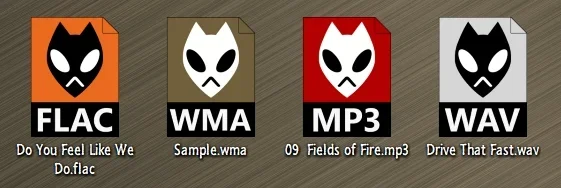
If all else fails, just use extensions that will embed the album art. Problem solved!

9481.webp
 

My Computers

System One System Two

  • OS
    Windows 11 Pro
    Computer type
    PC/Desktop
    Manufacturer/Model
    ASUS ROG Strix
  • Operating System
    Windows 11 Pro
    Computer type
    Laptop
    Manufacturer/Model
    ASUS VivoBook
But when the UWP Media Player is the default program for media files, Windows 11 just ignores this icon and somehow replaces it with the UWP Media Player's own program icon. Same thing with all the other media file types that the UWP Media Player supports.

If I change the data of the (Default) value in HKEY_CLASSES_ROOT\.avi to something like my-avi and create a corresoping my-avi key with a DefaultIcon sub-key which assigned an avi icon of my own choice, Windows 11 still ignores it when the UWP Media Player is the default program.

That's correct, when an UWP app registers its own set of File Associations, they override the other existing CLASSES values. If you were to uninstall Zune Media Player, then those settings would work again.
 

My Computer

System One

  • OS
    Windows 7
That's why we suggested to switch from UWP to the desktop version.
 

My Computers

System One System Two

  • OS
    Windows 11 Pro 23H2 (5699), 25H2 (8457)
    Computer type
    Laptop
    Manufacturer/Model
    Acer Extensa 5630EZ
    CPU
    Mobile DualCore Intel Core 2 Duo T7250, 2000 MHz
    Motherboard
    Acer Extensa 5630
    Memory
    4GB
    Graphics Card(s)
    Mobile Intel(R) GMA 4500M (Mobile 4 series)
    Sound Card
    Realtek ALC268 @ Intel 82801IB ICH9 - High Definition Audio Controller
    Monitor(s) Displays
    1
    Screen Resolution
    1280x800
    Hard Drives
    Samsung SSD 850 EVO 250GB SATA Device (250 GB, SATA-III)
    Internet Speed
    VDSL 50 Mbps
    Browser
    MICROSOFT EDGE
    Antivirus
    WINDOWS DEFENDER
    Other Info
    Legacy MBR installation, no TPM, no Secure Boot, no WDDM 2.0 graphics drivers, no SSE4.2, cannot get more unsupported ;) This is only my test laptop. I had installed Windows 11 here before upgrading my main PC. For my main PC I use everyday see my 2nd system specs.
  • Operating System
    Windows 11 Pro v25H2 (build 26200.8457)
    Computer type
    PC/Desktop
    Manufacturer/Model
    Custom-built PC
    CPU
    Intel Core-i7 3770 3.40GHz s1155 (3rd generation)
    Motherboard
    Asus P8H61 s1155 ATX
    Memory
    2x Kingston Hyper-X Blu 8GB DDR3-1600
    Graphics card(s)
    GIGABYTE GeForce RTX 3050 WINDFORCE OC V2 6GB (GV-N3050WF2OCV2-6GD)
    Sound Card
    Realtek HD audio (ALC887)
    Monitor(s) Displays
    Sony Bravia KDL-19L4000 19" LCD TV via VGA
    Screen Resolution
    1440x900 32-bit 60Hz
    Hard Drives
    WD Blue SA510 2.5 1000GB SSD as system disk, Western Digital Caviar Purple 4TB SATA III (WD40PURZ) as second
    PSU
    Thermaltake Litepower RGB 550W Full Wired
    Case
    SUPERCASE MIDI-TOWER
    Cooling
    Deepcool Gamma Archer CPU cooler, 1x 8cm fan at the back
    Keyboard
    Mitsumi 101-key PS/2
    Mouse
    Sunnyline OptiEye PS/2
    Internet Speed
    100Mbps
    Browser
    Microsoft Edge, Mozilla Firefox
    Antivirus
    Microsoft Windows Defender
    Other Info
    Legacy BIOS (MBR) installation, no TPM, no Secure Boot, WDDM 3.0 graphics drivers, WEI score 7.4
That's why we suggested to switch from UWP to the desktop version.

And that's a great suggestion I have followed. I think all is well now, by Just defaulting to the legacy WMP.
 

My Computer

System One

  • OS
    Windows 11 Pro 24H2 build 26100.4349
    Computer type
    PC/Desktop
    Manufacturer/Model
    self-built in Oct. 2024
    CPU
    Intel Core i5-12600K
    Motherboard
    Gigabyte B760M GAMING X AX DDR4 v1.2
    Memory
    2 x ADATA XPG GAMMIX D10 DDR4 16GB
    Graphics Card(s)
    (iGPU) Intel UHD Graphics 770
    Sound Card
    onboard Realtek ALC897 audio codec
    Monitor(s) Displays
    SamSung S22D300NY LCD (D-Sub, 2015) + Biaze ZH10 HDMI to VGA converter
    Screen Resolution
    1280 x 720
    Hard Drives
    1 x WD_BLACK SN850X NVMe SSD 1TB
    2 x WD WD5003ABYX RE4 500G SATA2 (RAID 0)
    PSU
    FSP HEXA 85+ HA350 350W
    Case
    Cooler Master N400
    Cooling
    DeepCool AG400 Plus tower cooler, 4 x PWM case fan
    Keyboard
    Logitech Y-SM48
    Mouse
    Toshiba Pala-Chan
    Internet Speed
    522/263 Mbps
    Browser
    Vivaldi v7.5.3735.58 + MS Edge v137.0.3296.83 (updating disabled for both) + Google Chrome (auto-updated)
    Antivirus
    Windows Security
    Other Info
    Epson Expression Home XP-2101 inkjet printer
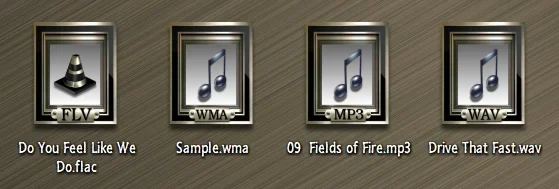
To play everything in legacy Media Player install the K-Lite codec pack. I also switch to MPC-HC because it has some features missing from legacy Media Player.
 

My Computers

System One System Two

  • OS
    Windows 11 Pro 23H2 (5699), 25H2 (8457)
    Computer type
    Laptop
    Manufacturer/Model
    Acer Extensa 5630EZ
    CPU
    Mobile DualCore Intel Core 2 Duo T7250, 2000 MHz
    Motherboard
    Acer Extensa 5630
    Memory
    4GB
    Graphics Card(s)
    Mobile Intel(R) GMA 4500M (Mobile 4 series)
    Sound Card
    Realtek ALC268 @ Intel 82801IB ICH9 - High Definition Audio Controller
    Monitor(s) Displays
    1
    Screen Resolution
    1280x800
    Hard Drives
    Samsung SSD 850 EVO 250GB SATA Device (250 GB, SATA-III)
    Internet Speed
    VDSL 50 Mbps
    Browser
    MICROSOFT EDGE
    Antivirus
    WINDOWS DEFENDER
    Other Info
    Legacy MBR installation, no TPM, no Secure Boot, no WDDM 2.0 graphics drivers, no SSE4.2, cannot get more unsupported ;) This is only my test laptop. I had installed Windows 11 here before upgrading my main PC. For my main PC I use everyday see my 2nd system specs.
  • Operating System
    Windows 11 Pro v25H2 (build 26200.8457)
    Computer type
    PC/Desktop
    Manufacturer/Model
    Custom-built PC
    CPU
    Intel Core-i7 3770 3.40GHz s1155 (3rd generation)
    Motherboard
    Asus P8H61 s1155 ATX
    Memory
    2x Kingston Hyper-X Blu 8GB DDR3-1600
    Graphics card(s)
    GIGABYTE GeForce RTX 3050 WINDFORCE OC V2 6GB (GV-N3050WF2OCV2-6GD)
    Sound Card
    Realtek HD audio (ALC887)
    Monitor(s) Displays
    Sony Bravia KDL-19L4000 19" LCD TV via VGA
    Screen Resolution
    1440x900 32-bit 60Hz
    Hard Drives
    WD Blue SA510 2.5 1000GB SSD as system disk, Western Digital Caviar Purple 4TB SATA III (WD40PURZ) as second
    PSU
    Thermaltake Litepower RGB 550W Full Wired
    Case
    SUPERCASE MIDI-TOWER
    Cooling
    Deepcool Gamma Archer CPU cooler, 1x 8cm fan at the back
    Keyboard
    Mitsumi 101-key PS/2
    Mouse
    Sunnyline OptiEye PS/2
    Internet Speed
    100Mbps
    Browser
    Microsoft Edge, Mozilla Firefox
    Antivirus
    Microsoft Windows Defender
    Other Info
    Legacy BIOS (MBR) installation, no TPM, no Secure Boot, WDDM 3.0 graphics drivers, WEI score 7.4

My Computer

System One

  • OS
    Windows 11 Pro 24H2 build 26100.4349
    Computer type
    PC/Desktop
    Manufacturer/Model
    self-built in Oct. 2024
    CPU
    Intel Core i5-12600K
    Motherboard
    Gigabyte B760M GAMING X AX DDR4 v1.2
    Memory
    2 x ADATA XPG GAMMIX D10 DDR4 16GB
    Graphics Card(s)
    (iGPU) Intel UHD Graphics 770
    Sound Card
    onboard Realtek ALC897 audio codec
    Monitor(s) Displays
    SamSung S22D300NY LCD (D-Sub, 2015) + Biaze ZH10 HDMI to VGA converter
    Screen Resolution
    1280 x 720
    Hard Drives
    1 x WD_BLACK SN850X NVMe SSD 1TB
    2 x WD WD5003ABYX RE4 500G SATA2 (RAID 0)
    PSU
    FSP HEXA 85+ HA350 350W
    Case
    Cooler Master N400
    Cooling
    DeepCool AG400 Plus tower cooler, 4 x PWM case fan
    Keyboard
    Logitech Y-SM48
    Mouse
    Toshiba Pala-Chan
    Internet Speed
    522/263 Mbps
    Browser
    Vivaldi v7.5.3735.58 + MS Edge v137.0.3296.83 (updating disabled for both) + Google Chrome (auto-updated)
    Antivirus
    Windows Security
    Other Info
    Epson Expression Home XP-2101 inkjet printer
Back
Top Bottom