User Folders on separate drive - Folder redirection?


jacobacci

Well-known member
Member
Local time
7:23 PM
Posts
64
OS
Windows 11 25H2
I have reset my indexing and search and now Windows indexed Start Menu and my User folder. I guess this is ok when my Documents, Music, Pictures and Videos folder are located there (as they are by default after a clean install). However mine are located on a large D:\ drive (which since has become an SSD as well).
I have changed the location of my Documents etc. folders in the sidebar of File Explorer to point to D:\Documents etc. Does this automatically include them in indexing and search?
Some people on reddit seem to be of the view that doing it this way is not state of the art, but the D:\Documents folder should be redirected to the deafult C:\User\.... location using gpedit.
What is the view of the experts on this forum as to what is state of the art in this respect?
My goals are to keep my system as stable as possible and indexing and search as well oiled as possible.
 

My Computer My Computer

At a glance

Windows 11 25H2i7-12700FCORSAIR Vengeance LPX - DDR4 - kit - 32 GB: 2...NVIDIA GeForce GTX 1050 Ti
OS
Windows 11 25H2
Computer type
PC/Desktop
Manufacturer/Model
MSI
CPU
i7-12700F
Motherboard
MSI PRO B660-A DDR4
Memory
CORSAIR Vengeance LPX - DDR4 - kit - 32 GB: 2 x 16 GB
Graphics Card(s)
NVIDIA GeForce GTX 1050 Ti
Sound Card
onboard
Monitor(s) Displays
ASUS PA32UCX
Screen Resolution
3840x2160
Hard Drives
ADATA SP900
AVAGO MR9361-8i SCSI with 3x Exos X20
PSU
Corsair RM650X
Case
Fractal Design Define R5 Blackout Edition
Cooling
Noctua CPU and Case Fans
Keyboard
Unicomp Model M
Mouse
Logitech MX Master
Internet Speed
1Gb/s
Browser
MS Edge
Antivirus
Microsoft Defender
GPEdit is not compulsory.
I have never had GPEdit [I have always had Windows Home] and I have never experienced any constraints or difficulties relocating my user folders.

Many people relocate their documents etc folders to a D:\ drive to suit their chosen backup methods [imaging for the OS & applications drive, file copying for the data drive]. I think reddit might well have misunderstood your question.

You can check that your changes have all been recorded correctly by looking at their values in this Registry Key
HKEY_CURRENT_USER\SOFTWARE\Microsoft\Windows\CurrentVersion\Explorer\User Shell Folders
[The entry Personal means your Documents folder path.]

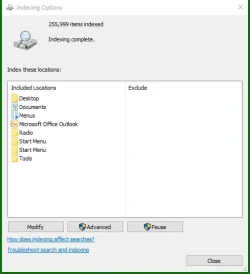
Indexing does not know about your changes. You need to change what is indexed using the Indexing options dialog. It gets a bit of getting used to.
control.exe srchadmin.dll
20250902 184435 Search options t17.webp
Then click on Modify to do changes.

Always take a screenshot of this dialog when you've finished changing the folders. It's the best record of them you can have.


Denis
 
Last edited:

My Computer My Computer

At a glance

Windows 11 Home x64 Version 25H2 Build 26200....
OS
Windows 11 Home x64 Version 25H2 Build 26200.8037
PS

My Indexing options dialog has two Start menu entries because there are always two Start menus [What you see onscreen as your Start menu is a combination of both of them].
Start menu - All users
C:\ProgramData\Microsoft\Windows\Start Menu
Start menu - CurrentUser
C:\Users\%UserName%\AppData\Roaming\Microsoft\Windows\Start Menu

Enclose these paths in " if you create shortcuts to get to them.
I've attached a zipped copy to save you the trouble.

Denis


Welcome to ElevenForum.

It's really worth making time to browse through the ElevenForum Tutorial index - there's a shortcut to it at the top of every ElevenForum page [within the Tutorials dropdown list].
- At the foot of the ElevenForum Tutorial index is a shortcut to download it as a spreadsheet.
- I download a new copy each month.
- By downloading it as a spreadsheet I can benefit from Excel's excellent filtering capabilities when I search for topics of interest.
- ElevenForum tutorials are also listed at Tutorials and there's a shortcut to that at the top of every page.

You can search ElevenForum using the search box in the top-right corner of all ElevenForum webpages or using Advanced Search - ElevenForum
- You can also search ElevenForum threads in many general search engines, such as Google, by adding site:elevenforum.com after your search term. For example,
Taskbar setup site:elevenforum.com
- [This is what the search box in the top-right corner of ElevenForum webpages does automatically]
 

Attachments

My Computer My Computer

At a glance

Windows 11 Home x64 Version 25H2 Build 26200....
OS
Windows 11 Home x64 Version 25H2 Build 26200.8037
I move my documents to a data drive, and other folders like Downloads I configure elsewhere as well. No, I do NOT use OneDrive, so that gets disabled on the spot!
 

My Computers My Computers

  • At a glance

    Win 11 Pro 25H2, Build 26200.8894Intel Core i5 1450064GB DDR4GeForce RTX 4060
    OS
    Win 11 Pro 25H2, Build 26200.8894
    Computer type
    PC/Desktop
    Manufacturer/Model
    Home Brew
    CPU
    Intel Core i5 14500
    Motherboard
    Gigabyte B760M G P WIFI
    Memory
    64GB DDR4
    Graphics Card(s)
    GeForce RTX 4060
    Sound Card
    Chipset Realtek
    Monitor(s) Displays
    LG 45" Ultragear, Acer 24" 1080p
    Screen Resolution
    5120x1440, 1920x1080
    Hard Drives
    Crucial P310 2TB 2280 PCIe Gen4 3D NAND NVMe M.2 SSD (O/S)
    Silicon Power 2TB US75 NVMe PCIe Gen4 M.2 2280 SSD (backup)
    Crucial BX500 2TB 3D NAND (2nd backup)
    Seagate 4TB Ironwolf, rotating HDD archive files
    External off-line backup Drives: 2 NVMe 4TB drives in external enclosures
    PSU
    Thermaltake Toughpower GF3 750W
    Case
    LIAN LI LANCOOL 216 E-ATX PC Case
    Cooling
    Lots of fans!
    Keyboard
    Microsoft Comfort Curve 2000
    Mouse
    Logitech G305
    Internet Speed
    Verizon FiOS 1GB
    Browser
    Firefox
    Antivirus
    Malware Bytes & Windows Defender Security
  • At a glance

    Win 11 Pro 25H2, Build 26200.8894Intel Core i5 1440032GB DDR5Intel 700 Embedded GPU
    Operating System
    Win 11 Pro 25H2, Build 26200.8894
    Computer type
    PC/Desktop
    Manufacturer/Model
    Home Brew
    CPU
    Intel Core i5 14400
    Motherboard
    Gigabyte B760M DS3H AX
    Memory
    32GB DDR5
    Graphics card(s)
    Intel 700 Embedded GPU
    Sound Card
    Realtek Embedded
    Monitor(s) Displays
    27" HP 1080p
    Screen Resolution
    1920x1080
    Hard Drives
    Crucial P310 2TB 2280 PCIe Gen4 eD NAND PCIe SSD
    Samsung EVO 990 2TB NVMe Gen4 SSD
    Samsung 2TB SATA SSD
    PSU
    Thermaltake Smart BM3 650W
    Case
    Okinos Micro ATX Case
    Cooling
    Fans
    Keyboard
    Microsoft Comfort Curve 2000
    Mouse
    Logitech G305
    Internet Speed
    Verizon FiOS 1GB
    Browser
    Firefox
    Antivirus
    Malware Bytes & Windows Defender Security
  • Nimo N171 17" Laptop, (Intel i3-1215U, 16GB RAM, 2TB NVMe, Win11 Pro)
    Acemagic Vista Mini PC V1 (Intel N150, 16GB RAM, 1TB NVMe, Win11 Pro)
    HP ENVY h8-1540t, (24GB RAM, 2TB SSD, 2TB HDD, Win11 Pro)
I have changed the location of my Documents etc. folders in the sidebar of File Explorer to point to D:\Documents etc. Does this automatically include them in indexing and search?

My answer is yes.
I have had user folders on a secondary drive for longer than I can think back, and I have never once had an issue with indexing. No I didn’t re-index. But like a lot of things it can’t hurt but in my opinion it isn’t necessary.

Don’t let it get complicated because It isn’t complicated. As long as you disabled OneDrive and moved your folders correctly, you’re good to go.
 

My Computers My Computers

  • At a glance

    Windows 11 Pro 25H2 Build 26200.8894Intel(R) Core(TM) i7-4770K CPU @ 3.50GHz32.0 GB of I forget and the box is in storage.Gigabyte nVidia GeForce GTX 1660 Super OC 6GB
    OS
    Windows 11 Pro 25H2 Build 26200.8894
    Computer type
    PC/Desktop
    Manufacturer/Model
    Sin-built 2013
    CPU
    Intel(R) Core(TM) i7-4770K CPU @ 3.50GHz
    Motherboard
    ASUS ROG Maximus VI Formula
    Memory
    32.0 GB of I forget and the box is in storage.
    Graphics Card(s)
    Gigabyte nVidia GeForce GTX 1660 Super OC 6GB
    Sound Card
    ROG SupremeFX Formula 8-Channel High Definition Audio
    Monitor(s) Displays
    5 x LG 25MS500-B - 1 x 24MK430H-B - 1 x Wacom Pro 22" Touch Screen Tablet
    Screen Resolution
    All over the place
    Hard Drives
    Too many to list. OS on Samsung 1TB 870 QVO SATA
    PSU
    Silverstone 1500
    Case
    NZXT Phantom 820 Full-Tower Case
    Cooling
    Noctua NH-D15 Elite Class Dual Tower CPU Cooler / 6 x EziDIY 120mm / 2 x Corsair 140mm somethings / 1 x 140mm Thermaltake something / 2 x 200mm Corsair.
    Keyboard
    Corsair K95 / Logitech diNovo Edge Wireless
    Mouse
    Logitech: G402 / G502 / Mx Masters / Mx Air Cordless
    Internet Speed
    2000/500Mbps
    Browser
    All sorts
    Antivirus
    Kaspersky Premium
    Other Info
    ㅤㅤㅤㅤㅤㅤㅤㅤㅤㅤㅤㅤㅤㅤㅤㅤㅤㅤㅤㅤㅤㅤㅤㅤㅤㅤㅤㅤㅤㅤㅤㅤㅤㅤㅤㅤㅤㅤㅤㅤ⠀⠀⠀⠀⠀⠀⠀⠀⠀⠀
    TP-Link BE9300 WiFi 7 Bluetooth 5.4 (Archer TBE550E)
    TP-Link TX201 V1 2.5GB Lan

    Grandstream HT812 - VoIP
    ASUS DSL-AX82U - Mesh
    ASUS RT-AC68U - Mesh
    ASUS RT-BE88U Router

    Brother MFC-L2880DW Printer

    I’m on a horse.
  • At a glance

    Windows 11 Pro 25H2 Build 26200.8894 (Wifes)13th Generation Intel® Core™ i5-1340P Process...16GB LPDDR5-52001x Intel® Iris® Xe Graphics
    Operating System
    Windows 11 Pro 25H2 Build 26200.8894 (Wifes)
    Computer type
    Laptop
    Manufacturer/Model
    LENOVO Yoga 7 14IRL8 - Type 82YL
    CPU
    13th Generation Intel® Core™ i5-1340P Processor(Core™ i5-1340P)
    Memory
    16GB LPDDR5-5200
    Graphics card(s)
    1x Intel® Iris® Xe Graphics
    Sound Card
    Optimized with Dolby Atmos®
    Screen Resolution
    QHD 2880 x 1800 OLED
    Hard Drives
    M.2 512 GB SSD PCIe
    Mouse
    Logiteck MX Master 3S
    Internet Speed
    2000/500
    Antivirus
    Defender / Malwarebytes
    Other Info
    …still on a horse.


    Wireless Network: Wi-Fi 6E 2x2 AX; Bluetooth® 5.1 or above
    Ports: 1x 1 Novo button; 2 in 1 Audio Combo jack; Micro SD Card Reader; HDMI 1.4b; 2 x USB Type-C (TBT4)
    USB 3.2 Gen 2 DP 1.4a
    PD 3.0); 1 x USB 3.2 Gen1 Type A
    Camera
    1x 1080P FHD IR/RGB Hybrid with Privacy Shutter and Dual Array Microphone
    Graphics
    1x Intel® Iris® Xe Graphics
    Monitor
    14" WUXGA
    Form Factor
    Convertible Notebook
  • Windows 11 Pro 25H2 Build 26200.8894 (Wifes)

    Yoga 7 2-in-1 14IML9 - Type 83DJ

    Processor: Intel® Core™ Ultra 7 155H Processor(Core™ Ultra 7 155H)

    Memory: 32GB LPD5X-7467

    Hard Drive: 1 TB SSD PCIe

    Wireless Network: 1x Wi-Fi 6E 2x2 AX; Bluetooth® 5.1 or above

    Ports: 1 x HDMI 2.1 TMDS; 1 x Novo Button; 1 x Combo Audio Jack
    2 x USB-C (USB 4.0)
    1 x USB-A 3.2 Gen 1

    Camera: 1080P FHD IR Hybrid with Dual Microphone

    Graphics: Intel® Arc™ Graphics

    Monitor: 14" 2.8K

    ...Where's my horse?
I have reset my indexing and search and now Windows indexed Start Menu and my User folder. I guess this is ok when my Documents, Music, Pictures and Videos folder are located there (as they are by default after a clean install). However mine are located on a large D:\ drive (which since has become an SSD as well).
I have changed the location of my Documents etc. folders in the sidebar of File Explorer to point to D:\Documents etc. Does this automatically include them in indexing and search?
Some people on reddit seem to be of the view that doing it this way is not state of the art, but the D:\Documents folder should be redirected to the deafult C:\User\.... location using gpedit.
What is the view of the experts on this forum as to what is state of the art in this respect?
My goals are to keep my system as stable as possible and indexing and search as well oiled as possible.

i have my drive partitioned and set up as C: drive for Windows and D: drive for Data
doc's, downloads, music, pictures and video folders have all been moved to D: drive

indexing just picked up there location automatically with no issues
and i have not had any other problem with these folders being placed on D: drive.

best of luck Steve ..
 

My Computers My Computers

  • At a glance

    Windows 11 HomeRyzen 7 5825u64GB DDR4 3200Ryzen 7 5825u
    OS
    Windows 11 Home
    Computer type
    PC/Desktop
    Manufacturer/Model
    HP 24" AiO
    CPU
    Ryzen 7 5825u
    Motherboard
    HP
    Memory
    64GB DDR4 3200
    Graphics Card(s)
    Ryzen 7 5825u
    Sound Card
    RealTek
    Monitor(s) Displays
    24" HP AiO
    Screen Resolution
    1920 x 1080 @60 Hz
    Hard Drives
    1TB WD Blue SN580 M2 SSD Partitioned.
    2x 1TB USB HDD External Backup/Storage.
    PSU
    90W external power brick
    Case
    24" All in One
    Cooling
    Default Air Cooling
    Keyboard
    HP WiFi UK extended
    Mouse
    HP WiFi 3 Button
    Internet Speed
    1GB full fibre
    Browser
    Edge & Firefox
    Antivirus
    AVG Internet Security/Windows Defender
    Other Info
    Mainly Open Source Software
  • At a glance

    Ubuntu 22.04.5 LTSi5 7200u16GB DDR4Intel
    Operating System
    Ubuntu 22.04.5 LTS
    Computer type
    Laptop
    Manufacturer/Model
    Dell 13" Latitude 2017
    CPU
    i5 7200u
    Motherboard
    Dell
    Memory
    16GB DDR4
    Graphics card(s)
    Intel
    Sound Card
    Intel
    Monitor(s) Displays
    13" Dell Laptop
    Hard Drives
    250GB Crucial 2.5" SSD
    Mouse
    Generic WiFi 3 button
    Internet Speed
    WiFi only
    Browser
    Firefox
    Antivirus
    ClamAV TK
    Other Info
    Mainly Open Source Software
Thanks guys, my concerns are gone re. the location of Documents etc. folders.
 
Last edited:

My Computer My Computer

At a glance

Windows 11 25H2i7-12700FCORSAIR Vengeance LPX - DDR4 - kit - 32 GB: 2...NVIDIA GeForce GTX 1050 Ti
OS
Windows 11 25H2
Computer type
PC/Desktop
Manufacturer/Model
MSI
CPU
i7-12700F
Motherboard
MSI PRO B660-A DDR4
Memory
CORSAIR Vengeance LPX - DDR4 - kit - 32 GB: 2 x 16 GB
Graphics Card(s)
NVIDIA GeForce GTX 1050 Ti
Sound Card
onboard
Monitor(s) Displays
ASUS PA32UCX
Screen Resolution
3840x2160
Hard Drives
ADATA SP900
AVAGO MR9361-8i SCSI with 3x Exos X20
PSU
Corsair RM650X
Case
Fractal Design Define R5 Blackout Edition
Cooling
Noctua CPU and Case Fans
Keyboard
Unicomp Model M
Mouse
Logitech MX Master
Internet Speed
1Gb/s
Browser
MS Edge
Antivirus
Microsoft Defender
Back
Top Bottom