Installation and Upgrade UUP Dump - Download Windows Insider ISO

  • Thread starter Thread starter Kari
  • Start date Published: Start date Updated Updated:
  • Tags Tags
    iso

UUP_Dump_banner.png

UUP Dump is the most practical and easy way to get ISO images of any Insider Windows 10 or Windows 11 version, as soon as Microsoft has released a new build. UUP Dump creates a download configuration file according to your choices, downloads necessary files directly from Microsoft servers, and finally creates an ISO image.

Please notice, that you don't have to join Windows Insider program to install and use Insider builds. You can simply download and install any Insider build from UUP Dump, and when an Insider build upgrade is released, download the upgrade build and upgrade your current Insider installation.

This tutorial will show you how to use UUP Dump to get any Windows Insider ISO.


1. In any browser, open an available link below to go to UUP Dump:


2. Select your Insider channel:

UUP Dump select channel.jpg


Select your preferred channel, and click the button for preferred bit architecture. Notice that Windows 11 is currently (July 2021) available in Dev Channel only, and that it is not available as x86 / 32-bit version. UUP Dump takes some time to create an ISO from downloaded UUP files; if you just want the latest public release, it's faster to get it directly from Microsoft. See tutorial:


3. Select link to your chosen Insider build:

UUP Dump select build.jpg


4. Select your preferred language from drop down list (language of the ISO), and click Next:

UUP Dump select language.jpg


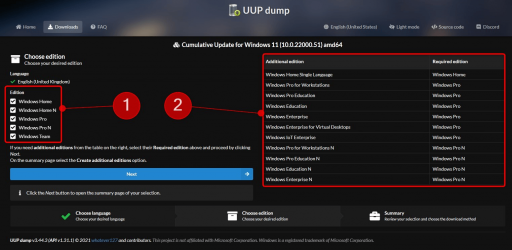
5. Select editions you want to download. (#1 in next screenshot). Notice that edition Windows Team is an Enterprise edition to be used in Surface Hub, and the N editions are normal Windows editions without media components like Windows Media Player. N editions need a specific N edition product key, and cannot be activated with standard Windows product keys.

Later, you can select additional editions to be added to your ISO (#2 in screenshot):

UUP Dump select editions.jpg


I recommend selecting only the HOME or PRO edition (or both), according to your needs. Click Next to proceed.

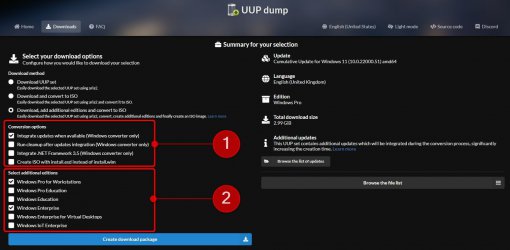
6. You will see a summary of your choices (#1 in next screenshot). The default setting is Download and convert to ISO (#2 in screenshot). An important choice is to select Integrate updates when available (#3 in screenshot). For instance, when creating build 22000 ISO today (July 2021), unselecting this will create a build 22000.1 ISO image, instead of fully updated build 22000.51 image.

In screenshot item #2, selecting Download, add additional editions and convert to ISO allows you to add additional Windows images to ISO.

UUP Dump select download options.jpg


7. In this example, I chose to add additional editions. I chose to integrate all updates (#1 in next screenshot), and add Pro for Workstations and Enterprise images (#2 in screenshot) to ISO:

1625279903304.png


8. When you have done your selections, click Create download package:

Download UUP configuration.jpg


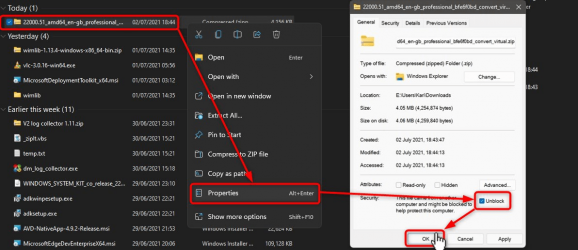
9. A ZIP archive file will be downloaded. As always when downloading any script, archive or executable file, you need to unblock it first. Right click the downloaded ZIP archive, select Properties, select Unblock, and click OK:

UUP Dump Unblock ZIP.jpg


10. Again, right click the downloaded ZIP archive. Select Extract all, accepting all defaults in next screen titled Select a destination and extract files:

UUP Dump Extract.jpg


Extract all.jpg


11. The ZIP archive will be extracted to a new folder, which will be opened automatically. Run the uup_download_windows.cmd file:

UUP Dump Run UUP Dump.jpg


12. UUP Dump starts to download necessary UUP files:

UUP Dump downloading.jpg


12. When download has finished, UUP Dump starts to build the ISO. A tell-tale of download finishing and building ISO starting is the change of background colour from black to blue :

UUP Dump Building ISO.jpg


13. Wait patiently, the process will take some time. When ready, text Press 0 to exit will be shown, Command Prompt window will close when you press 0. Alternatively, window can be closed from right top corner:

UUP Dump Done.png


14. A new ISO file can be found in folder where you extracted the ZIP archive:

UUP Dump ISO.jpg


15. Checking the ISO, you will see that all your selected Windows editions are included:


UUP Dump ISO editions.jpg


That's it, geeks!

Kari


Attachments

  • 1625279653471.png
    1625279653471.png
    207.9 KB · Views: 470
  • UUP Dump select updates and additional editions.jpg
    UUP Dump select updates and additional editions.jpg
    107.8 KB · Views: 425
  • 1625279933291.png
    1625279933291.png
    173.8 KB · Views: 352
  • 1625280767136.png
    1625280767136.png
    166.4 KB · Views: 426
  • 1625281359479.png
    1625281359479.png
    117.5 KB · Views: 449
Last edited by a moderator:
Pro Pro (?) tip:

Make directory that you use only to make the UUPDUMP .ISO (I called mine UUPDUMP, and put it in my \Downloads folder). Then exclude that folder from your AV autoscan (In Defender, set it as a folder exclusion).

I keep the folder even if it is empty, so I can always use it easily if I need to build an .ISO, and the exclusion is always there once created in Defender and Malwarebytes.
I guess that will still keep the rest of the system protected excluding the ISO building itself. The idea of a root folder is a good one as I normally just extract the default archive into the desktop directly. The only thing is it still needs to access folders in the main C:\
 
Last edited:

My Computer

System One

  • OS
    WindowsXP/7/8/8.1/10/11,Linux,Android,FreeBSD Unix
    Computer type
    Laptop
    Manufacturer/Model
    Dell XPS 15 9570
    CPU
    Intel® Core™ i7-8750H 8th Gen 2.2Ghz up to 4.1Ghz
    Motherboard
    Dell XPS 15 9570
    Memory
    64GB using 2x32GB CL16 Mushkin redLine modules
    Graphics Card(s)
    Intel UHD 630 & NVIDIA GeForce GTX 1050 Ti with 4GB DDR5
    Sound Card
    Realtek ALC3266-CG
    Monitor(s) Displays
    15.6" 4K Touch UltraHD 3840x2160 made by Sharp
    Screen Resolution
    3840x2160 4K UltraHD
    Hard Drives
    Samsung MZ-V9P4T0B/AM 990 PRO 4TB PCIe®4.0 NVMe™ M.2 SSD was Toshiba KXG60ZNV1T02 NVMe 1TB SSD
    PSU
    Dell XPS 15 9570
    Case
    Dell XPS 15 9570
    Cooling
    Stock
    Keyboard
    Stock
    Mouse
    SwitftPoint ProPoint
    Internet Speed
    Comcast/XFinity 1.44Gbps/42.5Mbps
    Browser
    Microsoft EDGE (Chromium based) & Google Chrome
    Antivirus
    Windows Defender that came with Windows
Have a question about UUP
The latest official release of Windows 10 IoT Enterprise LTSC is 19044.1288 (SHA-1: 2FB2897373C4F71B06F4490943B3D564B0F0FD6D) which is upgradable to 19044.5737
in UUPDump.net I can choose 22H2: Select language for Feature update to Windows 10, version 22H2 (19045.5796) amd64
if I choose "Download, add additional edition and convert to iso" and select the "IoT Enterprise", is it going to be LTSC or not?
What's the best option to download LTSC versions with updates without Microsoft subscription? Do I have to create an updated version with DISM?
 

My Computers

System One System Two

  • OS
    Windows 11 Pro 25H2
    Computer type
    Laptop
    Manufacturer/Model
    Huawei MateBook D15
    CPU
    Ryzen 5 3500U
    Memory
    8GB
    Graphics Card(s)
    Vega 8
    Screen Resolution
    FHD
    Hard Drives
    256GB Samsung SSD + 1TB HDD
    Browser
    Microsoft Edge
    Antivirus
    ESET Smart Security Premium
  • Operating System
    Windows 10 Enterprise LTSC 21H2
    Computer type
    Laptop
    Manufacturer/Model
    MSI GS73 6RF Stealth Pro
    CPU
    intel core i7 6700HQ
    Memory
    16GB
    Graphics card(s)
    Nvidia Geforce GTX1060 (6GB)
    Screen Resolution
    FHD
    Hard Drives
    128GB SSD + 1TB HDD
    Browser
    Microsoft Edge
    Antivirus
    Windows Defender
UUP will download all MS Store apps with aria2 but if you set SkipApps=1 in "ConvertConfig.ini", "Convert-UUP.cmd" will not integrate all of them to install.wim, so why waisting our internet and time? with this method UUP will not download unnecessary MS Store apps.

If you don't want to install Windows apps:

1- edit "convertconfig.ini" and set SkipApps=1
2- edit "uup_download_windows.cmd" and add a "pause" command before "echo Downloading Microsoft Store Apps..."
3- go to "files" folder.
4- edit "aria2_script.XXXXX.txt" file and clean all links except:
- Microsoft.WindowsStore_8wekyb3d8bbwe
- Microsoft.StorePurchaseApp_8wekyb3d8bbwe
- Microsoft.SecHealthUI_8wekyb3d8bbwe
- Microsoft.DesktopAppInstaller_8wekyb3d8bbwe

(Do not delete "checksum" and "out=" lines too.)

5- save the "aria2_script.XXXXX.txt" file.
6- in cmd script press any key to continue.


More about ConvertConfig.ini :
Batch:
:: Change to 1 to enable debug mode
set _Debug=0

:: ### Auto processing option ###
:: 1 - create ISO with install.wim
:: 2 - create ISO with install.esd
:: 3 - create install.wim only
:: 4 - create install.esd only
set AutoStart=0

:: Change to 1 to integrate updates (if detected) into install.wim/winre.wim
:: Change to 2 to add updates externally to iso distribution
set AddUpdates=0

:: Change to 1 to cleanup images to delta-compress superseded components (Warning: on 18362 and later, this removes the base RTM Edition packages)
set Cleanup=0

:: Change to 1 to rebase image and remove superseded components (faster than default delta-compress)
:: require first to set Cleanup=1
:: change to 2 to run rebase after each LCU for builds 26052 and later
set ResetBase=0

:: Change to 1 to enable .NET 3.5 feature with updates
set NetFx3=0

:: Change to 1 to start create_virtual_editions.cmd directly after conversion
set StartVirtual=0

:: Change to 1 to convert install.wim to install.esd
set wim2esd=0

:: Change to 1 to split install.wim into multiple install.swm
:: note: if both options are 1, install.esd takes precedence
set wim2swm=0

:: Change to 1 for not creating ISO file, result distribution folder will be kept
set SkipISO=0

:: Change to 1 for not adding winre.wim into install.wim/install.esd
set SkipWinRE=0

:: Change to 1 to force updating winre.wim with Cumulative Update regardless if SafeOS update detected
:: auto enabled for builds 22000-26050, change to 2 to disable
:: ignored and auto disabled for builds 26052 and later
set LCUwinre=0

:: Change to 1 to expand Cumulative Update and install from loose files via update.mum
:: applicable only for builds 22621 and later
:: auto enabled for builds 26052 and later, change to 2 to disable
set LCUmsuExpand=0

:: Change to 1 to disable updating process optimization by using editions upgrade (Home>Pro / ServerStandard>ServerDatacenter)
:: auto enabled for builds 26000 and later, change to 2 to disable
set DisableUpdatingUpgrade=0

:: Change to 1 to update ISO boot files bootmgr/memtest/efisys.bin from Cumulative Update
:: this also update new UEFI CA 2023 boot files if detected
set UpdtBootFiles=0

:: Change to 1 to use dism.exe for creating boot.wim
set ForceDism=0

:: Change to 1 to keep converted Reference ESDs
set RefESD=0

:: Change to 1 to skip creating Cumulative Update MSU for builds 21382 - 25330
set SkipLCUmsu=0

:: Change to 1 for not integrating EdgeChromium with Enablement Package or Cumulative Update
:: Change to 2 for alternative workaround to avoid EdgeChromium with Cumulative Update only
set SkipEdge=0

:: Change to 1 to exit the process on completion without prompt
set AutoExit=0

:: ### Drivers Options ###

:: Change to 1 to add drivers to install.wim and boot.wim / winre.wim
set AddDrivers=0

:: custom folder path for drivers - default is "Drivers" folder next to the script
:: the folder must contain subfolder for each drivers target:
:: ALL   / drivers will be added to all wim files
:: OS    / drivers will be added to install.wim only
:: WinPE / drivers will be added to boot.wim / winre.wim only
set "Drv_Source=\Drivers"

:: ### Store Apps for builds 22563 and later ###

:: Change to 1 for not integrating store apps into install.wim
set SkipApps=0

:: # Control added Apps for Client editions (except Team)
:: 0 / all referenced Apps
:: 1 / only Store, Security Health, App Installer
:: 2 / level 1 + Photos, Camera, Notepad, Paint
:: 3 / level 2 + Terminal, Widgets, Mail / Outlook, Clipchamp
:: 4 / level 3 + Media apps (Music, Video, Codecs, Phone Link) / not for N editions
set AppsLevel=0

:: # Control preference for Apps which are available as stubs
:: 0 / install as stub app
:: 1 / install as full app
set StubAppsFull=0

:: Enable using CustomAppsList.txt or CustomAppsList2.txt to pick and choose added Apps (takes precedence over AppsLevel)
:: CustomAppsList2.txt will be used if detected
set CustomList=0
 

My Computers

System One System Two

  • OS
    Windows 11 Pro 25H2
    Computer type
    Laptop
    Manufacturer/Model
    Huawei MateBook D15
    CPU
    Ryzen 5 3500U
    Memory
    8GB
    Graphics Card(s)
    Vega 8
    Screen Resolution
    FHD
    Hard Drives
    256GB Samsung SSD + 1TB HDD
    Browser
    Microsoft Edge
    Antivirus
    ESET Smart Security Premium
  • Operating System
    Windows 10 Enterprise LTSC 21H2
    Computer type
    Laptop
    Manufacturer/Model
    MSI GS73 6RF Stealth Pro
    CPU
    intel core i7 6700HQ
    Memory
    16GB
    Graphics card(s)
    Nvidia Geforce GTX1060 (6GB)
    Screen Resolution
    FHD
    Hard Drives
    128GB SSD + 1TB HDD
    Browser
    Microsoft Edge
    Antivirus
    Windows Defender
Easier to just uninstall them and don't touch UUPDump. Can be confusing for us dummys.
 

My Computer

System One

  • OS
    Win 11 Insider Release Preview and Beta channels.
    Computer type
    Laptop
    Manufacturer/Model
    HP ENVY Bought: March 2017
    CPU
    i5 Core [email protected] (Unsupported for Win 11)
    Motherboard
    HP 81AD (U3E1)
    Memory
    12GB
    Graphics Card(s)
    Generic PnP Monitor (1920x1080@60Hz) Intel HD Graphics 620 (HP)
    Sound Card
    Conexant ISST audio
    Monitor(s) Displays
    Generic PnP Monitor
    Screen Resolution
    1536x864 pixels
    Hard Drives
    HGST HTS721010A9E630
    PSU
    Well...PSU you too!! What's this mean?
    Case
    HP ENVY SILVER
    Cooling
    A fan.
    Keyboard
    USA
    Mouse
    Logitec Anywhere 2
    Internet Speed
    Good enough for me! Fast!
    Browser
    Edge/Waterfox
    Antivirus
    Windows Defender
    Other Info
    No 'mo.
Easier to just uninstall them and don't touch UUPDump. Can be confusing for us dummys.
Easier to update the config file. Unless you live somewhere with limited bandwidth, let the script do its thing. Since everything's auto-generated, the script could change without warning. Not that it changes that often, but still...
 

My Computer

System One

  • OS
    Windows 7
somewhere with limited bandwidth
5G mobile data is so expensive in Iran and I have to do such things. If you have a cheap or free internet you don’t have to do that. Enjoy living in paradise.
 

My Computers

System One System Two

  • OS
    Windows 11 Pro 25H2
    Computer type
    Laptop
    Manufacturer/Model
    Huawei MateBook D15
    CPU
    Ryzen 5 3500U
    Memory
    8GB
    Graphics Card(s)
    Vega 8
    Screen Resolution
    FHD
    Hard Drives
    256GB Samsung SSD + 1TB HDD
    Browser
    Microsoft Edge
    Antivirus
    ESET Smart Security Premium
  • Operating System
    Windows 10 Enterprise LTSC 21H2
    Computer type
    Laptop
    Manufacturer/Model
    MSI GS73 6RF Stealth Pro
    CPU
    intel core i7 6700HQ
    Memory
    16GB
    Graphics card(s)
    Nvidia Geforce GTX1060 (6GB)
    Screen Resolution
    FHD
    Hard Drives
    128GB SSD + 1TB HDD
    Browser
    Microsoft Edge
    Antivirus
    Windows Defender

Attachments

  • cb.gif
    cb.gif
    264 KB · Views: 43

My Computers

System One System Two

  • OS
    Windows11 Pro 26200.8655
    Computer type
    PC/Desktop
    Manufacturer/Model
    Dell Alienware Aurora R16
    CPU
    Intel Core i9 14900F (24 -Core, 68 MB Total Cache)
    Motherboard
    Dell Alienware
    Memory
    32GB DDR5
    Graphics Card(s)
    RTX 4080 Super w/581.95
    Sound Card
    Realtec
    Monitor(s) Displays
    Corsair XENEON 32QHD165
    Screen Resolution
    2560 X 1440
    Hard Drives
    1-2TB Samsung 990 Pro PCIe NVMe M2 SSD
    1-4TB Samsung 990 Pro PCIe NVMe M2 SSD
    PSU
    1000 Watt Platinum Dell
    Case
    Alienware
    Cooling
    Liquid Closed Loop
    Keyboard
    Corsair Strafe RGB
    Mouse
    Logitech MK270 Wireless
    Internet Speed
    100Gb's Down-20 Up
    Browser
    Firefox 151.0.4
    Antivirus
    Defender
    Other Info
    Very Quiet And Fast
    CyberPower UPS CP1500PFCLCD
  • Operating System
    PClinuxOS Mate (2025.7)
    Computer type
    PC/Desktop
    Manufacturer/Model
    Intel
    CPU
    13th Gen Inter(R) Core(TM) i3-1315U
    Motherboard
    Intel
    Memory
    64 GB DDR4 @3200 MHz.
    Graphics card(s)
    Internal
    Sound Card
    None
    Monitor(s) Displays
    Dell 2419HGCF
    Screen Resolution
    1920 X 1080
    Hard Drives
    SAMSUNG 980 PRO SSD 2TB, PCIe 4.0 M.2 2280
    PSU
    Chicony 30 Watt
    Case
    Small
    Keyboard
    Dell
    Mouse
    Razor
    Internet Speed
    1GB
    Browser
    Slimjet
I don't have free Internet, my Comcast bill is ridiculous.
Here's a dirty secret: You don't need to keep running UUP dump to create new builds.

Use the website option to skip integrating Updates, so it only creates a base version 26100.1 ISO. Keep that original ISO around, and download the KB updates separately.

Now your Internet cost is just the price of each month's KB updates, which UUP dump lists on the last page for manual download.

If you have NTLite, just load a copy of build 26100.1 and apply the saved KB updates to the image. Done.

For every month, as long as you're on the 26100 track, download the latest set of KB's and apply them to a copy of the 26100.1 ISO.
 

My Computer

System One

  • OS
    Windows 7
using SkipWinRE=1 causes error on 10% during windows installation. any suggestions?
 

My Computers

System One System Two

  • OS
    Windows 11 Pro 25H2
    Computer type
    Laptop
    Manufacturer/Model
    Huawei MateBook D15
    CPU
    Ryzen 5 3500U
    Memory
    8GB
    Graphics Card(s)
    Vega 8
    Screen Resolution
    FHD
    Hard Drives
    256GB Samsung SSD + 1TB HDD
    Browser
    Microsoft Edge
    Antivirus
    ESET Smart Security Premium
  • Operating System
    Windows 10 Enterprise LTSC 21H2
    Computer type
    Laptop
    Manufacturer/Model
    MSI GS73 6RF Stealth Pro
    CPU
    intel core i7 6700HQ
    Memory
    16GB
    Graphics card(s)
    Nvidia Geforce GTX1060 (6GB)
    Screen Resolution
    FHD
    Hard Drives
    128GB SSD + 1TB HDD
    Browser
    Microsoft Edge
    Antivirus
    Windows Defender

My Computer

System One

  • OS
    Windows 7
is it necessary to install Windows ADK before using UUPDump with this configuration (ForceDISM=1)?
I'm using Windows 10 21H2 to create Windows 11 24H2 iso.
Code:
[convert-UUP]
AutoStart    =1
AddUpdates   =1
Cleanup      =1
ResetBase    =1
NetFx3       =0
StartVirtual =0
wim2esd      =0
wim2swm      =0
SkipISO      =0
SkipWinRE    =0
LCUwinre     =1
LCUmsuExpand =1
UpdtBootFiles=1
ForceDism    =1
RefESD       =0
SkipLCUmsu   =0
SkipEdge     =1
AutoExit     =0
DisableUpdatingUpgrade=0
AddDrivers   =1
Drv_Source   =\Drivers

[Store_Apps]
SkipApps     =0
AppsLevel    =0
StubAppsFull =0
CustomList   =1

[create_virtual_editions]
vUseDism     =1
vAutoStart   =0
vDeleteSource=0
vPreserve    =0
vwim2esd     =0
vwim2swm     =0
vSkipISO     =0
vAutoEditions=
Note:
Slimlime mentioned here that ADK is necessary!
 
Last edited:

My Computers

System One System Two

  • OS
    Windows 11 Pro 25H2
    Computer type
    Laptop
    Manufacturer/Model
    Huawei MateBook D15
    CPU
    Ryzen 5 3500U
    Memory
    8GB
    Graphics Card(s)
    Vega 8
    Screen Resolution
    FHD
    Hard Drives
    256GB Samsung SSD + 1TB HDD
    Browser
    Microsoft Edge
    Antivirus
    ESET Smart Security Premium
  • Operating System
    Windows 10 Enterprise LTSC 21H2
    Computer type
    Laptop
    Manufacturer/Model
    MSI GS73 6RF Stealth Pro
    CPU
    intel core i7 6700HQ
    Memory
    16GB
    Graphics card(s)
    Nvidia Geforce GTX1060 (6GB)
    Screen Resolution
    FHD
    Hard Drives
    128GB SSD + 1TB HDD
    Browser
    Microsoft Edge
    Antivirus
    Windows Defender
ForceDism=1 isn't mandatory. UUP dump defaults to having it disabled.

ReadMe.html:
ForceDism
Use the official method with dism.exe for creating boot.wim, which require Windows 11/10 Host OS or ADK.

This is only used in reference to boot.wim, which is less important since you stop using boot.wim as soon as Setup exits WinPE, and restarts into the installed Windows image.
 

My Computer

System One

  • OS
    Windows 7
 

My Computer

System One

  • OS
    Windows 11 vmware
    Computer type
    Laptop
    Manufacturer/Model
    Dell
    CPU
    I9 13950hx
    Memory
    128GB
    Graphics Card(s)
    NVIDIA 4090
    Sound Card
    Realtek
I just followed the excellent guide to the letter, choosing my preferred version of Win 11 as 23H2, since I need to have WMR to use my VR HMD.
It took a very long time to complete, despite my enthusiast level PC.
Using the "dism /get-wiminfo /wimfile:I:\sources\install.wim" (ISO mounted to letter 'I' in my case), it reveals 'Version: 10.0.22621.2792'??

This is 22H2, since 23H2 should be 22631 instead of 22621?
I have gone through this long process twice trying to get the most up to date official public release ISO of 23H2 and end up with the same result.
I'm not sure what I'm doing wrong?
Appreciate feedback.
Thanks again for a terrific tutorial.

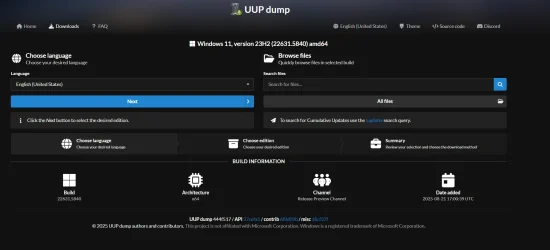
PS - for reference, here is the exact page I start this process on, which clearly shows the created ISO image version should be different:
 

Attachments

  • Screenshot 2025-08-27 155554.webp
    Screenshot 2025-08-27 155554.webp
    73.7 KB · Views: 49

My Computer

System One

  • OS
    Win 11 23H2 Enterprise
    Computer type
    PC/Desktop
    Manufacturer/Model
    Self-Built
    CPU
    Ryzen 9800X3D
    Motherboard
    MSI MAG X870 Tomahawk WiFi
    Memory
    G.Skill Trident Z RGB 6200MT CL30
    Graphics Card(s)
    MSI RTX 5090 Suprim SoC
    Sound Card
    Sound Blaster G8
    Monitor(s) Displays
    LG C2 42 Main Desktop, 3x Gigabyte FI32Q in a triple array for gaming simulations
    Screen Resolution
    3840x2160, 2560x1440 (3)
    Hard Drives
    WD SN850X 2TB M.2 NVME (OS Drive), WD SN850X 2TB M.2 NVME, 2x Crucial 2TB SSD, Crucial 1TB SSD, Seagate Barracuda 2TB HDD
    PSU
    NZXT C1200 Gold ATX 3.1-Fully Modular/Low-Noise-1200 Watts-12V-2x6 Connector-Zero Fan Mode-100% Japanese Capacitors
    Case
    NZXT H7
    Cooling
    EK AIO Elite 360mm Elite
    Keyboard
    Razer Huntsman V3 Pro
    Mouse
    Logitech G502X
    Internet Speed
    1GB
    Browser
    Edge Chromium
    Antivirus
    Windows Defender
I just followed the excellent guide to the letter, choosing my preferred version of Win 11 as 23H2, since I need to have WMR to use my VR HMD.
It took a very long time to complete, despite my enthusiast level PC.
Using the "dism /get-wiminfo /wimfile:I:\sources\install.wim" (ISO mounted to letter 'I' in my case), it reveals 'Version: 10.0.22621.2792'??

This is 22H2, since 23H2 should be 22631 instead of 22621?
I have gone through this long process twice trying to get the most up to date official public release ISO of 23H2 and end up with the same result.
I'm not sure what I'm doing wrong?
Appreciate feedback.
Thanks again for a terrific tutorial.

PS - for reference, here is the exact page I start this process on, which clearly shows the created ISO image version should be different:
There is nothing wrong .
All 226xx builds (v22H2 = 22621, v23H2 = 22631 ) including DISM share the same codebase based on build 22621.
You can carry on whatever you were trying to do.
 

My Computers

System One System Two

  • OS
    All Branches but Release
    Computer type
    Laptop
    Manufacturer/Model
    Acer Nitro ANV15-51
    CPU
    AMD Ryzen 7 7735HS 3200-4500 Mhz 8 cores x 2
    Motherboard
    Sportage_RBH
    Memory
    32 GB DDR5
    Graphics Card(s)
    Radeon Graphic / NVIDIA GeForce RTX 4060 8 GB GDDR6
    Sound Card
    AMD/Realtek(R) Audio
    Monitor(s) Displays
    Integrated Monitor (15.3"vis)
    Screen Resolution
    FHD 1920X1080 16:9 144Hz
    Hard Drives
    KINGSTON OM8SEP4512Q-AA 1TB
    Western Digital 256GB
    PSU
    19V DC 6.32 A 120 W
    Cooling
    Dual Fans
    Mouse
    MS Bluetooth
    Internet Speed
    Fiber 1GB Cox -us & 1GB Orange-fr
    Browser
    Edge Canary- Firefox Nightly-Chrome Dev-Chrome Dev
    Antivirus
    Windows Defender
  • Operating System
    Windows 11 Beta
    Computer type
    Laptop
    Manufacturer/Model
    Asus X751BP
    CPU
    AMD A9-9420
    Memory
    8 GB of DDR4
    Graphics card(s)
    AMD Radeon R5
    Screen Resolution
    1600x900
    Hard Drives
    Seagate 1 TB
Using the "dism /get-wiminfo /wimfile:I:\sources\install.wim" (ISO mounted to letter 'I' in my case), it reveals 'Version: 10.0.22621.2792'??

This is 22H2, since 23H2 should be 22631 instead of 22621?
That is correct. 22H2 and 23H2 share a common set of system files. In 22H2 the 23H2 features are dormant, they are enabled by a small Enablement Package which also bumps up the build from 22621 to 22631. The Dism command is telling you the build of the baseline system files, but the 23H2 ISO also contains and installs the enablement package.
 

My Computers

System One System Two

  • OS
    Windows 11 Home
    Computer type
    Laptop
    Manufacturer/Model
    Acer Aspire 3 A315-23-R9VY
    CPU
    AMD Athlon Silver 3050U
    Memory
    8GB
    Graphics Card(s)
    Radeon Graphics
    Monitor(s) Displays
    laptop screen
    Screen Resolution
    1366x768 native resolution, up to 2560x1440 with Radeon Virtual Super Resolution
    Hard Drives
    1TB Samsung EVO 870 SSD (from April 2026: 250GB EVO 850)
    Internet Speed
    150 Mbps
    Browser
    Edge, Firefox
    Antivirus
    Defender
    Other Info
    fully 'Windows 11 ready' laptop. Windows 10 C: partition migrated from my old unsupported 'main machine' then upgraded to 11. A test migration ran Insider builds for 2 months. When 11 was released on 5th October 2021 it was re-imaged back to 10 and was offered the upgrade in Windows Update on 20th October. Windows Update offered the 22H2 Feature Update on 20th September 2022. It got the 23H2 Feature Update on 4th November 2023 through Windows Update, 24H2 on 3rd October 2024 through Windows Update by setting the Target Release Version for 24H2, and 25H2 on 30th September 2025 through Windows Update by setting the Target Release Version for 25H2.

    UPDATE - 11 April 2026: due to mechanical deterioration this PC has been retired from active duty. The OS with all software and files has been migrated to my System Seven below to carry on as my general purpose 'main machine'.

    My SYSTEM THREE is a Dell Latitude 5410, i7-10610U, 32GB RAM, 512GB NVMe ssd, supported device running Windows 11 Pro.

    My SYSTEM FOUR is a 2-in-1 convertible Lenovo Yoga 11e 20DA, Celeron N2930, 8GB RAM, 256GB ssd. Unsupported device: currently running Win10 Pro, plus Win11 Pro RTM and Insider Dev, Beta, and RP 24H2 as native boot vhdx.

    My SYSTEM FIVE is a Dell Latitude 3190 2-in-1, Pentium Silver N5030, 8GB RAM, 1TB NVMe ssd, supported device running Windows 11 Pro, plus Insider Beta, Dev, and Canary builds (and a few others) as a native boot .vhdx.

    My SYSTEM SIX is a Dell Latitude 5550, Core Ultra 7 165H, 64GB RAM, 1TB NVMe SSD, supported device, Windows 11 Pro 24H2, Hyper-V host machine. Updated to 25H2 on 30th September 2025.

    My SYSTEM SEVEN is a Lenovo Thinkpad T580, Intel Core i7-8650U, 16GB RAM, 512GB NVMe SSD + 2nd 512GB NVMe SSD, a supported device for Windows 11. This is my current general purpose 'main machine'. The installed Windows 11 Home from my System One has been migrated to this machine.
  • Operating System
    Windows 11 Pro
    Computer type
    Laptop
    Manufacturer/Model
    Dell Latitude E4310
    CPU
    Intel® Core™ i5-520M
    Motherboard
    0T6M8G
    Memory
    8GB
    Graphics card(s)
    (integrated graphics) Intel HD Graphics
    Screen Resolution
    1366x768
    Hard Drives
    500GB Crucial MX500 SSD
    Browser
    Firefox, Edge
    Antivirus
    Defender
    Other Info
    unsupported machine: Legacy bios, MBR, TPM 1.2, upgraded from W10 to W11 using W10/W11 hybrid install media workaround. In-place upgrade to 22H2 using ISO and a workaround. Feature Update to 23H2 by manually installing the Enablement Package. In-place upgrade to 24H2 using hybrid 23H2/24H2 install media. Upgraded to 25H2 by Enablement Package. Also running Insider Dev, and Canary builds and Windows 10 as native boot .vhdx.

    My SYSTEM THREE is a Dell Latitude 5410, i7-10610U, 32GB RAM, 512GB NVMe ssd, supported device running Windows 11 Pro.

    My SYSTEM FOUR is a 2-in-1 convertible Lenovo Yoga 11e 20DA, Celeron N2930, 8GB RAM, 256GB ssd. Unsupported device: currently running Win10 Pro, plus Win11 Pro RTM and Insider Dev, Beta, and RP 24H2 as native boot vhdx.

    My SYSTEM FIVE is a Dell Latitude 3190 2-in-1, Pentium Silver N5030, 8GB RAM, 1TB NVMe ssd, supported device running Windows 11 Pro, plus Insider Beta, Dev, and Canary builds (and a few others) as a native boot .vhdx.

    My SYSTEM SIX is a Dell Latitude 5550, Core Ultra 7 165H, 64GB RAM, 1TB NVMe SSD, supported device, Windows 11 Pro 24H2, Hyper-V host machine. Updated to 25H2 on 30th September 2025.

    My SYSTEM SEVEN is a Lenovo Thinkpad T580, Intel Core i7-8650U, 16GB RAM, 512GB NVMe SSD + 2nd 512GB NVMe SSD, a supported device for Windows 11. This is my current general purpose 'main machine'. The installed Windows 11 Home from my System One has been migrated to this machine.
UUP dump is not broken.
It's been mentioned a few times before, DISM is an inaccurate method for finding the exact build of a WIM file.

You need a specialized tool to extract the CurrentBuild + UBR registry values from the install image's SOFTWARE hive, which DISM doesn't bother to do. For example if you ran the same DISM command on a clean 23H2 ISO, it would also report 22621.

Code:
CorrectVersion.bat F:\Win11_23H2_English_x64v2\sources\install.wim

Index Name                              Arch Edition                  Update Build
----- ----                              ---- -------                  ------------
   1  Windows 11 Home                   x64  Core                     22631.2861
   2  Windows 11 Home N                 x64  CoreN                    22631.2861
   3  Windows 11 Home Single Language   x64  CoreSingleLanguage       22631.2861
   4  Windows 11 Education              x64  Education                22631.2861
   5  Windows 11 Education N            x64  EducationN               22631.2861
   6  Windows 11 Pro                    x64  Professional             22631.2861
   7  Windows 11 Pro N                  x64  ProfessionalN            22631.2861
   8  Windows 11 Pro Education          x64  ProfessionalEducation    22631.2861
   9  Windows 11 Pro Education N        x64  ProfessionalEducationN   22631.2861
  10  Windows 11 Pro for Workstations   x64  ProfessionalWorkstation  22631.2861
  11  Windows 11 Pro N for Workstations x64  ProfessionalWorkstationN 22631.2861
 

Attachments

Last edited:

My Computer

System One

  • OS
    Windows 7
Good afternoon guys! I've been using Uup Dump for a long time, but whenever I update the windows 11 iso I delete the folder and run the new one I downloaded. It downloads all the files again. Question: would it be possible to take advantage of what has already been downloaded, to be faster and it only downloads the missing files?
 

My Computer

System One

  • OS
    WINDOWS 11 PRO
    Computer type
    PC/Desktop
Back
Top Bottom