UWP apps and System Proxy


atinfo

Well-known member
Power User
VIP
Local time
11:09 PM
Posts
1,171
OS
Win 11 Enterprise
Hi forum,

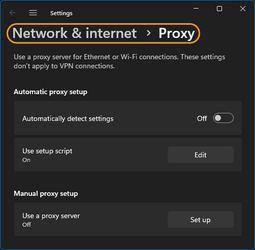
I'm trying to figure out how to force UWP apps (like Telegram) to use the system proxy (or PAC) settings. Any help?

ss.png
s2.png
 
Windows Build/Version
22621.1702

My Computer My Computer

At a glance

Win 11 Enterprisei7
OS
Win 11 Enterprise
Computer type
Laptop
CPU
i7
Hard Drives
SSD

My Computer My Computer

At a glance

Windows 10 Pro 64-bit 22H2 19045.4046Intel i7-3770 @ 3.40GHz8 GBAMD 7500 Radeon HD Series
OS
Windows 10 Pro 64-bit 22H2 19045.4046
Computer type
PC/Desktop
Manufacturer/Model
Dell/Vostro 470 (Year 2012)
CPU
Intel i7-3770 @ 3.40GHz
Memory
8 GB
Graphics Card(s)
AMD 7500 Radeon HD Series
Sound Card
Realtek Hi-Def Audio
Monitor(s) Displays
Dell U2412M
Hard Drives
1 TB 7200 HDD
Keyboard
Dell/USB
Mouse
Dell/USB
Internet Speed
100/10
Browser
Edge
Antivirus
Windows Security/MalwareBytes Premium
Hello @WXC,

Many thanks. I am aware of how to set it up on Android.

About the "thewindowsclub" article, I have read it before. The Registry trick implements a proxy domain setting to all UWP apps. The GPEdit method needs a proxy domain and a restart! I use a PAC file and the toggle key in settings to on/off it (SS above).

There is a difference between Telegram Desktop and Android (mobile version). On Telegram mobile you can open Telegram (without VPN/Proxy), see the channels (MTProto proxy channel and proxies) and select a new proxy if the current one doesn't work. On Telegram Desktop you can't open the app without a VPN/Proxy and see the channels (to set a new MTProto proxy)!

On PC I can use Nekoray to force UWP apps to use proxy settings as a VPN, I don't use Nekoray, and I don't want to use it (or any 3rd-party app) for proxy settings.

I don't know who had such an idiot idea to separate the UWP and Win32 apps' proxy settings.

 

My Computer My Computer

At a glance

Win 11 Enterprisei7
OS
Win 11 Enterprise
Computer type
Laptop
CPU
i7
Hard Drives
SSD
Back
Top Bottom