verify downloads


Maranna

Well-known member
Member
VIP
Local time
6:35 PM
Posts
305
OS
Windows 11 pro
I am very new in this area and have been studying YouTube videos of verifying downloads both Linux and windows without much success. Is there some way I can find a tutorial that is slower and more explanatory and the ones I've been using.
My skill level is just above average but I seem unable to accomplish this step by step. I just tried it with Ubuntu as it is a relatively small file but could not quite get the steps in order. I think it is worth it so I do not get a backdoor or any malicious file in my system. There are third party apps but I do not trust them.
 

My Computers My Computers

  • At a glance

    Windows 11 proIntel Core i9- 12900K Alder Lake 3.2 GHz LGA1700G-Skill Ripjaws S5 32GBNVIDIA GEForce GTX1616 Super dual fan
    OS
    Windows 11 pro
    Computer type
    PC/Desktop
    Manufacturer/Model
    ASUS built by Micro center
    CPU
    Intel Core i9- 12900K Alder Lake 3.2 GHz LGA1700
    Motherboard
    Asus prime Z790-v WI FI Intel LGA1700 ATX
    Memory
    G-Skill Ripjaws S5 32GB
    Graphics Card(s)
    NVIDIA GEForce GTX1616 Super dual fan
    Hard Drives
    Samsung 500GB 860 EVO
    PSU
    Thermalake 500 Watt
    Case
    V 100ATX
    Antivirus
    Defender primary with MBAM free secondary
  • At a glance

    Windows 11 Pro 21H2 22000.438
    Operating System
    Windows 11 Pro 21H2 22000.438
    Computer type
    PC/Desktop
    Manufacturer/Model
    ASUS board built
    Motherboard
    Asus Tuf Z390 - Tuf Plus Gaming WI = FI
I've used a small free program for several years to verify downloads. The site providing the download usually has a hash code on the page used to verify their product. The name of it is MD5_and_SHA_Checksum_Utility.exe, it is a stand-alone program and I choose a file to check, let it be read and put the hash in the bottom box then click Verify. Raymond's WordPress
 

My Computers My Computers

  • At a glance

    Win11 Pro RTM Version 24H2 Build 26100.4202Intel Core i5 11th Gen. 2.40GHz12GB
    OS
    Win11 Pro RTM Version 24H2 Build 26100.4202
    Computer type
    Laptop
    Manufacturer/Model
    Dell Vostro 3400
    CPU
    Intel Core i5 11th Gen. 2.40GHz
    Memory
    12GB
    Hard Drives
    256GB SSD NVMe M.2
  • At a glance

    Win11 Pro RTM Version 24H2 Build 26100.4202Intel Core i5 10th Gen. 2.90GHz16GBOnboard, no VGA, using a DisplayPort-to-VGA a...
    Operating System
    Win11 Pro RTM Version 24H2 Build 26100.4202
    Computer type
    PC/Desktop
    Manufacturer/Model
    Dell Vostro 5890
    CPU
    Intel Core i5 10th Gen. 2.90GHz
    Memory
    16GB
    Graphics card(s)
    Onboard, no VGA, using a DisplayPort-to-VGA adapter
    Monitor(s) Displays
    24" Dell
    Hard Drives
    512GB SSD NVMe, 4TB Seagate HDD
    Browser
    Firefox, Edge
    Antivirus
    Windows Defender/Microsoft Security
If you use 7-zip, it can add a CRC SHA verify to the right-click context menu.
 

My Computer My Computer

At a glance

Windows 11
OS
Windows 11
Computer type
PC/Desktop
Sorry guys. I am not savvy enough to grasp what to do. Sure wish I could do it.
Thanks for the offer.
BTW, 7zip is not compatible with Win 11 which I should have stated before.
 

My Computers My Computers

  • At a glance

    Windows 11 proIntel Core i9- 12900K Alder Lake 3.2 GHz LGA1700G-Skill Ripjaws S5 32GBNVIDIA GEForce GTX1616 Super dual fan
    OS
    Windows 11 pro
    Computer type
    PC/Desktop
    Manufacturer/Model
    ASUS built by Micro center
    CPU
    Intel Core i9- 12900K Alder Lake 3.2 GHz LGA1700
    Motherboard
    Asus prime Z790-v WI FI Intel LGA1700 ATX
    Memory
    G-Skill Ripjaws S5 32GB
    Graphics Card(s)
    NVIDIA GEForce GTX1616 Super dual fan
    Hard Drives
    Samsung 500GB 860 EVO
    PSU
    Thermalake 500 Watt
    Case
    V 100ATX
    Antivirus
    Defender primary with MBAM free secondary
  • At a glance

    Windows 11 Pro 21H2 22000.438
    Operating System
    Windows 11 Pro 21H2 22000.438
    Computer type
    PC/Desktop
    Manufacturer/Model
    ASUS board built
    Motherboard
    Asus Tuf Z390 - Tuf Plus Gaming WI = FI
I use it with Windows 11 without an issue. Why do you think it is not compatible?
 

My Computer My Computer

At a glance

Windows 11
OS
Windows 11
Computer type
PC/Desktop
When I went to download at various sites, it stated that it went to Win 10. I am likely wrong but I was just conveying what I read.
Any chance you could give me a few tips on steps?

I have an important question for you if I may;
To verify, do I do this before I downland or after. I ask because damage can be done after a downlead but I cannot see how to do it before the downland. Thank you!
 

My Computers My Computers

  • At a glance

    Windows 11 proIntel Core i9- 12900K Alder Lake 3.2 GHz LGA1700G-Skill Ripjaws S5 32GBNVIDIA GEForce GTX1616 Super dual fan
    OS
    Windows 11 pro
    Computer type
    PC/Desktop
    Manufacturer/Model
    ASUS built by Micro center
    CPU
    Intel Core i9- 12900K Alder Lake 3.2 GHz LGA1700
    Motherboard
    Asus prime Z790-v WI FI Intel LGA1700 ATX
    Memory
    G-Skill Ripjaws S5 32GB
    Graphics Card(s)
    NVIDIA GEForce GTX1616 Super dual fan
    Hard Drives
    Samsung 500GB 860 EVO
    PSU
    Thermalake 500 Watt
    Case
    V 100ATX
    Antivirus
    Defender primary with MBAM free secondary
  • At a glance

    Windows 11 Pro 21H2 22000.438
    Operating System
    Windows 11 Pro 21H2 22000.438
    Computer type
    PC/Desktop
    Manufacturer/Model
    ASUS board built
    Motherboard
    Asus Tuf Z390 - Tuf Plus Gaming WI = FI
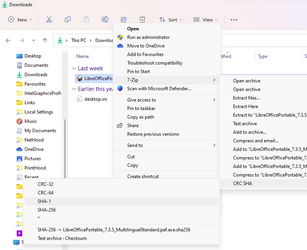
Download it from the official site... Download. The 1st download will work... 64-bit Windows x64. Install it. I don't recall if it will add the right-click extension during install or if you have to select it later in Options. If you have to add it from Options, run 7-zip as an Administrator so it can make the necessary changes. Note: it only adds CRC and SHA. It doesn't add MD5 verification.
 

My Computer My Computer

At a glance

Windows 11
OS
Windows 11
Computer type
PC/Desktop
Basically it is download the file, get the hash number from that same page and compare.
 

My Computers My Computers

  • At a glance

    Win11 Pro RTM Version 24H2 Build 26100.4202Intel Core i5 11th Gen. 2.40GHz12GB
    OS
    Win11 Pro RTM Version 24H2 Build 26100.4202
    Computer type
    Laptop
    Manufacturer/Model
    Dell Vostro 3400
    CPU
    Intel Core i5 11th Gen. 2.40GHz
    Memory
    12GB
    Hard Drives
    256GB SSD NVMe M.2
  • At a glance

    Win11 Pro RTM Version 24H2 Build 26100.4202Intel Core i5 10th Gen. 2.90GHz16GBOnboard, no VGA, using a DisplayPort-to-VGA a...
    Operating System
    Win11 Pro RTM Version 24H2 Build 26100.4202
    Computer type
    PC/Desktop
    Manufacturer/Model
    Dell Vostro 5890
    CPU
    Intel Core i5 10th Gen. 2.90GHz
    Memory
    16GB
    Graphics card(s)
    Onboard, no VGA, using a DisplayPort-to-VGA adapter
    Monitor(s) Displays
    24" Dell
    Hard Drives
    512GB SSD NVMe, 4TB Seagate HDD
    Browser
    Firefox, Edge
    Antivirus
    Windows Defender/Microsoft Security

My Computers My Computers

  • At a glance

    Windows 11 HomeAMD Athlon Silver 3050U8GBRadeon Graphics
    OS
    Windows 11 Home
    Computer type
    Laptop
    Manufacturer/Model
    Acer Aspire 3 A315-23-R9VY
    CPU
    AMD Athlon Silver 3050U
    Memory
    8GB
    Graphics Card(s)
    Radeon Graphics
    Monitor(s) Displays
    laptop screen
    Screen Resolution
    1366x768 native resolution, up to 2560x1440 with Radeon Virtual Super Resolution
    Hard Drives
    1TB Samsung EVO 870 SSD (from April 2026: 250GB EVO 850)
    Internet Speed
    150 Mbps
    Browser
    Edge, Firefox
    Antivirus
    Defender
    Other Info
    fully 'Windows 11 ready' laptop. Windows 10 C: partition migrated from my old unsupported 'main machine' then upgraded to 11. A test migration ran Insider builds for 2 months. When 11 was released on 5th October 2021 it was re-imaged back to 10 and was offered the upgrade in Windows Update on 20th October. Windows Update offered the 22H2 Feature Update on 20th September 2022. It got the 23H2 Feature Update on 4th November 2023 through Windows Update, 24H2 on 3rd October 2024 through Windows Update by setting the Target Release Version for 24H2, and 25H2 on 30th September 2025 through Windows Update by setting the Target Release Version for 25H2.

    UPDATE - 11 April 2026: due to mechanical deterioration this PC has been retired from active duty. The OS with all software and files has been migrated to my System Seven in 'Other systems' to carry on as my general purpose 'main machine'.
  • At a glance

    Windows 11 ProIntel® Core™ i5-520M8GB(integrated graphics) Intel HD Graphics
    Operating System
    Windows 11 Pro
    Computer type
    Laptop
    Manufacturer/Model
    Dell Latitude E4310
    CPU
    Intel® Core™ i5-520M
    Motherboard
    0T6M8G
    Memory
    8GB
    Graphics card(s)
    (integrated graphics) Intel HD Graphics
    Screen Resolution
    1366x768
    Hard Drives
    500GB Crucial MX500 SSD
    Browser
    Firefox, Edge
    Antivirus
    Defender
    Other Info
    unsupported machine: Legacy bios, MBR, TPM 1.2, upgraded from W10 to W11 using W10/W11 hybrid install media workaround.

    In-place upgrade to 22H2 using ISO and a workaround.
    Feature Update to 23H2 by manually installing the Enablement Package.
    In-place upgrade to 24H2 using hybrid 23H2/24H2 install media.
    Upgraded to 25H2 by Enablement Package.

    Also running Insider Dev, and Canary builds and Windows 10 as native boot .vhdx.
  • My SYSTEM THREE is a Dell Latitude 5410, i7-10610U, 32GB RAM, 512GB NVMe ssd, supported device running Windows 11 Pro.

    My SYSTEM FOUR is a 2-in-1 convertible Lenovo Yoga 11e 20DA, Celeron N2930, 8GB RAM, 256GB ssd. Unsupported device: currently running Win10 Pro, plus Win11 Pro RTM and Insider Dev, Beta, and RP 24H2 as native boot vhdx.

    My SYSTEM FIVE is a Dell Latitude 3190 2-in-1, Pentium Silver N5030, 8GB RAM, 1TB NVMe ssd, supported device running Windows 11 Pro, plus Insider Beta, Dev, and Canary builds (and a few others) as a native boot .vhdx.

    My SYSTEM SIX is a Dell Latitude 5550, Core Ultra 7 165H, 64GB RAM, 1TB NVMe SSD, supported device, Windows 11 Pro 24H2, Hyper-V host machine. Updated to 25H2 on 30th September 2025.

    My SYSTEM SEVEN is a Lenovo Thinkpad T580, Intel Core i7-8650U, 16GB RAM, 512GB NVMe SSD + 2nd 512GB NVMe SSD, a supported device for Windows 11. This is my current general purpose 'main machine'. The installed Windows 11 Home from my System One has been migrated to this machine.
OK I'll work on it. Thank you.

I used GtkHash and it worked with Lubuntu. Now having issues with a VM.
 

My Computers My Computers

  • At a glance

    Windows 11 proIntel Core i9- 12900K Alder Lake 3.2 GHz LGA1700G-Skill Ripjaws S5 32GBNVIDIA GEForce GTX1616 Super dual fan
    OS
    Windows 11 pro
    Computer type
    PC/Desktop
    Manufacturer/Model
    ASUS built by Micro center
    CPU
    Intel Core i9- 12900K Alder Lake 3.2 GHz LGA1700
    Motherboard
    Asus prime Z790-v WI FI Intel LGA1700 ATX
    Memory
    G-Skill Ripjaws S5 32GB
    Graphics Card(s)
    NVIDIA GEForce GTX1616 Super dual fan
    Hard Drives
    Samsung 500GB 860 EVO
    PSU
    Thermalake 500 Watt
    Case
    V 100ATX
    Antivirus
    Defender primary with MBAM free secondary
  • At a glance

    Windows 11 Pro 21H2 22000.438
    Operating System
    Windows 11 Pro 21H2 22000.438
    Computer type
    PC/Desktop
    Manufacturer/Model
    ASUS board built
    Motherboard
    Asus Tuf Z390 - Tuf Plus Gaming WI = FI
Sorry guys. I am not savvy enough to grasp what to do. Sure wish I could do it.
Thanks for the offer.
BTW, 7zip is not compatible with Win 11 which I should have stated before.
I also have 7-Zip on Win11 as well as WIn10.
 

My Computers My Computers

  • At a glance

    Win11 Pro RTM Version 24H2 Build 26100.4202Intel Core i5 11th Gen. 2.40GHz12GB
    OS
    Win11 Pro RTM Version 24H2 Build 26100.4202
    Computer type
    Laptop
    Manufacturer/Model
    Dell Vostro 3400
    CPU
    Intel Core i5 11th Gen. 2.40GHz
    Memory
    12GB
    Hard Drives
    256GB SSD NVMe M.2
  • At a glance

    Win11 Pro RTM Version 24H2 Build 26100.4202Intel Core i5 10th Gen. 2.90GHz16GBOnboard, no VGA, using a DisplayPort-to-VGA a...
    Operating System
    Win11 Pro RTM Version 24H2 Build 26100.4202
    Computer type
    PC/Desktop
    Manufacturer/Model
    Dell Vostro 5890
    CPU
    Intel Core i5 10th Gen. 2.90GHz
    Memory
    16GB
    Graphics card(s)
    Onboard, no VGA, using a DisplayPort-to-VGA adapter
    Monitor(s) Displays
    24" Dell
    Hard Drives
    512GB SSD NVMe, 4TB Seagate HDD
    Browser
    Firefox, Edge
    Antivirus
    Windows Defender/Microsoft Security
Back
Top Bottom