Very weird one today - cannot mount .ISO or open ANY .reg files from Explorer


SonicMojo

Well-known member
Member
Local time
1:01 PM
Posts
132
OS
Windows 11 PRO 25H2
Kinda thought I had maybe gotten close to "seeing it all" with Windows - but here is another one.

Yesterday - I needed to "mount" a Win 11 iso for an upcoming NT Lite session next week.

I right click on the ISO file and to my surprise - I notice that the "mount" option is nowhere to be seen. So I immediately head over the the Default Apps area and notice the .ISO association was linked to WinRAR - so I drop that and reassociate Windows File Explorer. No dice.

So then I start to search. Find some older "Brink" reg files to "re-establish" the association - no dice. I try sfc and DISM - no dice. I see an article about several parts of Defender maybe interfering with the mount process - no dice. I reboot several times - no dice.

Then while all this is going on - I wanted to examine these .reg files I downloaded - so I right click and choose open with Notepad. No dice. Open with Visual Studio Code? No dice.

In each case - be it an ISO OR a .reg file - I see something quickly flash on the taskbar - then a quick pause (in the case of an ISO - a REALLY long pause) and then nothing.

I have reset, rejigged and redone everything I can think of.

The only other thing that is even remotely related to disc images - is just prior to Christmas- I moved ALL the parts of this specific workstation - to a different case AND I added back - an ASUS BluRay drive I had lying around - where this specific install did not have one at the time of this install (Feb 2025).

Feel like this is either something VERY obvious or something very obscure here. The .reg file thing is even more weird - but somehow I think these are related in some way.

If anyone has any ideas - I am all ears and as always - most appreciative.

Cheers

S
 

My Computer

System One

  • OS
    Windows 11 PRO 25H2
    Computer type
    PC/Desktop
    Manufacturer/Model
    ASUS
    CPU
    Intel i5-10600K
    Motherboard
    ProArt z490-Creator 10G
    Memory
    Corsair Vengeance LPX 64GB (2x32GB) (CMK64GX5M2B5600C40)
    Graphics Card(s)
    Intel UHD Graphics 630
    Sound Card
    RME ADI-2 FS DAC
    Monitor(s) Displays
    Dell U2415
    Screen Resolution
    1920x1080
    Hard Drives
    Samsung NMVE (990 Pro, 970 EVO)
    PSU
    Seasonic GX750
    Case
    Coolermaster CM-690II
    Cooling
    Noctua
    Keyboard
    Logitech MX Keys
    Mouse
    Logitech M510
    Internet Speed
    1 GBPS+
    Browser
    MS Edge
    Antivirus
    Windows Defender
If anyone has any ideas - I am all ears and as always - most appreciative.

Cheers
Create a new user and log in as that new user to see if the problem occurs.
That would tell us if the issue is user or system related.
 

My Computers

System One System Two

  • OS
    All Branches but Release
    Computer type
    Laptop
    Manufacturer/Model
    Acer Nitro ANV15-51
    CPU
    AMD Ryzen 7 7735HS 3200-4500 Mhz 8 cores x 2
    Motherboard
    Sportage_RBH
    Memory
    32 GB DDR5
    Graphics Card(s)
    Radeon Graphic / NVIDIA GeForce RTX 4060 8 GB GDDR6
    Sound Card
    AMD/Realtek(R) Audio
    Monitor(s) Displays
    Integrated Monitor (15.3"vis)
    Screen Resolution
    FHD 1920X1080 16:9 144Hz
    Hard Drives
    KINGSTON OM8SEP4512Q-AA 1TB
    Western Digital 256GB
    PSU
    19V DC 6.32 A 120 W
    Cooling
    Dual Fans
    Mouse
    MS Bluetooth
    Internet Speed
    Fiber 1GB Cox -us & 1GB Orange-fr
    Browser
    Edge Canary- Firefox Nightly-Chrome Dev-Chrome Dev
    Antivirus
    Windows Defender
  • Operating System
    Windows 11 Beta
    Computer type
    Laptop
    Manufacturer/Model
    Asus X751BP
    CPU
    AMD A9-9420
    Memory
    8 GB of DDR4
    Graphics card(s)
    AMD Radeon R5
    Screen Resolution
    1600x900
    Hard Drives
    Seagate 1 TB
I notice that the "mount" option is nowhere to be seen. So I immediately head over the the Default Apps area and notice the .ISO association was linked to WinRAR


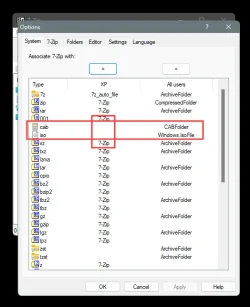
I had the same problem with 7zip. You have to un-associate ISO's and .cab files from within WinRAR.
If you only associate ISOs with Explorer in Windows Settings, WinRAR settings will keep over-ruling it.


Here's a pic of my 7zip Options. You can see what I had to do...

Image1.webp


I had to do the same thing for .cab files, which is why I mentioned them.
I couldn't right click and Install them until I un-associated them from 7zip, from within 7zip.
 

My Computers

System One System Two

  • OS
    Win 11 Home ♦♦♦26200.8655 ♦♦♦♦♦♦♦25H2
    Computer type
    PC/Desktop
    Manufacturer/Model
    Built by Ghot® [May 2020]
    CPU
    AMD Ryzen 7 3700X
    Motherboard
    Asus Pro WS X570-ACE (BIOS 5302)
    Memory
    G.Skill (F4-3200C14D-16GTZKW)
    Graphics Card(s)
    EVGA RTX 2070 (08G-P4-2171-KR)
    Sound Card
    Realtek ALC1220P / ALC S1220A
    Monitor(s) Displays
    Dell U3011 30"
    Screen Resolution
    2560 x 1600
    Hard Drives
    2x Samsung 860 EVO 500GB,
    WD 4TB Black FZBX - SATA III,
    WD 8TB Black FZBX - SATA III,
    DRW-24B1ST CD/DVD Burner
    PSU
    PC Power & Cooling 750W Quad EPS12V
    Case
    Cooler Master ATCS 840 Tower
    Cooling
    CM Hyper 212 EVO (push/pull)
    Keyboard
    Ducky DK9008 Shine II Blue LED
    Mouse
    Logitech Optical M-100
    Internet Speed
    300/300
    Browser
    Firefox (latest)
    Antivirus
    Bitdefender Total Security
    Other Info
    Speakers: Klipsch Pro Media 2.1
  • Operating System
    Windows XP Pro 32bit w/SP3
    Computer type
    PC/Desktop
    Manufacturer/Model
    Built by Ghot® (not in use)
    CPU
    AMD Athlon 64 X2 5000+ (OC'd @ 3.2Ghz)
    Motherboard
    ASUS M2N32-SLI Deluxe Wireless Edition
    Memory
    TWIN2X2048-6400C4DHX (2 x 1GB, DDR2 800)
    Graphics card(s)
    EVGA 256-P2-N758-TR GeForce 8600GT SSC
    Sound Card
    Onboard
    Monitor(s) Displays
    ViewSonic G90FB Black 19" Professional (CRT)
    Screen Resolution
    up to 2048 x 1536
    Hard Drives
    WD 36GB 10,000rpm Raptor SATA
    Seagate 80GB 7200rpm SATA
    Lite-On LTR-52246S CD/RW
    Lite-On LH-18A1P CD/DVD Burner
    PSU
    PC Power & Cooling Silencer 750 Quad EPS12V
    Case
    Generic Beige case, 80mm fans
    Cooling
    ZALMAN 9500A 92mm CPU Cooler
    Keyboard
    Logitech Classic Keybooard 200
    Mouse
    Logitech Optical M-BT96a
    Internet Speed
    300/300
    Browser
    Firefox 3.x ??
    Antivirus
    Symantec (Norton)
    Other Info
    Still assembled, still runs. Haven't turned it on for 15 years?
Start a Command Prompt as Admin, Copy and Paste or type
Code:
DISM /Online /CLEANUP-IMAGE  /CheckHealth Press Enter,. Then type
DISM /Online /CLEANUP-IMAGE  /RestoreHealth
After that finishes type
Code:
SFC /scannow
Restart the computer and try again.

You can view the ISO image using WinRAR as well as mounting the ISO image.
Right clicking a .REG file and choosing to open with Notepad should start the Windows Installer.
 

My Computer

System One

  • OS
    Windows 11 Pro Insider 64 bit 25H2 26200.5742
    Computer type
    PC/Desktop
    Manufacturer/Model
    Gigabyte Z390 UD
    CPU
    Intel Core i7 9700K 3.60
    Motherboard
    Gigabyte Z390 UD
    Memory
    16 GB
    Graphics Card(s)
    nVidia GEForce RTX 2060 Super
    Sound Card
    onboard
    Monitor(s) Displays
    Two 27" Dell 4K monitors
    Screen Resolution
    3840 x 2160
    Hard Drives
    M.2 NVME SSD, 500 GB; Two 2TB Mechanical HDD's
    PSU
    850w PSU
    Case
    Cyberpower PC
    Cooling
    Water cooled
    Keyboard
    Backlit Cyberpower gaming keyboard
    Mouse
    Backlit Cyberpower gaming mouse
    Internet Speed
    1 GB mbps
    Browser
    Brave
    Antivirus
    Windows Security
I had the same problem with 7zip. You have to un-associate ISO's and .cab files from within WinRAR.
If you only associate ISOs with Explorer in Windows Settings, WinRAR settings will keep over-ruling it.


Here's a pic of my 7zip Options. You can see what I had to do...

View attachment 160227


I had to do the same thing for .cab files, which is why I mentioned them.

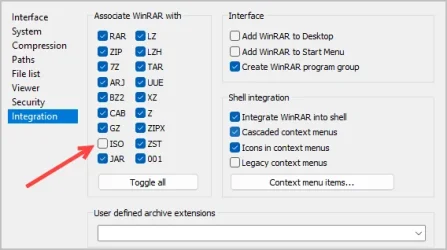
WinRAR is all good - I removed any reference to ISO in there. No change.

1768689559038.webp

S
 

My Computer

System One

  • OS
    Windows 11 PRO 25H2
    Computer type
    PC/Desktop
    Manufacturer/Model
    ASUS
    CPU
    Intel i5-10600K
    Motherboard
    ProArt z490-Creator 10G
    Memory
    Corsair Vengeance LPX 64GB (2x32GB) (CMK64GX5M2B5600C40)
    Graphics Card(s)
    Intel UHD Graphics 630
    Sound Card
    RME ADI-2 FS DAC
    Monitor(s) Displays
    Dell U2415
    Screen Resolution
    1920x1080
    Hard Drives
    Samsung NMVE (990 Pro, 970 EVO)
    PSU
    Seasonic GX750
    Case
    Coolermaster CM-690II
    Cooling
    Noctua
    Keyboard
    Logitech MX Keys
    Mouse
    Logitech M510
    Internet Speed
    1 GBPS+
    Browser
    MS Edge
    Antivirus
    Windows Defender

WinRAR is all good - I removed any reference to ISO in there. No change.


Do you have any other un-zipping programs installed?
 

My Computers

System One System Two

  • OS
    Win 11 Home ♦♦♦26200.8655 ♦♦♦♦♦♦♦25H2
    Computer type
    PC/Desktop
    Manufacturer/Model
    Built by Ghot® [May 2020]
    CPU
    AMD Ryzen 7 3700X
    Motherboard
    Asus Pro WS X570-ACE (BIOS 5302)
    Memory
    G.Skill (F4-3200C14D-16GTZKW)
    Graphics Card(s)
    EVGA RTX 2070 (08G-P4-2171-KR)
    Sound Card
    Realtek ALC1220P / ALC S1220A
    Monitor(s) Displays
    Dell U3011 30"
    Screen Resolution
    2560 x 1600
    Hard Drives
    2x Samsung 860 EVO 500GB,
    WD 4TB Black FZBX - SATA III,
    WD 8TB Black FZBX - SATA III,
    DRW-24B1ST CD/DVD Burner
    PSU
    PC Power & Cooling 750W Quad EPS12V
    Case
    Cooler Master ATCS 840 Tower
    Cooling
    CM Hyper 212 EVO (push/pull)
    Keyboard
    Ducky DK9008 Shine II Blue LED
    Mouse
    Logitech Optical M-100
    Internet Speed
    300/300
    Browser
    Firefox (latest)
    Antivirus
    Bitdefender Total Security
    Other Info
    Speakers: Klipsch Pro Media 2.1
  • Operating System
    Windows XP Pro 32bit w/SP3
    Computer type
    PC/Desktop
    Manufacturer/Model
    Built by Ghot® (not in use)
    CPU
    AMD Athlon 64 X2 5000+ (OC'd @ 3.2Ghz)
    Motherboard
    ASUS M2N32-SLI Deluxe Wireless Edition
    Memory
    TWIN2X2048-6400C4DHX (2 x 1GB, DDR2 800)
    Graphics card(s)
    EVGA 256-P2-N758-TR GeForce 8600GT SSC
    Sound Card
    Onboard
    Monitor(s) Displays
    ViewSonic G90FB Black 19" Professional (CRT)
    Screen Resolution
    up to 2048 x 1536
    Hard Drives
    WD 36GB 10,000rpm Raptor SATA
    Seagate 80GB 7200rpm SATA
    Lite-On LTR-52246S CD/RW
    Lite-On LH-18A1P CD/DVD Burner
    PSU
    PC Power & Cooling Silencer 750 Quad EPS12V
    Case
    Generic Beige case, 80mm fans
    Cooling
    ZALMAN 9500A 92mm CPU Cooler
    Keyboard
    Logitech Classic Keybooard 200
    Mouse
    Logitech Optical M-BT96a
    Internet Speed
    300/300
    Browser
    Firefox 3.x ??
    Antivirus
    Symantec (Norton)
    Other Info
    Still assembled, still runs. Haven't turned it on for 15 years?
Update.

Tried all the suggestions - thank you all.

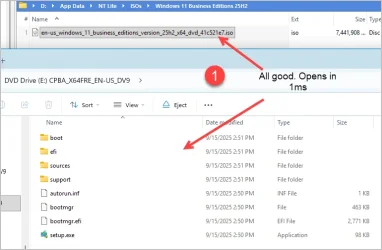
1. After a restart (sfc/dism run) - went into File Explorer - and noticed some very odd behavior.

Looks like I am back with some ISOs:

1768690523923.webp

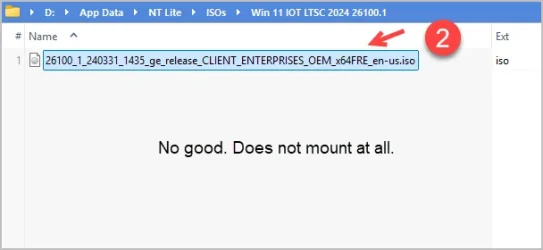
But this one - dead...

1768690551159.webp

This one loads perfectly into NT Lite - but has something odd when doing a basic mount.

Never really thought it might be the actual ISO file - but it appears it is. So that one is solved.

The .reg file one continues - ever after the dism run

If I right click a .reg file - none of the possible options work.

If I double click - I get no warning about wanting to open this file. If I push to Notepad - nothing. If I push it to VC Code - nothing.

Weird man. Weird.

S
 

My Computer

System One

  • OS
    Windows 11 PRO 25H2
    Computer type
    PC/Desktop
    Manufacturer/Model
    ASUS
    CPU
    Intel i5-10600K
    Motherboard
    ProArt z490-Creator 10G
    Memory
    Corsair Vengeance LPX 64GB (2x32GB) (CMK64GX5M2B5600C40)
    Graphics Card(s)
    Intel UHD Graphics 630
    Sound Card
    RME ADI-2 FS DAC
    Monitor(s) Displays
    Dell U2415
    Screen Resolution
    1920x1080
    Hard Drives
    Samsung NMVE (990 Pro, 970 EVO)
    PSU
    Seasonic GX750
    Case
    Coolermaster CM-690II
    Cooling
    Noctua
    Keyboard
    Logitech MX Keys
    Mouse
    Logitech M510
    Internet Speed
    1 GBPS+
    Browser
    MS Edge
    Antivirus
    Windows Defender

And...solved the REG file one as well.

Again - it was a specific file. One of Brinks oldies actually.

As a test - I created a sample standard registry file with the usual trimmings. Right click - choose Edit and it opens in Notepad

Right click on one of Brinks oldies - nothing.

Turns out it was a mis aligned file. No reference to "Windows Registry Editor Version 5.00" at the start was probably the cause

Anyhoo - that's enough file association fun for one day.

Thanks all!

S
 

My Computer

System One

  • OS
    Windows 11 PRO 25H2
    Computer type
    PC/Desktop
    Manufacturer/Model
    ASUS
    CPU
    Intel i5-10600K
    Motherboard
    ProArt z490-Creator 10G
    Memory
    Corsair Vengeance LPX 64GB (2x32GB) (CMK64GX5M2B5600C40)
    Graphics Card(s)
    Intel UHD Graphics 630
    Sound Card
    RME ADI-2 FS DAC
    Monitor(s) Displays
    Dell U2415
    Screen Resolution
    1920x1080
    Hard Drives
    Samsung NMVE (990 Pro, 970 EVO)
    PSU
    Seasonic GX750
    Case
    Coolermaster CM-690II
    Cooling
    Noctua
    Keyboard
    Logitech MX Keys
    Mouse
    Logitech M510
    Internet Speed
    1 GBPS+
    Browser
    MS Edge
    Antivirus
    Windows Defender

And...solved the REG file one as well.

Again - it was a specific file. One of Brinks oldies actually.

As a test - I created a sample standard registry file with the usual trimmings. Right click - choose Edit and it opens in Notepad

Right click on one of Brinks oldies - nothing.

Turns out it was a mis aligned file. No reference to "Windows Registry Editor Version 5.00" at the start was probably the cause

Anyhoo - that's enough file association fun for one day.

Thanks all!

S

Firstly… Extremely unlikely. I’d look for another reason.
Secondly, did you post about it in the thread where you got the reg file/s? Because on the off chance a reg file from here doesn’t work (open, again unlikely), I would say that @Brink would want to know about it. Also, I’d like to test it/them also.
 

My Computers

System One System Two

  • OS
    Windows 11 Pro 25H2 Build 26200.8655
    Computer type
    PC/Desktop
    Manufacturer/Model
    Sin-built 2013
    CPU
    Intel(R) Core(TM) i7-4770K CPU @ 3.50GHz
    Motherboard
    ASUS ROG Maximus VI Formula
    Memory
    32.0 GB of I forget and the box is in storage.
    Graphics Card(s)
    Gigabyte nVidia GeForce GTX 1660 Super OC 6GB
    Sound Card
    Onboard thingy
    Monitor(s) Displays
    5 x LG 25MS500-B - 1 x 24MK430H-B - 1 x Wacom Pro 22" Touch Screen Tablet
    Screen Resolution
    All over the place
    Hard Drives
    Too many to list.
    OS on Samsung 1TB 870 QVO SATA
    PSU
    Silverstone 1500
    Case
    NZXT Phantom 820 Full-Tower Case
    Cooling
    Noctua NH-D15 Elite Class Dual Tower CPU Cooler / 6 x EziDIY 120mm / 2 x Corsair 140mm somethings / 1 x 140mm Thermaltake something / 2 x 200mm Corsair.
    Keyboard
    Corsair K95 / Logitech diNovo Edge Wireless
    Mouse
    Logitech: G402 / G502 / Mx Masters / Mx Air Cordless
    Internet Speed
    2000/500Mbps
    Browser
    All sorts
    Antivirus
    Kaspersky Premium
    Other Info
    ㅤㅤㅤㅤㅤㅤㅤㅤㅤㅤㅤㅤㅤㅤㅤㅤㅤㅤㅤㅤㅤㅤㅤㅤㅤㅤㅤㅤㅤㅤㅤㅤㅤㅤㅤㅤㅤㅤㅤㅤ⠀⠀⠀⠀⠀⠀⠀⠀⠀⠀
    TP-Link BE9300 WiFi 7 Bluetooth 5.4 (Archer TBE550E)
    TP-Link TX201 V1 2.5GB Lan

    Grandstream HT812 - VoIP
    ASUS DSL-AX82U - Mesh
    ASUS RT-AC68U - Mesh
    ASUS RT-BE88U Router

    Brother MFC-L2880DW Printer

    I’m on a horse.
  • Operating System
    Windows 11 Pro 25H2 Build 26200.8655
    Computer type
    Laptop
    Manufacturer/Model
    LENOVO Yoga 7 14IRL8 - 7i EVO OLED 14" Touchscreen i5 12 Core 16GB/512GB
    CPU
    Intel Core 12th Gen i5-1240P Processor (1.7 - 4.4GHz)
    Memory
    16GB LPDDR5 RAM
    Graphics card(s)
    Intel Iris Xe Graphics Processor
    Sound Card
    Optimized with Dolby Atmos®
    Screen Resolution
    QHD 2880 x 1800 OLED
    Hard Drives
    M.2 512GB
    Antivirus
    Defender / Malwarebytes
    Other Info
    …still on a horse.
Firstly… Extremely unlikely. I’d look for another reason.
Secondly, did you post about it in the thread where you got the reg file/s? Because on the off chance a reg file from here doesn’t work (open, again unlikely), I would say that @Brink would want to know about it. Also, I’d like to test it/them also.

Noted - cannot remember where I got the file - but upon examination - it was not a properly formatted "registry" file.

Clearly edited by someone as I am well aware that Brinks stuff is always top shelf. No slight to him in the least.

Tested 5 more "properly" formatted files and they all open normally via Right-click->Edit (in Notepad)

S
 

My Computer

System One

  • OS
    Windows 11 PRO 25H2
    Computer type
    PC/Desktop
    Manufacturer/Model
    ASUS
    CPU
    Intel i5-10600K
    Motherboard
    ProArt z490-Creator 10G
    Memory
    Corsair Vengeance LPX 64GB (2x32GB) (CMK64GX5M2B5600C40)
    Graphics Card(s)
    Intel UHD Graphics 630
    Sound Card
    RME ADI-2 FS DAC
    Monitor(s) Displays
    Dell U2415
    Screen Resolution
    1920x1080
    Hard Drives
    Samsung NMVE (990 Pro, 970 EVO)
    PSU
    Seasonic GX750
    Case
    Coolermaster CM-690II
    Cooling
    Noctua
    Keyboard
    Logitech MX Keys
    Mouse
    Logitech M510
    Internet Speed
    1 GBPS+
    Browser
    MS Edge
    Antivirus
    Windows Defender

So you can’t remember the reg file that the issue was all about? “Someone” doesn’t have access to the reg files from in here, only Brink? So again, it could be beneficial to remember so it can be checked anyway. because you never know, I suppose.
 

My Computers

System One System Two

  • OS
    Windows 11 Pro 25H2 Build 26200.8655
    Computer type
    PC/Desktop
    Manufacturer/Model
    Sin-built 2013
    CPU
    Intel(R) Core(TM) i7-4770K CPU @ 3.50GHz
    Motherboard
    ASUS ROG Maximus VI Formula
    Memory
    32.0 GB of I forget and the box is in storage.
    Graphics Card(s)
    Gigabyte nVidia GeForce GTX 1660 Super OC 6GB
    Sound Card
    Onboard thingy
    Monitor(s) Displays
    5 x LG 25MS500-B - 1 x 24MK430H-B - 1 x Wacom Pro 22" Touch Screen Tablet
    Screen Resolution
    All over the place
    Hard Drives
    Too many to list.
    OS on Samsung 1TB 870 QVO SATA
    PSU
    Silverstone 1500
    Case
    NZXT Phantom 820 Full-Tower Case
    Cooling
    Noctua NH-D15 Elite Class Dual Tower CPU Cooler / 6 x EziDIY 120mm / 2 x Corsair 140mm somethings / 1 x 140mm Thermaltake something / 2 x 200mm Corsair.
    Keyboard
    Corsair K95 / Logitech diNovo Edge Wireless
    Mouse
    Logitech: G402 / G502 / Mx Masters / Mx Air Cordless
    Internet Speed
    2000/500Mbps
    Browser
    All sorts
    Antivirus
    Kaspersky Premium
    Other Info
    ㅤㅤㅤㅤㅤㅤㅤㅤㅤㅤㅤㅤㅤㅤㅤㅤㅤㅤㅤㅤㅤㅤㅤㅤㅤㅤㅤㅤㅤㅤㅤㅤㅤㅤㅤㅤㅤㅤㅤㅤ⠀⠀⠀⠀⠀⠀⠀⠀⠀⠀
    TP-Link BE9300 WiFi 7 Bluetooth 5.4 (Archer TBE550E)
    TP-Link TX201 V1 2.5GB Lan

    Grandstream HT812 - VoIP
    ASUS DSL-AX82U - Mesh
    ASUS RT-AC68U - Mesh
    ASUS RT-BE88U Router

    Brother MFC-L2880DW Printer

    I’m on a horse.
  • Operating System
    Windows 11 Pro 25H2 Build 26200.8655
    Computer type
    Laptop
    Manufacturer/Model
    LENOVO Yoga 7 14IRL8 - 7i EVO OLED 14" Touchscreen i5 12 Core 16GB/512GB
    CPU
    Intel Core 12th Gen i5-1240P Processor (1.7 - 4.4GHz)
    Memory
    16GB LPDDR5 RAM
    Graphics card(s)
    Intel Iris Xe Graphics Processor
    Sound Card
    Optimized with Dolby Atmos®
    Screen Resolution
    QHD 2880 x 1800 OLED
    Hard Drives
    M.2 512GB
    Antivirus
    Defender / Malwarebytes
    Other Info
    …still on a horse.
So you can’t remember the reg file that the issue was all about? “Someone” doesn’t have access to the reg files from in here, only Brink? So again, it could be beneficial to remember so it can be checked anyway. because you never know, I suppose.

Here is the file. This will NOT open for me - using right click->EDIT (handing off to Notepad)

But if I open Notepad (old school non-Ai version) standalone and choose File-Open - this file does open

It will also not open via Explorer if I right click and choose Open With->Visual Studio Code.

If I open VS Code standalone and click File->Open - this thing does open but only after what feels like a 3 second delay.

Something is up with this file - no other reg files that I have handy - exhibit any weirdness like this one.

Examine and let know what you see.

EDIT: Just checked another 30 reg files. Confirmed that any reg file that has "comments" in it - like pretty much every one that Brink issues - will not open for me from Explorer using standrad right click methods.

Conversely any reg file without comments - opens straight away.

So this is even more weird than I thought.

S
 

Attachments

Last edited:

My Computer

System One

  • OS
    Windows 11 PRO 25H2
    Computer type
    PC/Desktop
    Manufacturer/Model
    ASUS
    CPU
    Intel i5-10600K
    Motherboard
    ProArt z490-Creator 10G
    Memory
    Corsair Vengeance LPX 64GB (2x32GB) (CMK64GX5M2B5600C40)
    Graphics Card(s)
    Intel UHD Graphics 630
    Sound Card
    RME ADI-2 FS DAC
    Monitor(s) Displays
    Dell U2415
    Screen Resolution
    1920x1080
    Hard Drives
    Samsung NMVE (990 Pro, 970 EVO)
    PSU
    Seasonic GX750
    Case
    Coolermaster CM-690II
    Cooling
    Noctua
    Keyboard
    Logitech MX Keys
    Mouse
    Logitech M510
    Internet Speed
    1 GBPS+
    Browser
    MS Edge
    Antivirus
    Windows Defender

This is what is in that reg patch... I just downloaded it from post #12

For me... I can right click and choose: Edit with Notepad, or Edit with notepad classic. Both work.

Code:
Windows Registry Editor Version 5.00

; Created by: Shawn Brink
; http://www.tenforums.com
; Tutorial: http://www.tenforums.com/tutorials/30231-mount-context-menu-add-remove-windows-10-a.html


[HKEY_CLASSES_ROOT\Windows.IsoFile\shell\mount]
"CommandStateSync"=""
"ExplorerCommandHandler"="{9ab3b1c9-3225-4bb4-93b6-bfb3c0d93743}"
"MultiSelectModel"="Document"

[HKEY_CLASSES_ROOT\Windows.IsoFile\shell\mount\command]
@=hex(2):25,00,53,00,79,00,73,00,74,00,65,00,6d,00,52,00,6f,00,6f,00,74,00,25,\
  00,5c,00,45,00,78,00,70,00,6c,00,6f,00,72,00,65,00,72,00,2e,00,65,00,78,00,\
  65,00,00,00
"DelegateExecute"="{9ab3b1c9-3225-4bb4-93b6-bfb3c0d93743}"


And here's the one downloaded right from the tutorial...

Code:
Windows Registry Editor Version 5.00

; Created by: Shawn Brink
; http://www.tenforums.com
; Tutorial: http://www.tenforums.com/tutorials/30231-mount-context-menu-add-remove-windows-10-a.html


[HKEY_CLASSES_ROOT\Windows.IsoFile\shell\mount]
"CommandStateSync"=""
"ExplorerCommandHandler"="{9ab3b1c9-3225-4bb4-93b6-bfb3c0d93743}"
"MultiSelectModel"="Document"

[HKEY_CLASSES_ROOT\Windows.IsoFile\shell\mount\command]
@=hex(2):25,00,53,00,79,00,73,00,74,00,65,00,6d,00,52,00,6f,00,6f,00,74,00,25,\
  00,5c,00,45,00,78,00,70,00,6c,00,6f,00,72,00,65,00,72,00,2e,00,65,00,78,00,\
  65,00,00,00
"DelegateExecute"="{9ab3b1c9-3225-4bb4-93b6-bfb3c0d93743}"


They both work for me. 🤷‍♂️
 

My Computers

System One System Two

  • OS
    Win 11 Home ♦♦♦26200.8655 ♦♦♦♦♦♦♦25H2
    Computer type
    PC/Desktop
    Manufacturer/Model
    Built by Ghot® [May 2020]
    CPU
    AMD Ryzen 7 3700X
    Motherboard
    Asus Pro WS X570-ACE (BIOS 5302)
    Memory
    G.Skill (F4-3200C14D-16GTZKW)
    Graphics Card(s)
    EVGA RTX 2070 (08G-P4-2171-KR)
    Sound Card
    Realtek ALC1220P / ALC S1220A
    Monitor(s) Displays
    Dell U3011 30"
    Screen Resolution
    2560 x 1600
    Hard Drives
    2x Samsung 860 EVO 500GB,
    WD 4TB Black FZBX - SATA III,
    WD 8TB Black FZBX - SATA III,
    DRW-24B1ST CD/DVD Burner
    PSU
    PC Power & Cooling 750W Quad EPS12V
    Case
    Cooler Master ATCS 840 Tower
    Cooling
    CM Hyper 212 EVO (push/pull)
    Keyboard
    Ducky DK9008 Shine II Blue LED
    Mouse
    Logitech Optical M-100
    Internet Speed
    300/300
    Browser
    Firefox (latest)
    Antivirus
    Bitdefender Total Security
    Other Info
    Speakers: Klipsch Pro Media 2.1
  • Operating System
    Windows XP Pro 32bit w/SP3
    Computer type
    PC/Desktop
    Manufacturer/Model
    Built by Ghot® (not in use)
    CPU
    AMD Athlon 64 X2 5000+ (OC'd @ 3.2Ghz)
    Motherboard
    ASUS M2N32-SLI Deluxe Wireless Edition
    Memory
    TWIN2X2048-6400C4DHX (2 x 1GB, DDR2 800)
    Graphics card(s)
    EVGA 256-P2-N758-TR GeForce 8600GT SSC
    Sound Card
    Onboard
    Monitor(s) Displays
    ViewSonic G90FB Black 19" Professional (CRT)
    Screen Resolution
    up to 2048 x 1536
    Hard Drives
    WD 36GB 10,000rpm Raptor SATA
    Seagate 80GB 7200rpm SATA
    Lite-On LTR-52246S CD/RW
    Lite-On LH-18A1P CD/DVD Burner
    PSU
    PC Power & Cooling Silencer 750 Quad EPS12V
    Case
    Generic Beige case, 80mm fans
    Cooling
    ZALMAN 9500A 92mm CPU Cooler
    Keyboard
    Logitech Classic Keybooard 200
    Mouse
    Logitech Optical M-BT96a
    Internet Speed
    300/300
    Browser
    Firefox 3.x ??
    Antivirus
    Symantec (Norton)
    Other Info
    Still assembled, still runs. Haven't turned it on for 15 years?

My Computers

System One System Two

  • OS
    Windows 11 Pro for Workstations
    Computer type
    PC/Desktop
    Manufacturer/Model
    Custom self build
    CPU
    Intel i7-8700K 5 GHz
    Motherboard
    ASUS ROG Maximus XI Formula Z390
    Memory
    64 GB (4x16GB) G.SKILL TridentZ RGB DDR4 3600 MHz (F4-3600C18D-32GTZR)
    Graphics Card(s)
    ASUS ROG-STRIX-GTX1080TI-O11G-GAMING (11GB GDDR5X)
    Sound Card
    Integrated Digital Audio (S/PDIF)
    Monitor(s) Displays
    2 x Samsung Odyssey G75 27"
    Screen Resolution
    2560x1440
    Hard Drives
    1TB Samsung 990 PRO M.2,
    4TB Samsung 990 PRO M.2,
    TerraMaster F8 SSD Plus NAS
    PSU
    Seasonic Prime Titanium 850W
    Case
    Thermaltake Core P3 wall mounted
    Cooling
    Corsair Hydro H115i
    Keyboard
    Amazon Basics Wired Full Keyboard MD005
    Mouse
    Logitech MX Master 4
    Internet Speed
    2 Gbps Download and 100 Mbps Upload
    Browser
    Chrome and Edge
    Antivirus
    Microsoft Defender
    Other Info
    Logitech Z625 speaker system,
    Logitech BRIO 4K Pro webcam,
    HP Color LaserJet Pro MFP M477fdn,
    CyberPower CP1500PFCLCD
    Galaxy S23 Plus phone
  • Operating System
    Windows 11 Pro
    Computer type
    Laptop
    Manufacturer/Model
    Surface Laptop 7 Copilot+ PC
    CPU
    Snapdragon X Elite (12 core) 3.42 GHz
    Memory
    16 GB LPDDR5x-7467 MHz
    Monitor(s) Displays
    15" HDR
    Screen Resolution
    2496 x 1664
    Hard Drives
    1 TB SSD
    Internet Speed
    Wi-Fi 7 and Bluetooth 5.4
    Browser
    Chrome and Edge
    Antivirus
    Microsoft Defender
Thank you for the heads up. I checked the REG files in the mentioned tutorial below, but they all look fine.


Brink

I am sure they are all just fine and always have been. But check this out:

Here is one of your files previewed - in my preferred File Manager (XYPlorer):

1768694724850.webp

All good.

And then here is the same file previewed via File Explorer:

1768694756059.webp

This is new to me. Just spotted this in the last few minutes. Clearly this "stoppage" is the reason Win 11 is not letting me open these straight up.

Whoa. Wait a sec. As soon as I right clicked and choose Properties->Unblock - we are now good to go?

When did "unblock" suddenly become part of the play? I literally have never click this checkbox ever in my entire Windows lifetime.

AND - only your files have the Unblock panel via Properties. Just checked a few that I have had forever - and there is no Unblock area at all,

Even more strange. I edited one of yours - took all the comments out - saved it and still the Unblock panel is showing. This is definitely something different that I have never seen before. Seems Win 11 knows this file came from "outside" and is now applying some kind of forcefield around it.

Is this new? Like as of Patch Tuesday or something?

S
 

My Computer

System One

  • OS
    Windows 11 PRO 25H2
    Computer type
    PC/Desktop
    Manufacturer/Model
    ASUS
    CPU
    Intel i5-10600K
    Motherboard
    ProArt z490-Creator 10G
    Memory
    Corsair Vengeance LPX 64GB (2x32GB) (CMK64GX5M2B5600C40)
    Graphics Card(s)
    Intel UHD Graphics 630
    Sound Card
    RME ADI-2 FS DAC
    Monitor(s) Displays
    Dell U2415
    Screen Resolution
    1920x1080
    Hard Drives
    Samsung NMVE (990 Pro, 970 EVO)
    PSU
    Seasonic GX750
    Case
    Coolermaster CM-690II
    Cooling
    Noctua
    Keyboard
    Logitech MX Keys
    Mouse
    Logitech M510
    Internet Speed
    1 GBPS+
    Browser
    MS Edge
    Antivirus
    Windows Defender
I don't see anything wrong with the REG file below.


Check to see if it may need to be unblocked first. Also, you may test trying to merge the REG file with it on the desktop. If the REG file is on some external drive, it may not like it from that source location.


Code:
Windows Registry Editor Version 5.00

; Created by: Shawn Brink
; Created on: January 11, 2024
; Updated on: December 24, 2025
; Tutorial: https://www.elevenforum.com/t/restore-classic-file-explorer-with-ribbon-in-windows-11.620/

[-HKEY_CURRENT_USER\Software\Classes\CLSID\{2aa9162e-c906-4dd9-ad0b-3d24a8eef5a0}]

[-HKEY_CURRENT_USER\Software\Classes\CLSID\{6480100b-5a83-4d1e-9f69-8ae5a88e9a33}]

[HKEY_CURRENT_USER\Software\Microsoft\Internet Explorer\Toolbar\ShellBrowser]
"ITBar7Layout"=hex:13,00,00,00,00,00,00,00,00,00,00,00,20,00,00,00,10,00,00,00,\
  00,00,00,00,01,00,00,00,01,07,00,00,5e,01,00,00,00,00,00,00,00,00,00,00,00,\
  00,00,00,00,00,00,00,00,00,00,00,00,00,00,00,00,00,00,00,00,00,00,00,00,00,\
  00,00,00,00,00,00,00,00,00,00,00,00,00,00,00,00,00,00,00,00,00,00,00,00,00,\
  00,00,00,00,00,00,00,00,00,00,00,00,00,00,00,00,00,00,00,00,00,00,00,00,00,\
  00,00,00,00,00,00,00,00,00,00,00,00,00,00,00,00,00,00,00,00,00,00,00,00,00,\
  00,00,00,00,00,00,00,00,00,00,00,00,00,00,00,00,00,00,00,00,00,00,00,00,00,\
  00,00,00,00,00,00,00,00,00,00,00,00,00,00,00,00,00,00,00,00,00,00,00,00,00,\
  00,00,00,00,00,00,00,00,00,00,00,00,00,00,00,00,00,00,00,00,00,00,00,00,00,\
  00,00,00,00,00,00,00,00,00,00,00,00,00,00,00,00,00,00,00,00,00,00,00,00,00,\
  00,00,00,00,00,00,00,00,00,00,00,00,00,00,00,00,00,00,00,00,00,00,00,00,00,\
  00,00,00,00,00,00,00,00,00,00,00,00,00,00,00,00,00,00,00,00,00,00,00,00,00,\
  00,00,00,00,00,00,00,00,00,00,00,00,00,00,00,00,00,00,00,00,00,00,00,00,00,\
  00,00,00,00,00,00,00,00,00,00,00,00,00,00,00,00,00,00,00,00,00,00,00,00,00,\
  00,00,00,00,00,00,00,00,00,00,00,00,00,00,00,00,00,00,00,00,00,00,00,00,00,\
  00,00,00,00,00,00,00,00,00,00,00,00,00,00,00,00,00,00,00,00,00,00,00,00,00,\
  00,00,00,00,00,00,00,00,00,00,00,00,00,00,00,00,00,00,00,00,00,00,00,00,00,\
  00,00,00,00,00,00,00,00,00,00,00,00,00,00,00,00,00,00,00,00,00,00,00,00,00,\
  00,00,00,00,00,00,00,00,00,00,00,00,00,00,00,00,00,00,00,00,00,00,00,00,00,\
  00,00,00,00,00,00,00,00,00,00,00,00,00,00,00,00,00,00,00,00,00,00,00,00,00,\
  00,00,00,00,00,00,00,00,00,00,00,00,00,00,00,00,00,00,00,00,00,00,00,00,00,\
  00,00,00,00,00,00,00,00,00,00,00,00,00,00,00,00,00,00,00,00,00,00,00,00,00,\
  00,00,00,00,00,00,00,00,00,00,00,00,00,00,00,00,00,00,00,00,00,00,00
 

My Computers

System One System Two

  • OS
    Windows 11 Pro for Workstations
    Computer type
    PC/Desktop
    Manufacturer/Model
    Custom self build
    CPU
    Intel i7-8700K 5 GHz
    Motherboard
    ASUS ROG Maximus XI Formula Z390
    Memory
    64 GB (4x16GB) G.SKILL TridentZ RGB DDR4 3600 MHz (F4-3600C18D-32GTZR)
    Graphics Card(s)
    ASUS ROG-STRIX-GTX1080TI-O11G-GAMING (11GB GDDR5X)
    Sound Card
    Integrated Digital Audio (S/PDIF)
    Monitor(s) Displays
    2 x Samsung Odyssey G75 27"
    Screen Resolution
    2560x1440
    Hard Drives
    1TB Samsung 990 PRO M.2,
    4TB Samsung 990 PRO M.2,
    TerraMaster F8 SSD Plus NAS
    PSU
    Seasonic Prime Titanium 850W
    Case
    Thermaltake Core P3 wall mounted
    Cooling
    Corsair Hydro H115i
    Keyboard
    Amazon Basics Wired Full Keyboard MD005
    Mouse
    Logitech MX Master 4
    Internet Speed
    2 Gbps Download and 100 Mbps Upload
    Browser
    Chrome and Edge
    Antivirus
    Microsoft Defender
    Other Info
    Logitech Z625 speaker system,
    Logitech BRIO 4K Pro webcam,
    HP Color LaserJet Pro MFP M477fdn,
    CyberPower CP1500PFCLCD
    Galaxy S23 Plus phone
  • Operating System
    Windows 11 Pro
    Computer type
    Laptop
    Manufacturer/Model
    Surface Laptop 7 Copilot+ PC
    CPU
    Snapdragon X Elite (12 core) 3.42 GHz
    Memory
    16 GB LPDDR5x-7467 MHz
    Monitor(s) Displays
    15" HDR
    Screen Resolution
    2496 x 1664
    Hard Drives
    1 TB SSD
    Internet Speed
    Wi-Fi 7 and Bluetooth 5.4
    Browser
    Chrome and Edge
    Antivirus
    Microsoft Defender
I don't see anything wrong with the REG file below.


Check to see if it may need to be unblocked first.


Code:
Windows Registry Editor Version 5.00

; Created by: Shawn Brink
; Created on: January 11, 2024
; Updated on: December 24, 2025
; Tutorial: https://www.elevenforum.com/t/restore-classic-file-explorer-with-ribbon-in-windows-11.620/

[-HKEY_CURRENT_USER\Software\Classes\CLSID\{2aa9162e-c906-4dd9-ad0b-3d24a8eef5a0}]

[-HKEY_CURRENT_USER\Software\Classes\CLSID\{6480100b-5a83-4d1e-9f69-8ae5a88e9a33}]

[HKEY_CURRENT_USER\Software\Microsoft\Internet Explorer\Toolbar\ShellBrowser]
"ITBar7Layout"=hex:13,00,00,00,00,00,00,00,00,00,00,00,20,00,00,00,10,00,00,00,\
  00,00,00,00,01,00,00,00,01,07,00,00,5e,01,00,00,00,00,00,00,00,00,00,00,00,\
  00,00,00,00,00,00,00,00,00,00,00,00,00,00,00,00,00,00,00,00,00,00,00,00,00,\
  00,00,00,00,00,00,00,00,00,00,00,00,00,00,00,00,00,00,00,00,00,00,00,00,00,\
  00,00,00,00,00,00,00,00,00,00,00,00,00,00,00,00,00,00,00,00,00,00,00,00,00,\
  00,00,00,00,00,00,00,00,00,00,00,00,00,00,00,00,00,00,00,00,00,00,00,00,00,\
  00,00,00,00,00,00,00,00,00,00,00,00,00,00,00,00,00,00,00,00,00,00,00,00,00,\
  00,00,00,00,00,00,00,00,00,00,00,00,00,00,00,00,00,00,00,00,00,00,00,00,00,\
  00,00,00,00,00,00,00,00,00,00,00,00,00,00,00,00,00,00,00,00,00,00,00,00,00,\
  00,00,00,00,00,00,00,00,00,00,00,00,00,00,00,00,00,00,00,00,00,00,00,00,00,\
  00,00,00,00,00,00,00,00,00,00,00,00,00,00,00,00,00,00,00,00,00,00,00,00,00,\
  00,00,00,00,00,00,00,00,00,00,00,00,00,00,00,00,00,00,00,00,00,00,00,00,00,\
  00,00,00,00,00,00,00,00,00,00,00,00,00,00,00,00,00,00,00,00,00,00,00,00,00,\
  00,00,00,00,00,00,00,00,00,00,00,00,00,00,00,00,00,00,00,00,00,00,00,00,00,\
  00,00,00,00,00,00,00,00,00,00,00,00,00,00,00,00,00,00,00,00,00,00,00,00,00,\
  00,00,00,00,00,00,00,00,00,00,00,00,00,00,00,00,00,00,00,00,00,00,00,00,00,\
  00,00,00,00,00,00,00,00,00,00,00,00,00,00,00,00,00,00,00,00,00,00,00,00,00,\
  00,00,00,00,00,00,00,00,00,00,00,00,00,00,00,00,00,00,00,00,00,00,00,00,00,\
  00,00,00,00,00,00,00,00,00,00,00,00,00,00,00,00,00,00,00,00,00,00,00,00,00,\
  00,00,00,00,00,00,00,00,00,00,00,00,00,00,00,00,00,00,00,00,00,00,00,00,00,\
  00,00,00,00,00,00,00,00,00,00,00,00,00,00,00,00,00,00,00,00,00,00,00,00,00,\
  00,00,00,00,00,00,00,00,00,00,00,00,00,00,00,00,00,00,00,00,00,00,00,00,00,\
  00,00,00,00,00,00,00,00,00,00,00,00,00,00,00,00,00,00,00,00,00,00,00

Totally understand. But what I am saying is I have downloaded tons of your files - for years.

And not once did I ever need to Unblock anything.

Again - this is the first time I even have seen this checkbox - let alone used it.

S
 

My Computer

System One

  • OS
    Windows 11 PRO 25H2
    Computer type
    PC/Desktop
    Manufacturer/Model
    ASUS
    CPU
    Intel i5-10600K
    Motherboard
    ProArt z490-Creator 10G
    Memory
    Corsair Vengeance LPX 64GB (2x32GB) (CMK64GX5M2B5600C40)
    Graphics Card(s)
    Intel UHD Graphics 630
    Sound Card
    RME ADI-2 FS DAC
    Monitor(s) Displays
    Dell U2415
    Screen Resolution
    1920x1080
    Hard Drives
    Samsung NMVE (990 Pro, 970 EVO)
    PSU
    Seasonic GX750
    Case
    Coolermaster CM-690II
    Cooling
    Noctua
    Keyboard
    Logitech MX Keys
    Mouse
    Logitech M510
    Internet Speed
    1 GBPS+
    Browser
    MS Edge
    Antivirus
    Windows Defender
Totally understand. But what I am saying is I have downloaded tons of your files - for years.

And not once did I ever need to Unblock anything.

Again - this is the first time I even have seen this checkbox - let alone used it.

S

Could be because of where you had it saved at causing it to treat it as an unknown source needing to "unblock" first to approve. I've seen external sources sometimes cause funky security flags.
 

My Computers

System One System Two

  • OS
    Windows 11 Pro for Workstations
    Computer type
    PC/Desktop
    Manufacturer/Model
    Custom self build
    CPU
    Intel i7-8700K 5 GHz
    Motherboard
    ASUS ROG Maximus XI Formula Z390
    Memory
    64 GB (4x16GB) G.SKILL TridentZ RGB DDR4 3600 MHz (F4-3600C18D-32GTZR)
    Graphics Card(s)
    ASUS ROG-STRIX-GTX1080TI-O11G-GAMING (11GB GDDR5X)
    Sound Card
    Integrated Digital Audio (S/PDIF)
    Monitor(s) Displays
    2 x Samsung Odyssey G75 27"
    Screen Resolution
    2560x1440
    Hard Drives
    1TB Samsung 990 PRO M.2,
    4TB Samsung 990 PRO M.2,
    TerraMaster F8 SSD Plus NAS
    PSU
    Seasonic Prime Titanium 850W
    Case
    Thermaltake Core P3 wall mounted
    Cooling
    Corsair Hydro H115i
    Keyboard
    Amazon Basics Wired Full Keyboard MD005
    Mouse
    Logitech MX Master 4
    Internet Speed
    2 Gbps Download and 100 Mbps Upload
    Browser
    Chrome and Edge
    Antivirus
    Microsoft Defender
    Other Info
    Logitech Z625 speaker system,
    Logitech BRIO 4K Pro webcam,
    HP Color LaserJet Pro MFP M477fdn,
    CyberPower CP1500PFCLCD
    Galaxy S23 Plus phone
  • Operating System
    Windows 11 Pro
    Computer type
    Laptop
    Manufacturer/Model
    Surface Laptop 7 Copilot+ PC
    CPU
    Snapdragon X Elite (12 core) 3.42 GHz
    Memory
    16 GB LPDDR5x-7467 MHz
    Monitor(s) Displays
    15" HDR
    Screen Resolution
    2496 x 1664
    Hard Drives
    1 TB SSD
    Internet Speed
    Wi-Fi 7 and Bluetooth 5.4
    Browser
    Chrome and Edge
    Antivirus
    Microsoft Defender
Could be because of where you had it saved at causing it to treat it as an unknown source needing to "unblock" first to approve. I've seen external sources sometimes cause some funky security flags.

Well - I have had a folder full of reg files in the same folder for like 3 years and not once have I ever been told to unblock anything.

I could right click->Edit to my hearts content and every file (yours or anyone else's) would just open in Notepad - like normal.

And suddenly today (of all days) - I am now being asked to "unblock" stuff?

And I found this - from like 2018?


Literally have had no idea any of this even existed.

What did I suddenly change on this machine? This is really bizarre.

S
 

My Computer

System One

  • OS
    Windows 11 PRO 25H2
    Computer type
    PC/Desktop
    Manufacturer/Model
    ASUS
    CPU
    Intel i5-10600K
    Motherboard
    ProArt z490-Creator 10G
    Memory
    Corsair Vengeance LPX 64GB (2x32GB) (CMK64GX5M2B5600C40)
    Graphics Card(s)
    Intel UHD Graphics 630
    Sound Card
    RME ADI-2 FS DAC
    Monitor(s) Displays
    Dell U2415
    Screen Resolution
    1920x1080
    Hard Drives
    Samsung NMVE (990 Pro, 970 EVO)
    PSU
    Seasonic GX750
    Case
    Coolermaster CM-690II
    Cooling
    Noctua
    Keyboard
    Logitech MX Keys
    Mouse
    Logitech M510
    Internet Speed
    1 GBPS+
    Browser
    MS Edge
    Antivirus
    Windows Defender
Totally understand. But what I am saying is I have downloaded tons of your files - for years.

And not once did I ever need to Unblock anything.

Again - this is the first time I even have seen this checkbox - let alone used it.

Been this way for a while. Read the tutorials, you can unblock a whole folder with your 3 year collection all at once. You can add Unblock to the context menu. It isn’t just for reg files.


My Computers

System One System Two

  • OS
    Windows 11 Pro 25H2 Build 26200.8655
    Computer type
    PC/Desktop
    Manufacturer/Model
    Sin-built 2013
    CPU
    Intel(R) Core(TM) i7-4770K CPU @ 3.50GHz
    Motherboard
    ASUS ROG Maximus VI Formula
    Memory
    32.0 GB of I forget and the box is in storage.
    Graphics Card(s)
    Gigabyte nVidia GeForce GTX 1660 Super OC 6GB
    Sound Card
    Onboard thingy
    Monitor(s) Displays
    5 x LG 25MS500-B - 1 x 24MK430H-B - 1 x Wacom Pro 22" Touch Screen Tablet
    Screen Resolution
    All over the place
    Hard Drives
    Too many to list.
    OS on Samsung 1TB 870 QVO SATA
    PSU
    Silverstone 1500
    Case
    NZXT Phantom 820 Full-Tower Case
    Cooling
    Noctua NH-D15 Elite Class Dual Tower CPU Cooler / 6 x EziDIY 120mm / 2 x Corsair 140mm somethings / 1 x 140mm Thermaltake something / 2 x 200mm Corsair.
    Keyboard
    Corsair K95 / Logitech diNovo Edge Wireless
    Mouse
    Logitech: G402 / G502 / Mx Masters / Mx Air Cordless
    Internet Speed
    2000/500Mbps
    Browser
    All sorts
    Antivirus
    Kaspersky Premium
    Other Info
    ㅤㅤㅤㅤㅤㅤㅤㅤㅤㅤㅤㅤㅤㅤㅤㅤㅤㅤㅤㅤㅤㅤㅤㅤㅤㅤㅤㅤㅤㅤㅤㅤㅤㅤㅤㅤㅤㅤㅤㅤ⠀⠀⠀⠀⠀⠀⠀⠀⠀⠀
    TP-Link BE9300 WiFi 7 Bluetooth 5.4 (Archer TBE550E)
    TP-Link TX201 V1 2.5GB Lan

    Grandstream HT812 - VoIP
    ASUS DSL-AX82U - Mesh
    ASUS RT-AC68U - Mesh
    ASUS RT-BE88U Router

    Brother MFC-L2880DW Printer

    I’m on a horse.
  • Operating System
    Windows 11 Pro 25H2 Build 26200.8655
    Computer type
    Laptop
    Manufacturer/Model
    LENOVO Yoga 7 14IRL8 - 7i EVO OLED 14" Touchscreen i5 12 Core 16GB/512GB
    CPU
    Intel Core 12th Gen i5-1240P Processor (1.7 - 4.4GHz)
    Memory
    16GB LPDDR5 RAM
    Graphics card(s)
    Intel Iris Xe Graphics Processor
    Sound Card
    Optimized with Dolby Atmos®
    Screen Resolution
    QHD 2880 x 1800 OLED
    Hard Drives
    M.2 512GB
    Antivirus
    Defender / Malwarebytes
    Other Info
    …still on a horse.
Back
Top Bottom