Solved vEthernet adapter appeared and can't remove


steveg

Well-known member
Member
Local time
11:47 PM
Posts
286
OS
11 Pro 25H2
Recently discovered a vEthernet adapter appearing in the adapter settings of Network and Sharing. I don't know when it got installed, maybe during the 24H2 update. The thing is I can't make any changes to it like stop it from being the default, uninstall it or disable it. Very frustrating as I'm not much of a virtual machine user so I don't normally have the virtual features enabled.

So I enabled Hyper V and Hyper Visor then rebooted. Went to the Hyper V manager and still could do nothing with the adapter. Unselected both features, rebooted and the adapter is still there with options to delete still greyed out.

Getting very frustrated especially since it shows as the default adapter, I didn't install it, and seems I can't do anything about it. Anybody have any experience with this and is it a requirement of 24H2 that is always there? Thanks.

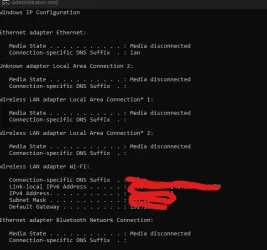
PS: It doesn't show in ipconfigScreenshot 2025-05-27 072950.webpScreenshot 2025-05-27 110336.webp
 

My Computer My Computer

At a glance

11 Pro 25H2i7-10750H16GB Samsung DDR4 3200Intel + Nvidia RTX3060 Laptop
OS
11 Pro 25H2
Computer type
Laptop
Manufacturer/Model
MSI
CPU
i7-10750H
Motherboard
MSI MS-17F5
Memory
16GB Samsung DDR4 3200
Graphics Card(s)
Intel + Nvidia RTX3060 Laptop
Sound Card
Realtek
Monitor(s) Displays
Samsung 24" Curved (HDMI)
Screen Resolution
1920x1080
Hard Drives
Sabrent Rocket Gen3 1Tb Smasung EVO 870 1TB
Antivirus
Bitdefender
Virtual network card is installed when you enable hyper-v platform or an item which needs a piece of integrated Windows virtualization, like WSA for example. vEthernet exists across Default Virtual Switch, which cannot be deleted. Otherwise uninstalling hyper-v and all its dependencies.
 

My Computers My Computers

  • At a glance

    Windows 11 Pro 25H2Intel Core Ultra 5 125H32GBIntegrated Intel ARC
    OS
    Windows 11 Pro 25H2
    Computer type
    PC/Desktop
    Manufacturer/Model
    Asus NUC 14 Pro +
    CPU
    Intel Core Ultra 5 125H
    Motherboard
    NUC14RVS
    Memory
    32GB
    Graphics Card(s)
    Integrated Intel ARC
    Sound Card
    Integrated
    Monitor(s) Displays
    DELL U2719D
    Screen Resolution
    2560x1440
    Hard Drives
    SSD Crucial T500 - 4TB
    SSD Integral - 1TB
    PSU
    Integrated
    Case
    Integrated
    Cooling
    Integrated
    Keyboard
    Dell WK717
    Mouse
    Logitech M650L
    Internet Speed
    Orange / Fiber @ 1 gbps
    Browser
    Edge
    Antivirus
    Integrated (WD)
    Other Info
    Routers/Mesh TP-Link BE550 + TP-Link AX53
    Phone Google Pixel 7 @ Android 16 & Orange 4G
  • At a glance

    Windows 10 Pro x64Intel Core i3-322012GBnVidia GT1030 GDDR5
    Operating System
    Windows 10 Pro x64
    Computer type
    PC/Desktop
    Manufacturer/Model
    Home made
    CPU
    Intel Core i3-3220
    Motherboard
    Intel DH77EB
    Memory
    12GB
    Graphics card(s)
    nVidia GT1030 GDDR5
    Sound Card
    Asus Xonar DX
    Monitor(s) Displays
    Sony FW-43BZ35F @ Android TV 9
    Screen Resolution
    3840x2160
    Hard Drives
    SSD Sandisk - 240GB
    HDD WD - 1.5TB
    PSU
    Antec Earthwatts 380W
    Case
    Lian-Li PC-C37
    Cooling
    Stock cooler
    Keyboard
    Logitech K400
    Browser
    Edge
    Antivirus
    Integrated (WD)
That gets installed by Hyper-V. You would need to uninstall Hyper-V to get rid of it. The Default Switch in Hyper-V allows Hyper-V guests to access the network via NAT.
 

My Computers My Computers

  • At a glance

    Win11 Pro 26H2 (Release Preview)Intel i7-14650HX32 GBNo GPU - Built-in Intel Graphics
    OS
    Win11 Pro 26H2 (Release Preview)
    Computer type
    PC/Desktop
    Manufacturer/Model
    Acemagic Matrix M5
    CPU
    Intel i7-14650HX
    Memory
    32 GB
    Graphics Card(s)
    No GPU - Built-in Intel Graphics
    Sound Card
    Integrated
    Monitor(s) Displays
    Varies as machine will often be moved to locations with different monitors
    Screen Resolution
    Varies
    Hard Drives
    1 x 1TB Gen 4 NVMe SSD
    PSU
    120W Power Brick
    Keyboard
    Corsair K70 Max RGB Magnetic Keyboard
    Mouse
    Logitech MX Master 3
    Internet Speed
    1Gb Up / 1 Gb Down
    Browser
    Edge
    Antivirus
    Windows Defender
  • At a glance

    Win11 Pro 26H2 (Release Preview)Intel i7-1255U16 GBIntel Iris Xe Graphics
    Operating System
    Win11 Pro 26H2 (Release Preview)
    Computer type
    Laptop
    Manufacturer/Model
    Lenovo ThinkBook 13x Gen 2
    CPU
    Intel i7-1255U
    Memory
    16 GB
    Graphics card(s)
    Intel Iris Xe Graphics
    Sound Card
    Realtek® ALC3306-CG codec
    Monitor(s) Displays
    13.3-inch IPS Display
    Screen Resolution
    WQXGA (2560 x 1600)
    Hard Drives
    4 TB 4 x 4 NVMe SSD
    PSU
    USB-C / Thunderbolt 4 Power / Charging Using an Anker 160W Charger
    Keyboard
    Backlit, spill resistant keyboard
    Mouse
    Buttonless Glass Precision Touchpad
    Internet Speed
    1Gb Up / 1Gb Down
    Browser
    Edge
    Antivirus
    Windows Defender
    Other Info
    WiFi 6e / Bluetooth 5.1 / Facial Recognition / Fingerprint Sensor / ToF (Time of Flight) Human Presence Sensor
That gets installed by Hyper-V. You would need to uninstall Hyper-V to get rid of it. The Default Switch in Hyper-V allows Hyper-V guests to access the network via NAT.

So just unchecking Hyper-V in features doesn't get rid of it? Weird part is I didn't have it checked as an added feature when the adapter appeared. Enabling Hyper-V , rebooting then disabling and rebooting didn't get rid of it either. Not aware of anything on my system that needs vEthernet adapter and very annoyed it shows as the default switch.
 

My Computer My Computer

At a glance

11 Pro 25H2i7-10750H16GB Samsung DDR4 3200Intel + Nvidia RTX3060 Laptop
OS
11 Pro 25H2
Computer type
Laptop
Manufacturer/Model
MSI
CPU
i7-10750H
Motherboard
MSI MS-17F5
Memory
16GB Samsung DDR4 3200
Graphics Card(s)
Intel + Nvidia RTX3060 Laptop
Sound Card
Realtek
Monitor(s) Displays
Samsung 24" Curved (HDMI)
Screen Resolution
1920x1080
Hard Drives
Sabrent Rocket Gen3 1Tb Smasung EVO 870 1TB
Antivirus
Bitdefender
Could Avast antivirus be doing it? Have had a few years though and never saw this before.
 

My Computer My Computer

At a glance

11 Pro 25H2i7-10750H16GB Samsung DDR4 3200Intel + Nvidia RTX3060 Laptop
OS
11 Pro 25H2
Computer type
Laptop
Manufacturer/Model
MSI
CPU
i7-10750H
Motherboard
MSI MS-17F5
Memory
16GB Samsung DDR4 3200
Graphics Card(s)
Intel + Nvidia RTX3060 Laptop
Sound Card
Realtek
Monitor(s) Displays
Samsung 24" Curved (HDMI)
Screen Resolution
1920x1080
Hard Drives
Sabrent Rocket Gen3 1Tb Smasung EVO 870 1TB
Antivirus
Bitdefender
The virtual card does not appear like that. You should have installed a program that activated a virtual feature of HV.

Have you read my previous post ?
 
Last edited:

My Computers My Computers

  • At a glance

    Windows 11 Pro 25H2Intel Core Ultra 5 125H32GBIntegrated Intel ARC
    OS
    Windows 11 Pro 25H2
    Computer type
    PC/Desktop
    Manufacturer/Model
    Asus NUC 14 Pro +
    CPU
    Intel Core Ultra 5 125H
    Motherboard
    NUC14RVS
    Memory
    32GB
    Graphics Card(s)
    Integrated Intel ARC
    Sound Card
    Integrated
    Monitor(s) Displays
    DELL U2719D
    Screen Resolution
    2560x1440
    Hard Drives
    SSD Crucial T500 - 4TB
    SSD Integral - 1TB
    PSU
    Integrated
    Case
    Integrated
    Cooling
    Integrated
    Keyboard
    Dell WK717
    Mouse
    Logitech M650L
    Internet Speed
    Orange / Fiber @ 1 gbps
    Browser
    Edge
    Antivirus
    Integrated (WD)
    Other Info
    Routers/Mesh TP-Link BE550 + TP-Link AX53
    Phone Google Pixel 7 @ Android 16 & Orange 4G
  • At a glance

    Windows 10 Pro x64Intel Core i3-322012GBnVidia GT1030 GDDR5
    Operating System
    Windows 10 Pro x64
    Computer type
    PC/Desktop
    Manufacturer/Model
    Home made
    CPU
    Intel Core i3-3220
    Motherboard
    Intel DH77EB
    Memory
    12GB
    Graphics card(s)
    nVidia GT1030 GDDR5
    Sound Card
    Asus Xonar DX
    Monitor(s) Displays
    Sony FW-43BZ35F @ Android TV 9
    Screen Resolution
    3840x2160
    Hard Drives
    SSD Sandisk - 240GB
    HDD WD - 1.5TB
    PSU
    Antec Earthwatts 380W
    Case
    Lian-Li PC-C37
    Cooling
    Stock cooler
    Keyboard
    Logitech K400
    Browser
    Edge
    Antivirus
    Integrated (WD)
The virtual card does not appear like that. You should have installed a program that activated a virtual feature of HV.

Have you read my previous post ?

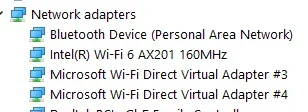
I just don't know what that would be. I have found 2 wifi direct virtual direct adapters in hidden items in Device Manager. They reappear after a reboot when I uninstall/delete them. So yes something is creating them. I'll have to keep digging.Screenshot 2025-05-27 115557.webp
 

My Computer My Computer

At a glance

11 Pro 25H2i7-10750H16GB Samsung DDR4 3200Intel + Nvidia RTX3060 Laptop
OS
11 Pro 25H2
Computer type
Laptop
Manufacturer/Model
MSI
CPU
i7-10750H
Motherboard
MSI MS-17F5
Memory
16GB Samsung DDR4 3200
Graphics Card(s)
Intel + Nvidia RTX3060 Laptop
Sound Card
Realtek
Monitor(s) Displays
Samsung 24" Curved (HDMI)
Screen Resolution
1920x1080
Hard Drives
Sabrent Rocket Gen3 1Tb Smasung EVO 870 1TB
Antivirus
Bitdefender
OK, I think I might know what created it and why it won't go away. I was playing with Phone Link a while back and it seems it does setup a virtual adapter. Even when Phone Link is disabled the virtual adapter stays. Would probably have to nuke the entire app but it is heavily embedded in the system and don't think I want to go through that right now. Thanks to all, it got me looking deeper into it.
 

My Computer My Computer

At a glance

11 Pro 25H2i7-10750H16GB Samsung DDR4 3200Intel + Nvidia RTX3060 Laptop
OS
11 Pro 25H2
Computer type
Laptop
Manufacturer/Model
MSI
CPU
i7-10750H
Motherboard
MSI MS-17F5
Memory
16GB Samsung DDR4 3200
Graphics Card(s)
Intel + Nvidia RTX3060 Laptop
Sound Card
Realtek
Monitor(s) Displays
Samsung 24" Curved (HDMI)
Screen Resolution
1920x1080
Hard Drives
Sabrent Rocket Gen3 1Tb Smasung EVO 870 1TB
Antivirus
Bitdefender
Try this :

go to old control panel, then "programs and features", then "Turn Windows Features On or Off". Inside new box, you can see which features are enabled. You should find items related to HV. If so, disable these features and reboot.
 

My Computers My Computers

  • At a glance

    Windows 11 Pro 25H2Intel Core Ultra 5 125H32GBIntegrated Intel ARC
    OS
    Windows 11 Pro 25H2
    Computer type
    PC/Desktop
    Manufacturer/Model
    Asus NUC 14 Pro +
    CPU
    Intel Core Ultra 5 125H
    Motherboard
    NUC14RVS
    Memory
    32GB
    Graphics Card(s)
    Integrated Intel ARC
    Sound Card
    Integrated
    Monitor(s) Displays
    DELL U2719D
    Screen Resolution
    2560x1440
    Hard Drives
    SSD Crucial T500 - 4TB
    SSD Integral - 1TB
    PSU
    Integrated
    Case
    Integrated
    Cooling
    Integrated
    Keyboard
    Dell WK717
    Mouse
    Logitech M650L
    Internet Speed
    Orange / Fiber @ 1 gbps
    Browser
    Edge
    Antivirus
    Integrated (WD)
    Other Info
    Routers/Mesh TP-Link BE550 + TP-Link AX53
    Phone Google Pixel 7 @ Android 16 & Orange 4G
  • At a glance

    Windows 10 Pro x64Intel Core i3-322012GBnVidia GT1030 GDDR5
    Operating System
    Windows 10 Pro x64
    Computer type
    PC/Desktop
    Manufacturer/Model
    Home made
    CPU
    Intel Core i3-3220
    Motherboard
    Intel DH77EB
    Memory
    12GB
    Graphics card(s)
    nVidia GT1030 GDDR5
    Sound Card
    Asus Xonar DX
    Monitor(s) Displays
    Sony FW-43BZ35F @ Android TV 9
    Screen Resolution
    3840x2160
    Hard Drives
    SSD Sandisk - 240GB
    HDD WD - 1.5TB
    PSU
    Antec Earthwatts 380W
    Case
    Lian-Li PC-C37
    Cooling
    Stock cooler
    Keyboard
    Logitech K400
    Browser
    Edge
    Antivirus
    Integrated (WD)
Try this :

go to old control panel, then "programs and features", then "Turn Windows Features On or Off". Inside new box, you can see which features are enabled. You should find items related to HV. If so, disable these features and reboot.

Thanks maybe I didn't explain it well before but I did all that. Pretty sure it was created when I updated Phone Link and enabled it. I'm not going to try to completely remove it as I've read some horror stories about attempting to that. Also this short note by Microsoft: Phone Link Uninstall
 

My Computer My Computer

At a glance

11 Pro 25H2i7-10750H16GB Samsung DDR4 3200Intel + Nvidia RTX3060 Laptop
OS
11 Pro 25H2
Computer type
Laptop
Manufacturer/Model
MSI
CPU
i7-10750H
Motherboard
MSI MS-17F5
Memory
16GB Samsung DDR4 3200
Graphics Card(s)
Intel + Nvidia RTX3060 Laptop
Sound Card
Realtek
Monitor(s) Displays
Samsung 24" Curved (HDMI)
Screen Resolution
1920x1080
Hard Drives
Sabrent Rocket Gen3 1Tb Smasung EVO 870 1TB
Antivirus
Bitdefender
Back
Top Bottom