Video and Image Delay


Punch649

Member
Local time
3:19 PM
Posts
24
OS
Windows 11
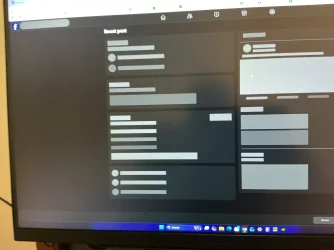
My Social media and other software under chrome seems to be having some problems displaying some videos and images. Which causes a delay and blurry images. Some take a few seconds and some never show at all. Win 11. Thanks.Reel Video.webpIMG_0058.webp
 

My Computer My Computer

At a glance

Windows 11Intel Core i7 14700KF (3.40 GHz) Processor32GB DDR5-6000 RAMNVIDIA GeForce RTX 5070 Graphics Card
OS
Windows 11
Computer type
PC/Desktop
Manufacturer/Model
PowerSpec G453
CPU
Intel Core i7 14700KF (3.40 GHz) Processor
Motherboard
MSI Pro Z790-P WiFi Motherboard
Memory
32GB DDR5-6000 RAM
Graphics Card(s)
NVIDIA GeForce RTX 5070 Graphics Card
Sound Card
Realtek ALC897 7.1
Monitor(s) Displays
LG UltraGear 27" 2K WQHD (2560 x 1440) 180Hz Gaming Monitor
Screen Resolution
2560 x 1440
Hard Drives
2TB Solid State Drive
PSU
750 Watt
Case
PowerSpec ATX 205 Mesh
Cooling
240mm AIO Liquid Cooler
Keyboard
inland
Mouse
inland
Internet Speed
xfinity Dl 948.37 Mbps Up 180.13 Mbps
Browser
Chrome
Antivirus
Windows Security
How is your internet speed?

Have you tried deleting temporary internet files and try again?

Install the newest graphics card driver.

Install the newest network card driver.
 

My Computer My Computer

At a glance

Windows 11AMD Ryzen 7 5700GMicron Technology DDR4-3200 16GBNVIDIA GeForce RTX 3060
OS
Windows 11
Computer type
PC/Desktop
Manufacturer/Model
HP Pavilion
CPU
AMD Ryzen 7 5700G
Motherboard
Erica6
Memory
Micron Technology DDR4-3200 16GB
Graphics Card(s)
NVIDIA GeForce RTX 3060
Sound Card
Realtek ALC671
Monitor(s) Displays
Samsung SyncMaster U28E590
Screen Resolution
3840 x 2160
Hard Drives
SAMSUNG MZVLQ1T0HALB-000H1
In this or any other thread here, Please click your User Profile picture at the top right toolbar. Click System Specs
Please Fill this in ,(ie) Laptop or Desktop, Computer Manufacturer, Motherboard, GPU (video Card) or if using the Integrated onboard video Make and Model #. Please Fill out your computer specs and Windows OS version Number, so we know what we are dealing with and don't have to ask you.

Are you connecting with WiFi or using an Ethernet Cable? Does this happen in any other browser, like Edge or Firefox?
Open Chrome and type highlight the address bar, and type Fast.com and press Enter. This will test your internet speed. If it is way slower then what you are paying for, restart the computer and try again. If it is still too slow, call your ISP and have them test the lines.

If internet is fine, then press the Windows key +X choose Device Manager. Expand Display Adapter.
Is Take note of the driver, if it is the Generic Default Microsoft driver,
As stated, go to the Manufacturers Download site and download the latest video driver for your model.

Once installed and the computer restarted, right click the desktop and choose Display Settings
Under Display Resolution choose (Recommended) Resolution. Under Scaling choose the % that is comfortable for you.
 

My Computer My Computer

At a glance

Windows 11 Pro Insider 64 bit 25H2 26200.5742Intel Core i7 9700K 3.6016 GBnVidia GEForce RTX 2060 Super
OS
Windows 11 Pro Insider 64 bit 25H2 26200.5742
Computer type
PC/Desktop
Manufacturer/Model
Gigabyte Z390 UD
CPU
Intel Core i7 9700K 3.60
Motherboard
Gigabyte Z390 UD
Memory
16 GB
Graphics Card(s)
nVidia GEForce RTX 2060 Super
Sound Card
onboard
Monitor(s) Displays
Two 27" Dell 4K monitors
Screen Resolution
3840 x 2160
Hard Drives
M.2 NVME SSD, 500 GB; Two 2TB Mechanical HDD's
PSU
850w PSU
Case
Cyberpower PC
Cooling
Water cooled
Keyboard
Backlit Cyberpower gaming keyboard
Mouse
Backlit Cyberpower gaming mouse
Internet Speed
1 GB mbps
Browser
Brave
Antivirus
Windows Security
In this or any other thread here, Please click your User Profile picture at the top right toolbar. Click System Specs
Please Fill this in ,(ie) Laptop or Desktop, Computer Manufacturer, Motherboard, GPU (video Card) or if using the Integrated onboard video Make and Model #. Please Fill out your computer specs and Windows OS version Number, so we know what we are dealing with and don't have to ask you.

Are you connecting with WiFi or using an Ethernet Cable? Does this happen in any other browser, like Edge or Firefox?
Open Chrome and type highlight the address bar, and type Fast.com and press Enter. This will test your internet speed. If it is way slower then what you are paying for, restart the computer and try again. If it is still too slow, call your ISP and have them test the lines.

If internet is fine, then press the Windows key +X choose Device Manager. Expand Display Adapter.
Is Take note of the driver, if it is the Generic Default Microsoft driver,
As stated, go to the Manufacturers Download site and download the latest video driver for your model.

Once installed and the computer restarted, right click the desktop and choose Display Settings
Under Display Resolution choose (Recommended) Resolution. Under Scaling choose the % that is comfortable for you.
Yes it is Ethernet Cable and happens in Chrome and Edge. Specs are in My Computer Link. Internet Speed is DL 910
Mbps and Up 22 Mbps. Display adapter is fine as well a my Display Resolution. I've only had this PC about 5 months. Hopes this helps. Thx
 

My Computer My Computer

At a glance

Windows 11Intel Core i7 14700KF (3.40 GHz) Processor32GB DDR5-6000 RAMNVIDIA GeForce RTX 5070 Graphics Card
OS
Windows 11
Computer type
PC/Desktop
Manufacturer/Model
PowerSpec G453
CPU
Intel Core i7 14700KF (3.40 GHz) Processor
Motherboard
MSI Pro Z790-P WiFi Motherboard
Memory
32GB DDR5-6000 RAM
Graphics Card(s)
NVIDIA GeForce RTX 5070 Graphics Card
Sound Card
Realtek ALC897 7.1
Monitor(s) Displays
LG UltraGear 27" 2K WQHD (2560 x 1440) 180Hz Gaming Monitor
Screen Resolution
2560 x 1440
Hard Drives
2TB Solid State Drive
PSU
750 Watt
Case
PowerSpec ATX 205 Mesh
Cooling
240mm AIO Liquid Cooler
Keyboard
inland
Mouse
inland
Internet Speed
xfinity Dl 948.37 Mbps Up 180.13 Mbps
Browser
Chrome
Antivirus
Windows Security
How is your internet speed?

Have you tried deleting temporary internet files and try again?

Install the newest graphics card driver.

Install the newest network card driver.
Internet Speed is DL 910 Mbps and Up 22 Mbps
Tempory temp files are deleted. Display driver is up to date and I haven't installed a new Ethernet network driver. I'll look into it though. This PC is not even 5 months old. Thanks for the feedback.
 

My Computer My Computer

At a glance

Windows 11Intel Core i7 14700KF (3.40 GHz) Processor32GB DDR5-6000 RAMNVIDIA GeForce RTX 5070 Graphics Card
OS
Windows 11
Computer type
PC/Desktop
Manufacturer/Model
PowerSpec G453
CPU
Intel Core i7 14700KF (3.40 GHz) Processor
Motherboard
MSI Pro Z790-P WiFi Motherboard
Memory
32GB DDR5-6000 RAM
Graphics Card(s)
NVIDIA GeForce RTX 5070 Graphics Card
Sound Card
Realtek ALC897 7.1
Monitor(s) Displays
LG UltraGear 27" 2K WQHD (2560 x 1440) 180Hz Gaming Monitor
Screen Resolution
2560 x 1440
Hard Drives
2TB Solid State Drive
PSU
750 Watt
Case
PowerSpec ATX 205 Mesh
Cooling
240mm AIO Liquid Cooler
Keyboard
inland
Mouse
inland
Internet Speed
xfinity Dl 948.37 Mbps Up 180.13 Mbps
Browser
Chrome
Antivirus
Windows Security
Is it only happens with single web browser, how about when you use other web browsers.

To reset Windows 11 network settings, go to Settings > Network & internet > Advanced network settings > Network reset, then click Reset now and confirm, which will remove and reinstall network adapters and restart your PC, requiring you to reconnect to Wi-Fi. This process fixes many connectivity issues by returning all network components to their default settings.
 

My Computer My Computer

At a glance

Windows 11AMD Ryzen 7 5700GMicron Technology DDR4-3200 16GBNVIDIA GeForce RTX 3060
OS
Windows 11
Computer type
PC/Desktop
Manufacturer/Model
HP Pavilion
CPU
AMD Ryzen 7 5700G
Motherboard
Erica6
Memory
Micron Technology DDR4-3200 16GB
Graphics Card(s)
NVIDIA GeForce RTX 3060
Sound Card
Realtek ALC671
Monitor(s) Displays
Samsung SyncMaster U28E590
Screen Resolution
3840 x 2160
Hard Drives
SAMSUNG MZVLQ1T0HALB-000H1
Try the suggestions here. (I understand that it's referring to Google Images, but there are suggestions that I would still try):

Also try suggestions here:
 

My Computer My Computer

At a glance

Windows 11
OS
Windows 11
Computer type
PC/Desktop
Manufacturer/Model
Custom Built
Try the suggestions here. (I understand that it's referring to Google Images, but there are suggestions that I would still try):

Also try suggestions here:
I tried a Google image search it and it comes up immediately. I'll look into the link you provided about windows tips. THX I'll get back to ya if I solve it.
 

My Computer My Computer

At a glance

Windows 11Intel Core i7 14700KF (3.40 GHz) Processor32GB DDR5-6000 RAMNVIDIA GeForce RTX 5070 Graphics Card
OS
Windows 11
Computer type
PC/Desktop
Manufacturer/Model
PowerSpec G453
CPU
Intel Core i7 14700KF (3.40 GHz) Processor
Motherboard
MSI Pro Z790-P WiFi Motherboard
Memory
32GB DDR5-6000 RAM
Graphics Card(s)
NVIDIA GeForce RTX 5070 Graphics Card
Sound Card
Realtek ALC897 7.1
Monitor(s) Displays
LG UltraGear 27" 2K WQHD (2560 x 1440) 180Hz Gaming Monitor
Screen Resolution
2560 x 1440
Hard Drives
2TB Solid State Drive
PSU
750 Watt
Case
PowerSpec ATX 205 Mesh
Cooling
240mm AIO Liquid Cooler
Keyboard
inland
Mouse
inland
Internet Speed
xfinity Dl 948.37 Mbps Up 180.13 Mbps
Browser
Chrome
Antivirus
Windows Security
Is it only happens with single web browser, how about when you use other web browsers.

To reset Windows 11 network settings, go to Settings > Network & internet > Advanced network settings > Network reset, then click Reset now and confirm, which will remove and reinstall network adapters and restart your PC, requiring you to reconnect to Wi-Fi. This process fixes many connectivity issues by returning all network components to their default settings.
Yes it happens with Chrome and Edge. I did the network reset, but still having the same problems. I'll let you know what I find out. The screenshot examples I posted are in FB when I click on a reel you can see what happens, it does finnaly comes up. And the other screenshot example I provided is when I click to boost an ad. And you can see whats happening. It finally came up as well, but not as fast as it should. Sometimes 3 seconds or more. Another example when I go to best buy website schrool down looking at there pictures it hesitates as well. More than it should. Thanks for your Feedback.
 

My Computer My Computer

At a glance

Windows 11Intel Core i7 14700KF (3.40 GHz) Processor32GB DDR5-6000 RAMNVIDIA GeForce RTX 5070 Graphics Card
OS
Windows 11
Computer type
PC/Desktop
Manufacturer/Model
PowerSpec G453
CPU
Intel Core i7 14700KF (3.40 GHz) Processor
Motherboard
MSI Pro Z790-P WiFi Motherboard
Memory
32GB DDR5-6000 RAM
Graphics Card(s)
NVIDIA GeForce RTX 5070 Graphics Card
Sound Card
Realtek ALC897 7.1
Monitor(s) Displays
LG UltraGear 27" 2K WQHD (2560 x 1440) 180Hz Gaming Monitor
Screen Resolution
2560 x 1440
Hard Drives
2TB Solid State Drive
PSU
750 Watt
Case
PowerSpec ATX 205 Mesh
Cooling
240mm AIO Liquid Cooler
Keyboard
inland
Mouse
inland
Internet Speed
xfinity Dl 948.37 Mbps Up 180.13 Mbps
Browser
Chrome
Antivirus
Windows Security
Back
Top Bottom