Video to monitor cycles on and off


lbeck

Well-known member
Member
Local time
5:33 PM
Posts
72
OS
Windows 11
PC doesn't actually reboot or even sign out to require user sign-in. But the screen goes dark and programs generally shut down. This cycles every 2-5 seconds. I have 2 monitors and if I'm fast enough I can load a program and some will stay on the second monitor, but my primary monitor continues the cycling. I've eliminated the possibility that it's a monitor problem. It's the signal to the primary monitor that continues cycling.

Google search suggests that it may be due to overheating. I've opened the computer door and disconnected all external HDDs and even the Ethernet cable. Nothing I've tried so far helps. I'm happy to supply additional information.
 

My Computers My Computers

  • At a glance

    Windows 1113th Gen Intel(R) Core(TM) i5-13400F 2.50 GHz32.0 GBNVIDIA Gforce RTX 4060
    OS
    Windows 11
    Computer type
    PC/Desktop
    Manufacturer/Model
    Device name CyberPowerPC
    CPU
    13th Gen Intel(R) Core(TM) i5-13400F 2.50 GHz
    Memory
    32.0 GB
    Graphics Card(s)
    NVIDIA Gforce RTX 4060
    Hard Drives
    2 TB ADATA Legend 800 Gold SSD and several HDDs
    PSU
    650W
    Browser
    Chrome
    Other Info
    Windows 11 23H2 10.0.26100 Build 26100
  • At a glance

    Windows 10 Home 22H2 19045.4123Intel(R) Core(TM) i7-4790 CPU @ 3.60GHz 3.60 GHz32.0 GBGforce GTX 745
    Operating System
    Windows 10 Home 22H2 19045.4123
    Computer type
    PC/Desktop
    Manufacturer/Model
    Acer_Desktop
    CPU
    Intel(R) Core(TM) i7-4790 CPU @ 3.60GHz 3.60 GHz
    Memory
    32.0 GB
    Graphics card(s)
    Gforce GTX 745
    Sound Card
    ONN24
    Hard Drives
    Many
    Keyboard
    JLAB supports 2 computers/monitors
    Mouse
    Acer wired USB
    Browser
    Chrome
    Antivirus
    Only what W10 installed
    Other Info
    64-bit operating system, x64-based processor
  • OS Windows 11 Home 25H2, 26200.8894, 5/‎20/‎2025

    Computer type = PC/Laptop

    Manufacturer/Model = HP

    Device name = Victus

    CPU = 12th Gen Intel(R) Core(TM) i7-12700H (2.30 GHz)

    Motherboard

    Memory = 16.0 GB (15.7 GB usable)

    Graphics Card = NVIDIA GeForce RTX 3050 Laptop GPU (4 GB)

    Sound Card = Internal

    Monitor(s) Displays = Attached

    Screen Resolution = UNK

    Hard Drives = 954 GB and several external HDDs

    PSU = UNK

    Case = NA

    Cooling = UNK

    Keyboard = NA

    Mouse = Wireless Logitech (Touchpad also)

    Internet Speed = 31Mbps download; 8.24 Mbps upload

    Browser = Chrome

    Antivirus=Windows Defender only

    Other Info
Nothing I've tried so far helps


You can use HWMonitor to monitor the temps...


It would also help to know which computer of yours, has this problem.


And just in case...


 DDU Instructions - Nvidia


I don't know if this will solve your issue, but everyone should know about the Tutorial below, and the DDU instructions.

Sometimes the drivers that MS occasionally includes with Windows Updates... can conflict with drivers that are already installed. Which is what the tutorial below is for.

DDU, on the other hand, will remove all the leftovers from MS or Nvidia drivers, so when you install an Nvidia driver, it has a clean slate to work with.

1. First, do Option Two, step #3 and onward, here...
2. This will block MS from including drivers in Windows Updates.
3. They'll still be listed as Optional Updates, if you ever need them.


1. Get this program, here: Display Driver Uninstaller (DDU) | Wagnardsoft ...get the latest version, and save it to your desktop.
2. Get the Nvidia WHQL vid card driver here... https://www.guru3d.com/files/category/videocards-nvidia-geforce-windows-7-8-10/ ...save this to your desktop.
3. Unhook the internet completely.
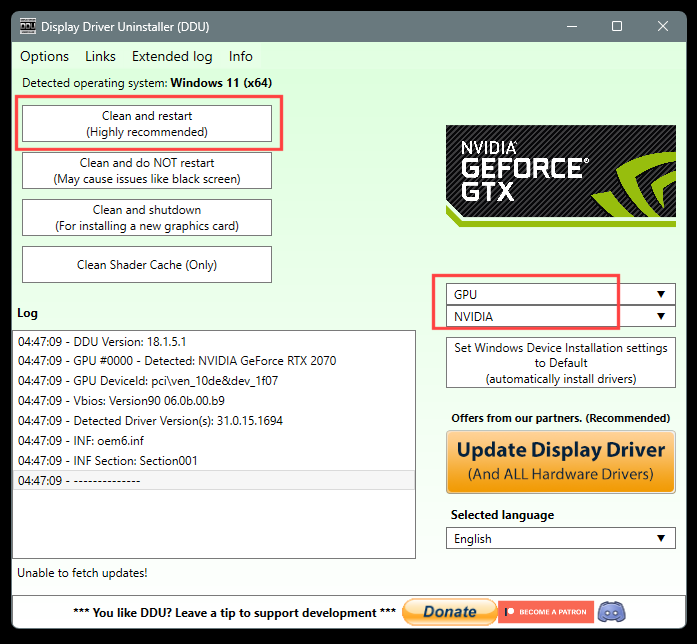
4. Reboot into Safe Mode and run DDU (Display Driver Uninstaller) choose the "Highly Recommend Option", and just do what it tells you.
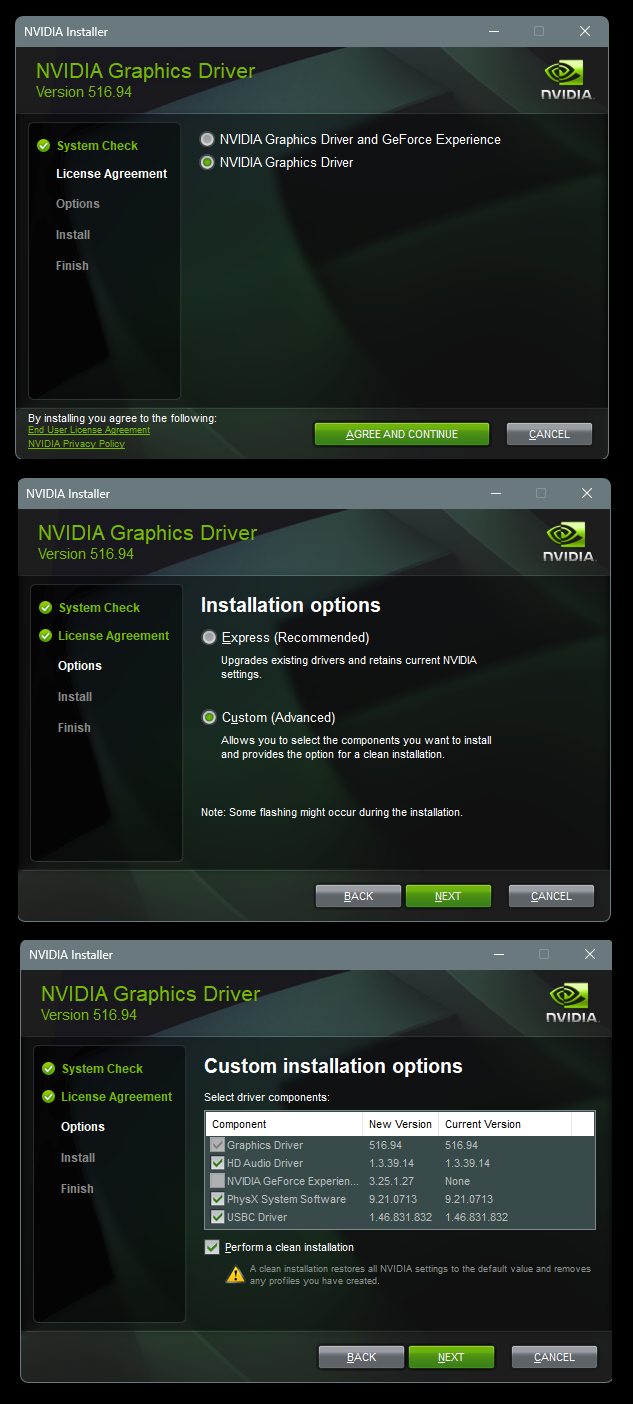
5. After it's done, reboot to normal mode, then just double click the Nvidia driver to install.
[See pics below]. If it want's to reboot, let it.
Rehook the internet.

Wo1E6bz.png


KdHz2yJ.png
 

My Computers My Computers

  • At a glance

    Win 11 Home ♦♦♦26200.9168 ♦♦♦♦♦♦♦25H2AMD Ryzen 7 3700XG.Skill (F4-3200C14D-16GTZKW)EVGA RTX 2070 (08G-P4-2171-KR)
    OS
    Win 11 Home ♦♦♦26200.9168 ♦♦♦♦♦♦♦25H2
    Computer type
    PC/Desktop
    Manufacturer/Model
    Built by Ghot® [May 2020]
    CPU
    AMD Ryzen 7 3700X
    Motherboard
    Asus Pro WS X570-ACE (BIOS 5302)
    Memory
    G.Skill (F4-3200C14D-16GTZKW)
    Graphics Card(s)
    EVGA RTX 2070 (08G-P4-2171-KR)
    Sound Card
    Realtek ALC1220P / ALC S1220A
    Monitor(s) Displays
    Dell U3011 30"
    Screen Resolution
    2560 x 1600
    Hard Drives
    2x Samsung 860 EVO 500GB,
    WD 4TB Black FZBX - SATA III,
    WD 8TB Black FZBX - SATA III,
    DRW-24B1ST CD/DVD Burner
    PSU
    PC Power & Cooling 750W Quad EPS12V
    Case
    Cooler Master ATCS 840 Tower
    Cooling
    CM Hyper 212 EVO (push/pull)
    Keyboard
    Ducky DK9008 Shine II Blue LED
    Mouse
    Logitech Optical M-100
    Internet Speed
    300/300
    Browser
    Firefox (latest)
    Antivirus
    Bitdefender Total Security
    Other Info
    Speakers: Klipsch Pro Media 2.1
  • At a glance

    Windows XP Pro 32bit w/SP3AMD Athlon 64 X2 5000+ (OC'd @ 3.2Ghz)TWIN2X2048-6400C4DHX (2 x 1GB, DDR2 800)EVGA 256-P2-N758-TR GeForce 8600GT SSC
    Operating System
    Windows XP Pro 32bit w/SP3
    Computer type
    PC/Desktop
    Manufacturer/Model
    Built by Ghot® (not in use)
    CPU
    AMD Athlon 64 X2 5000+ (OC'd @ 3.2Ghz)
    Motherboard
    ASUS M2N32-SLI Deluxe Wireless Edition
    Memory
    TWIN2X2048-6400C4DHX (2 x 1GB, DDR2 800)
    Graphics card(s)
    EVGA 256-P2-N758-TR GeForce 8600GT SSC
    Sound Card
    Onboard
    Monitor(s) Displays
    ViewSonic G90FB Black 19" Professional (CRT)
    Screen Resolution
    up to 2048 x 1536
    Hard Drives
    WD 36GB 10,000rpm Raptor SATA
    Seagate 80GB 7200rpm SATA
    Lite-On LTR-52246S CD/RW
    Lite-On LH-18A1P CD/DVD Burner
    PSU
    PC Power & Cooling Silencer 750 Quad EPS12V
    Case
    Generic Beige case, 80mm fans
    Cooling
    ZALMAN 9500A 92mm CPU Cooler
    Keyboard
    Logitech Classic Keybooard 200
    Mouse
    Logitech Optical M-BT96a
    Internet Speed
    300/300
    Browser
    Firefox 3.x ??
    Antivirus
    Symantec (Norton)
    Other Info
    Still assembled, still runs. Haven't turned it on for 15 years?
You're experiencing a cyclical crash of the Windows graphical shell (explorer.exe or dwm.exe processes - the Desktop Window Manager). The computer doesn't fully reboot, but the graphics engine crashes and restarts every 2-5 seconds.
Since some programs survive on the second monitor, this confirms that the PC itself is working, but the process of displaying images to the primary display (cable, settings, driver) is malfunctioning.
Temporarily disabling the second monitor may help narrow down the bottleneck.
 

My Computer My Computer

At a glance

Windows 11 Insider Experimental (26H2)Intel Core i5-1140032Gb (DDR4 SDRAM)Intel(R) UHD Graphics 730
OS
Windows 11 Insider Experimental (26H2)
Computer type
PC/Desktop
Manufacturer/Model
Gigabyte Technology Co., Ltd.
CPU
Intel Core i5-11400
Motherboard
Z590 AORUS PRO AX
Memory
32Gb (DDR4 SDRAM)
Graphics Card(s)
Intel(R) UHD Graphics 730
Sound Card
Realtek USB Audio
Monitor(s) Displays
LG 27US500-W 4K UHD UltraFine™
Screen Resolution
3840x2160
Hard Drives
Samsung SSD 980 PRO 1TB
WDC WD7501AALS
PSU
Montech CENTURY, 650W, 80+ Gold
Case
Cougar Airface ECO RGB
Cooling
ID-COOLING SE-224-XTS BLACK
Keyboard
Microsoft SideWinder X6 Keyboard
Mouse
Microsoft SideWinder Mouse
Internet Speed
Internet speed of 1 Gbit/s
Browser
Vivaldi browser
Antivirus
Windows Defender
Q1 - Which of your two systems is this happening on?

Q2 - Had you installed anything (software or hardware) just before this started happening or did it just start on its own?

Q3 - Are you able to update your two OS's to the latest version and build? 25H2 Build 26200.9168.
 

My Computers My Computers

  • At a glance

    Windows 11 ProAMD Ryzen 9 8945HS32GB DDR5 SO-DIMMIntegrated AMD Radeon 780M (4.00 GHz)
    OS
    Windows 11 Pro
    Computer type
    PC/Desktop
    Manufacturer/Model
    GMKtec K11
    CPU
    AMD Ryzen 9 8945HS
    Memory
    32GB DDR5 SO-DIMM
    Graphics Card(s)
    Integrated AMD Radeon 780M (4.00 GHz)
    Monitor(s) Displays
    Benq 2250HM
    Screen Resolution
    1920 x 1080
    Hard Drives
    1 TB PCIe 4.0 NVMe M.2 SSD
  • At a glance

    Windows 11 HomeIntel® Core™ Ultra 7 - 255H processor16 GB LPDDR5 SDRAMIntel Arc 140T onboard graphics
    Operating System
    Windows 11 Home
    Computer type
    Laptop
    Manufacturer/Model
    ASUS Zenbook 14 OLED 14" Laptop - UX3405CA-QL192W
    CPU
    Intel® Core™ Ultra 7 - 255H processor
    Memory
    16 GB LPDDR5 SDRAM
    Graphics card(s)
    Intel Arc 140T onboard graphics
    Screen Resolution
    1920 x 1200 (16:10 WUXGA resolution) OLED Touchscreen
    Hard Drives
    1TB SSD
First, I need to apologize for not keeping my profile up to date. The computer with the problem is system number one, the cyberpowerPC. The Acer that I have in my profile has been retired and probably works. But I don't know what good confirming that would do. I'm working from a laptop now. I'll add that to my profile after I get my primary computer operational.

You all have given great advice. I'll try everything suggested and will report back to tell what worked.

Thank you all very much.
 

My Computers My Computers

  • At a glance

    Windows 1113th Gen Intel(R) Core(TM) i5-13400F 2.50 GHz32.0 GBNVIDIA Gforce RTX 4060
    OS
    Windows 11
    Computer type
    PC/Desktop
    Manufacturer/Model
    Device name CyberPowerPC
    CPU
    13th Gen Intel(R) Core(TM) i5-13400F 2.50 GHz
    Memory
    32.0 GB
    Graphics Card(s)
    NVIDIA Gforce RTX 4060
    Hard Drives
    2 TB ADATA Legend 800 Gold SSD and several HDDs
    PSU
    650W
    Browser
    Chrome
    Other Info
    Windows 11 23H2 10.0.26100 Build 26100
  • At a glance

    Windows 10 Home 22H2 19045.4123Intel(R) Core(TM) i7-4790 CPU @ 3.60GHz 3.60 GHz32.0 GBGforce GTX 745
    Operating System
    Windows 10 Home 22H2 19045.4123
    Computer type
    PC/Desktop
    Manufacturer/Model
    Acer_Desktop
    CPU
    Intel(R) Core(TM) i7-4790 CPU @ 3.60GHz 3.60 GHz
    Memory
    32.0 GB
    Graphics card(s)
    Gforce GTX 745
    Sound Card
    ONN24
    Hard Drives
    Many
    Keyboard
    JLAB supports 2 computers/monitors
    Mouse
    Acer wired USB
    Browser
    Chrome
    Antivirus
    Only what W10 installed
    Other Info
    64-bit operating system, x64-based processor
  • OS Windows 11 Home 25H2, 26200.8894, 5/‎20/‎2025

    Computer type = PC/Laptop

    Manufacturer/Model = HP

    Device name = Victus

    CPU = 12th Gen Intel(R) Core(TM) i7-12700H (2.30 GHz)

    Motherboard

    Memory = 16.0 GB (15.7 GB usable)

    Graphics Card = NVIDIA GeForce RTX 3050 Laptop GPU (4 GB)

    Sound Card = Internal

    Monitor(s) Displays = Attached

    Screen Resolution = UNK

    Hard Drives = 954 GB and several external HDDs

    PSU = UNK

    Case = NA

    Cooling = UNK

    Keyboard = NA

    Mouse = Wireless Logitech (Touchpad also)

    Internet Speed = 31Mbps download; 8.24 Mbps upload

    Browser = Chrome

    Antivirus=Windows Defender only

    Other Info

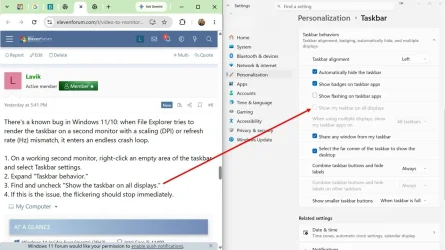
There's a known bug in Windows 11/10: when File Explorer tries to render the taskbar on a second monitor with a scaling (DPI) or refresh rate (Hz) mismatch, it enters an endless crash loop.

1. On a working second monitor, right-click an empty area of the taskbar and select Taskbar settings.
2. Expand "Taskbar behavior."
3. Find and uncheck "Show the taskbar on all displays."
4. If this is the issue, the flickering should stop immediately.
 

My Computer My Computer

At a glance

Windows 11 Insider Experimental (26H2)Intel Core i5-1140032Gb (DDR4 SDRAM)Intel(R) UHD Graphics 730
OS
Windows 11 Insider Experimental (26H2)
Computer type
PC/Desktop
Manufacturer/Model
Gigabyte Technology Co., Ltd.
CPU
Intel Core i5-11400
Motherboard
Z590 AORUS PRO AX
Memory
32Gb (DDR4 SDRAM)
Graphics Card(s)
Intel(R) UHD Graphics 730
Sound Card
Realtek USB Audio
Monitor(s) Displays
LG 27US500-W 4K UHD UltraFine™
Screen Resolution
3840x2160
Hard Drives
Samsung SSD 980 PRO 1TB
WDC WD7501AALS
PSU
Montech CENTURY, 650W, 80+ Gold
Case
Cougar Airface ECO RGB
Cooling
ID-COOLING SE-224-XTS BLACK
Keyboard
Microsoft SideWinder X6 Keyboard
Mouse
Microsoft SideWinder Mouse
Internet Speed
Internet speed of 1 Gbit/s
Browser
Vivaldi browser
Antivirus
Windows Defender
There's a known bug in Windows 11/10: when File Explorer tries to render the taskbar on a second monitor with a scaling (DPI) or refresh rate (Hz) mismatch, it enters an endless crash loop.

1. On a working second monitor, right-click an empty area of the taskbar and select Taskbar settings.
2. Expand "Taskbar behavior."
3. Find and uncheck "Show the taskbar on all displays."
4. If this is the issue, the flickering should stop immediately.
Exellent response and I tried it first. Unfortunately "Show the taskbar on all displays." was already unchecked.

Thanks anyway.


Taskbar example redacted.webp
View attachment 179692
 
Last edited:

My Computers My Computers

  • At a glance

    Windows 1113th Gen Intel(R) Core(TM) i5-13400F 2.50 GHz32.0 GBNVIDIA Gforce RTX 4060
    OS
    Windows 11
    Computer type
    PC/Desktop
    Manufacturer/Model
    Device name CyberPowerPC
    CPU
    13th Gen Intel(R) Core(TM) i5-13400F 2.50 GHz
    Memory
    32.0 GB
    Graphics Card(s)
    NVIDIA Gforce RTX 4060
    Hard Drives
    2 TB ADATA Legend 800 Gold SSD and several HDDs
    PSU
    650W
    Browser
    Chrome
    Other Info
    Windows 11 23H2 10.0.26100 Build 26100
  • At a glance

    Windows 10 Home 22H2 19045.4123Intel(R) Core(TM) i7-4790 CPU @ 3.60GHz 3.60 GHz32.0 GBGforce GTX 745
    Operating System
    Windows 10 Home 22H2 19045.4123
    Computer type
    PC/Desktop
    Manufacturer/Model
    Acer_Desktop
    CPU
    Intel(R) Core(TM) i7-4790 CPU @ 3.60GHz 3.60 GHz
    Memory
    32.0 GB
    Graphics card(s)
    Gforce GTX 745
    Sound Card
    ONN24
    Hard Drives
    Many
    Keyboard
    JLAB supports 2 computers/monitors
    Mouse
    Acer wired USB
    Browser
    Chrome
    Antivirus
    Only what W10 installed
    Other Info
    64-bit operating system, x64-based processor
  • OS Windows 11 Home 25H2, 26200.8894, 5/‎20/‎2025

    Computer type = PC/Laptop

    Manufacturer/Model = HP

    Device name = Victus

    CPU = 12th Gen Intel(R) Core(TM) i7-12700H (2.30 GHz)

    Motherboard

    Memory = 16.0 GB (15.7 GB usable)

    Graphics Card = NVIDIA GeForce RTX 3050 Laptop GPU (4 GB)

    Sound Card = Internal

    Monitor(s) Displays = Attached

    Screen Resolution = UNK

    Hard Drives = 954 GB and several external HDDs

    PSU = UNK

    Case = NA

    Cooling = UNK

    Keyboard = NA

    Mouse = Wireless Logitech (Touchpad also)

    Internet Speed = 31Mbps download; 8.24 Mbps upload

    Browser = Chrome

    Antivirus=Windows Defender only

    Other Info
Does the flickering stop if I temporarily make only one monitor active in Windows display settings (switch the display mode with the Win + P keys to "Computer screen only" mode)?
 

My Computer My Computer

At a glance

Windows 11 Insider Experimental (26H2)Intel Core i5-1140032Gb (DDR4 SDRAM)Intel(R) UHD Graphics 730
OS
Windows 11 Insider Experimental (26H2)
Computer type
PC/Desktop
Manufacturer/Model
Gigabyte Technology Co., Ltd.
CPU
Intel Core i5-11400
Motherboard
Z590 AORUS PRO AX
Memory
32Gb (DDR4 SDRAM)
Graphics Card(s)
Intel(R) UHD Graphics 730
Sound Card
Realtek USB Audio
Monitor(s) Displays
LG 27US500-W 4K UHD UltraFine™
Screen Resolution
3840x2160
Hard Drives
Samsung SSD 980 PRO 1TB
WDC WD7501AALS
PSU
Montech CENTURY, 650W, 80+ Gold
Case
Cougar Airface ECO RGB
Cooling
ID-COOLING SE-224-XTS BLACK
Keyboard
Microsoft SideWinder X6 Keyboard
Mouse
Microsoft SideWinder Mouse
Internet Speed
Internet speed of 1 Gbit/s
Browser
Vivaldi browser
Antivirus
Windows Defender
Does the flickering stop if I temporarily make only one monitor active in Windows display settings (switch the display mode with the Win + P keys to "Computer screen only" mode)?
 

My Computers My Computers

  • At a glance

    Windows 1113th Gen Intel(R) Core(TM) i5-13400F 2.50 GHz32.0 GBNVIDIA Gforce RTX 4060
    OS
    Windows 11
    Computer type
    PC/Desktop
    Manufacturer/Model
    Device name CyberPowerPC
    CPU
    13th Gen Intel(R) Core(TM) i5-13400F 2.50 GHz
    Memory
    32.0 GB
    Graphics Card(s)
    NVIDIA Gforce RTX 4060
    Hard Drives
    2 TB ADATA Legend 800 Gold SSD and several HDDs
    PSU
    650W
    Browser
    Chrome
    Other Info
    Windows 11 23H2 10.0.26100 Build 26100
  • At a glance

    Windows 10 Home 22H2 19045.4123Intel(R) Core(TM) i7-4790 CPU @ 3.60GHz 3.60 GHz32.0 GBGforce GTX 745
    Operating System
    Windows 10 Home 22H2 19045.4123
    Computer type
    PC/Desktop
    Manufacturer/Model
    Acer_Desktop
    CPU
    Intel(R) Core(TM) i7-4790 CPU @ 3.60GHz 3.60 GHz
    Memory
    32.0 GB
    Graphics card(s)
    Gforce GTX 745
    Sound Card
    ONN24
    Hard Drives
    Many
    Keyboard
    JLAB supports 2 computers/monitors
    Mouse
    Acer wired USB
    Browser
    Chrome
    Antivirus
    Only what W10 installed
    Other Info
    64-bit operating system, x64-based processor
  • OS Windows 11 Home 25H2, 26200.8894, 5/‎20/‎2025

    Computer type = PC/Laptop

    Manufacturer/Model = HP

    Device name = Victus

    CPU = 12th Gen Intel(R) Core(TM) i7-12700H (2.30 GHz)

    Motherboard

    Memory = 16.0 GB (15.7 GB usable)

    Graphics Card = NVIDIA GeForce RTX 3050 Laptop GPU (4 GB)

    Sound Card = Internal

    Monitor(s) Displays = Attached

    Screen Resolution = UNK

    Hard Drives = 954 GB and several external HDDs

    PSU = UNK

    Case = NA

    Cooling = UNK

    Keyboard = NA

    Mouse = Wireless Logitech (Touchpad also)

    Internet Speed = 31Mbps download; 8.24 Mbps upload

    Browser = Chrome

    Antivirus=Windows Defender only

    Other Info

No. and flickering isn't my problem. Issue is that my main computer (system 1 in my profile) has video that cycles on and off every ~2-5 seconds.

Thanks though. I'm going to try the other suggestions. I may get more clues.
 

My Computers My Computers

  • At a glance

    Windows 1113th Gen Intel(R) Core(TM) i5-13400F 2.50 GHz32.0 GBNVIDIA Gforce RTX 4060
    OS
    Windows 11
    Computer type
    PC/Desktop
    Manufacturer/Model
    Device name CyberPowerPC
    CPU
    13th Gen Intel(R) Core(TM) i5-13400F 2.50 GHz
    Memory
    32.0 GB
    Graphics Card(s)
    NVIDIA Gforce RTX 4060
    Hard Drives
    2 TB ADATA Legend 800 Gold SSD and several HDDs
    PSU
    650W
    Browser
    Chrome
    Other Info
    Windows 11 23H2 10.0.26100 Build 26100
  • At a glance

    Windows 10 Home 22H2 19045.4123Intel(R) Core(TM) i7-4790 CPU @ 3.60GHz 3.60 GHz32.0 GBGforce GTX 745
    Operating System
    Windows 10 Home 22H2 19045.4123
    Computer type
    PC/Desktop
    Manufacturer/Model
    Acer_Desktop
    CPU
    Intel(R) Core(TM) i7-4790 CPU @ 3.60GHz 3.60 GHz
    Memory
    32.0 GB
    Graphics card(s)
    Gforce GTX 745
    Sound Card
    ONN24
    Hard Drives
    Many
    Keyboard
    JLAB supports 2 computers/monitors
    Mouse
    Acer wired USB
    Browser
    Chrome
    Antivirus
    Only what W10 installed
    Other Info
    64-bit operating system, x64-based processor
  • OS Windows 11 Home 25H2, 26200.8894, 5/‎20/‎2025

    Computer type = PC/Laptop

    Manufacturer/Model = HP

    Device name = Victus

    CPU = 12th Gen Intel(R) Core(TM) i7-12700H (2.30 GHz)

    Motherboard

    Memory = 16.0 GB (15.7 GB usable)

    Graphics Card = NVIDIA GeForce RTX 3050 Laptop GPU (4 GB)

    Sound Card = Internal

    Monitor(s) Displays = Attached

    Screen Resolution = UNK

    Hard Drives = 954 GB and several external HDDs

    PSU = UNK

    Case = NA

    Cooling = UNK

    Keyboard = NA

    Mouse = Wireless Logitech (Touchpad also)

    Internet Speed = 31Mbps download; 8.24 Mbps upload

    Browser = Chrome

    Antivirus=Windows Defender only

    Other Info
No. and flickering isn't my problem.
I didn’t express myself correctly. Of course, we’re talking about the video signal.

You can try to find out the cause using Task Manager.
Since programs are opening on the second monitor, let it check what exactly is "killing" Explorer on the first.

1. In Task Manager, go to the "Details" tab.
2. Find the explorer.exe process.
3. Right-click it and select "Analyze wait chain."
4. Windows will show which system process or process ID (PID) is blocking Explorer and causing it to crash.
 

My Computer My Computer

At a glance

Windows 11 Insider Experimental (26H2)Intel Core i5-1140032Gb (DDR4 SDRAM)Intel(R) UHD Graphics 730
OS
Windows 11 Insider Experimental (26H2)
Computer type
PC/Desktop
Manufacturer/Model
Gigabyte Technology Co., Ltd.
CPU
Intel Core i5-11400
Motherboard
Z590 AORUS PRO AX
Memory
32Gb (DDR4 SDRAM)
Graphics Card(s)
Intel(R) UHD Graphics 730
Sound Card
Realtek USB Audio
Monitor(s) Displays
LG 27US500-W 4K UHD UltraFine™
Screen Resolution
3840x2160
Hard Drives
Samsung SSD 980 PRO 1TB
WDC WD7501AALS
PSU
Montech CENTURY, 650W, 80+ Gold
Case
Cougar Airface ECO RGB
Cooling
ID-COOLING SE-224-XTS BLACK
Keyboard
Microsoft SideWinder X6 Keyboard
Mouse
Microsoft SideWinder Mouse
Internet Speed
Internet speed of 1 Gbit/s
Browser
Vivaldi browser
Antivirus
Windows Defender
Lavik,

Temporarily disabling the second monitor may help narrow down the bottleneck.
More information but not a solution.

I disabled my MAIN monitor and my primary PC appears to function 90% okay on my second monitor. It rocognizes only my laptop keyboard/mouse and I can't cut/paste stuff from monitor 1. Maybe I can save to the cloud and work from there. Maybe - Maybe - Maybe - Maybe but of course that's unaccptable.

Still working on this trying to find a solution........
 

My Computers My Computers

  • At a glance

    Windows 1113th Gen Intel(R) Core(TM) i5-13400F 2.50 GHz32.0 GBNVIDIA Gforce RTX 4060
    OS
    Windows 11
    Computer type
    PC/Desktop
    Manufacturer/Model
    Device name CyberPowerPC
    CPU
    13th Gen Intel(R) Core(TM) i5-13400F 2.50 GHz
    Memory
    32.0 GB
    Graphics Card(s)
    NVIDIA Gforce RTX 4060
    Hard Drives
    2 TB ADATA Legend 800 Gold SSD and several HDDs
    PSU
    650W
    Browser
    Chrome
    Other Info
    Windows 11 23H2 10.0.26100 Build 26100
  • At a glance

    Windows 10 Home 22H2 19045.4123Intel(R) Core(TM) i7-4790 CPU @ 3.60GHz 3.60 GHz32.0 GBGforce GTX 745
    Operating System
    Windows 10 Home 22H2 19045.4123
    Computer type
    PC/Desktop
    Manufacturer/Model
    Acer_Desktop
    CPU
    Intel(R) Core(TM) i7-4790 CPU @ 3.60GHz 3.60 GHz
    Memory
    32.0 GB
    Graphics card(s)
    Gforce GTX 745
    Sound Card
    ONN24
    Hard Drives
    Many
    Keyboard
    JLAB supports 2 computers/monitors
    Mouse
    Acer wired USB
    Browser
    Chrome
    Antivirus
    Only what W10 installed
    Other Info
    64-bit operating system, x64-based processor
  • OS Windows 11 Home 25H2, 26200.8894, 5/‎20/‎2025

    Computer type = PC/Laptop

    Manufacturer/Model = HP

    Device name = Victus

    CPU = 12th Gen Intel(R) Core(TM) i7-12700H (2.30 GHz)

    Motherboard

    Memory = 16.0 GB (15.7 GB usable)

    Graphics Card = NVIDIA GeForce RTX 3050 Laptop GPU (4 GB)

    Sound Card = Internal

    Monitor(s) Displays = Attached

    Screen Resolution = UNK

    Hard Drives = 954 GB and several external HDDs

    PSU = UNK

    Case = NA

    Cooling = UNK

    Keyboard = NA

    Mouse = Wireless Logitech (Touchpad also)

    Internet Speed = 31Mbps download; 8.24 Mbps upload

    Browser = Chrome

    Antivirus=Windows Defender only

    Other Info
You can try to find out the cause using Task Manager.
Since programs are opening on the second monitor, let it check what exactly is "killing" Explorer on the first.

1. In Task Manager, go to the "Details" tab.
2. Find the explorer.exe process.
3. Right-click it and select "Analyze wait chain."
4. Windows will show which system process or process ID (PID) is blocking Explorer and causing it to crash.
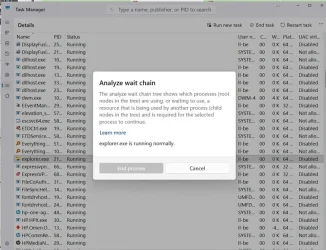
I'm working from my laptop. I think that I've really messed up. I got to the point 3 "Analyze wait chain" and as shown in the attached image it says that Explorer is running normally. Being impatient I clicked the option to "End process". I think it returned a warning or two and I clicked the go-ahead buttons. Now I've worsened my problem and even after several restarts I can't get either monitor working properly. I've tried using settings to change display parameters and nothing works there. So in desperation I tried using Windows recovery to return my Windows settings to an earlier time and that doesn't work either.

So at this point I need to ask if you know of a way to return my main computer to the point before I deleted Explorer - the point where I started this thread. Or do I need to start a NEW thread on how to reset Windows without losing my apps and saved data.

Clearly the problem is my doing and zero blame is your helpful suggestions.


Explorer response cropped.webp
 

My Computers My Computers

  • At a glance

    Windows 1113th Gen Intel(R) Core(TM) i5-13400F 2.50 GHz32.0 GBNVIDIA Gforce RTX 4060
    OS
    Windows 11
    Computer type
    PC/Desktop
    Manufacturer/Model
    Device name CyberPowerPC
    CPU
    13th Gen Intel(R) Core(TM) i5-13400F 2.50 GHz
    Memory
    32.0 GB
    Graphics Card(s)
    NVIDIA Gforce RTX 4060
    Hard Drives
    2 TB ADATA Legend 800 Gold SSD and several HDDs
    PSU
    650W
    Browser
    Chrome
    Other Info
    Windows 11 23H2 10.0.26100 Build 26100
  • At a glance

    Windows 10 Home 22H2 19045.4123Intel(R) Core(TM) i7-4790 CPU @ 3.60GHz 3.60 GHz32.0 GBGforce GTX 745
    Operating System
    Windows 10 Home 22H2 19045.4123
    Computer type
    PC/Desktop
    Manufacturer/Model
    Acer_Desktop
    CPU
    Intel(R) Core(TM) i7-4790 CPU @ 3.60GHz 3.60 GHz
    Memory
    32.0 GB
    Graphics card(s)
    Gforce GTX 745
    Sound Card
    ONN24
    Hard Drives
    Many
    Keyboard
    JLAB supports 2 computers/monitors
    Mouse
    Acer wired USB
    Browser
    Chrome
    Antivirus
    Only what W10 installed
    Other Info
    64-bit operating system, x64-based processor
  • OS Windows 11 Home 25H2, 26200.8894, 5/‎20/‎2025

    Computer type = PC/Laptop

    Manufacturer/Model = HP

    Device name = Victus

    CPU = 12th Gen Intel(R) Core(TM) i7-12700H (2.30 GHz)

    Motherboard

    Memory = 16.0 GB (15.7 GB usable)

    Graphics Card = NVIDIA GeForce RTX 3050 Laptop GPU (4 GB)

    Sound Card = Internal

    Monitor(s) Displays = Attached

    Screen Resolution = UNK

    Hard Drives = 954 GB and several external HDDs

    PSU = UNK

    Case = NA

    Cooling = UNK

    Keyboard = NA

    Mouse = Wireless Logitech (Touchpad also)

    Internet Speed = 31Mbps download; 8.24 Mbps upload

    Browser = Chrome

    Antivirus=Windows Defender only

    Other Info
So at this point I need to ask if you know of a way to return my main computer to the point before I deleted Explorer - the point where I started this thread.
This is exactly the method. Recovery via Windows Update helped me out recently.
 

My Computer My Computer

At a glance

Windows 11 Insider Experimental (26H2)Intel Core i5-1140032Gb (DDR4 SDRAM)Intel(R) UHD Graphics 730
OS
Windows 11 Insider Experimental (26H2)
Computer type
PC/Desktop
Manufacturer/Model
Gigabyte Technology Co., Ltd.
CPU
Intel Core i5-11400
Motherboard
Z590 AORUS PRO AX
Memory
32Gb (DDR4 SDRAM)
Graphics Card(s)
Intel(R) UHD Graphics 730
Sound Card
Realtek USB Audio
Monitor(s) Displays
LG 27US500-W 4K UHD UltraFine™
Screen Resolution
3840x2160
Hard Drives
Samsung SSD 980 PRO 1TB
WDC WD7501AALS
PSU
Montech CENTURY, 650W, 80+ Gold
Case
Cougar Airface ECO RGB
Cooling
ID-COOLING SE-224-XTS BLACK
Keyboard
Microsoft SideWinder X6 Keyboard
Mouse
Microsoft SideWinder Mouse
Internet Speed
Internet speed of 1 Gbit/s
Browser
Vivaldi browser
Antivirus
Windows Defender
Thanks so much for your continued support. My computer is working i weird ways previously unseen, but at least it's back working. I'll report here after I get things figured out.

Thanks again.
 

My Computers My Computers

  • At a glance

    Windows 1113th Gen Intel(R) Core(TM) i5-13400F 2.50 GHz32.0 GBNVIDIA Gforce RTX 4060
    OS
    Windows 11
    Computer type
    PC/Desktop
    Manufacturer/Model
    Device name CyberPowerPC
    CPU
    13th Gen Intel(R) Core(TM) i5-13400F 2.50 GHz
    Memory
    32.0 GB
    Graphics Card(s)
    NVIDIA Gforce RTX 4060
    Hard Drives
    2 TB ADATA Legend 800 Gold SSD and several HDDs
    PSU
    650W
    Browser
    Chrome
    Other Info
    Windows 11 23H2 10.0.26100 Build 26100
  • At a glance

    Windows 10 Home 22H2 19045.4123Intel(R) Core(TM) i7-4790 CPU @ 3.60GHz 3.60 GHz32.0 GBGforce GTX 745
    Operating System
    Windows 10 Home 22H2 19045.4123
    Computer type
    PC/Desktop
    Manufacturer/Model
    Acer_Desktop
    CPU
    Intel(R) Core(TM) i7-4790 CPU @ 3.60GHz 3.60 GHz
    Memory
    32.0 GB
    Graphics card(s)
    Gforce GTX 745
    Sound Card
    ONN24
    Hard Drives
    Many
    Keyboard
    JLAB supports 2 computers/monitors
    Mouse
    Acer wired USB
    Browser
    Chrome
    Antivirus
    Only what W10 installed
    Other Info
    64-bit operating system, x64-based processor
  • OS Windows 11 Home 25H2, 26200.8894, 5/‎20/‎2025

    Computer type = PC/Laptop

    Manufacturer/Model = HP

    Device name = Victus

    CPU = 12th Gen Intel(R) Core(TM) i7-12700H (2.30 GHz)

    Motherboard

    Memory = 16.0 GB (15.7 GB usable)

    Graphics Card = NVIDIA GeForce RTX 3050 Laptop GPU (4 GB)

    Sound Card = Internal

    Monitor(s) Displays = Attached

    Screen Resolution = UNK

    Hard Drives = 954 GB and several external HDDs

    PSU = UNK

    Case = NA

    Cooling = UNK

    Keyboard = NA

    Mouse = Wireless Logitech (Touchpad also)

    Internet Speed = 31Mbps download; 8.24 Mbps upload

    Browser = Chrome

    Antivirus=Windows Defender only

    Other Info
Okay - I'm going to call this "solved." Somehow 90% with Lavik's help and some with my poking around, my monitor is no longer cycling on and off. There are a few formatting issues but I'm convinced that I can work through those. I wish that I could cite one, or even a few, things that I did to accomplish success. But i can't and I'm not going to break it again and fix it to identify what worked. I do know that Microsoft's shut-down and repair utilities played a large part. But I used those in desperation only after I broke my computer by not regrading warnings,

In any event, thanks to all who contributed here ad especially to Lavik who stuck with me through the issues.
 

My Computers My Computers

  • At a glance

    Windows 1113th Gen Intel(R) Core(TM) i5-13400F 2.50 GHz32.0 GBNVIDIA Gforce RTX 4060
    OS
    Windows 11
    Computer type
    PC/Desktop
    Manufacturer/Model
    Device name CyberPowerPC
    CPU
    13th Gen Intel(R) Core(TM) i5-13400F 2.50 GHz
    Memory
    32.0 GB
    Graphics Card(s)
    NVIDIA Gforce RTX 4060
    Hard Drives
    2 TB ADATA Legend 800 Gold SSD and several HDDs
    PSU
    650W
    Browser
    Chrome
    Other Info
    Windows 11 23H2 10.0.26100 Build 26100
  • At a glance

    Windows 10 Home 22H2 19045.4123Intel(R) Core(TM) i7-4790 CPU @ 3.60GHz 3.60 GHz32.0 GBGforce GTX 745
    Operating System
    Windows 10 Home 22H2 19045.4123
    Computer type
    PC/Desktop
    Manufacturer/Model
    Acer_Desktop
    CPU
    Intel(R) Core(TM) i7-4790 CPU @ 3.60GHz 3.60 GHz
    Memory
    32.0 GB
    Graphics card(s)
    Gforce GTX 745
    Sound Card
    ONN24
    Hard Drives
    Many
    Keyboard
    JLAB supports 2 computers/monitors
    Mouse
    Acer wired USB
    Browser
    Chrome
    Antivirus
    Only what W10 installed
    Other Info
    64-bit operating system, x64-based processor
  • OS Windows 11 Home 25H2, 26200.8894, 5/‎20/‎2025

    Computer type = PC/Laptop

    Manufacturer/Model = HP

    Device name = Victus

    CPU = 12th Gen Intel(R) Core(TM) i7-12700H (2.30 GHz)

    Motherboard

    Memory = 16.0 GB (15.7 GB usable)

    Graphics Card = NVIDIA GeForce RTX 3050 Laptop GPU (4 GB)

    Sound Card = Internal

    Monitor(s) Displays = Attached

    Screen Resolution = UNK

    Hard Drives = 954 GB and several external HDDs

    PSU = UNK

    Case = NA

    Cooling = UNK

    Keyboard = NA

    Mouse = Wireless Logitech (Touchpad also)

    Internet Speed = 31Mbps download; 8.24 Mbps upload

    Browser = Chrome

    Antivirus=Windows Defender only

    Other Info
Latest Support Threads

Back
Top Bottom