Virus POP-UP


PA WOODCHUCK

Well-known member
Member
VIP
Local time
8:52 AM
Posts
119
OS
Windows 11
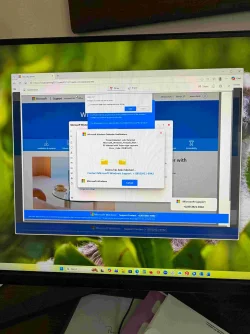
On wife's Win-11 PC which I think is from edge browser when opened. In the past would get pop-up in lower right so I turned off notification. Doesn't happen every-time. I'm sure it's from a site she went to as she likes to use "search feature". I can post the full link? but not sure how to do safely? Here's the ending reference web-xxxxx-core-xxxxx-windows-xxxxx- net

I replaced the "." with "-xxxxx-"

Also open to suggestion how to remove this are anti virus software that works. MS defender found nothing on FULL scan

thanks
 

Attachments
  • Virus-1.webp
    Virus-1.webp
    857.6 KB · Views: 2

My Computer

System One

  • OS
    Windows 11
    Computer type
    PC/Desktop
    Manufacturer/Model
    Dell R16
    CPU
    i7-10700
    Memory
    32GB
    Graphics Card(s)
    GFORCE RTX 2070 SUPER
Did you already check if there is any malicious looking extensions installed in the Edge browser?
Can you show us a screenshot of what the popup looks like? Is it a banner or a text notification?
 

My Computer

System One

  • OS
    Windows 11
    Computer type
    Laptop
    Manufacturer/Model
    Lenovo
    CPU
    Intel Core i7 12700H
    Memory
    2x16GB
    Graphics Card(s)
    Geforce RTX 3070
    Screen Resolution
    2560x1600
    Browser
    FireFox
i have just checked the link and it goes 'site not found' aka it seems not to exist

clear the cache on the browser via the browser settings
then check to see if its gone.

best of luck Steve ..
 

My Computers

System One System Two

  • OS
    Windows 11 Home
    Computer type
    PC/Desktop
    Manufacturer/Model
    HP 24" AiO
    CPU
    Ryzen 7 5825u
    Motherboard
    HP
    Memory
    64GB DDR4 3200
    Graphics Card(s)
    Ryzen 7 5825u
    Sound Card
    RealTek
    Monitor(s) Displays
    24" HP AiO
    Screen Resolution
    1920 x 1080 @60 Hz
    Hard Drives
    1TB WD Blue SN580 M2 SSD Partitioned.
    2x 1TB USB HDD External Backup/Storage.
    PSU
    90W external power brick
    Case
    24" All in One
    Cooling
    Default Air Cooling
    Keyboard
    HP WiFi UK extended
    Mouse
    HP WiFi 3 Button
    Internet Speed
    1GB full fibre
    Browser
    Edge & Firefox
    Antivirus
    AVG Internet Security/Windows Defender
    Other Info
    Mainly Open Source Software
  • Operating System
    Ubuntu 22.04.5 LTS
    Computer type
    Laptop
    Manufacturer/Model
    Dell 13" Latitude 2017
    CPU
    i5 7200u
    Motherboard
    Dell
    Memory
    16GB DDR4
    Graphics card(s)
    Intel
    Sound Card
    Intel
    Monitor(s) Displays
    13" Dell Laptop
    Hard Drives
    250GB Crucial 2.5" SSD
    Mouse
    Generic WiFi 3 button
    Internet Speed
    WiFi only
    Browser
    Firefox
    Antivirus
    ClamAV TK
    Other Info
    Mainly Open Source Software
Sorry, added photo in original post
 

My Computer

System One

  • OS
    Windows 11
    Computer type
    PC/Desktop
    Manufacturer/Model
    Dell R16
    CPU
    i7-10700
    Memory
    32GB
    Graphics Card(s)
    GFORCE RTX 2070 SUPER
i have just checked the link and it goes 'site not found' aka it seems not to exist

clear the cache on the browser via the browser settings
then check to see if its gone.

best of luck Steve ..
Here''s the beginning of link, didn't want to post full link. I could if it's safe to post full link???

viruswarning0312uswb3721.z13.
 

My Computer

System One

  • OS
    Windows 11
    Computer type
    PC/Desktop
    Manufacturer/Model
    Dell R16
    CPU
    i7-10700
    Memory
    32GB
    Graphics Card(s)
    GFORCE RTX 2070 SUPER

Here''s the beginning of link, didn't want to post full link. I could if it's safe to post full link???

viruswarning0312uswb3721.z13.


It's fine, with what you have posted most users here can figure out the actual URL.

I still think its being caused by something in your browser, be it a extension, user-script installed in an extension.
Did you go trough them. Also have a look at the browser processes in Edge, does it show anything weird?

You can find the browser processes by going to the three dots button between the profile and AI button.
Then go to "More Tools" to find the "browser task manager"

Also it's worth reporting the URL to Microsoft with Report an unsafe site - Microsoft Security Intelligence so they can take it down.
 

My Computer

System One

  • OS
    Windows 11
    Computer type
    Laptop
    Manufacturer/Model
    Lenovo
    CPU
    Intel Core i7 12700H
    Memory
    2x16GB
    Graphics Card(s)
    Geforce RTX 3070
    Screen Resolution
    2560x1600
    Browser
    FireFox
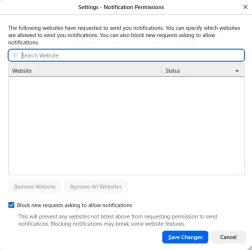
I would open Edge's settings and search for notifications. You should have a setting for "Not allowed to send notifications." Click the Add site button, and add *.web.core.windows.net. That will block any site hosted on Microsoft Azure from sending notifications, so if you find you need to allow a site later, use the "Allowed to send notifications" setting to allow notifications for that one particular site you want to allow later.

By the way, a safe way to post URLs is to just manipulate them so they're broken. Anyone who wants to visit the URL will have to intentionally fix it. For example,
  • https://viruswarning0312uswb3721.z13.web.core.windows(DOT)net
  • hXXps://viruswarning0312uswb3721.z13.web.core.windows.net
 

My Computer

System One

  • OS
    Windows 11 Pro 25H2
    Computer type
    PC/Desktop
    Manufacturer/Model
    Intel NUC12WSHi7
    CPU
    12th Gen Core i7-1260P
    Motherboard
    NUC12WSBi7
    Memory
    64 GB Micron PC4-25600
    Graphics Card(s)
    Intel Iris Xe Graphics
    Sound Card
    on-board Realtek HD Audio
    Monitor(s) Displays
    Dell U3219Q
    Screen Resolution
    3840 x 2160
    Hard Drives
    Samsung SSD 990 PRO 1TB
    Crucial MX500 2 TB
    Antivirus
    Microsoft Defender
I would open Edge's settings and search for notifications. You should have a setting for "Not allowed to send notifications." Click the Add site button, and add *.web.core.windows.net.
Even better is to block all notifications in every browser. It's simply good security practice.
 
Last edited:

My Computer

System One

  • OS
    Windows 11 Pro 25H2 26200.7840
    Computer type
    Laptop
    Manufacturer/Model
    Lenovo IdeaPad L340
    CPU
    Intel Core i3-8145U
    Memory
    16GB
    Hard Drives
    500 GB M2 1 TB HDD
    Internet Speed
    400 MB
    Browser
    Chrome | Edge
    Antivirus
    Microsoft Defender | Block unknown executables | Various ASR rules enabled | Smart App Control
As a virus warning, it is a fake and you are not infected. It's just a scam attempt. You could try using a different browser temporarily, such as Chrome to see if it goes away.
 

My Computers

System One System Two

  • OS
    Windows 11 Pro 25H2 26200.8524
    Computer type
    Laptop
    Manufacturer/Model
    Acemagic LX15PRO
    CPU
    AMD Ryzen 7 5825U with Radeon Graphics
    Memory
    16GB
    Screen Resolution
    1920 x 1080
    Hard Drives
    SSD 2TB
    Internet Speed
    30 Mbps
    Browser
    Brave
    Antivirus
    Webroot Secure Anywhere
    Other Info
    System 3

    Acer Swift SF114-34 laptop
    OS Windows 11 Pro 26200.8524
    CPU Pentium Silver N6000
    RAM 4GB
    SSD Samsung 970 EVO Plus SSD 2TB (an upgrade)
  • Operating System
    Windows 11 Pro 23H2 22631.2506
    Computer type
    Laptop
    Manufacturer/Model
    HP Mini 210-1090NR PC (bought in late 2009!)
    CPU
    Atom N450 1.66GHz
    Memory
    2GB
    Browser
    Brave
    Antivirus
    Webroot
That is how I have firefox set.
That is how I have it too, but already for a long time I now and then still get a popup asking for permission to use notifications on fully legal sites.
I have been searching how I could disable notifications fully (via about:config). Got a few tricks, but nothing really functions.
Then I decided to leave it like that and just click no for the site it concerns, because the amount of cases they ask for permisson is minimal, maybe once a week or so.
 

My Computer

System One

  • OS
    Windows 11 Pro 25H2 26200.8457
    Computer type
    PC/Desktop
    Manufacturer/Model
    Build by vendor to my specs
    CPU
    AMD Ryzen 7 5700G
    Motherboard
    MSI PRO B550M-P Gen3
    Memory
    Kingston FURY Beast 2x16GB DIMM DDR4 2666 CL16
    Graphics Card(s)
    MSI GeForce GT 730 2GB LP V1
    Sound Card
    Creative Sound Blaster Audigy FX
    Monitor(s) Displays
    Samsung S24E450F 24"
    Screen Resolution
    1920 x 1080
    Hard Drives
    1. SSD Crucial P5 Plus 500GB PCIe M.2
    2. SSD-SATA Crucial MX500-2TB
    PSU
    Corsair CV650W
    Case
    Cooler Master Silencio S400
    Cooling
    Cooler Master Hyper H412R with Be Quiet Pure Wings 2 PWM BL038 fan
    Keyboard
    Cherry Stream (wired, scissor keys)
    Mouse
    Asus WT465 (wireless)
    Internet Speed
    70 Mbps down / 80 Mbps up
    Browser
    Firefox 130.0
    Antivirus
    F-Secure (Internetprovider version)
    Other Info
    Router: FRITZBox 7490
    Oracle VirtualBox 7 for testing software on Win 10 or 11
Update, so far, the pop-up's haven't returned.
 

My Computer

System One

  • OS
    Windows 11
    Computer type
    PC/Desktop
    Manufacturer/Model
    Dell R16
    CPU
    i7-10700
    Memory
    32GB
    Graphics Card(s)
    GFORCE RTX 2070 SUPER
Back
Top Bottom