CarameloGay
Member
- Local time
- 8:09 AM
- Posts
- 15
- OS
- Windows
Home PC specs
Work PC specs
ChatGPT refers to this as “misplacement flash”, but I cannot find this expression used anywhere online, it's very hard to know where to start fixing this.
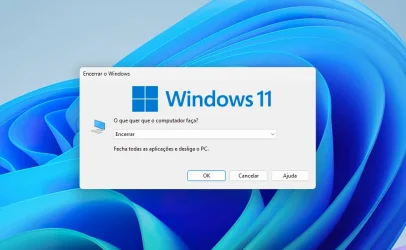
On my home PC, not every time but very frequently, when opening a window for the first time—such as File Explorer, application windows, “Save As” dialogs (from any app), folder properties, or even the Windows shutdown screen—the window’s shadow (not the window content itself) briefly flashes in an incorrect position on the screen. This flash lasts less than a second, after which the window appears in the correct position.
It is difficult to describe more precisely, but the shadow appears momentarily offset before snapping to the correct location.
This behaviour does not occur at all on the work PC, despite running the same Windows 11 Pro build and sharing some specs.
Observations / things already tested
If I install Windhawk and enable the “Bring back the borders” mod (which restores Windows 10-style square borders and shadows), the issue disappears immediately. This, to me, again points toward a DWM-related cause.
What else could be causing this? I have not found anyone else reporting this issue, and ChatGPT keeps suggesting the same troubleshooting steps I have already tried.
Video
I’ve attached a video showing the issue. Please focus on the top-left area of the screen. It is subtle and easy to miss, so it may require watching several times.
It's very distracting I really appreciate any help you could give.
(Sorry for my english, I'm not native, used ai to format the text)
- Windows 11 Pro 25H2, fully updated
- Intel i7-12400F
- NVIDIA RTX 3050
- 16 GB DDR4
- ASUS entry-level H610 motherboard
- Dual-monitor setup: one 180 Hz display and one 144 Hz display
Work PC specs
- Windows 11 Pro 25H2, fully updated
- Intel i3-12100 (integrated graphics)
- Same ASUS H610 motherboard model as the home PC
- 16 GB DDR4
- Single-monitor setup 60hz
ChatGPT refers to this as “misplacement flash”, but I cannot find this expression used anywhere online, it's very hard to know where to start fixing this.
On my home PC, not every time but very frequently, when opening a window for the first time—such as File Explorer, application windows, “Save As” dialogs (from any app), folder properties, or even the Windows shutdown screen—the window’s shadow (not the window content itself) briefly flashes in an incorrect position on the screen. This flash lasts less than a second, after which the window appears in the correct position.
It is difficult to describe more precisely, but the shadow appears momentarily offset before snapping to the correct location.
This behaviour does not occur at all on the work PC, despite running the same Windows 11 Pro build and sharing some specs.
Observations / things already tested
- The issue does not occur on a dual-boot installation of Windows 10 on the same hardware.
- NVIDIA driver version makes no difference; it occurs on every version tested.
- Disabling or enabling the following has no effect:
- Multiplane Overlay (MPO)
- HAGS
- Game Mode
- Windowed game optimisations
- Happens in both HDR and SDR modes.
- G-SYNC on or off makes no difference.
- Turning off either monitor does not resolve it.
- The issue seems to occur less frequently when NVIDIA Power Management is set to Prefer maximum performance.
If I install Windhawk and enable the “Bring back the borders” mod (which restores Windows 10-style square borders and shadows), the issue disappears immediately. This, to me, again points toward a DWM-related cause.
What else could be causing this? I have not found anyone else reporting this issue, and ChatGPT keeps suggesting the same troubleshooting steps I have already tried.
Video
I’ve attached a video showing the issue. Please focus on the top-left area of the screen. It is subtle and easy to miss, so it may require watching several times.
It's very distracting
I really appreciate any help you could give.(Sorry for my english, I'm not native, used ai to format the text)
Last edited:
My Computer
At a glance
Windows
- OS
- Windows