Visual bug when opening windows on home PC driving me crazy.


Hi @CarameloGay, hi all,

I'm really glad I found your post.

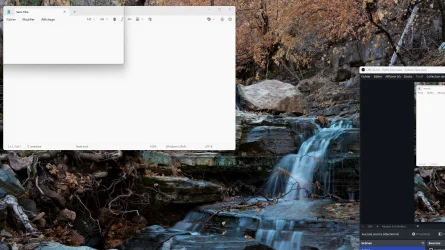
I'm having the exact same problem. The window border appears in a wrong position for a fraction of a second just before the window is displayed.

The problem started about 4 or 5 months ago (end of 2025). It exist on Windows 11 25H2 (not yet tested 25H1), on 2 computers, and on dozens of VMs that I reinstall every day for work (I'm a developer).

It also appear on Windows 11 ARM installed on VMware Fusion on Macbook Pro M4. This excludes NVIDIA card or driver issue.

To test yourself as explained by @CarameloGay: click on Windows taskbar, hold the Alt key down, and press F4 repeatedly. Each time you press F4, the Shut Down dialog box opens and closes. Repeat the operation so that the window appears and then closes, and while you are doing this, stare at the upper left corner of the screen: you will sometimes see a black rectangular outline flashing.

This glitch occurs regularly with all Windows 11 dialog boxes randomly.

Damn right, still happening to this day.

Fortunately, I found a workaround, need to use a third party app though - DWMGLASSBLUR (avast marked this as suspicious but it's a well known app, safe).

Just download from here:


Extract to C:\DWMBlurGlass

Run it, go to Symbols and download that.

Then just use the attached config file (change extension to ini), I made it to only correct window borders colors to the correct windows light theme colors, rest of settings I kept the same exact appearance of stock Windows 11. You can customize those if you like but I see no need personally.

When windows updates, it'll throw an error at boot, just download Symbols again.

Windhawk has a mod that also fixes this issue (Windows 11 Custom Title Bar Colours) but there's a bug with it, explorer tabs have their colors messed up.
 

Attachments

My Computer

System One

  • OS
    Windows
Damn right, still happening to this day.

Fortunately, I found a workaround, need to use a third party app though - DWMGLASSBLUR (avast marked this as suspicious but it's a well known app, safe).

Just download from here:


Extract to C:\DWMBlurGlass

Run it, go to Symbols and download that.

Then just use the attached config file (change extension to ini), I made it to only correct window borders colors to the correct windows light theme colors, rest of settings I kept the same exact appearance of stock Windows 11. You can customize those if you like but I see no need personally.

When windows updates, it'll throw an error at boot, just download Symbols again.

Windhawk has a mod that also fixes this issue (Windows 11 Custom Title Bar Colours) but there's a bug with it, explorer tabs have their colors messed up.
I just tested and it effectively suppress the glitch! Thank you

Out of curiosity, we could test every version of Windows 11 since September 2025 to see which one created the bug...
 

My Computer

System One

  • OS
    Windows 11
I’m not quite able to see your problem, but resently I had a annoing problem with some flashing edges in Windows 25H2 when opening windows. There is a setting, that ad a small border on popup windows, and it was the course. Don’t know how it got activated, but it not working propper, because of the very annoying short flash on edges before it settles right.


My Computer

System One

  • OS
    Windows 11 Pro
    Computer type
    PC/Desktop
    Manufacturer/Model
    Homemade by me
    CPU
    Intel i5 12600K
    Motherboard
    MSI PRO Z690-A DDR4
    Memory
    G.Skill Ripjaws V DDR4 3600 MHz / PC4-28800 CL16 2x8 GB
    Graphics Card(s)
    Intel® UHD Graphics 770 (iGPU)
    Sound Card
    8-Channel (7.1) HD Audio
    Monitor(s) Displays
    Legion/Lenovo Y25-25
    Screen Resolution
    Full HD 1920 x 1080
    Hard Drives
    WD Black NVMe M.2 500 GB (system drive)
    Case
    Lian-Li
    Keyboard
    Old solid and heavy IBM🙂
    Mouse
    Logitech
    Internet Speed
    1000 mbit
    Antivirus
    Avast free
I’m not quite able to see your problem, but resently I had a annoing problem with some flashing edges in Windows 25H2 when opening windows. There is a setting, that ad a small border on popup windows, and it was the course. Don’t know how it got activated, but it not working propper, because of the very annoying short flash on edges before it settles right.

Nope. I appreciate your answer but this runs much deeper than a simple windows appearance setting.
This is a dwm.exe issue. So far, the only way to get around it is to hook on to dwm.exe and either use DWMGlassBlur (100% working) or using a windhawk mod (Windows 11 Custom Title Bar Colours - Has bugs)
 

My Computer

System One

  • OS
    Windows
I’m not quite able to see your problem, but resently I had a annoing problem with some flashing edges in Windows 25H2 when opening windows. There is a setting, that ad a small border on popup windows, and it was the course. Don’t know how it got activated, but it not working propper, because of the very annoying short flash on edges before it settles right.

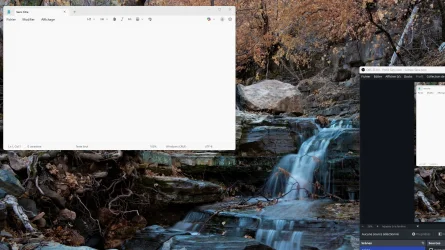
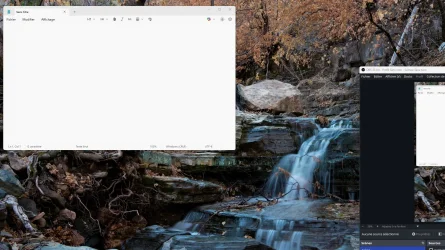
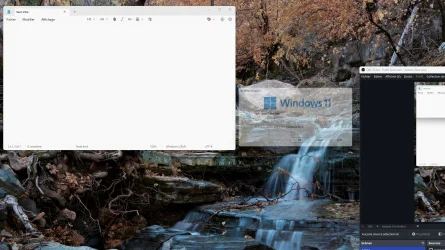
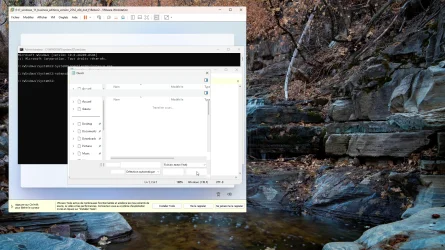
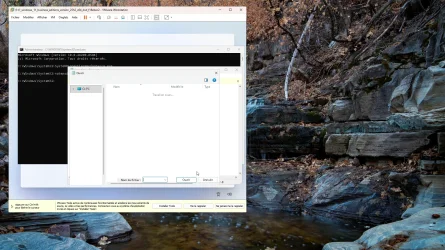
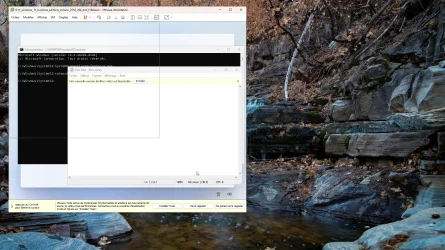
Here is the glitch, frame by frame. The 2nd picture (border1.webp) is the misplaced outline. The 4th picture (border3.webp) is when the window fade-in start.
 

Attachments

  • border0.webp
    border0.webp
    357 KB · Views: 2
  • border1.webp
    border1.webp
    364.4 KB · Views: 1
  • border2.webp
    border2.webp
    356.4 KB · Views: 2
  • border3.webp
    border3.webp
    345.4 KB · Views: 2

My Computer

System One

  • OS
    Windows 11
Looks like DWM is preparing to draw the window but has not any position data yet and attempts to draw it top left of the screen. Then it gets the correct upper left corner coordinates and immediately deletes it from top left and draws it on the correct position. This happens too fast it looks like flashing. I haven't tested it on my computer, but I will and report back. If it doesn't show, it means my nVidia Geforce RTX 3050 is too fast that DWM doesn't has the time to draw the window top left first.

PS: I confirmed, it doesn't happen on my main PC (see 2nd system specs).
 

My Computers

System One System Two

  • OS
    Windows 11 Pro 23H2 (5699), 25H2 (8457)
    Computer type
    Laptop
    Manufacturer/Model
    Acer Extensa 5630EZ
    CPU
    Mobile DualCore Intel Core 2 Duo T7250, 2000 MHz
    Motherboard
    Acer Extensa 5630
    Memory
    4GB
    Graphics Card(s)
    Mobile Intel(R) GMA 4500M (Mobile 4 series)
    Sound Card
    Realtek ALC268 @ Intel 82801IB ICH9 - High Definition Audio Controller
    Monitor(s) Displays
    1
    Screen Resolution
    1280x800
    Hard Drives
    Samsung SSD 850 EVO 250GB SATA Device (250 GB, SATA-III)
    Internet Speed
    VDSL 50 Mbps
    Browser
    MICROSOFT EDGE
    Antivirus
    WINDOWS DEFENDER
    Other Info
    Legacy MBR installation, no TPM, no Secure Boot, no WDDM 2.0 graphics drivers, no SSE4.2, cannot get more unsupported ;) This is only my test laptop. I had installed Windows 11 here before upgrading my main PC. For my main PC I use everyday see my 2nd system specs.
  • Operating System
    Windows 11 Pro v25H2 (build 26200.8457)
    Computer type
    PC/Desktop
    Manufacturer/Model
    Custom-built PC
    CPU
    Intel Core-i7 3770 3.40GHz s1155 (3rd generation)
    Motherboard
    Asus P8H61 s1155 ATX
    Memory
    2x Kingston Hyper-X Blu 8GB DDR3-1600
    Graphics card(s)
    GIGABYTE GeForce RTX 3050 WINDFORCE OC V2 6GB (GV-N3050WF2OCV2-6GD)
    Sound Card
    Realtek HD audio (ALC887)
    Monitor(s) Displays
    Sony Bravia KDL-19L4000 19" LCD TV via VGA
    Screen Resolution
    1440x900 32-bit 60Hz
    Hard Drives
    WD Blue SA510 2.5 1000GB SSD as system disk, Western Digital Caviar Purple 4TB SATA III (WD40PURZ) as second
    PSU
    Thermaltake Litepower RGB 550W Full Wired
    Case
    SUPERCASE MIDI-TOWER
    Cooling
    Deepcool Gamma Archer CPU cooler, 1x 8cm fan at the back
    Keyboard
    Mitsumi 101-key PS/2
    Mouse
    Sunnyline OptiEye PS/2
    Internet Speed
    100Mbps
    Browser
    Microsoft Edge, Mozilla Firefox
    Antivirus
    Microsoft Windows Defender
    Other Info
    Legacy BIOS (MBR) installation, no TPM, no Secure Boot, WDDM 3.0 graphics drivers, WEI score 7.4
Looks like DWM is preparing to draw the window but has not any position data yet and attempts to draw it top left of the screen. Then it gets the correct upper left corner coordinates and immediately deletes it from top left and draws it on the correct position. This happens too fast it looks like flashing. I haven't tested it on my computer, but I will and report back. If it doesn't show, it means my nVidia Geforce RTX 3050 is too fast that DWM doesn't has the time to draw the window top left first.

RTX 3050 is the exact graphics card I'm running, believe me, it's noticeable.
 

My Computer

System One

  • OS
    Windows
This also appens during Windows setup.

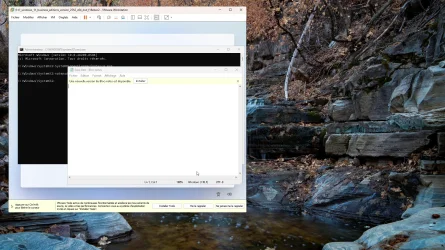
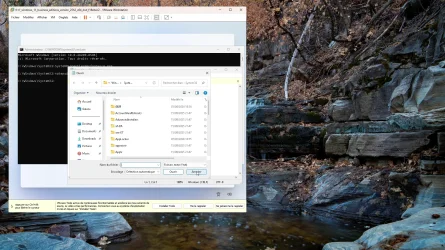
Here is Windows 11 25H2 February update. I pressed Shift+F10 to bring up command prompt, opened Notepad, then typed Ctrl+O and Cancel. Glitch first occurs around 00:28.


My Computer

System One

  • OS
    Windows 11
Are you sure all your drivers are updated? I would make sure I update the chipset drivers first, if available, and then install the official graphics drivers directly from Intel/nVidia/AMD. Don't trust Windows Update. About a month ago I realized some glitches when playing some videos and upon checking MPC-HC was using a software decoder (no hardware acceleration) when the decoder in LAV Video filter was set to DXVA2. I had to set it to the older CUVID to force using nVidia CUDA because my card wasn't detected properly for some reason. I checked some settings and then I decided to load nVidia Control Panel to check my video settings. But when I right-clicked on the desktop I discovered that nVidia Control Panel wasn't available and this got me suspicious. Sure enough, Windows Update had replaced my official Jan 2026 nVidia driver with an older Dec 2025 version without the nVidia Control Panel. Once I downloaded the official nVidia Jan 2026 driver directly form nVidia and reinstalled the issue was gone. I didn't have to change any settings in nVidia Control Panel. So you too, make sure you install the latest OFFICIAL graphics drivers and then check if the issue persists.

TIP: For those with old graphics cards and no newer official driver is available, install the latest official driver and to prevent Windows Update replacing it, you must hide (block) the respective update using a tool such as Microsoft's Windows Update Show/Hide Tool or Windows Automatic Updates Manager (WAU Manager). Both are available in Major Geeks:


My Computers

System One System Two

  • OS
    Windows 11 Pro 23H2 (5699), 25H2 (8457)
    Computer type
    Laptop
    Manufacturer/Model
    Acer Extensa 5630EZ
    CPU
    Mobile DualCore Intel Core 2 Duo T7250, 2000 MHz
    Motherboard
    Acer Extensa 5630
    Memory
    4GB
    Graphics Card(s)
    Mobile Intel(R) GMA 4500M (Mobile 4 series)
    Sound Card
    Realtek ALC268 @ Intel 82801IB ICH9 - High Definition Audio Controller
    Monitor(s) Displays
    1
    Screen Resolution
    1280x800
    Hard Drives
    Samsung SSD 850 EVO 250GB SATA Device (250 GB, SATA-III)
    Internet Speed
    VDSL 50 Mbps
    Browser
    MICROSOFT EDGE
    Antivirus
    WINDOWS DEFENDER
    Other Info
    Legacy MBR installation, no TPM, no Secure Boot, no WDDM 2.0 graphics drivers, no SSE4.2, cannot get more unsupported ;) This is only my test laptop. I had installed Windows 11 here before upgrading my main PC. For my main PC I use everyday see my 2nd system specs.
  • Operating System
    Windows 11 Pro v25H2 (build 26200.8457)
    Computer type
    PC/Desktop
    Manufacturer/Model
    Custom-built PC
    CPU
    Intel Core-i7 3770 3.40GHz s1155 (3rd generation)
    Motherboard
    Asus P8H61 s1155 ATX
    Memory
    2x Kingston Hyper-X Blu 8GB DDR3-1600
    Graphics card(s)
    GIGABYTE GeForce RTX 3050 WINDFORCE OC V2 6GB (GV-N3050WF2OCV2-6GD)
    Sound Card
    Realtek HD audio (ALC887)
    Monitor(s) Displays
    Sony Bravia KDL-19L4000 19" LCD TV via VGA
    Screen Resolution
    1440x900 32-bit 60Hz
    Hard Drives
    WD Blue SA510 2.5 1000GB SSD as system disk, Western Digital Caviar Purple 4TB SATA III (WD40PURZ) as second
    PSU
    Thermaltake Litepower RGB 550W Full Wired
    Case
    SUPERCASE MIDI-TOWER
    Cooling
    Deepcool Gamma Archer CPU cooler, 1x 8cm fan at the back
    Keyboard
    Mitsumi 101-key PS/2
    Mouse
    Sunnyline OptiEye PS/2
    Internet Speed
    100Mbps
    Browser
    Microsoft Edge, Mozilla Firefox
    Antivirus
    Microsoft Windows Defender
    Other Info
    Legacy BIOS (MBR) installation, no TPM, no Secure Boot, WDDM 3.0 graphics drivers, WEI score 7.4

My Computer

System One

  • OS
    Windows 11
Have you tried to disable visual effects (transparency, animations, fades) and check again?
 

My Computers

System One System Two

  • OS
    Windows 11 Pro 23H2 (5699), 25H2 (8457)
    Computer type
    Laptop
    Manufacturer/Model
    Acer Extensa 5630EZ
    CPU
    Mobile DualCore Intel Core 2 Duo T7250, 2000 MHz
    Motherboard
    Acer Extensa 5630
    Memory
    4GB
    Graphics Card(s)
    Mobile Intel(R) GMA 4500M (Mobile 4 series)
    Sound Card
    Realtek ALC268 @ Intel 82801IB ICH9 - High Definition Audio Controller
    Monitor(s) Displays
    1
    Screen Resolution
    1280x800
    Hard Drives
    Samsung SSD 850 EVO 250GB SATA Device (250 GB, SATA-III)
    Internet Speed
    VDSL 50 Mbps
    Browser
    MICROSOFT EDGE
    Antivirus
    WINDOWS DEFENDER
    Other Info
    Legacy MBR installation, no TPM, no Secure Boot, no WDDM 2.0 graphics drivers, no SSE4.2, cannot get more unsupported ;) This is only my test laptop. I had installed Windows 11 here before upgrading my main PC. For my main PC I use everyday see my 2nd system specs.
  • Operating System
    Windows 11 Pro v25H2 (build 26200.8457)
    Computer type
    PC/Desktop
    Manufacturer/Model
    Custom-built PC
    CPU
    Intel Core-i7 3770 3.40GHz s1155 (3rd generation)
    Motherboard
    Asus P8H61 s1155 ATX
    Memory
    2x Kingston Hyper-X Blu 8GB DDR3-1600
    Graphics card(s)
    GIGABYTE GeForce RTX 3050 WINDFORCE OC V2 6GB (GV-N3050WF2OCV2-6GD)
    Sound Card
    Realtek HD audio (ALC887)
    Monitor(s) Displays
    Sony Bravia KDL-19L4000 19" LCD TV via VGA
    Screen Resolution
    1440x900 32-bit 60Hz
    Hard Drives
    WD Blue SA510 2.5 1000GB SSD as system disk, Western Digital Caviar Purple 4TB SATA III (WD40PURZ) as second
    PSU
    Thermaltake Litepower RGB 550W Full Wired
    Case
    SUPERCASE MIDI-TOWER
    Cooling
    Deepcool Gamma Archer CPU cooler, 1x 8cm fan at the back
    Keyboard
    Mitsumi 101-key PS/2
    Mouse
    Sunnyline OptiEye PS/2
    Internet Speed
    100Mbps
    Browser
    Microsoft Edge, Mozilla Firefox
    Antivirus
    Microsoft Windows Defender
    Other Info
    Legacy BIOS (MBR) installation, no TPM, no Secure Boot, WDDM 3.0 graphics drivers, WEI score 7.4
Windows 11 24H2 RTM (Insider Preview 26100.1, released April 2024) also has the issue.
 

My Computer

System One

  • OS
    Windows 11
Okay, I found the problem.

The issue appears in Windows 11 24H2 build 25179 (8/10/2022) and is present in all 24H2 and 25H2 builds. It is absent in Windows 11 24H2 build 25174 (8/3/2022) and all previous builds (including 23H2 and 22H2). In any case, it never existed before.

The release notes for build 25179 includes the following:

[Windowing]

  • Fixed an issue where when resizing certain app windows near the edge of the screen when using mixed DPI monitors might unexpectedly cause the window to jump and shrink.


This probably be what caused this bug.


Build 25174 (there is no bug):

Build 25179 (window outline sometime appears just before the winver dialog):

List of builds:
 
Last edited:

My Computer

System One

  • OS
    Windows 11
These look like Insider's builds. I haven't seen this bug on standard builds, such as 26200.xxxx for 25H2.
 

My Computers

System One System Two

  • OS
    Windows 11 Pro 23H2 (5699), 25H2 (8457)
    Computer type
    Laptop
    Manufacturer/Model
    Acer Extensa 5630EZ
    CPU
    Mobile DualCore Intel Core 2 Duo T7250, 2000 MHz
    Motherboard
    Acer Extensa 5630
    Memory
    4GB
    Graphics Card(s)
    Mobile Intel(R) GMA 4500M (Mobile 4 series)
    Sound Card
    Realtek ALC268 @ Intel 82801IB ICH9 - High Definition Audio Controller
    Monitor(s) Displays
    1
    Screen Resolution
    1280x800
    Hard Drives
    Samsung SSD 850 EVO 250GB SATA Device (250 GB, SATA-III)
    Internet Speed
    VDSL 50 Mbps
    Browser
    MICROSOFT EDGE
    Antivirus
    WINDOWS DEFENDER
    Other Info
    Legacy MBR installation, no TPM, no Secure Boot, no WDDM 2.0 graphics drivers, no SSE4.2, cannot get more unsupported ;) This is only my test laptop. I had installed Windows 11 here before upgrading my main PC. For my main PC I use everyday see my 2nd system specs.
  • Operating System
    Windows 11 Pro v25H2 (build 26200.8457)
    Computer type
    PC/Desktop
    Manufacturer/Model
    Custom-built PC
    CPU
    Intel Core-i7 3770 3.40GHz s1155 (3rd generation)
    Motherboard
    Asus P8H61 s1155 ATX
    Memory
    2x Kingston Hyper-X Blu 8GB DDR3-1600
    Graphics card(s)
    GIGABYTE GeForce RTX 3050 WINDFORCE OC V2 6GB (GV-N3050WF2OCV2-6GD)
    Sound Card
    Realtek HD audio (ALC887)
    Monitor(s) Displays
    Sony Bravia KDL-19L4000 19" LCD TV via VGA
    Screen Resolution
    1440x900 32-bit 60Hz
    Hard Drives
    WD Blue SA510 2.5 1000GB SSD as system disk, Western Digital Caviar Purple 4TB SATA III (WD40PURZ) as second
    PSU
    Thermaltake Litepower RGB 550W Full Wired
    Case
    SUPERCASE MIDI-TOWER
    Cooling
    Deepcool Gamma Archer CPU cooler, 1x 8cm fan at the back
    Keyboard
    Mitsumi 101-key PS/2
    Mouse
    Sunnyline OptiEye PS/2
    Internet Speed
    100Mbps
    Browser
    Microsoft Edge, Mozilla Firefox
    Antivirus
    Microsoft Windows Defender
    Other Info
    Legacy BIOS (MBR) installation, no TPM, no Secure Boot, WDDM 3.0 graphics drivers, WEI score 7.4
These look like Insider's builds. I haven't seen this bug on standard builds, such as 26200.xxxx for 25H2.
Here is a frame by frame from my previous capture on post #35 with 25H2 retail build.

Do you see rectangular outline?
 

Attachments

  • 4.webp
    4.webp
    407.7 KB · Views: 2
  • 3.webp
    3.webp
    400.8 KB · Views: 1
  • 2.webp
    2.webp
    401.9 KB · Views: 2
  • 1.webp
    1.webp
    400.8 KB · Views: 2
  • 5.webp
    5.webp
    424.1 KB · Views: 2

My Computer

System One

  • OS
    Windows 11
Now that I saw your photos, I have seen it too, but occasionally. It doesn't happen too often and I cannot reproduce it. This is usually when some startup application opens briefly and then closes or minimizes before the whole window of the application appears. Like I said it doesn't happen too often and I cannot reproduce it.
 

My Computers

System One System Two

  • OS
    Windows 11 Pro 23H2 (5699), 25H2 (8457)
    Computer type
    Laptop
    Manufacturer/Model
    Acer Extensa 5630EZ
    CPU
    Mobile DualCore Intel Core 2 Duo T7250, 2000 MHz
    Motherboard
    Acer Extensa 5630
    Memory
    4GB
    Graphics Card(s)
    Mobile Intel(R) GMA 4500M (Mobile 4 series)
    Sound Card
    Realtek ALC268 @ Intel 82801IB ICH9 - High Definition Audio Controller
    Monitor(s) Displays
    1
    Screen Resolution
    1280x800
    Hard Drives
    Samsung SSD 850 EVO 250GB SATA Device (250 GB, SATA-III)
    Internet Speed
    VDSL 50 Mbps
    Browser
    MICROSOFT EDGE
    Antivirus
    WINDOWS DEFENDER
    Other Info
    Legacy MBR installation, no TPM, no Secure Boot, no WDDM 2.0 graphics drivers, no SSE4.2, cannot get more unsupported ;) This is only my test laptop. I had installed Windows 11 here before upgrading my main PC. For my main PC I use everyday see my 2nd system specs.
  • Operating System
    Windows 11 Pro v25H2 (build 26200.8457)
    Computer type
    PC/Desktop
    Manufacturer/Model
    Custom-built PC
    CPU
    Intel Core-i7 3770 3.40GHz s1155 (3rd generation)
    Motherboard
    Asus P8H61 s1155 ATX
    Memory
    2x Kingston Hyper-X Blu 8GB DDR3-1600
    Graphics card(s)
    GIGABYTE GeForce RTX 3050 WINDFORCE OC V2 6GB (GV-N3050WF2OCV2-6GD)
    Sound Card
    Realtek HD audio (ALC887)
    Monitor(s) Displays
    Sony Bravia KDL-19L4000 19" LCD TV via VGA
    Screen Resolution
    1440x900 32-bit 60Hz
    Hard Drives
    WD Blue SA510 2.5 1000GB SSD as system disk, Western Digital Caviar Purple 4TB SATA III (WD40PURZ) as second
    PSU
    Thermaltake Litepower RGB 550W Full Wired
    Case
    SUPERCASE MIDI-TOWER
    Cooling
    Deepcool Gamma Archer CPU cooler, 1x 8cm fan at the back
    Keyboard
    Mitsumi 101-key PS/2
    Mouse
    Sunnyline OptiEye PS/2
    Internet Speed
    100Mbps
    Browser
    Microsoft Edge, Mozilla Firefox
    Antivirus
    Microsoft Windows Defender
    Other Info
    Legacy BIOS (MBR) installation, no TPM, no Secure Boot, WDDM 3.0 graphics drivers, WEI score 7.4

Latest Support Threads

Back
Top Bottom