Visual Studio Code github:
Update 1.139.1: The update addresses these issues.
Release highlights
This release makes large agent session lists faster, extends Dev Container support to remote projects, and improves everyday editing.- Remote Dev Container sessions: Run agents inside your project's Dev Container on SSH, Tunnel, and WSL hosts.
- Session list improvements: Load large session lists faster, fit more sessions on screen, and in-place session renaming.
- Editor experience: Identify wrapped lines at a glance and avoid duplicate closing brackets as you type.
Agents
The agent host runs agent harnesses in a dedicated process based on the Agent Host Protocol (AHP), so you can connect to the same session from multiple VS Code windows. Learn more about its architecture and workflows in the agent host blog post.Run agent sessions in Dev Containers on remote hosts
Setting: chat.agentHost.devContainer.enabled (Agents Window only)Let agents build and test your remote project with the right tools and dependencies, without duplicating toolchain setup on your laptop or the remote host. This release extends Dev Container sessions from local folders to projects on SSH, Tunnel, and WSL hosts.
To get started, enable chat.agentHost.devContainer.enabled and select Use Dev Container from the folder menu in the Agents Window. The remote folder must have a supported Dev Container configuration, and Docker must be available on the remote host.
Note: Dev Container sessions are rolling out gradually, so the setting might not be enabled by default for you yet. You can enable the setting manually to try the feature now.
Faster session list loading
VS Code loads and refreshes large agent session lists faster. The agent host keeps lightweight session and chat metadata in a central catalog instead of opening every conversation database each time the list is built. Full conversation content remains isolated in the individual session and chat databases.The improvement grows with the number of sessions because the previous approach did work in proportion to your session count. Measured with around 645 sessions on a development machine:
Operation | Before | After | Improvement |
|---|---|---|---|
| First session listing after launch | 1.3 seconds | 0.1 seconds | About 12x faster |
| Refresh the session list | 0.6 seconds | 0.15 seconds | About 4x faster |
If you have few sessions, expect a smaller difference. Sessions created before this release are migrated automatically in the background.
Compact sessions list
Fit more sessions in the sessions list by enabling Compact View in the sessions list view of the Agents Window.Compact rows show the session title at rest and reveal workspace details when you hover over or focus the row. A row expands when the session needs input or approval, so these requests remain visible.
Progress also appears on the row for the chat that owns the work. When you collapse a session, the parent row summarizes progress from its hidden chats.
Filter empty session groups
Disable Empty Groups from Filter Sessions to hide empty custom groups and the empty Chats section. This preference is stored in your profile and resets with the other sessions list filters.Rename sessions and chats in place
Rename a session or nested chat directly in the sessions list. Double-click its title, use the Rename context menu action, or focus the row and press F2 for a session or F2 for a nested chat. Inline validation prevents blank titles, and canceling restores the previous title.Choose how chats appear in a session (Preview)
Setting: sessions.showChatTabs (Agents Window only)An agent session can contain multiple chats, each representing a different conversation or context. When a session contains multiple chats, choose the presentation that best fits your workflow from the session header menu:
- Multiple shows each chat on its own tab.
- Single shows only the active chat and hides the tab bar.
Chat
Pet naming contest update (Experimental)
Thank you to everyone who submitted a name for the VS Code pet. The naming contest closed on September 17, 2026, and we're reviewing the eligible entries. We'll announce the winner and the pet's new name soon.While you wait, enter /vscode-pet in chat to meet your companion and explore all its interactions and reactions.
Editor experience
Word wrap indicators
Display word wrap indicators to make wrapped lines easier to identify. An arrow at the word wrap column on the right side of the editor indicates that a line wraps.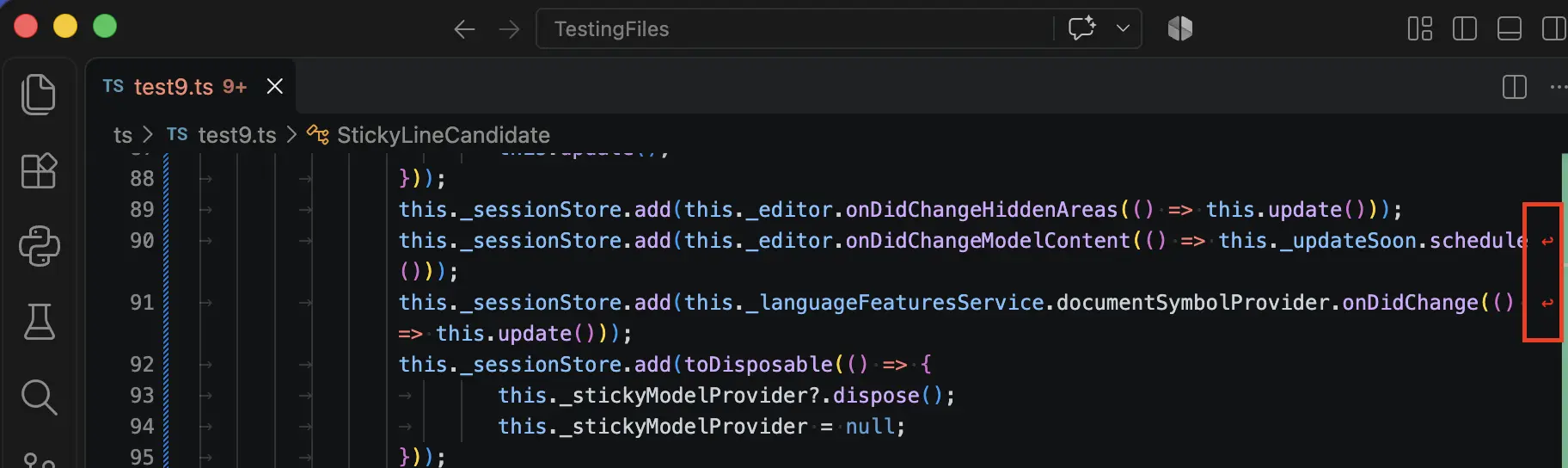
Improved bracket auto-closing behavior
VS Code avoids inserting duplicate closing brackets when you type an opening bracket. If a matching closing bracket exists, VS Code uses it. Otherwise, VS Code inserts one.Proposed APIs
Access token lifetime on authentication sessions
AuthenticationSession exposes an access token but no information about how long that token stays valid. An extension that passes a credential to an SDK with its own refresh callback cannot distinguish between a token that never expires and one that is about to expire. As a result, the extension either refreshes the credential unnecessarily or lets a long-running operation fail when the token expires.The authSessionExpiration proposal adds an optional expiresAfter property to AuthenticationSession:
Code:
export interface AuthenticationSession {
  /**
   * The access token's remaining lifetime, in milliseconds, when the authentication
   * provider returns the session.
   */
  readonly expiresAfter?: number;
}
The value is the remaining lifetime when the session is returned rather than an absolute expiration timestamp. The extension host can run on a different machine than the client, and the two clocks can disagree. Authentication providers that return a cached session recompute the value each time and leave it undefined when the token's expiration is unknown. The built-in Microsoft account provider supplies this value.
Try it out and let us know what you think in the API proposal issue. To learn how to build against a proposal, see using proposed APIs.
Deprecated features and settings
NoneNotable fixes
- For users whose organization disables Agent mode by account policy, ensure the Welcome invitation opening is hidden and that alternative methods of launching the disabled Agents Window (for example, code --agents disallow circumvention of the control). #336968: Fix account policy enforcement in the Agents window
- For users with enterprise-managed OpenTelemetry (OTel) settings, fix a race condition in the configuration of OTel in the Local (i.e. non-Agent Host Harness) to ensure OTel is not dropped. #336701: Fix Enterprise Managed OTel Race in Copilot Extension
Thank you
Source:

Downloads:
Download Visual Studio Code - Free AI Code Editor for Mac, Linux, Windows
Download Visual Studio Code for free on Linux, macOS, and Windows. The open source AI code editor for agent-first development, with built-in multi-agent workflows and AI-powered coding.
Download Visual Studio Code Insiders
Get early access to the latest AI agent features in VS Code with the Insiders Build. New builds daily with cutting-edge agent workflows. Available on Mac, Linux, and Windows.
Last edited: