Vivaldi Address Bar Driving me Insane in Tab Bar and Below


Xplorer4x4

Well-known member
Local time
2:20 AM
Posts
33
OS
Windows 11 Pro Insider Preview Dev
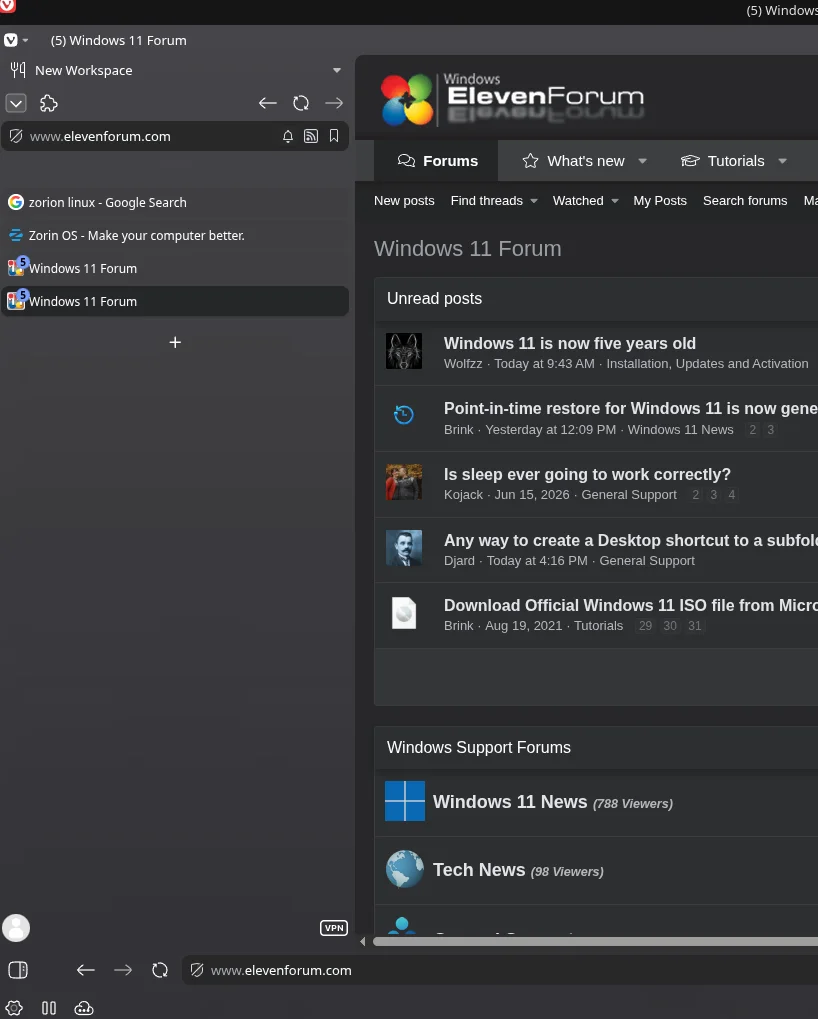
So I have used the vivaldi settings to move my address bar to the bottom. I have my tab bar to the left but I don't want the address bar in my tab bar. I have literally used like 9 reset buttons in the crower and think I have gotten back to stock but no matter what I can not disable the stupid address bar on the left under the extensions puzzle piece! Can someone please help me?!
1782345491049.webp
 

My Computer My Computer

At a glance

Windows 11 Pro Insider Preview DevAMD Ryzen 5 2600xCorsair DDR4-2132AMD B550
OS
Windows 11 Pro Insider Preview Dev
Computer type
PC/Desktop
CPU
AMD Ryzen 5 2600x
Motherboard
MSI MPG B550 GAMING EDGE WIFI
Memory
Corsair DDR4-2132
Graphics Card(s)
AMD B550
Monitor(s) Displays
Spectere C24
Weird, address bar stays put when I move tab bar to left

Screenshot (5).webp
 

My Computers My Computers

  • At a glance

    Windows 11 25H2Intel Core Ultra 9 275HX (24-Core)64GB DDR5 6400MT/sNVIDIA GeForce RTX 5080 and Intel UHD Graphics
    OS
    Windows 11 25H2
    Computer type
    Laptop
    Manufacturer/Model
    Alienware 18 Area-51
    CPU
    Intel Core Ultra 9 275HX (24-Core)
    Motherboard
    Alienware
    Memory
    64GB DDR5 6400MT/s
    Graphics Card(s)
    NVIDIA GeForce RTX 5080 and Intel UHD Graphics
    Sound Card
    Onboard, Realtek high-performance Audio chips (ALC3329 & ALC1708))
    Monitor(s) Displays
    300HZ 18-inch QHD 500 nit Comfort View+
    Screen Resolution
    2560 x 1600
    Hard Drives
    2TB NVMe M.2 PCIe Gen 5 SSD
    Case
    Magnesium Alloy
    Cooling
    Advanced Cryo-Tech Quad-Fan Cooling system & large vapor chamber
    Keyboard
    Cherry MX ultra low profile mechanical keyboard with per key AlienFX RGB lighting
    Mouse
    Logitech MX Master 4
    Browser
    Vivaldi (main), Firefox, Chrome, Edge
    Antivirus
    MS Defender and Malwarebytes Free
  • At a glance

    Windows 11 25H2Qualcomm Snapdragon X Elite (12 Core) ARM bas...16GB LPDDR5Qualcomm Adreno X1-85
    Operating System
    Windows 11 25H2
    Computer type
    Laptop
    Manufacturer/Model
    Microsoft Surface Laptop 7
    CPU
    Qualcomm Snapdragon X Elite (12 Core) ARM based CPU
    Motherboard
    Microsoft Corp.
    Memory
    16GB LPDDR5
    Graphics card(s)
    Qualcomm Adreno X1-85
    Sound Card
    Omnisonic speakers with Dolby Atmos spatial sound
    Monitor(s) Displays
    120 Hz 13.8-inch 600 nit PixelSense Flow touchscreen
    Screen Resolution
    2304x1536
    Hard Drives
    1TB NVMe Gen 4 SSD
    Case
    Anodized Aluminum
    Cooling
    Traditional active cooling fan system
    Keyboard
    Mechanical QWERTY, backlit when in use
    Mouse
    Logitech MX Master 4 and Surface Arc Mouse
    Browser
    Vivaldi (main), Firefox, Chrome, Edge
    Antivirus
    MS Defender and Malwarebytes Free
Strange. This only recentley started after an update and it's driving me nutes.
 

My Computer My Computer

At a glance

Windows 11 Pro Insider Preview DevAMD Ryzen 5 2600xCorsair DDR4-2132AMD B550
OS
Windows 11 Pro Insider Preview Dev
Computer type
PC/Desktop
CPU
AMD Ryzen 5 2600x
Motherboard
MSI MPG B550 GAMING EDGE WIFI
Memory
Corsair DDR4-2132
Graphics Card(s)
AMD B550
Monitor(s) Displays
Spectere C24
right click 'New Workspace' and on that menu click 'remove'
that will remove the workspace search bar

to move the actual search bar over at the bottom
right click one of the buttons 'forward - back'
click customise
then add a flexible space to the far left of the bar
which will move the whole address bar to the right.

best of luck Steve ..
 

My Computers My Computers

  • At a glance

    Windows 11 HomeRyzen 7 5825u64GB DDR4 3200Ryzen 7 5825u
    OS
    Windows 11 Home
    Computer type
    PC/Desktop
    Manufacturer/Model
    HP 24" AiO
    CPU
    Ryzen 7 5825u
    Motherboard
    HP
    Memory
    64GB DDR4 3200
    Graphics Card(s)
    Ryzen 7 5825u
    Sound Card
    RealTek
    Monitor(s) Displays
    24" HP AiO
    Screen Resolution
    1920 x 1080 @60 Hz
    Hard Drives
    1TB WD Blue SN580 M2 SSD Partitioned.
    2x 1TB USB HDD External Backup/Storage.
    PSU
    90W external power brick
    Case
    24" All in One
    Cooling
    Default Air Cooling
    Keyboard
    HP WiFi UK extended
    Mouse
    HP WiFi 3 Button
    Internet Speed
    1GB full fibre
    Browser
    Edge & Firefox
    Antivirus
    AVG Internet Security/Windows Defender
    Other Info
    Mainly Open Source Software
  • At a glance

    Ubuntu 22.04.5 LTSi5 7200u16GB DDR4Intel
    Operating System
    Ubuntu 22.04.5 LTS
    Computer type
    Laptop
    Manufacturer/Model
    Dell 13" Latitude 2017
    CPU
    i5 7200u
    Motherboard
    Dell
    Memory
    16GB DDR4
    Graphics card(s)
    Intel
    Sound Card
    Intel
    Monitor(s) Displays
    13" Dell Laptop
    Hard Drives
    250GB Crucial 2.5" SSD
    Mouse
    Generic WiFi 3 button
    Internet Speed
    WiFi only
    Browser
    Firefox
    Antivirus
    ClamAV TK
    Other Info
    Mainly Open Source Software
Not quite sure this is the answer, or at least I couldn't get it to work.
 

My Computer My Computer

At a glance

Windows 11 Pro Insider Preview DevAMD Ryzen 5 2600xCorsair DDR4-2132AMD B550
OS
Windows 11 Pro Insider Preview Dev
Computer type
PC/Desktop
CPU
AMD Ryzen 5 2600x
Motherboard
MSI MPG B550 GAMING EDGE WIFI
Memory
Corsair DDR4-2132
Graphics Card(s)
AMD B550
Monitor(s) Displays
Spectere C24
Not quite sure this is the answer, or at least I couldn't get it to work.
then please try settings
in the search box 'workspaces'

untick enable 'workspaces'
that should remove workspaces and its search bar
you may have to restart the browser.

best of luck Steve ..
 

My Computers My Computers

  • At a glance

    Windows 11 HomeRyzen 7 5825u64GB DDR4 3200Ryzen 7 5825u
    OS
    Windows 11 Home
    Computer type
    PC/Desktop
    Manufacturer/Model
    HP 24" AiO
    CPU
    Ryzen 7 5825u
    Motherboard
    HP
    Memory
    64GB DDR4 3200
    Graphics Card(s)
    Ryzen 7 5825u
    Sound Card
    RealTek
    Monitor(s) Displays
    24" HP AiO
    Screen Resolution
    1920 x 1080 @60 Hz
    Hard Drives
    1TB WD Blue SN580 M2 SSD Partitioned.
    2x 1TB USB HDD External Backup/Storage.
    PSU
    90W external power brick
    Case
    24" All in One
    Cooling
    Default Air Cooling
    Keyboard
    HP WiFi UK extended
    Mouse
    HP WiFi 3 Button
    Internet Speed
    1GB full fibre
    Browser
    Edge & Firefox
    Antivirus
    AVG Internet Security/Windows Defender
    Other Info
    Mainly Open Source Software
  • At a glance

    Ubuntu 22.04.5 LTSi5 7200u16GB DDR4Intel
    Operating System
    Ubuntu 22.04.5 LTS
    Computer type
    Laptop
    Manufacturer/Model
    Dell 13" Latitude 2017
    CPU
    i5 7200u
    Motherboard
    Dell
    Memory
    16GB DDR4
    Graphics card(s)
    Intel
    Sound Card
    Intel
    Monitor(s) Displays
    13" Dell Laptop
    Hard Drives
    250GB Crucial 2.5" SSD
    Mouse
    Generic WiFi 3 button
    Internet Speed
    WiFi only
    Browser
    Firefox
    Antivirus
    ClamAV TK
    Other Info
    Mainly Open Source Software
If the reset Tab bar doesn't work, then have you tried opening the Toolbar editor, and then just dragging that particular "Address Field" on to any area of the background web page (not the Toolbar editor).

Viva.webp
 

My Computer My Computer

At a glance

Win 11 25H2intel i7-870032GbIntel iGPU
OS
Win 11 25H2
Computer type
PC/Desktop
Manufacturer/Model
custom
CPU
intel i7-8700
Motherboard
Asus Z370 TUF Gaming
Memory
32Gb
Graphics Card(s)
Intel iGPU
Sound Card
Realtek
Hard Drives
Samsung
PSU
Corsair
Cooling
Fans
At best I can move the toolbar to another area, but I cannot remove it. This seemed to be on a fresh install before syncing any extensions, which shouldn't cause this issue.
 

My Computer My Computer

At a glance

Windows 11 Pro Insider Preview DevAMD Ryzen 5 2600xCorsair DDR4-2132AMD B550
OS
Windows 11 Pro Insider Preview Dev
Computer type
PC/Desktop
CPU
AMD Ryzen 5 2600x
Motherboard
MSI MPG B550 GAMING EDGE WIFI
Memory
Corsair DDR4-2132
Graphics Card(s)
AMD B550
Monitor(s) Displays
Spectere C24
Sorry that didn't work. The only other way I know is to use a user CSS style as a stopgap to hide it, which could work until an update gets rid of the bug you seem to be having.
 

My Computer My Computer

At a glance

Win 11 25H2intel i7-870032GbIntel iGPU
OS
Win 11 25H2
Computer type
PC/Desktop
Manufacturer/Model
custom
CPU
intel i7-8700
Motherboard
Asus Z370 TUF Gaming
Memory
32Gb
Graphics Card(s)
Intel iGPU
Sound Card
Realtek
Hard Drives
Samsung
PSU
Corsair
Cooling
Fans
Have you checked out Vivaldi's forum as well?


They also may have some answers.
 

My Computers My Computers

  • At a glance

    Windows 11 Pro 25H2 build: (26200.7623)32GB
    OS
    Windows 11 Pro 25H2 build: (26200.7623)
    Computer type
    Laptop
    Manufacturer/Model
    Microsoft Surface Pro
    Memory
    32GB
  • At a glance

    Microsoft 25H2 ProIntel Core Ultra 764GBIntel Integrated Graphics
    Operating System
    Microsoft 25H2 Pro
    Computer type
    Laptop
    Manufacturer/Model
    Dell Pro 14 - PC14250
    CPU
    Intel Core Ultra 7
    Memory
    64GB
    Graphics card(s)
    Intel Integrated Graphics
    Hard Drives
    Micron 1TB SSD
If the reset Tab bar doesn't work, then have you tried opening the Toolbar editor, and then just dragging that particular "Address Field" on to any area of the background web page (not the Toolbar editor).

View attachment 175124
This kinda worked.

Have you checked out Vivaldi's forum as well?


They also may have some answers.
Ha, I know the username and password and the email to the forum, but I lost my key. I have the username, password, and encryption key for the browser, and they won't help me gain access in any way lol. As far as I know, duplicate accounts aren't allowed, so...this seems quite stupid,.
 

My Computer My Computer

At a glance

Windows 11 Pro Insider Preview DevAMD Ryzen 5 2600xCorsair DDR4-2132AMD B550
OS
Windows 11 Pro Insider Preview Dev
Computer type
PC/Desktop
CPU
AMD Ryzen 5 2600x
Motherboard
MSI MPG B550 GAMING EDGE WIFI
Memory
Corsair DDR4-2132
Graphics Card(s)
AMD B550
Monitor(s) Displays
Spectere C24
Ha, I know the username and password and the email to the forum, but I lost my key. I have the username, password, and encryption key for the browser, and they won't help me gain access in any way lol. As far as I know, duplicate accounts aren't allowed, so...this seems quite stupid,.

Yeah, that is kinda dumb.

They should issue you a new key. As a small browser, marketshare-wise, I don't think they can't afford to alienate any of their users.
 

My Computers My Computers

  • At a glance

    Windows 11 Pro 25H2 build: (26200.7623)32GB
    OS
    Windows 11 Pro 25H2 build: (26200.7623)
    Computer type
    Laptop
    Manufacturer/Model
    Microsoft Surface Pro
    Memory
    32GB
  • At a glance

    Microsoft 25H2 ProIntel Core Ultra 764GBIntel Integrated Graphics
    Operating System
    Microsoft 25H2 Pro
    Computer type
    Laptop
    Manufacturer/Model
    Dell Pro 14 - PC14250
    CPU
    Intel Core Ultra 7
    Memory
    64GB
    Graphics card(s)
    Intel Integrated Graphics
    Hard Drives
    Micron 1TB SSD
Yep it's really quite stupid. I don't even think I ended up using the account. If I did I made like 2 threads. Delete the account and let me start fresh.
 

My Computer My Computer

At a glance

Windows 11 Pro Insider Preview DevAMD Ryzen 5 2600xCorsair DDR4-2132AMD B550
OS
Windows 11 Pro Insider Preview Dev
Computer type
PC/Desktop
CPU
AMD Ryzen 5 2600x
Motherboard
MSI MPG B550 GAMING EDGE WIFI
Memory
Corsair DDR4-2132
Graphics Card(s)
AMD B550
Monitor(s) Displays
Spectere C24
I signed up for this forum just to answer this question. I had this same issue with Vivaldi on Linux I just installed (buh bye Windows 11 with the ads, AI, and BS). It is kind of Vivaldi's fault for making the settings not all that easy to find. Here is how to fix it:
  1. Open SETTINGS.
  2. Click on APPEARANCE on the left.
  3. Under LAYOUT PRESETS, select "Classic".
  4. Click on TABS on the left.
  5. Under TAB BAR POSITION, select where you want the tabs to show.
  6. Close SETTINGS then close Vivaldi and re-open Vivaldi.
 

My Computer My Computer

At a glance

Bazzite (Fedora KDE)
OS
Bazzite (Fedora KDE)
Computer type
PC/Desktop
I signed up for this forum just to answer this question. I had this same issue with Vivaldi on Linux I just installed (buh bye Windows 11 with the ads, AI, and BS). It is kind of Vivaldi's fault for making the settings not all that easy to find. Here is how to fix it:
  1. Open SETTINGS.
  2. Click on APPEARANCE on the left.
  3. Under LAYOUT PRESETS, select "Classic".
  4. Click on TABS on the left.
  5. Under TAB BAR POSITION, select where you want the tabs to show.
  6. Close SETTINGS then close Vivaldi and re-open Vivaldi.
That's great to hear! Usually I am not this resistant to major UI changes, but this was horribly done on their part. Most of the time I actually find them refreshing. Like when Samsung went from TouchWiz to OneUI or Windows changed the Taskbar and Start Menu on major Windows updates. Win 11 was my favorite Windows Taskbar and Start Menu, starting from when they were first introduced in Win 95, I think. I felt each generation's upgrade was new and improved, but Vivaldi dropped the ball on this one.

I have dropped Windows 11 with the exception of playing GTA V just due to modding, as it is a real hurdle on Linux. It is doable, but all the tools are designed for Windows, and it's easier than trying to get them all working with Wine/Proton. I will probably revisit Windows from time to time just to see what's changed but I am really enjoying linux for the most part.
 

My Computer My Computer

At a glance

Windows 11 Pro Insider Preview DevAMD Ryzen 5 2600xCorsair DDR4-2132AMD B550
OS
Windows 11 Pro Insider Preview Dev
Computer type
PC/Desktop
CPU
AMD Ryzen 5 2600x
Motherboard
MSI MPG B550 GAMING EDGE WIFI
Memory
Corsair DDR4-2132
Graphics Card(s)
AMD B550
Monitor(s) Displays
Spectere C24
  • Like
Reactions: NLA
This is why I am enjoying this forum so far, people actually helping people solve issues and not being obnoxious about it too. Simple straightforward steps as well.
 

My Computer My Computer

At a glance

Windows 11 25H2AMD Ryzen 7 7800X3D 8-Core Processor (4.20 GHz)32GbsAMD Radeon RX 9060 XT (16 GB)
OS
Windows 11 25H2
Computer type
PC/Desktop
Manufacturer/Model
ThermalTake LCGS View 7896XS-270
CPU
AMD Ryzen 7 7800X3D 8-Core Processor (4.20 GHz)
Motherboard
ASRock
Memory
32Gbs
Graphics Card(s)
AMD Radeon RX 9060 XT (16 GB)
Sound Card
Realtek audio
Monitor(s) Displays
LG Ultragear
Screen Resolution
2560x1440
Hard Drives
Lexar SSD NQ7A 1TB NVMe M.2
PSU
650W - 80Plus Gold Power Supply
Case
Thermaltake View
Cooling
Liquid Cooled
Keyboard
Razer
Mouse
Razer
Internet Speed
2.0Gbps
Browser
Brave, Firefox
This is why I am enjoying this forum so far, people actually helping people solve issues and not being obnoxious about it too. Simple straightforward steps as well.
I was part of some of the previous Windows forums run by this group and never had a single issue! As much as I love my CachyOS as an OS, the forum is toxic. When I get frustrated from days of no response to basic questions, I become the bad guy because I complain no one will help me and educate me on what's wrong so that I both understand the problem and the solution. I get talked down to by a Linux elitist, and that's ok, but if I mention their attitude and disrespect and that I am grateful they unsubscribed from the thread after a comment. that I proved to be irrelevant anyways, I get a ban. The discord is completely opposite, although I really don't like discord. If I butt in to a random conversation to understand a problem, people are more than happy to teach me! They do it in a respectful and helpful way without snobbing their nose like I should just know everything linux after 6 months.

That's part of the reason I posted here, is these Windows communities have provided great help as well as tips and tricks since Win 7! Never a single confloct that I can recall!
 

My Computer My Computer

At a glance

Windows 11 Pro Insider Preview DevAMD Ryzen 5 2600xCorsair DDR4-2132AMD B550
OS
Windows 11 Pro Insider Preview Dev
Computer type
PC/Desktop
CPU
AMD Ryzen 5 2600x
Motherboard
MSI MPG B550 GAMING EDGE WIFI
Memory
Corsair DDR4-2132
Graphics Card(s)
AMD B550
Monitor(s) Displays
Spectere C24

Latest Support Threads

Back
Top Bottom