

- Local time
- 7:50 AM
- Posts
- 37
- OS
- Windows 11
Hey guys.
Googling this, I found out that this problem or a similar one even occured to some people on Win7. I tried other media players and did not see this behavior. It seems to be a known VLC-Problem of some sorts.
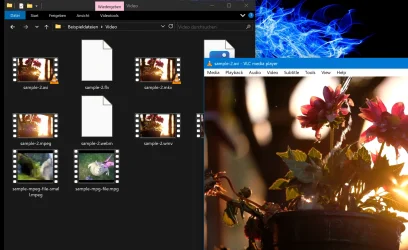
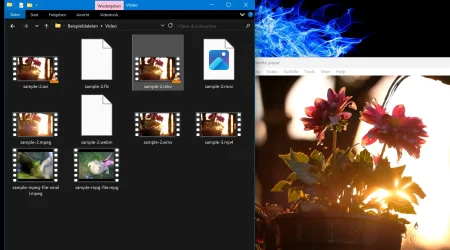
Description: You have an open Window with multiple video files in it. You doubleclick one video and VLC opens said video on top of that File Explorer window, as intended and as every other media player seems to behave (Screenshot1). If you return your mouse to your explorer window with the multiple video files and you click on a new video, the VLC player goes to the background for a moment. If you open a new video now, VLC SHOULD return to the foreground, as it did in my previous WIN10 and as any other media player seems to behave. But it doesnt. Any new video started will start the VLC Player in the background, as seen in Screenshot 2.
Does someone have a similar problem? Did someone have a solution for that? Google AI suggests to disable hardware acc or use the cache differently, both don't work. I deleted my settings, I reinstalled, I installed even a very old VLC. All the same, which lets me assume, that Win11 is somehow responsible for that. I freshly installed Win11, it's updated and so are GPU, VLC and everything else.
I do NOT want it to be always on top. The videos must be in the background when needed and I also know the workaround with Powertools, which you can use to manually pin a window to always be on the top. I would like to have a solution where VLC or the file explorer act how intended. What is it with Windows and windows...
24H2 26100.4770
Googling this, I found out that this problem or a similar one even occured to some people on Win7. I tried other media players and did not see this behavior. It seems to be a known VLC-Problem of some sorts.
Description: You have an open Window with multiple video files in it. You doubleclick one video and VLC opens said video on top of that File Explorer window, as intended and as every other media player seems to behave (Screenshot1). If you return your mouse to your explorer window with the multiple video files and you click on a new video, the VLC player goes to the background for a moment. If you open a new video now, VLC SHOULD return to the foreground, as it did in my previous WIN10 and as any other media player seems to behave. But it doesnt. Any new video started will start the VLC Player in the background, as seen in Screenshot 2.
Does someone have a similar problem? Did someone have a solution for that? Google AI suggests to disable hardware acc or use the cache differently, both don't work. I deleted my settings, I reinstalled, I installed even a very old VLC. All the same, which lets me assume, that Win11 is somehow responsible for that. I freshly installed Win11, it's updated and so are GPU, VLC and everything else.
I do NOT want it to be always on top. The videos must be in the background when needed and I also know the workaround with Powertools, which you can use to manually pin a window to always be on the top. I would like to have a solution where VLC or the file explorer act how intended. What is it with Windows and windows...
24H2 26100.4770
Attachments
My Computer
At a glance
Windows 11Ryzen 5 2600x32GB DDR4RTX 3060
- OS
- Windows 11
- Computer type
- PC/Desktop
- CPU
- Ryzen 5 2600x
- Motherboard
- X470 Gaming Plus
- Memory
- 32GB DDR4
- Graphics Card(s)
- RTX 3060
- Sound Card
- My last one was Soundblaster 16
- Monitor(s) Displays
- 2
- Screen Resolution
- 2560x1440 both; 120Hz and 75Hz
- Hard Drives
- SSD M.2 2TB with System, and a HDD 8TB for stuff






