- Local time
- 5:59 PM
- Posts
- 149
- OS
- Windows 11 Home
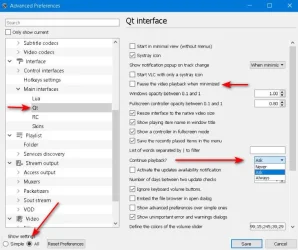
It has happened to me twice on two days that a video i left paused and but not closed it, they somehow resumed play a few minutes later on their own. The only warning is when the symbol for VLC glows a faint red on the start menu. But they don't cover the screen over the browser. But this can cause audio tracks to clash when i decide to go back to watch youtube videos and it has been quite a pest.
I have checked for any Lenovo Vantage smart behavior type modes for like and get no correct help on google or outdated. I am also not getting any password reset emails on a correctly linked email so i can't access videolan forums for help. How do i fix this ?
I have checked for any Lenovo Vantage smart behavior type modes for like and get no correct help on google or outdated. I am also not getting any password reset emails on a correctly linked email so i can't access videolan forums for help. How do i fix this ?
My Computer
At a glance
Windows 11 Home
- OS
- Windows 11 Home
- Computer type
- Laptop
- Manufacturer/Model
- Lenovo Yoga 7 Slim 14I110