VmWare Virtual Machine has 2 hard drives, 3 File Explorer entries


Kim Parker

Well-known member
Member
Local time
11:29 PM
Posts
69
OS
Windows 10 physical Windows 11 virtual
Have been making virtual machines with a single (virtual) hard drive. Experimented with adding a 2nd virtual drive. Worked like it should, can copy files.

The problem is, the 2nd drive is repeated.
I now have C: (once), D: (once) the virtual CD Rom that has VMware tools, and E: that is the added 2nd drive is there twice.

Whatever I put in the topmost E: drive is repeated in the other. How and why is this happening? Is there a way to keep it from happening? If now, is there a way to fix?
Thanks
 

My Computer My Computer

At a glance

Windows 10 physical Windows 11 virtual12128Nvidia
OS
Windows 10 physical Windows 11 virtual
Computer type
PC/Desktop
Manufacturer/Model
Custom Built
CPU
12
Motherboard
Asus
Memory
128
Graphics Card(s)
Nvidia
Screen Resolution
1360x768
Hard Drives
2
PSU
850
Case
Cooler Master
Cooling
fans
Keyboard
ergonomic
Mouse
wired
Browser
several
Antivirus
abast
Could you open Disk Management within the VM and grab a screenshot of what it is that you are seeing?
 

My Computers My Computers

  • At a glance

    Win11 Pro 25H2 (RTM+)Intel i7-14650HX32 GBNo GPU - Built-in Intel Graphics
    OS
    Win11 Pro 25H2 (RTM+)
    Computer type
    PC/Desktop
    Manufacturer/Model
    Acemagic
    CPU
    Intel i7-14650HX
    Memory
    32 GB
    Graphics Card(s)
    No GPU - Built-in Intel Graphics
    Sound Card
    Integrated
    Monitor(s) Displays
    Varies as machine will often be moved to locations with different monitors
    Screen Resolution
    Varies
    Hard Drives
    1 x 1TB Gen 4 NVMe SSD
    PSU
    120W Power Brick
    Keyboard
    Corsair K70 Max RGB Magnetic Keyboard
    Mouse
    Logitech MX Master 3
    Internet Speed
    1Gb Up / 1 Gb Down
    Browser
    Edge
    Antivirus
    Windows Defender
  • At a glance

    Win11 Pro 25H2 (RTM+)Intel i7-1255U16 GBIntel Iris Xe Graphics
    Operating System
    Win11 Pro 25H2 (RTM+)
    Computer type
    Laptop
    Manufacturer/Model
    Lenovo ThinkBook 13x Gen 2
    CPU
    Intel i7-1255U
    Memory
    16 GB
    Graphics card(s)
    Intel Iris Xe Graphics
    Sound Card
    Realtek® ALC3306-CG codec
    Monitor(s) Displays
    13.3-inch IPS Display
    Screen Resolution
    WQXGA (2560 x 1600)
    Hard Drives
    2 TB 4 x 4 NVMe SSD
    PSU
    USB-C / Thunderbolt 4 Power / Charging
    Keyboard
    Backlit, spill resistant keyboard
    Mouse
    Buttonless Glass Precision Touchpad
    Internet Speed
    1Gb Up / 1Gb Down
    Browser
    Edge
    Antivirus
    Windows Defender
    Other Info
    WiFi 6e / Bluetooth 5.1 / Facial Recognition / Fingerprint Sensor / ToF (Time of Flight) Human Presence Sensor
Here is what Disk Management of the virtual shows. It is in File Explorer that the added 2nd virtual drive is repeated
 

Attachments

  • sc.dm.2.drives.jpg
    sc.dm.2.drives.jpg
    73.3 KB · Views: 5

My Computer My Computer

At a glance

Windows 10 physical Windows 11 virtual12128Nvidia
OS
Windows 10 physical Windows 11 virtual
Computer type
PC/Desktop
Manufacturer/Model
Custom Built
CPU
12
Motherboard
Asus
Memory
128
Graphics Card(s)
Nvidia
Screen Resolution
1360x768
Hard Drives
2
PSU
850
Case
Cooler Master
Cooling
fans
Keyboard
ergonomic
Mouse
wired
Browser
several
Antivirus
abast
And here is what shows in File Explorer
 

Attachments

  • sc.vm.2drives.jpg
    sc.vm.2drives.jpg
    25.4 KB · Views: 4

My Computer My Computer

At a glance

Windows 10 physical Windows 11 virtual12128Nvidia
OS
Windows 10 physical Windows 11 virtual
Computer type
PC/Desktop
Manufacturer/Model
Custom Built
CPU
12
Motherboard
Asus
Memory
128
Graphics Card(s)
Nvidia
Screen Resolution
1360x768
Hard Drives
2
PSU
850
Case
Cooler Master
Cooling
fans
Keyboard
ergonomic
Mouse
wired
Browser
several
Antivirus
abast
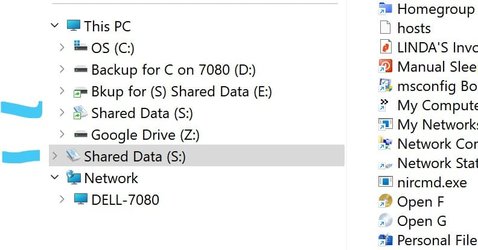
Your drive E: is configured as removeable.
The Windows File explorer shows all removeables twice
 

My Computer My Computer

At a glance

W10 pro 21H1
OS
W10 pro 21H1
@syntoh is correct. Here is my usb drive. It's always been shown twice in left pane of explorer.
 

Attachments

  • Screenshot 2023-01-09 070338.jpg
    Screenshot 2023-01-09 070338.jpg
    36.9 KB · Views: 3

My Computers My Computers

  • At a glance

    Windows 11 Pro 25H2 26200.8875i9-10900 10 core 20 threads32 gbnone-Intel UHD Graphics 630
    OS
    Windows 11 Pro 25H2 26200.8875
    Computer type
    PC/Desktop
    Manufacturer/Model
    Dell Optiplex 7080
    CPU
    i9-10900 10 core 20 threads
    Motherboard
    DELL 0J37VM
    Memory
    32 gb
    Graphics Card(s)
    none-Intel UHD Graphics 630
    Sound Card
    Integrated Realtek
    Monitor(s) Displays
    Benq 27
    Screen Resolution
    2560x1440
    Hard Drives
    2x1tb Solidigm m.2 nvme /External drives 512gb Samsung m.2 sata+2tb Kingston m2.nvme
    PSU
    500w
    Case
    MT
    Cooling
    Dell Premium
    Keyboard
    Logitech wired
    Mouse
    Logitech wireless
    Internet Speed
    so slow I'm too embarrassed to tell
    Browser
    #1 Edge #2 Firefox
    Antivirus
    Defender+MWB Premium
  • At a glance

    Windows 11 Pro 24H2 26200.8875AMD Ryzen 7 6800U32 gbintegrated
    Operating System
    Windows 11 Pro 24H2 26200.8875
    Computer type
    PC/Desktop
    Manufacturer/Model
    Beelink Mini PC SER5
    CPU
    AMD Ryzen 7 6800U
    Memory
    32 gb
    Graphics card(s)
    integrated
    Sound Card
    integrated
    Monitor(s) Displays
    Benq 27
    Screen Resolution
    2560x1440
    Hard Drives
    1TB Crucial nvme
    Keyboard
    Logitech wired
    Mouse
    Logitech wireless
    Internet Speed
    still too embarrassed to tell
    Browser
    Firefox
    Antivirus
    Defender
    Other Info
    System 3 is non compliant Dell 9020 i7-4770/24gb ram Win11 PRO 26200.8875
VM Workstation selected the drives, so I let it. When creating VM with more than one hard drive how would I select so the drives aren't removable? VMWare chose both as nvme.
 

My Computer My Computer

At a glance

Windows 10 physical Windows 11 virtual12128Nvidia
OS
Windows 10 physical Windows 11 virtual
Computer type
PC/Desktop
Manufacturer/Model
Custom Built
CPU
12
Motherboard
Asus
Memory
128
Graphics Card(s)
Nvidia
Screen Resolution
1360x768
Hard Drives
2
PSU
850
Case
Cooler Master
Cooling
fans
Keyboard
ergonomic
Mouse
wired
Browser
several
Antivirus
abast

My Computers My Computers

  • At a glance

    Windows 11 Pro 25H2 26200.8875i9-10900 10 core 20 threads32 gbnone-Intel UHD Graphics 630
    OS
    Windows 11 Pro 25H2 26200.8875
    Computer type
    PC/Desktop
    Manufacturer/Model
    Dell Optiplex 7080
    CPU
    i9-10900 10 core 20 threads
    Motherboard
    DELL 0J37VM
    Memory
    32 gb
    Graphics Card(s)
    none-Intel UHD Graphics 630
    Sound Card
    Integrated Realtek
    Monitor(s) Displays
    Benq 27
    Screen Resolution
    2560x1440
    Hard Drives
    2x1tb Solidigm m.2 nvme /External drives 512gb Samsung m.2 sata+2tb Kingston m2.nvme
    PSU
    500w
    Case
    MT
    Cooling
    Dell Premium
    Keyboard
    Logitech wired
    Mouse
    Logitech wireless
    Internet Speed
    so slow I'm too embarrassed to tell
    Browser
    #1 Edge #2 Firefox
    Antivirus
    Defender+MWB Premium
  • At a glance

    Windows 11 Pro 24H2 26200.8875AMD Ryzen 7 6800U32 gbintegrated
    Operating System
    Windows 11 Pro 24H2 26200.8875
    Computer type
    PC/Desktop
    Manufacturer/Model
    Beelink Mini PC SER5
    CPU
    AMD Ryzen 7 6800U
    Memory
    32 gb
    Graphics card(s)
    integrated
    Sound Card
    integrated
    Monitor(s) Displays
    Benq 27
    Screen Resolution
    2560x1440
    Hard Drives
    1TB Crucial nvme
    Keyboard
    Logitech wired
    Mouse
    Logitech wireless
    Internet Speed
    still too embarrassed to tell
    Browser
    Firefox
    Antivirus
    Defender
    Other Info
    System 3 is non compliant Dell 9020 i7-4770/24gb ram Win11 PRO 26200.8875
As this is default behavior, it has never bothered me. You might see if this will help you. I have not tried so this is not a recommendation. Just passing on information. I would certainly backup the registry key first. USB Drive Appearing Twice In Navigation Pane Of Windows 10/11 File Explorer
I have edited the (physical) Windows registry before when an external drive appeared twice. Just searching now for VmWare VM, and there is a fix by editing a couple files in the virtual machine. One of the links referred to the physical install, then said something about not being the same. Wish I would have kept that, now to find it again.
 

My Computer My Computer

At a glance

Windows 10 physical Windows 11 virtual12128Nvidia
OS
Windows 10 physical Windows 11 virtual
Computer type
PC/Desktop
Manufacturer/Model
Custom Built
CPU
12
Motherboard
Asus
Memory
128
Graphics Card(s)
Nvidia
Screen Resolution
1360x768
Hard Drives
2
PSU
850
Case
Cooler Master
Cooling
fans
Keyboard
ergonomic
Mouse
wired
Browser
several
Antivirus
abast
As this is default behavior, it has never bothered me. You might see if this will help you. I have not tried so this is not a recommendation. Just passing on information. I would certainly backup the registry key first. USB Drive Appearing Twice In Navigation Pane Of Windows 10/11 File Explorer
Just tried the link you gave and it and it worked! Thank you so much. I took the advice of one of the comments and renamed the key inside the brackets with an .OLD extension. Didn't realize at first that I had to use a rename, but after I found that it was named with .OLD (rather than deleting. Very glad I didn't have to use the editing vmware files from the links I had found. Didn't get that at all.

Thank you so much again, very easy to do and it works.
 
Last edited:

My Computer My Computer

At a glance

Windows 10 physical Windows 11 virtual12128Nvidia
OS
Windows 10 physical Windows 11 virtual
Computer type
PC/Desktop
Manufacturer/Model
Custom Built
CPU
12
Motherboard
Asus
Memory
128
Graphics Card(s)
Nvidia
Screen Resolution
1360x768
Hard Drives
2
PSU
850
Case
Cooler Master
Cooling
fans
Keyboard
ergonomic
Mouse
wired
Browser
several
Antivirus
abast
Just tried the link you gave and it and it worked! Thank you so much. I took the advice of one of the comments and renamed the key inside the brackets with an .OLD extension. Didn't realize at first that I had to use a rename, but after I found that it was named with .OLD (rather than deleting. Very glad I didn't have to use the editing vmware files from the links I had found. Didn't get that at all.

Thank you so much again, very easy to do and it works.
Not sure how easy it is with VMWare but I'd configure a VM with a small virtual disk (for "Virtual boot" and the OS while assigning a physical partition or better a physical disk as a 2nd disk. The advantage of that is then you use the real native disk OS I/O rather than virtual I/O which can lead to bottlenecks. Virtual Disk I/O is often a performance problem on VM's which is why commercial servers etc try and "pass thru" real hardware to the VM to achieve almost native performance.

With a Linux VM it's even easier as all you need to do is have a tiny grub / boot "Virtual partition" and the rest on a physical disk. The Grub / boot partition only needs to be around 100 MB !!!!.

This does actually work using a Windows host running VMWare (although these days unless running XP as a VM I'd choose HYPER-V as a matter of course as it is a solid performer these days (and of course Free if you have W11 Pro and above).

Cheers
jimbo
 

My Computer My Computer

At a glance

Windows XP,11 Linux Fedora Rawhide pre-releas...2 X Intel i7
OS
Windows XP,11 Linux Fedora Rawhide pre-release 45
Computer type
PC/Desktop
CPU
2 X Intel i7
Screen Resolution
4KUHD X 2
Found a registry hack.
This must be happening a lot. Believe it or not I found a registry hack from answers.microsoft. com that automagically fixes duolicates in Explorer. Not only that, it can restore to the original if wanted. It is a little more than halfway down the page of this link.

"Redirecting"

Hi Clifford,
Please try the REG file method (remove-duplicate-drives.zip)
Note that you need to log off and log back into your account for the change to take effect.
 
Last edited:

My Computer My Computer

At a glance

Windows 10 physical Windows 11 virtual12128Nvidia
OS
Windows 10 physical Windows 11 virtual
Computer type
PC/Desktop
Manufacturer/Model
Custom Built
CPU
12
Motherboard
Asus
Memory
128
Graphics Card(s)
Nvidia
Screen Resolution
1360x768
Hard Drives
2
PSU
850
Case
Cooler Master
Cooling
fans
Keyboard
ergonomic
Mouse
wired
Browser
several
Antivirus
abast
Not sure how easy it is with VMWare but I'd configure a VM with a small virtual disk (for "Virtual boot" and the OS while assigning a physical partition or better a physical disk as a 2nd disk. The advantage of that is then you use the real native disk OS I/O rather than virtual I/O which can lead to bottlenecks. Virtual Disk I/O is often a performance problem on VM's which is why commercial servers etc try and "pass thru" real hardware to the VM to achieve almost native performance.

With a Linux VM it's even easier as all you need to do is have a tiny grub / boot "Virtual partition" and the rest on a physical disk. The Grub / boot partition only needs to be around 100 MB !!!!.

This does actually work using a Windows host running VMWare (although these days unless running XP as a VM I'd choose HYPER-V as a matter of course as it is a solid performer these days (and of course Free if you have W11 Pro and above).

Cheers
jimbo
I have found that when creating a VMware Workstation virtual, it works for me to start with the default 60 gigs for the operating system, then when Windows is installed I add a 2nd virtual 100 gig hard drive (not pre-allocated) for my files and testing downloads to see if I like before install on something more permanent. I have been installing Windows on that great little Sandisk SSD keyhole portable, then I put my virtuals on that. I use my physical basically to boot up to the Sandisk, and as a holder for my virtuals.

In the past before I found VM my physical would get wear and tear in the registry, and I would try and patch it together without much success and there we were limping along. The SSD/ virtuals are so great, if anything causes trouble I just delete the vm. Like that Voodoo Anti-Virus that I didn't continue with and now every single time I boot up I have to go thru multiple clicks to get rid of the "buy a license now!"

My last 2 virtuals I made, one didn't have the multiple explorer listing and one did. Tried to edit the registry first, to delete the key, didn't work. Then tried the registry hack (as I posted above) and it worked perfectly. So I think I'm all set :)
 

My Computer My Computer

At a glance

Windows 10 physical Windows 11 virtual12128Nvidia
OS
Windows 10 physical Windows 11 virtual
Computer type
PC/Desktop
Manufacturer/Model
Custom Built
CPU
12
Motherboard
Asus
Memory
128
Graphics Card(s)
Nvidia
Screen Resolution
1360x768
Hard Drives
2
PSU
850
Case
Cooler Master
Cooling
fans
Keyboard
ergonomic
Mouse
wired
Browser
several
Antivirus
abast
Back
Top Bottom