VPN General Info


mrmatt

Member
Local time
11:28 AM
Posts
101
Location
UK
OS
Windows 11 Home 25H2 26200.8875
Hello all :)


This is maybe the wrong forum to ask, but as someone as a novice who doesn't know very much I'm wondering if someone could point me in the right direction please.


I'm looking just for a general introduction to VPNs, as I don't know much about them, and may need to in the future ? (such as when I'm away from home, and using public wi-fi, for example public libraries).


If anyone could give me any suggestions please (yes I have tried using G**g**, although there's loads of websites out there and I'm quite clueless).


Thank you.
 

My Computer My Computer

At a glance

Windows 11 Home 25H2 26200.8875
OS
Windows 11 Home 25H2 26200.8875
Computer type
PC/Desktop
Manufacturer/Model
HP
A VPN is typically a paid service that keeps your web browsing secure and private over public Wi-Fi hotspots. VPNs can also get past regional restrictions for video- and music-streaming sites and help you evade government censorship restrictions—though that last one is especially tricky.

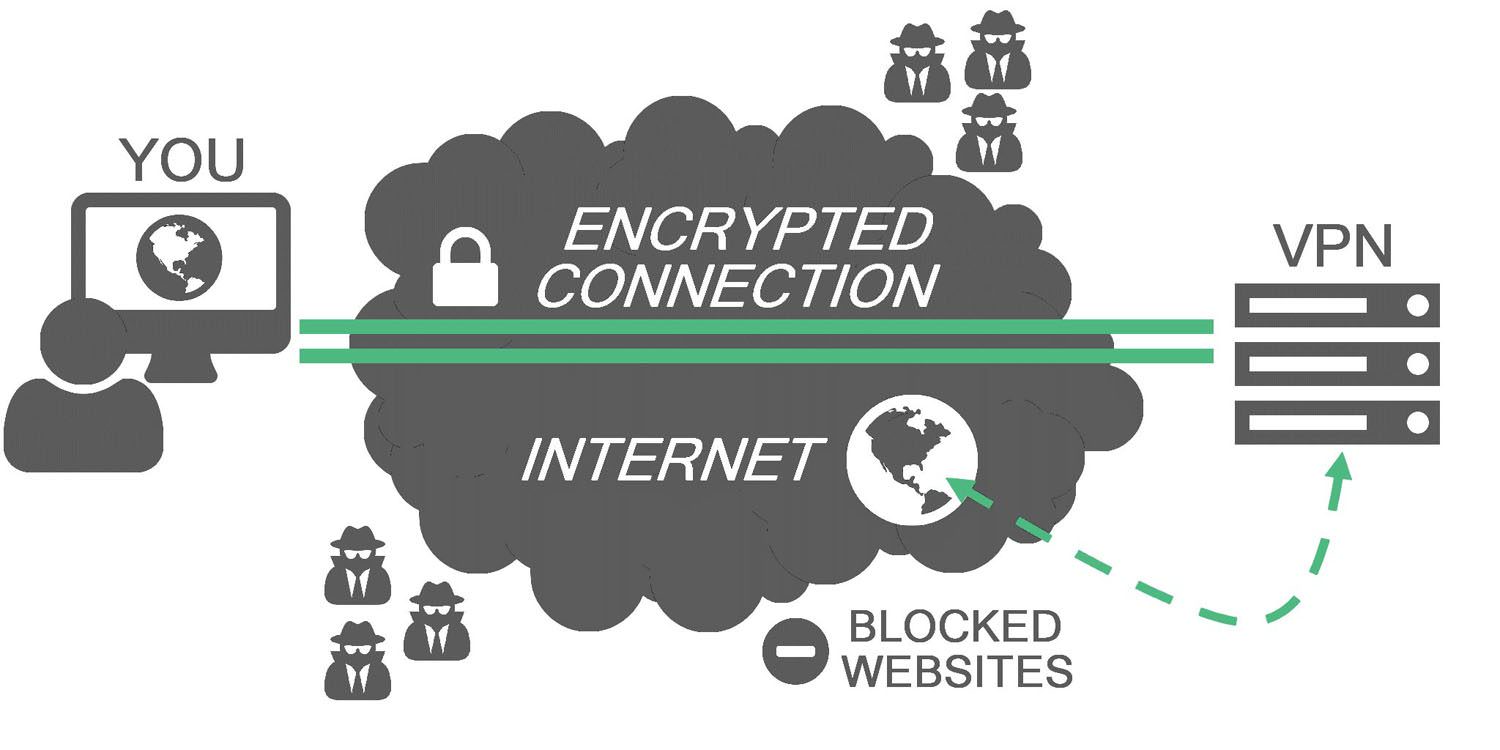
Your PC connects to a VPN server, which can be located in the United States or a foreign country like the United Kingdom, France, Sweden, or Thailand. Your web traffic then passes back and forth through that server. The end result: As far as most websites are concerned, you’re browsing from that server’s geographical location, not your computer’s location.

Once you’re connected to the VPN and are “inside the secure tunnel,” it becomes very difficult for anyone else to spy on your web-browsing activity. The only people who will know what you’re up to are you, the VPN provider (usually an HTTPS connection can mitigate this), and the website you’re visiting.

rMMRlr4.jpg


When you’re on public Wi-Fi at an airport or café, that means hackers will have a harder time stealing your login credentials or redirecting your PC to a phony banking site. Your Internet service provider (ISP), or anyone else trying to spy on you, will also have a near impossible time figuring out which websites you’re visiting.

On top of all that, you get the benefits of spoofing your location. If you’re in Los Angeles, for example, and the VPN server is in the U.K., it will look to most websites that you’re browsing from there, not southern California.

While VPNs are an important tool, they are far from foolproof. The problem with anonymity is there are so many issues to consider—most of which are beyond the scope of this tutorial. Does the VPN you want to use have any issues with data leakage or weak encryption that could expose your web browsing? How much information does your VPN provider log about your activity, and would that information be accessible to the government? Are you using an anonymous identity online on a PC that you never use in conjunction with your actual identity?

Anonymity online is a very difficult goal to achieve. If, however, you are trying to remain private from prying eyes or evade NSA-style bulk data collection as a matter of principle, a reputable VPN will probably be good enough.
 

My Computer My Computer

At a glance

Windows 11AMD Ryzen 7 5700GMicron Technology DDR4-3200 16GBNVIDIA GeForce RTX 3060
OS
Windows 11
Computer type
PC/Desktop
Manufacturer/Model
HP Pavilion
CPU
AMD Ryzen 7 5700G
Motherboard
Erica6
Memory
Micron Technology DDR4-3200 16GB
Graphics Card(s)
NVIDIA GeForce RTX 3060
Sound Card
Realtek ALC671
Monitor(s) Displays
Samsung SyncMaster U28E590
Screen Resolution
3840 x 2160
Hard Drives
SAMSUNG MZVLQ1T0HALB-000H1
Check out YT video on using the free version of Proton. Lacks a lot of settings to the paid version but it allows you to try using a VPN.


My Computers My Computers

  • At a glance

    Win 11 ProAMD Ryzen™ 7 7730U24GB Dual-Channel DDR4 @ 1596MHz (22-22-22-52)512MB ATI AMD Radeon Graphics (ASUStek Comput...
    OS
    Win 11 Pro
    Computer type
    Laptop
    Manufacturer/Model
    ASUS Vivobook
    CPU
    AMD Ryzen™ 7 7730U
    Motherboard
    M1605YA
    Memory
    24GB Dual-Channel DDR4 @ 1596MHz (22-22-22-52)
    Graphics Card(s)
    512MB ATI AMD Radeon Graphics (ASUStek Computer Inc)
    Monitor(s) Displays
    Generic PnP Monitor (1920x1200@60Hz) - P1 PLUS (1920x1080@59Hz)
    Screen Resolution
    1920 X 1200
    Hard Drives
    953GB Western Digital WD
    PSU
    45 Watts
    Mouse
    Lenovo Bluetooth.
    Internet Speed
    500 Mbps
    Browser
    Edge
    Antivirus
    Defender
  • At a glance

    Windows 11AMD Ryzen 7 5800H / 3.2 GHz32 GB DDR4 SDRAM 3200 MHzNVIDIA GeForce RTX 3060 6 GB GDDR6 SDRAM
    Operating System
    Windows 11
    Computer type
    Laptop
    Manufacturer/Model
    ACER NITRO
    CPU
    AMD Ryzen 7 5800H / 3.2 GHz
    Motherboard
    CZ Scala_CAS (FP6)
    Memory
    32 GB DDR4 SDRAM 3200 MHz
    Graphics card(s)
    NVIDIA GeForce RTX 3060 6 GB GDDR6 SDRAM
    Sound Card
    Realtek Audio. NVIDIA High Definition Audio
    Monitor(s) Displays
    15.6" LED backlight 1920 x 1080 (Full HD) 144 Hz
    Screen Resolution
    1920 x 1080 (Full HD)
    Hard Drives
    Samsung 970 Evo Plus 2TB NVMe M.2
    PSU
    180 Watt, 19.5 V
    Mouse
    Lenovo Bluetooth
    Internet Speed
    500 Mbps
    Browser
    Edge
    Antivirus
    Defender
This guide explores what OpenVPN is, how it works, and how to install and use it on Windows installation to have free VPN service.


My Computer My Computer

At a glance

Windows 11AMD Ryzen 7 5700GMicron Technology DDR4-3200 16GBNVIDIA GeForce RTX 3060
OS
Windows 11
Computer type
PC/Desktop
Manufacturer/Model
HP Pavilion
CPU
AMD Ryzen 7 5700G
Motherboard
Erica6
Memory
Micron Technology DDR4-3200 16GB
Graphics Card(s)
NVIDIA GeForce RTX 3060
Sound Card
Realtek ALC671
Monitor(s) Displays
Samsung SyncMaster U28E590
Screen Resolution
3840 x 2160
Hard Drives
SAMSUNG MZVLQ1T0HALB-000H1
Hi all :)


Apologies for delay in replying.


At the moment, it is still very much something I'm trying (but need to) learn about.

I am aware of a few - such as OpenVPN, Nord, Proton. There are many more, I'm sure. I'm just gradually trying to look at them and learn. I am aware I may have to pay to use one.


Having a quick G**g**, it seems these are some of things, I need to look out for:


Encryption (e.g. AES-256 ? Or any more advanced ?)

No-logs policy ?

a 'Kill Switch' ?

Number of devices ? (At the moment, it would just be a smartphone / or laptop; maybe both)


There is a guide I've just found which may help me:


And another one:


Yet another one:


Anoher one:


(and doubtless more.................................)


It will take some time to try and look at those. It is very confusing for a beginner, and so much to be aware of, especially when I don't know much.


I'll leave it there for now.


Thanks for your advice, assistance and time.
 

My Computer My Computer

At a glance

Windows 11 Home 25H2 26200.8875
OS
Windows 11 Home 25H2 26200.8875
Computer type
PC/Desktop
Manufacturer/Model
HP
If you're not concerned about "hiding" your location, the free Cloudflare One Client (formerly Cloudflare WARP) is a good solution.

Simple to use, and offers the side benefit of an IPv6 connection, even if your ISP does not provide it yet.
 

My Computer My Computer

At a glance

Windows 11 Pro 25H2
OS
Windows 11 Pro 25H2
Computer type
Laptop
Manufacturer/Model
Toshiba
A VPN is a remote access tool. It doesn't really enhance security beyond what HTTPS already gets you. It also doesn't do much for privacy. It merely shifts privacy from the ISP to the VPN provider. Unless you're trying to bypass a regional restriction VPNs are not that useful.
 

My Computer My Computer

At a glance

Linux Mint
OS
Linux Mint
Computer type
Laptop
Manufacturer/Model
System76 Lemur Pro
Hello all :)


This is maybe the wrong forum to ask, but as someone as a novice who doesn't know very much I'm wondering if someone could point me in the right direction please.


I'm looking just for a general introduction to VPNs, as I don't know much about them, and may need to in the future ? (such as when I'm away from home, and using public wi-fi, for example public libraries).


If anyone could give me any suggestions please (yes I have tried using G**g**, although there's loads of websites out there and I'm quite clueless).


Thank you.
Hi MrMatt :-) @FreeBooter 's post above VPN General Info post #2 was a really good non too technical explanation of what a VPN is etc.
The only thing a VPN alone cant hide you from NSA data collection thogh.. to hide from those kind of agency's then we talking advanced levels. 🤓
But otherwise his post was good, simple and correct. 😎

as for what service to use.. that depends on your use-case.. paid VS free.. I always prioritize privacy and security...Free then i think Proton is the best choice out there.... Paid, then Proton again and Mullvad.. there is more of them.. but this two i know do not keep any logs etc. So even if the police show up with a warrant, they end up empty handed.

You say learn about VPN.. and that is a wide question.. as VPN as a technology is Networking.... As a service its mostly known for normal users as privacy online

So with your wide question FreeBooter answered it well.... then if you feel you didn't get the answer, then you have to reformulate the question. :-)

If you want learn from Youtube.. look up David Bombal and search his channel for VPN. He will talk about VPN both in a deep technical perspective and also from a privacy perspective.... and he does it in some videos from the UK perspective as he live in UK as you seem to do. :-)


Good luck at your VPN journey 😎
 

My Computers My Computers

  • At a glance

    Linux: Debian, Kali-linux, Alma, Win:7,10IoT,...i3, i5 and i7 From 2gen to 9th gen... Server ...
    OS
    Linux: Debian, Kali-linux, Alma, Win:7,10IoT,2012R
    Manufacturer/Model
    HP Elitebook 840, AsusX53, Aspire E1-572. AsusUX32A, HP Pro3130mt+3010mt, HP Proliant ML150, 3xCustom-PC, i3, i5, i7
    CPU
    i3, i5 and i7 From 2gen to 9th gen... Server dual Xenon
    Hard Drives
    Sata, M.2, SAS
  • At a glance

    Retro: 2003server.XPpro, Win2000, Win98SE, Wi...Oldest intel 8088 up to P4 dual core
    Operating System
    Retro: 2003server.XPpro, Win2000, Win98SE, Win95, Win3.11, MS-DOS, IBM-DOS
    Manufacturer/Model
    Commodore, AST, Fujitsu, Compaq, etc etc. etc Around 15 desktops and 20 laptops in the collection
    CPU
    Oldest intel 8088 up to P4 dual core
    Hard Drives
    MFM, IDE, SCSI
A VPN is a remote access tool. It doesn't really enhance security beyond what HTTPS already gets you. It also doesn't do much for privacy. It merely shifts privacy from the ISP to the VPN provider. Unless you're trying to bypass a regional restriction VPNs are not that useful.

This is probably the single most important piece of advice about VPNs that one can give, don't fall into the marketing traps and understand why you really need it, if at all.
Most likely, VPNs are really useful only for watching foreign Netflix and similar things, but don't actually improve privacy nor security, and they might even be detrimental.
 

My Computer My Computer

At a glance

Windows 11
OS
Windows 11
Computer type
PC/Desktop
This is probably the single most important piece of advice about VPNs that one can give, don't fall into the marketing traps and understand why you really need it, if at all.
Most likely, VPNs are really useful only for watching foreign Netflix and similar things, but don't actually improve privacy nor security, and they might even be detrimental.
True, Marketing is hyping VPN... but.. VPN is a really important link to privacy.. and also security if you are on an open wifi network as hotels internet cafés etc. Yes 99.9% of all internet traffic is going over HTTPS.. but if you are on an open network others can still see what website you are visiting. this can be used for Doxing etc.
VPN is also good for bypassing network restrictions if you are on a network that block some websites etc.
 

My Computers My Computers

  • At a glance

    Linux: Debian, Kali-linux, Alma, Win:7,10IoT,...i3, i5 and i7 From 2gen to 9th gen... Server ...
    OS
    Linux: Debian, Kali-linux, Alma, Win:7,10IoT,2012R
    Manufacturer/Model
    HP Elitebook 840, AsusX53, Aspire E1-572. AsusUX32A, HP Pro3130mt+3010mt, HP Proliant ML150, 3xCustom-PC, i3, i5, i7
    CPU
    i3, i5 and i7 From 2gen to 9th gen... Server dual Xenon
    Hard Drives
    Sata, M.2, SAS
  • At a glance

    Retro: 2003server.XPpro, Win2000, Win98SE, Wi...Oldest intel 8088 up to P4 dual core
    Operating System
    Retro: 2003server.XPpro, Win2000, Win98SE, Win95, Win3.11, MS-DOS, IBM-DOS
    Manufacturer/Model
    Commodore, AST, Fujitsu, Compaq, etc etc. etc Around 15 desktops and 20 laptops in the collection
    CPU
    Oldest intel 8088 up to P4 dual core
    Hard Drives
    MFM, IDE, SCSI
Yes 99.9% of all internet traffic is going over HTTPS.. but if you are on an open network others can still see what website you are visiting. this can be used for Doxing etc.

I don't see how seeing the host name alone could be that bad (ie "elevenforum.com" and nothing more). TLS 1.3 is already on the way of hiding that too, but until then, nothing more than that name leaks. And if you're in a public place, a person standing behind you or a security camera pointing to your screen/keyboard is a far more importan threat.
Even if the trafic is invisible to the wifi peers, it's still visible to the VPN owner, and no VPN can make non-HTTPS websites safe (for the tiny portion that are still plain text).
VPNs shift the threat actor, not removes them.

And all that assuming that the VPN encryption is properly encrypted and secure, which is also very difficult, if possible at all to check. You have to have blind faith on the operator on that.
 

My Computer My Computer

At a glance

Windows 11
OS
Windows 11
Computer type
PC/Desktop
No they really can't see what you're doing. The Wi-Fi operator will see IP addresses and DNS but can't see any data and as long as you're not accepting untrusted https requests they can't see your data. Claiming public wireless is super dangerous is more marketing BS. You can hide you DNS by simply using DoT or DoH


Last edited:

My Computer My Computer

At a glance

Linux Mint
OS
Linux Mint
Computer type
Laptop
Manufacturer/Model
System76 Lemur Pro
I don't see how seeing the host name alone could be that bad (ie "elevenforum.com" and nothing more). TLS 1.3 is already on the way of hiding that too, but until then, nothing more than that name leaks. And if you're in a public place, a person standing behind you or a security camera pointing to your screen/keyboard is a far more importan threat.
Even if the trafic is invisible to the wifi peers, it's still visible to the VPN owner, and no VPN can make non-HTTPS websites safe (for the tiny portion that are still plain text).
VPNs shift the threat actor, not removes them.

And all that assuming that the VPN encryption is properly encrypted and secure, which is also very difficult, if possible at all to check. You have to have blind faith on the operator on that.
i have not heard TLS is working on to hide SNI if you try to hide DNS over DoH.. i will have a look at that.
Public wifi and public place can be the same and also two different things. Showing traffic destination is often harmless if you are a normal user just visiting Facebok or elevenforum. But there is also hotspots that is setup by bad people and people do like internet for free. and also some parts of the world, hotels and other places or ISP's do collect data.
The VPN owner can only see the traffic if they logging.. no VPN provider will look on a screen see what traffic is running thru the server in real-time. This is why choice of VPN provider is important if it is for privacy reasons. and you dont have to have blind faith as some of them do get inspected by third party to prove/show/certify that they do hold up on their statements.
Mullvad VPN even proved it in the newspapers when the police did a raid to get hold of data.. and they ended up empty handed as they do not do logging and they dont even have anything written to disk as all is living in RAM.
True an HTTP site will still be visible from the VPN exit node to the website itself.. a VPN will not fix that step.
 

My Computers My Computers

  • At a glance

    Linux: Debian, Kali-linux, Alma, Win:7,10IoT,...i3, i5 and i7 From 2gen to 9th gen... Server ...
    OS
    Linux: Debian, Kali-linux, Alma, Win:7,10IoT,2012R
    Manufacturer/Model
    HP Elitebook 840, AsusX53, Aspire E1-572. AsusUX32A, HP Pro3130mt+3010mt, HP Proliant ML150, 3xCustom-PC, i3, i5, i7
    CPU
    i3, i5 and i7 From 2gen to 9th gen... Server dual Xenon
    Hard Drives
    Sata, M.2, SAS
  • At a glance

    Retro: 2003server.XPpro, Win2000, Win98SE, Wi...Oldest intel 8088 up to P4 dual core
    Operating System
    Retro: 2003server.XPpro, Win2000, Win98SE, Win95, Win3.11, MS-DOS, IBM-DOS
    Manufacturer/Model
    Commodore, AST, Fujitsu, Compaq, etc etc. etc Around 15 desktops and 20 laptops in the collection
    CPU
    Oldest intel 8088 up to P4 dual core
    Hard Drives
    MFM, IDE, SCSI
i have not heard TLS is working on to hide SNI if you try to hide DNS over DoH.. i will have a look at that.

Have a look at TLS 1.3. While it's still in the initial phases of adoption (very few websites uses it) it really increases privacy by encrypting SNI and the server certificate, hiding the host name completely. Couple it with DoH or DoT and the website name is no longer in plaintext anywhere, leaving only the target IP as the only indicator of where you're going.


Public wifi and public place can be the same and also two different things. Showing traffic destination is often harmless if you are a normal user just visiting Facebok or elevenforum. But there is also hotspots that is setup by bad people and people do like internet for free. and also some parts of the world, hotels and other places or ISP's do collect data.

ISP and anyone with network access can log your trafic if they're in the right place, but again, we have HTTPS to prevent that. Other than the host name there is little info leaked. And any data paterns, usage, trafic, is still visible regardless of VPN, TLS or anything.
If you fear your ISP, you should change your ISP, not introduce yet another actor into the mix, which you must trust separately.

Also if your ISP is logging your trafic, nothing prevents them to analyze and attempt to decrypt it, specially if the VPN doesn't implements perfect forward secrecy, and if they succeed you now have two attack vectors, the ISP you wanted to avoid and the VPN too. There is little warranty that the VPN encryption is actually as secure as they claim, this is another blind faith jump you must do.

On the other hand, the TLS implementations on browser are among the most scrutinized pieces of software ever made, and given that only a handful of browsers exists, all being open source, validating them is not too difficult. Not that they are perfect (far from it) but I would put more trust on Firefox or Chromium rather than a VPN operator.


Claiming public wireless is super dangerous is more marketing BS.

It is super dangerous, in addition to being BS. The whole internet is super dangerous, literally no mans land.
That's why we have TLS, which is designed specifically to be secure even in scenarios where every intermediate host is hostile.
With HTTPS using untrusted networks become secure, as long as your device is not tampered with.[/QUOTE]
 

My Computer My Computer

At a glance

Windows 11
OS
Windows 11
Computer type
PC/Desktop
Have a look at TLS 1.3. While it's still in the initial phases of adoption (very few websites uses it) it really increases privacy by encrypting SNI and the server certificate, hiding the host name completely. Couple it with DoH or DoT and the website name is no longer in plaintext anywhere, leaving only the target IP as the only indicator of where you're going.


ISP and anyone with network access can log your trafic if they're in the right place, but again, we have HTTPS to prevent that. Other than the host name there is little info leaked. And any data paterns, usage, trafic, is still visible regardless of VPN, TLS or anything.
If you fear your ISP, you should change your ISP, not introduce yet another actor into the mix, which you must trust separately.
I had a quick look yesterday.. Yes they did look in to it, but.. the abandon the idea as it requires another encryption layer, so there is no plans on hiding the client/server hello handshake.

There you are wrong. With an VPN your traffic with your internet-connection ID is not visible. If you are the only user of that VPN IP then they can connect it. If you are one among 100 user on the same IP they can not connect what traffic that is from you.
A lot of EU countries has ISP/phone meta-data collection up to 6 months for the police to use.. no ISP or phone operator can resist that law. VPN servises is not an ISP and is therefor not forced to meta-data collection.
So switching ISP dont do a thing.
In US there you have the ISP's selling data to databrokers, that is even worse.. how do you avoid that.. if all ISP's doing that in US?

Also if your ISP is logging your trafic, nothing prevents them to analyze and attempt to decrypt it, specially if the VPN doesn't implements perfect forward secrecy, and if they succeed you now have two attack vectors, the ISP you wanted to avoid and the VPN too. There is little warranty that the VPN encryption is actually as secure as they claim, this is another blind faith jump you must do.
you have to have a really poor VPN or you give someone the encryption key if the ISP or even NSA should be able to encrypt VPN traffic.
A lot of company's with people working from home using VPN would be at risk if it was that easy to decrypt VPN traffic.

On the other hand, the TLS implementations on browser are among the most scrutinized pieces of software ever made, and given that only a handful of browsers exists, all being open source, validating them is not too difficult. Not that they are perfect (far from it) but I would put more trust on Firefox or Chromium rather than a VPN operator.
you have more then just the browser that connecting to the internet.. and if you using windows out of the box, the traffic is massive. Have you ever looked at it with wireshark?

It is super dangerous, in addition to being BS. The whole internet is super dangerous, literally no mans land.
That's why we have TLS, which is designed specifically to be secure even in scenarios where every intermediate host is hostile.
With HTTPS using untrusted networks become secure, as long as your device is not tampered with.

I know you answred another person... Not the whole internet, but yeah big parts of it is dangerous.. and even more if you using darknet now and then.
 

My Computers My Computers

  • At a glance

    Linux: Debian, Kali-linux, Alma, Win:7,10IoT,...i3, i5 and i7 From 2gen to 9th gen... Server ...
    OS
    Linux: Debian, Kali-linux, Alma, Win:7,10IoT,2012R
    Manufacturer/Model
    HP Elitebook 840, AsusX53, Aspire E1-572. AsusUX32A, HP Pro3130mt+3010mt, HP Proliant ML150, 3xCustom-PC, i3, i5, i7
    CPU
    i3, i5 and i7 From 2gen to 9th gen... Server dual Xenon
    Hard Drives
    Sata, M.2, SAS
  • At a glance

    Retro: 2003server.XPpro, Win2000, Win98SE, Wi...Oldest intel 8088 up to P4 dual core
    Operating System
    Retro: 2003server.XPpro, Win2000, Win98SE, Win95, Win3.11, MS-DOS, IBM-DOS
    Manufacturer/Model
    Commodore, AST, Fujitsu, Compaq, etc etc. etc Around 15 desktops and 20 laptops in the collection
    CPU
    Oldest intel 8088 up to P4 dual core
    Hard Drives
    MFM, IDE, SCSI

Latest Support Threads

Back
Top Bottom