W10 / W11 Together


MourningStar

(-(-_(-_-)_-)-)
Member
VIP
Local time
9:26 AM
Posts
40
Location
USA
OS
System 1-W10/System 2-W11
Hi All -

The media bombardment of End-of-Ten has me looking for options to keep all the time and sweat I put into personalizing my system going as long as this machine has life. These pundits warn to avoid the risk and pain is get a new pc. Very few are sympathetic and advise to disconnect from the 'outside' and have certainty with data that is put on the machine by other means. Fortunately, I don't really need the internet for 90% of what I use my system for. Still, I don't want to be totally ignorant of risks during the 10% I do spend on the www.

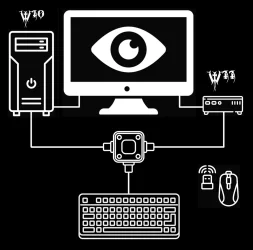
I recently have been wrestling with several inexpensive internet use-only options to bring W11 into my life. I started with looking at laptops and tablets. A lot of possibilities with that route and the shopping adventure was quite numbing. However, my deskspace is crowded with lots of other gear and gadgets. I am so focused on my personal projects that I rarely come out for air. This search venture was quite educational. As a result this road has led me to discover a technology that has been around for sometime but completely foreign to my mental-basement existence. The most common term is a mini-PC. They come with the W11-Pro pre-installed and from what I have read it looks to be a solution that even I may be able to do on my own. I did this layout of how I think it can be implemented and seems to be simple enough for someone as low-tech as me to assemble.

Your thoughts, advice and recommendations ...
-thank you

ps - I liken my situation to : my wreckless youth in the 60's I had this muscle car that I lovingly custom modified for the drag strip and car shows. Then came the '70s and post oil-embargo California which rendered my love to no longer be street legal. Rather than 'update' it I bought a cheap law-compliant rice burner for 'daylight' travel, all the while keeping my beast for the strip and 'night' prowls.
 

Attachments
  • W10-11.webp
    W10-11.webp
    33.2 KB · Views: 4

My Computers

System One System Two

  • OS
    System 1-W10/System 2-W11
    Computer type
    PC/Desktop
    Manufacturer/Model
    Predator Orion 9000
    CPU
    Intel® Processor Core™ i7 4.70 GHz
    Motherboard
    American Megatrends Inc.
    Memory
    32 GB DDR4 SDRAM
    Graphics Card(s)
    NVIDIA® GeForce® RTX™ 2080 Ti 11 GB GDDR6
    Sound Card
    Sound Blaster X Pro
    Monitor(s) Displays
    Predator X32X3
    Screen Resolution
    3840 x 2160
    Hard Drives
    SSD 256 GB / HDD 2 TB
    PSU
    1000W Modular
    Case
    Metal
    Cooling
    Liquid / Fans - Cooler Master® CPU Liquid Cooler* / IceTunnel® Airflow Management
    Keyboard
    Logitech G510s
    Mouse
    MA M1Pro Trackball M570
    Internet Speed
    500/500
    Browser
    Edge / Moon / Fox
    Antivirus
    Windows Security / Malwarebytes
    Other Info
    Optical Drive - DVD Writer

    Bose Companion 5 2.1 Multimedia Speaker System
  • Operating System
    Windows 11 Pro
    Computer type
    PC/Desktop
    Manufacturer/Model
    BMAX B4 Turbo
    CPU
    Intel N150
    Motherboard
    AMI
    Memory
    16GB DDR4
    Hard Drives
    512GB SSD
@MourningStar

Welcome to ElevenForum. :-)

I believe your laptop is already compatible with Windows 11.
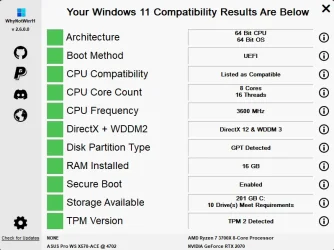
You can run WhyNotWin11.exe ...and if you get all GREEN boxes, you're good to go.

It should look like this...

WhynotWin11 results.webp


If it is compatible, you can just do an In-Place Upgrade from Win 10 to Win 11.
It will keep all your files and programs intact.

You don't "need" to buy another PC.


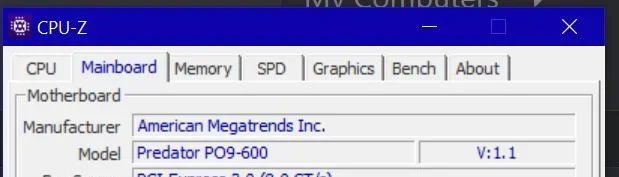
NOTE: Also, you can get CPU-Z here, which will help you fill out your computer specs, properly.
For example... American Megatrends writes BIOSes, they don't make motherboards.
And you should include the make/model of your RAM as well.
The ZIP version is the portable version.


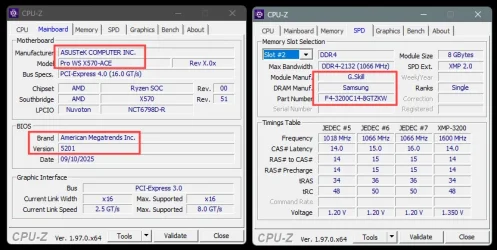
Here, you can see that my motherboard is an Asus Pro WS X570-ACE (BIOS 5201)
...and my RAM is G.Skill (F4-3200C14D-16GTZKW)


Image1.webp


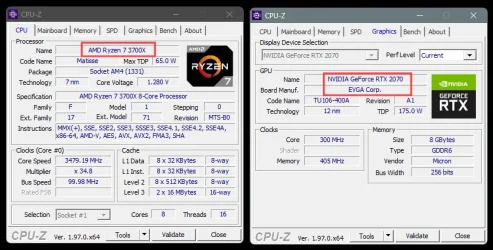
Same for the CPU (AMD Ryzen 7 3700X), and the graphics card (EVGA RTX 2070)...

Image1.webp


And because I just know that you're gonna fix up your computer specs, I've given you ten points. :-)
 
Last edited:

My Computers

System One System Two

  • OS
    Win 11 Home ♦♦♦26200.8655 ♦♦♦♦♦♦♦25H2
    Computer type
    PC/Desktop
    Manufacturer/Model
    Built by Ghot® [May 2020]
    CPU
    AMD Ryzen 7 3700X
    Motherboard
    Asus Pro WS X570-ACE (BIOS 5302)
    Memory
    G.Skill (F4-3200C14D-16GTZKW)
    Graphics Card(s)
    EVGA RTX 2070 (08G-P4-2171-KR)
    Sound Card
    Realtek ALC1220P / ALC S1220A
    Monitor(s) Displays
    Dell U3011 30"
    Screen Resolution
    2560 x 1600
    Hard Drives
    2x Samsung 860 EVO 500GB,
    WD 4TB Black FZBX - SATA III,
    WD 8TB Black FZBX - SATA III,
    DRW-24B1ST CD/DVD Burner
    PSU
    PC Power & Cooling 750W Quad EPS12V
    Case
    Cooler Master ATCS 840 Tower
    Cooling
    CM Hyper 212 EVO (push/pull)
    Keyboard
    Ducky DK9008 Shine II Blue LED
    Mouse
    Logitech Optical M-100
    Internet Speed
    300/300
    Browser
    Firefox (latest)
    Antivirus
    Bitdefender Total Security
    Other Info
    Speakers: Klipsch Pro Media 2.1
  • Operating System
    Windows XP Pro 32bit w/SP3
    Computer type
    PC/Desktop
    Manufacturer/Model
    Built by Ghot® (not in use)
    CPU
    AMD Athlon 64 X2 5000+ (OC'd @ 3.2Ghz)
    Motherboard
    ASUS M2N32-SLI Deluxe Wireless Edition
    Memory
    TWIN2X2048-6400C4DHX (2 x 1GB, DDR2 800)
    Graphics card(s)
    EVGA 256-P2-N758-TR GeForce 8600GT SSC
    Sound Card
    Onboard
    Monitor(s) Displays
    ViewSonic G90FB Black 19" Professional (CRT)
    Screen Resolution
    up to 2048 x 1536
    Hard Drives
    WD 36GB 10,000rpm Raptor SATA
    Seagate 80GB 7200rpm SATA
    Lite-On LTR-52246S CD/RW
    Lite-On LH-18A1P CD/DVD Burner
    PSU
    PC Power & Cooling Silencer 750 Quad EPS12V
    Case
    Generic Beige case, 80mm fans
    Cooling
    ZALMAN 9500A 92mm CPU Cooler
    Keyboard
    Logitech Classic Keybooard 200
    Mouse
    Logitech Optical M-BT96a
    Internet Speed
    300/300
    Browser
    Firefox 3.x ??
    Antivirus
    Symantec (Norton)
    Other Info
    Still assembled, still runs. Haven't turned it on for 15 years?
Thank you Ghot for your post. I do not have a laptop and I apologize if I was unclear on the point that I will not upgrade The Predator to W11.

(I did d/l the sysinfo tool you mentioned and my specs are spot on)
 

Attachments

  • Capture.webp
    Capture.webp
    13.2 KB · Views: 1

My Computers

System One System Two

  • OS
    System 1-W10/System 2-W11
    Computer type
    PC/Desktop
    Manufacturer/Model
    Predator Orion 9000
    CPU
    Intel® Processor Core™ i7 4.70 GHz
    Motherboard
    American Megatrends Inc.
    Memory
    32 GB DDR4 SDRAM
    Graphics Card(s)
    NVIDIA® GeForce® RTX™ 2080 Ti 11 GB GDDR6
    Sound Card
    Sound Blaster X Pro
    Monitor(s) Displays
    Predator X32X3
    Screen Resolution
    3840 x 2160
    Hard Drives
    SSD 256 GB / HDD 2 TB
    PSU
    1000W Modular
    Case
    Metal
    Cooling
    Liquid / Fans - Cooler Master® CPU Liquid Cooler* / IceTunnel® Airflow Management
    Keyboard
    Logitech G510s
    Mouse
    MA M1Pro Trackball M570
    Internet Speed
    500/500
    Browser
    Edge / Moon / Fox
    Antivirus
    Windows Security / Malwarebytes
    Other Info
    Optical Drive - DVD Writer

    Bose Companion 5 2.1 Multimedia Speaker System
  • Operating System
    Windows 11 Pro
    Computer type
    PC/Desktop
    Manufacturer/Model
    BMAX B4 Turbo
    CPU
    Intel N150
    Motherboard
    AMI
    Memory
    16GB DDR4
    Hard Drives
    512GB SSD
I, too, will not be moving my custom Win10 desktop to Win11. I use several anti-malware apps fhat scan fne PC daily and I ldo very little browsing. Quicken, MS Word & Excel and a few other apps is all,I use it for.

I had to replace the Win7 desktop in my hamshack lwhen it bit the dust. The Win7 box was running just a single on-line app.."live" weather radar (3-6 minute delay). I now have a Win11 laptop running that app.

Posts on fhe Win11 forum are replete of reports of Win11 problems. No, thanks for now but maybe in a year or so. I didn't make the switch from Win7 to Win10 on our desktop umtil 10 had been out for a long while and seemed stable.
 

My Computer

System One

  • OS
    Windows 11 Pro @2N23
    Computer type
    Laptop
    Manufacturer/Model
    Dell
    CPU
    AMD Ryzen 7
    Memory
    16gb
    Hard Drives
    M2 2TB SSD
    Browser
    Edge
    Antivirus
    ioBit
Every new iteration of Windows since Windows 3.1 comes with the same hand wringing paranoia and fear of upgrading. The people that post about the upgrade are the ones that have problems.
No one hears from the several hundreds of Millions of users whose update goes smoothly. No one reports that there computer is running well. Only from people with problems.

Just like Windows 7, when support ended, you found that the computer kept working fine and you didn't feel it necessary to upgrade. The same thing will happen with Windows 10. The computer will still work. Anti-Virus software is helpful, but the security flaws with be with the OS; anti-virus does not help without updates to the OS. If you don't do much online, your computer running Windows 10 will work for a very long time.
 

My Computer

System One

  • OS
    Windows 11 Pro Insider 64 bit 25H2 26200.5742
    Computer type
    PC/Desktop
    Manufacturer/Model
    Gigabyte Z390 UD
    CPU
    Intel Core i7 9700K 3.60
    Motherboard
    Gigabyte Z390 UD
    Memory
    16 GB
    Graphics Card(s)
    nVidia GEForce RTX 2060 Super
    Sound Card
    onboard
    Monitor(s) Displays
    Two 27" Dell 4K monitors
    Screen Resolution
    3840 x 2160
    Hard Drives
    M.2 NVME SSD, 500 GB; Two 2TB Mechanical HDD's
    PSU
    850w PSU
    Case
    Cyberpower PC
    Cooling
    Water cooled
    Keyboard
    Backlit Cyberpower gaming keyboard
    Mouse
    Backlit Cyberpower gaming mouse
    Internet Speed
    1 GB mbps
    Browser
    Brave
    Antivirus
    Windows Security
Thank you rk911 and Spunk for your posts. Yeah, my pc road began with a Macintosh Plus in the mid to late '80s. Then the Windows machines began to creep in to our workspace, my 1st thought was man!, what a rip-off (of the apple ui). Management may have been in bed with MS because all the apple stuff was phased out and I had no choice. For years I went pc-less in the home and started with 95 then ME followed by 7 and now 10. A lot has changed and I have no fear of Windows 11. It's just I feel better if it's the OS that comes with the computer as were the one's of my past (all were HP except the current one). I never changed OS on my previous machines, so call me a dinosaur that lives by "if it ain't broke ...".


My Computers

System One System Two

  • OS
    System 1-W10/System 2-W11
    Computer type
    PC/Desktop
    Manufacturer/Model
    Predator Orion 9000
    CPU
    Intel® Processor Core™ i7 4.70 GHz
    Motherboard
    American Megatrends Inc.
    Memory
    32 GB DDR4 SDRAM
    Graphics Card(s)
    NVIDIA® GeForce® RTX™ 2080 Ti 11 GB GDDR6
    Sound Card
    Sound Blaster X Pro
    Monitor(s) Displays
    Predator X32X3
    Screen Resolution
    3840 x 2160
    Hard Drives
    SSD 256 GB / HDD 2 TB
    PSU
    1000W Modular
    Case
    Metal
    Cooling
    Liquid / Fans - Cooler Master® CPU Liquid Cooler* / IceTunnel® Airflow Management
    Keyboard
    Logitech G510s
    Mouse
    MA M1Pro Trackball M570
    Internet Speed
    500/500
    Browser
    Edge / Moon / Fox
    Antivirus
    Windows Security / Malwarebytes
    Other Info
    Optical Drive - DVD Writer

    Bose Companion 5 2.1 Multimedia Speaker System
  • Operating System
    Windows 11 Pro
    Computer type
    PC/Desktop
    Manufacturer/Model
    BMAX B4 Turbo
    CPU
    Intel N150
    Motherboard
    AMI
    Memory
    16GB DDR4
    Hard Drives
    512GB SSD
I miss W7...prolly the best version of Windows...ever!
 

My Computer

System One

  • OS
    Windows 11 Pro @2N23
    Computer type
    Laptop
    Manufacturer/Model
    Dell
    CPU
    AMD Ryzen 7
    Memory
    16gb
    Hard Drives
    M2 2TB SSD
    Browser
    Edge
    Antivirus
    ioBit
Windows 11 official hardware requirements are at least 8th generation Intel Core-i3 or higher or at least 2nd generation AMD Ryzen or higher CPU, 4GB RAM and 64GB hard disk space, UEFI firmware (not Legacy BIOS), Secure Boot, TMP 2.0 and WDDM 2.0 or newer graphics card. Of course this is intentional to scare users and upgrade their systems or buy new. Remember everyone upgrading to install Vista? It was later revealed it wasn't necessary! The real hardware requirements (bypassing the compatibility check) are for Windows 11 21H2, 22H2 and 23H2 ANY 64-bit CPU except 1st generation AMD 64, with at least 2GB RAM and 40GB+ hard disk space. No UEFI firmware required, Windows 11 can boot in Legacy BIOS mode (aka CSM), much like Windows 10. No Secure Boot, no TPM necessary. Also no WDDM 2.0 graphics card, you can use any WDDM graphics card and its Vista 64-bit drivers. You can even use a much older graphics card without WDDM drivers, Windows will install the Microsoft Basic Display Adapter drivers (aka Standard VGA in earlier Windows). In fact as an experiment I managed to install Windows 11 23H2 to an Intel Pentium 645 socket 775 CPU (1st generation Intel 64-bit CPUs), with 2GB RAM and 40GB mechanical IDE hard disk (no SATA) without UEFI firmware, without TPM, without Secure Boot and even without WDDM graphics card! Yes, it took more than one hour to install, and yes, it was very slow, but I wanted to prove Microsoft hardware requirements are BS.

In Windows 24H2 and 25H2 there is one more requirement that cannot by bypassed, the CPU must support SSE4.2 instructions. This means at least 1st generation Intel Core-i3 or equivalent AMD. The rest hardware requirements are the same and can be bypassed. So before you buy anything new, since your old one covers your needs, consider upgrading from Windows 10 to Windows 11 keeping all your apps and data.

PS: Back in Vista the rumors said without a WDDM graphics card you are doomed and other BS. Much like what they say today for non-compliant PCs. Later it was revealed that if you run the 32-bit version of Vista (most back then did as all they had was a 32-bit Intel Pentium 4 or lower), you can use the Windows XP graphics drivers (aka XPDM mode). The same is true for Windows 7 32-bit, it too can use the Windows XP graphics drivers if you don't have any WDDM graphics card. Windows 8 and later removed that option and they force the Microsoft Basic Display Adapter driver which is WDDM but without any hardware acceleration and makes the computer crawl. At least in XPDM mode you had full DirectX 9.0 acceleration and the computer had the same performance as running Windows XP.

PS2: If you don't like the Windows 11 interface, there are utilities to make it look like Windows 10 or even Windows 7.
 

My Computers

System One System Two

  • OS
    Windows 11 Pro 23H2 (5699), 25H2 (8655)
    Computer type
    Laptop
    Manufacturer/Model
    Acer Extensa 5630EZ
    CPU
    Mobile DualCore Intel Core 2 Duo T7250, 2000 MHz
    Motherboard
    Acer Extensa 5630
    Memory
    4GB
    Graphics Card(s)
    Mobile Intel(R) GMA 4500M (Mobile 4 series)
    Sound Card
    Realtek ALC268 @ Intel 82801IB ICH9 - High Definition Audio Controller
    Monitor(s) Displays
    1
    Screen Resolution
    1280x800
    Hard Drives
    Samsung SSD 850 EVO 250GB SATA Device (250 GB, SATA-III)
    Internet Speed
    VDSL 50 Mbps
    Browser
    MICROSOFT EDGE
    Antivirus
    WINDOWS DEFENDER
    Other Info
    Legacy MBR installation, no TPM, no Secure Boot, no WDDM 2.0 graphics drivers, no SSE4.2, cannot get more unsupported ;) This is only my test laptop. I had installed Windows 11 here before upgrading my main PC. For my main PC I use everyday see my 2nd system specs.
  • Operating System
    Windows 11 Pro v25H2 (build 26200.8655)
    Computer type
    PC/Desktop
    Manufacturer/Model
    Custom-built PC
    CPU
    Intel Core-i7 3770 3.40GHz s1155 (3rd generation)
    Motherboard
    Asus P8H61 s1155 ATX
    Memory
    2x Kingston Hyper-X Blu 8GB DDR3-1600
    Graphics card(s)
    GIGABYTE GeForce RTX 3050 WINDFORCE OC V2 6GB (GV-N3050WF2OCV2-6GD)
    Sound Card
    Realtek HD audio (ALC887)
    Monitor(s) Displays
    Sony Bravia KDL-19L4000 19" LCD TV via VGA
    Screen Resolution
    1440x900 32-bit 60Hz
    Hard Drives
    WD Blue SA510 2.5 1000GB SSD as system disk, Western Digital Caviar Purple 4TB SATA III (WD40PURZ) as second
    PSU
    Thermaltake Litepower RGB 550W Full Wired
    Case
    SUPERCASE MIDI-TOWER
    Cooling
    Deepcool Gamma Archer CPU cooler, 1x 8cm fan at the back
    Keyboard
    Mitsumi 101-key PS/2
    Mouse
    Sunnyline OptiEye PS/2
    Internet Speed
    100Mbps
    Browser
    Microsoft Edge, Mozilla Firefox
    Antivirus
    Microsoft Windows Defender
    Other Info
    Legacy BIOS (MBR) installation, no TPM, no Secure Boot, WDDM 3.0 graphics drivers, WEI score 7.4
... So before you buy anything new, since your old one covers your needs, consider upgrading from Windows 10 to Windows 11 ...

PS2: If you don't like the Windows 11 interface, there are utilities to make it look like Windows 10 or even Windows 7.
Thank you spapakons for a very educational post.

As referenced in the OP, I'm a driver basically with extremely light mechanic skills. I feel more confident and safe with a system that is fresh out of the factory and 'ready to roll'. 'Scotty' would let me visit the engine room, and then send me back to the bridge.

I will look into the utilities you refer to - thx
 

My Computers

System One System Two

  • OS
    System 1-W10/System 2-W11
    Computer type
    PC/Desktop
    Manufacturer/Model
    Predator Orion 9000
    CPU
    Intel® Processor Core™ i7 4.70 GHz
    Motherboard
    American Megatrends Inc.
    Memory
    32 GB DDR4 SDRAM
    Graphics Card(s)
    NVIDIA® GeForce® RTX™ 2080 Ti 11 GB GDDR6
    Sound Card
    Sound Blaster X Pro
    Monitor(s) Displays
    Predator X32X3
    Screen Resolution
    3840 x 2160
    Hard Drives
    SSD 256 GB / HDD 2 TB
    PSU
    1000W Modular
    Case
    Metal
    Cooling
    Liquid / Fans - Cooler Master® CPU Liquid Cooler* / IceTunnel® Airflow Management
    Keyboard
    Logitech G510s
    Mouse
    MA M1Pro Trackball M570
    Internet Speed
    500/500
    Browser
    Edge / Moon / Fox
    Antivirus
    Windows Security / Malwarebytes
    Other Info
    Optical Drive - DVD Writer

    Bose Companion 5 2.1 Multimedia Speaker System
  • Operating System
    Windows 11 Pro
    Computer type
    PC/Desktop
    Manufacturer/Model
    BMAX B4 Turbo
    CPU
    Intel N150
    Motherboard
    AMI
    Memory
    16GB DDR4
    Hard Drives
    512GB SSD
To change the start menu and start button, Open Shell. To make taskbar and File Explorer behave like in Windows 10, Explorer Patcher. You can install both and combine. To run good old Vista/Windows 7 gadgets in Windows 11, 8gadgetpack. Beware that latest versions support only 64-bit gadgets. To use an old 32-bit gadget use version 37. There is a script to even install Windows Media Center, yes the one controlled by a remote! Also search for Winaero. He has made tools to get the old calculator back (the modern one is huge and ugly), to get old MS Paint and many others. To extract system icons use Customizer God or Resource Hacker. Same to replace the icons in the respective Windows 11 system files. Most of it are discussed in the Personalization section of the Forum.
 

My Computers

System One System Two

  • OS
    Windows 11 Pro 23H2 (5699), 25H2 (8655)
    Computer type
    Laptop
    Manufacturer/Model
    Acer Extensa 5630EZ
    CPU
    Mobile DualCore Intel Core 2 Duo T7250, 2000 MHz
    Motherboard
    Acer Extensa 5630
    Memory
    4GB
    Graphics Card(s)
    Mobile Intel(R) GMA 4500M (Mobile 4 series)
    Sound Card
    Realtek ALC268 @ Intel 82801IB ICH9 - High Definition Audio Controller
    Monitor(s) Displays
    1
    Screen Resolution
    1280x800
    Hard Drives
    Samsung SSD 850 EVO 250GB SATA Device (250 GB, SATA-III)
    Internet Speed
    VDSL 50 Mbps
    Browser
    MICROSOFT EDGE
    Antivirus
    WINDOWS DEFENDER
    Other Info
    Legacy MBR installation, no TPM, no Secure Boot, no WDDM 2.0 graphics drivers, no SSE4.2, cannot get more unsupported ;) This is only my test laptop. I had installed Windows 11 here before upgrading my main PC. For my main PC I use everyday see my 2nd system specs.
  • Operating System
    Windows 11 Pro v25H2 (build 26200.8655)
    Computer type
    PC/Desktop
    Manufacturer/Model
    Custom-built PC
    CPU
    Intel Core-i7 3770 3.40GHz s1155 (3rd generation)
    Motherboard
    Asus P8H61 s1155 ATX
    Memory
    2x Kingston Hyper-X Blu 8GB DDR3-1600
    Graphics card(s)
    GIGABYTE GeForce RTX 3050 WINDFORCE OC V2 6GB (GV-N3050WF2OCV2-6GD)
    Sound Card
    Realtek HD audio (ALC887)
    Monitor(s) Displays
    Sony Bravia KDL-19L4000 19" LCD TV via VGA
    Screen Resolution
    1440x900 32-bit 60Hz
    Hard Drives
    WD Blue SA510 2.5 1000GB SSD as system disk, Western Digital Caviar Purple 4TB SATA III (WD40PURZ) as second
    PSU
    Thermaltake Litepower RGB 550W Full Wired
    Case
    SUPERCASE MIDI-TOWER
    Cooling
    Deepcool Gamma Archer CPU cooler, 1x 8cm fan at the back
    Keyboard
    Mitsumi 101-key PS/2
    Mouse
    Sunnyline OptiEye PS/2
    Internet Speed
    100Mbps
    Browser
    Microsoft Edge, Mozilla Firefox
    Antivirus
    Microsoft Windows Defender
    Other Info
    Legacy BIOS (MBR) installation, no TPM, no Secure Boot, WDDM 3.0 graphics drivers, WEI score 7.4
ok - as per the diagram in the OP I am up and running on the new mini pc with W11 Pro and am coming to you live! The new multi-device mouse and A-B switch are working perfectly. Now to take in the W11 experience. Will update my specs soon.
 

My Computers

System One System Two

  • OS
    System 1-W10/System 2-W11
    Computer type
    PC/Desktop
    Manufacturer/Model
    Predator Orion 9000
    CPU
    Intel® Processor Core™ i7 4.70 GHz
    Motherboard
    American Megatrends Inc.
    Memory
    32 GB DDR4 SDRAM
    Graphics Card(s)
    NVIDIA® GeForce® RTX™ 2080 Ti 11 GB GDDR6
    Sound Card
    Sound Blaster X Pro
    Monitor(s) Displays
    Predator X32X3
    Screen Resolution
    3840 x 2160
    Hard Drives
    SSD 256 GB / HDD 2 TB
    PSU
    1000W Modular
    Case
    Metal
    Cooling
    Liquid / Fans - Cooler Master® CPU Liquid Cooler* / IceTunnel® Airflow Management
    Keyboard
    Logitech G510s
    Mouse
    MA M1Pro Trackball M570
    Internet Speed
    500/500
    Browser
    Edge / Moon / Fox
    Antivirus
    Windows Security / Malwarebytes
    Other Info
    Optical Drive - DVD Writer

    Bose Companion 5 2.1 Multimedia Speaker System
  • Operating System
    Windows 11 Pro
    Computer type
    PC/Desktop
    Manufacturer/Model
    BMAX B4 Turbo
    CPU
    Intel N150
    Motherboard
    AMI
    Memory
    16GB DDR4
    Hard Drives
    512GB SSD
Here's some other things that you may find useful...


My Computers

System One System Two

  • OS
    Win 11 Home ♦♦♦26200.8655 ♦♦♦♦♦♦♦25H2
    Computer type
    PC/Desktop
    Manufacturer/Model
    Built by Ghot® [May 2020]
    CPU
    AMD Ryzen 7 3700X
    Motherboard
    Asus Pro WS X570-ACE (BIOS 5302)
    Memory
    G.Skill (F4-3200C14D-16GTZKW)
    Graphics Card(s)
    EVGA RTX 2070 (08G-P4-2171-KR)
    Sound Card
    Realtek ALC1220P / ALC S1220A
    Monitor(s) Displays
    Dell U3011 30"
    Screen Resolution
    2560 x 1600
    Hard Drives
    2x Samsung 860 EVO 500GB,
    WD 4TB Black FZBX - SATA III,
    WD 8TB Black FZBX - SATA III,
    DRW-24B1ST CD/DVD Burner
    PSU
    PC Power & Cooling 750W Quad EPS12V
    Case
    Cooler Master ATCS 840 Tower
    Cooling
    CM Hyper 212 EVO (push/pull)
    Keyboard
    Ducky DK9008 Shine II Blue LED
    Mouse
    Logitech Optical M-100
    Internet Speed
    300/300
    Browser
    Firefox (latest)
    Antivirus
    Bitdefender Total Security
    Other Info
    Speakers: Klipsch Pro Media 2.1
  • Operating System
    Windows XP Pro 32bit w/SP3
    Computer type
    PC/Desktop
    Manufacturer/Model
    Built by Ghot® (not in use)
    CPU
    AMD Athlon 64 X2 5000+ (OC'd @ 3.2Ghz)
    Motherboard
    ASUS M2N32-SLI Deluxe Wireless Edition
    Memory
    TWIN2X2048-6400C4DHX (2 x 1GB, DDR2 800)
    Graphics card(s)
    EVGA 256-P2-N758-TR GeForce 8600GT SSC
    Sound Card
    Onboard
    Monitor(s) Displays
    ViewSonic G90FB Black 19" Professional (CRT)
    Screen Resolution
    up to 2048 x 1536
    Hard Drives
    WD 36GB 10,000rpm Raptor SATA
    Seagate 80GB 7200rpm SATA
    Lite-On LTR-52246S CD/RW
    Lite-On LH-18A1P CD/DVD Burner
    PSU
    PC Power & Cooling Silencer 750 Quad EPS12V
    Case
    Generic Beige case, 80mm fans
    Cooling
    ZALMAN 9500A 92mm CPU Cooler
    Keyboard
    Logitech Classic Keybooard 200
    Mouse
    Logitech Optical M-BT96a
    Internet Speed
    300/300
    Browser
    Firefox 3.x ??
    Antivirus
    Symantec (Norton)
    Other Info
    Still assembled, still runs. Haven't turned it on for 15 years?
^
Yes, very useful, -thank you Ghot.
 

My Computers

System One System Two

  • OS
    System 1-W10/System 2-W11
    Computer type
    PC/Desktop
    Manufacturer/Model
    Predator Orion 9000
    CPU
    Intel® Processor Core™ i7 4.70 GHz
    Motherboard
    American Megatrends Inc.
    Memory
    32 GB DDR4 SDRAM
    Graphics Card(s)
    NVIDIA® GeForce® RTX™ 2080 Ti 11 GB GDDR6
    Sound Card
    Sound Blaster X Pro
    Monitor(s) Displays
    Predator X32X3
    Screen Resolution
    3840 x 2160
    Hard Drives
    SSD 256 GB / HDD 2 TB
    PSU
    1000W Modular
    Case
    Metal
    Cooling
    Liquid / Fans - Cooler Master® CPU Liquid Cooler* / IceTunnel® Airflow Management
    Keyboard
    Logitech G510s
    Mouse
    MA M1Pro Trackball M570
    Internet Speed
    500/500
    Browser
    Edge / Moon / Fox
    Antivirus
    Windows Security / Malwarebytes
    Other Info
    Optical Drive - DVD Writer

    Bose Companion 5 2.1 Multimedia Speaker System
  • Operating System
    Windows 11 Pro
    Computer type
    PC/Desktop
    Manufacturer/Model
    BMAX B4 Turbo
    CPU
    Intel N150
    Motherboard
    AMI
    Memory
    16GB DDR4
    Hard Drives
    512GB SSD
I guess you inspired your username from Lucifer Morningstar, but do you realize that mourning has different meaning from morning?
 

My Computers

System One System Two

  • OS
    Windows 11 Pro 23H2 (5699), 25H2 (8655)
    Computer type
    Laptop
    Manufacturer/Model
    Acer Extensa 5630EZ
    CPU
    Mobile DualCore Intel Core 2 Duo T7250, 2000 MHz
    Motherboard
    Acer Extensa 5630
    Memory
    4GB
    Graphics Card(s)
    Mobile Intel(R) GMA 4500M (Mobile 4 series)
    Sound Card
    Realtek ALC268 @ Intel 82801IB ICH9 - High Definition Audio Controller
    Monitor(s) Displays
    1
    Screen Resolution
    1280x800
    Hard Drives
    Samsung SSD 850 EVO 250GB SATA Device (250 GB, SATA-III)
    Internet Speed
    VDSL 50 Mbps
    Browser
    MICROSOFT EDGE
    Antivirus
    WINDOWS DEFENDER
    Other Info
    Legacy MBR installation, no TPM, no Secure Boot, no WDDM 2.0 graphics drivers, no SSE4.2, cannot get more unsupported ;) This is only my test laptop. I had installed Windows 11 here before upgrading my main PC. For my main PC I use everyday see my 2nd system specs.
  • Operating System
    Windows 11 Pro v25H2 (build 26200.8655)
    Computer type
    PC/Desktop
    Manufacturer/Model
    Custom-built PC
    CPU
    Intel Core-i7 3770 3.40GHz s1155 (3rd generation)
    Motherboard
    Asus P8H61 s1155 ATX
    Memory
    2x Kingston Hyper-X Blu 8GB DDR3-1600
    Graphics card(s)
    GIGABYTE GeForce RTX 3050 WINDFORCE OC V2 6GB (GV-N3050WF2OCV2-6GD)
    Sound Card
    Realtek HD audio (ALC887)
    Monitor(s) Displays
    Sony Bravia KDL-19L4000 19" LCD TV via VGA
    Screen Resolution
    1440x900 32-bit 60Hz
    Hard Drives
    WD Blue SA510 2.5 1000GB SSD as system disk, Western Digital Caviar Purple 4TB SATA III (WD40PURZ) as second
    PSU
    Thermaltake Litepower RGB 550W Full Wired
    Case
    SUPERCASE MIDI-TOWER
    Cooling
    Deepcool Gamma Archer CPU cooler, 1x 8cm fan at the back
    Keyboard
    Mitsumi 101-key PS/2
    Mouse
    Sunnyline OptiEye PS/2
    Internet Speed
    100Mbps
    Browser
    Microsoft Edge, Mozilla Firefox
    Antivirus
    Microsoft Windows Defender
    Other Info
    Legacy BIOS (MBR) installation, no TPM, no Secure Boot, WDDM 3.0 graphics drivers, WEI score 7.4
I guess you inspired your username from Lucifer Morningstar, but do you realize that mourning has different meaning from morning?
RockOn.gif
 

My Computers

System One System Two

  • OS
    System 1-W10/System 2-W11
    Computer type
    PC/Desktop
    Manufacturer/Model
    Predator Orion 9000
    CPU
    Intel® Processor Core™ i7 4.70 GHz
    Motherboard
    American Megatrends Inc.
    Memory
    32 GB DDR4 SDRAM
    Graphics Card(s)
    NVIDIA® GeForce® RTX™ 2080 Ti 11 GB GDDR6
    Sound Card
    Sound Blaster X Pro
    Monitor(s) Displays
    Predator X32X3
    Screen Resolution
    3840 x 2160
    Hard Drives
    SSD 256 GB / HDD 2 TB
    PSU
    1000W Modular
    Case
    Metal
    Cooling
    Liquid / Fans - Cooler Master® CPU Liquid Cooler* / IceTunnel® Airflow Management
    Keyboard
    Logitech G510s
    Mouse
    MA M1Pro Trackball M570
    Internet Speed
    500/500
    Browser
    Edge / Moon / Fox
    Antivirus
    Windows Security / Malwarebytes
    Other Info
    Optical Drive - DVD Writer

    Bose Companion 5 2.1 Multimedia Speaker System
  • Operating System
    Windows 11 Pro
    Computer type
    PC/Desktop
    Manufacturer/Model
    BMAX B4 Turbo
    CPU
    Intel N150
    Motherboard
    AMI
    Memory
    16GB DDR4
    Hard Drives
    512GB SSD

Latest Support Threads

Back
Top Bottom