
W11 Partitions mystery
I clean installed W11pro on a Dell 7010 using Rufus to avoid TPM, SecureBoot, Bitlocker, MS Acct. I wanted GPT/UEFI but forgot to
select this and ended up with a legacy MBR install of W11. After booting W11 I used the mbr2gpt utility, switched to UEFI in BIOS,
and after reboot I checked with msinfo32 to make sure it was now UEFI. There are a few confusing things about what Disk Manager
shows:
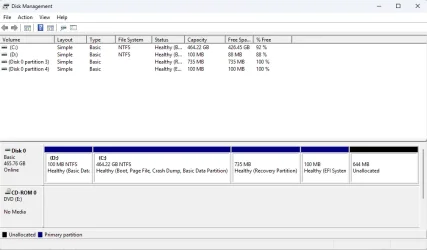
The partitions are in a different order than shown in the "Default UEFI/GPT Hard Drive Partition Layout" post on this site.
Instead of EFISystem,MSR,Windows,Recovery I seem to have MSR,Windows,Recovery,EFISystem. This was probably caused by the steps
I used. I can go back and recreate the install media as GPT/UEFI to get the preferred order, or maybe there is a way to force
it even with MBR target install media?
Another issue is it seems the MSR? partition was assigned drive letter D. My understanding is the MSR and EFISystem partitions are
not meant to be user accessible so why give them drive letters? Further confusion is if I look at the Storage use for D: it holds
System & Reserved stuff as expected but also some document(s) as if it really were a general use partition. Any insights?
By examining partition IDs and flags, Disk Manager is able to provide some useful info to identify what each partition is about,
such as "Boot","Recovery","EFI System", but the only thing it offers up for this "D:" partition is "Basic Data", when it should
probably be saying MSR or System. Good luck using disk utilities without useful partition identifiers.
I clean installed W11pro on a Dell 7010 using Rufus to avoid TPM, SecureBoot, Bitlocker, MS Acct. I wanted GPT/UEFI but forgot to
select this and ended up with a legacy MBR install of W11. After booting W11 I used the mbr2gpt utility, switched to UEFI in BIOS,
and after reboot I checked with msinfo32 to make sure it was now UEFI. There are a few confusing things about what Disk Manager
shows:
The partitions are in a different order than shown in the "Default UEFI/GPT Hard Drive Partition Layout" post on this site.
Instead of EFISystem,MSR,Windows,Recovery I seem to have MSR,Windows,Recovery,EFISystem. This was probably caused by the steps
I used. I can go back and recreate the install media as GPT/UEFI to get the preferred order, or maybe there is a way to force
it even with MBR target install media?
Another issue is it seems the MSR? partition was assigned drive letter D. My understanding is the MSR and EFISystem partitions are
not meant to be user accessible so why give them drive letters? Further confusion is if I look at the Storage use for D: it holds
System & Reserved stuff as expected but also some document(s) as if it really were a general use partition. Any insights?
By examining partition IDs and flags, Disk Manager is able to provide some useful info to identify what each partition is about,
such as "Boot","Recovery","EFI System", but the only thing it offers up for this "D:" partition is "Basic Data", when it should
probably be saying MSR or System. Good luck using disk utilities without useful partition identifiers.
My Computer
At a glance
W11pi5 34708GBintegrated
- OS
- W11p
- Computer type
- PC/Desktop
- Manufacturer/Model
- Dell 7010
- CPU
- i5 3470
- Memory
- 8GB
- Graphics Card(s)
- integrated
- Hard Drives
- 512GB SSD










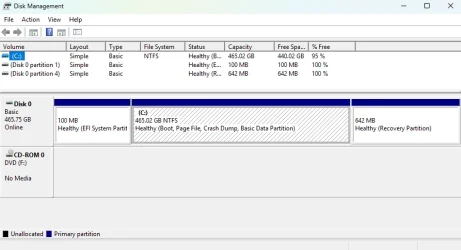


 convert the disk layout
 not reorganize the disk to match the exact clean-install partition layout






