W11 Partitions mystery


tns1

Member
Member
Local time
8:45 AM
Posts
21
OS
W11p
W11 Partitions mystery

I clean installed W11pro on a Dell 7010 using Rufus to avoid TPM, SecureBoot, Bitlocker, MS Acct. I wanted GPT/UEFI but forgot to
select this and ended up with a legacy MBR install of W11. After booting W11 I used the mbr2gpt utility, switched to UEFI in BIOS,
and after reboot I checked with msinfo32 to make sure it was now UEFI. There are a few confusing things about what Disk Manager
shows:
Screenshot 2025-11-06 084140.webp
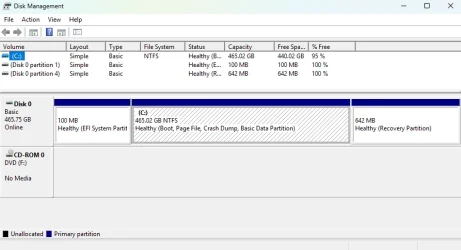
The partitions are in a different order than shown in the "Default UEFI/GPT Hard Drive Partition Layout" post on this site.
Instead of EFISystem,MSR,Windows,Recovery I seem to have MSR,Windows,Recovery,EFISystem. This was probably caused by the steps
I used. I can go back and recreate the install media as GPT/UEFI to get the preferred order, or maybe there is a way to force
it even with MBR target install media?

Another issue is it seems the MSR? partition was assigned drive letter D. My understanding is the MSR and EFISystem partitions are
not meant to be user accessible so why give them drive letters? Further confusion is if I look at the Storage use for D: it holds
System & Reserved stuff as expected but also some document(s) as if it really were a general use partition. Any insights?

By examining partition IDs and flags, Disk Manager is able to provide some useful info to identify what each partition is about,
such as "Boot","Recovery","EFI System", but the only thing it offers up for this "D:" partition is "Basic Data", when it should
probably be saying MSR or System. Good luck using disk utilities without useful partition identifiers.
 

My Computer

System One

  • OS
    W11p
    Computer type
    PC/Desktop
    Manufacturer/Model
    Dell 7010
    CPU
    i5 3470
    Memory
    8GB
    Graphics Card(s)
    integrated
    Hard Drives
    512GB SSD
Screenshot 2025-11-06 143817.webp
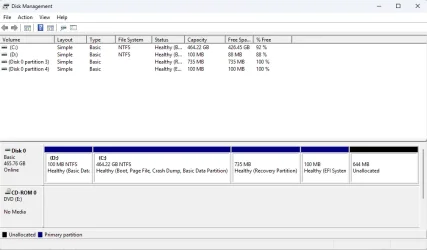
Mine shows like the above the last partition in From Dell , if I wanted to restore it to how it was on install. I would have to say that yours is OK you can remove the letter D from it. My partitions are larger due to have a 2TB drive.
 

My Computers

System One System Two

  • OS
    Windows11 Pro 26200.8655
    Computer type
    PC/Desktop
    Manufacturer/Model
    Dell Alienware Aurora R16
    CPU
    Intel Core i9 14900F (24 -Core, 68 MB Total Cache)
    Motherboard
    Dell Alienware
    Memory
    32GB DDR5
    Graphics Card(s)
    RTX 4080 Super w/581.95
    Sound Card
    Realtec
    Monitor(s) Displays
    Corsair XENEON 32QHD165
    Screen Resolution
    2560 X 1440
    Hard Drives
    1-2TB Samsung 990 Pro PCIe NVMe M2 SSD
    1-4TB Samsung 990 Pro PCIe NVMe M2 SSD
    PSU
    1000 Watt Platinum Dell
    Case
    Alienware
    Cooling
    Liquid Closed Loop
    Keyboard
    Corsair Strafe RGB
    Mouse
    Logitech MK270 Wireless
    Internet Speed
    100Gb's Down-20 Up
    Browser
    Firefox 152.0
    Antivirus
    Defender
    Other Info
    Very Quiet And Fast
    CyberPower UPS CP1500PFCLCD
  • Operating System
    PClinuxOS Mate (2025.7)
    Computer type
    PC/Desktop
    Manufacturer/Model
    Intel
    CPU
    13th Gen Inter(R) Core(TM) i3-1315U
    Motherboard
    Intel
    Memory
    64 GB DDR4 @3200 MHz.
    Graphics card(s)
    Internal
    Sound Card
    None
    Monitor(s) Displays
    Dell 2419HGCF
    Screen Resolution
    1920 X 1080
    Hard Drives
    SAMSUNG 980 PRO SSD 2TB, PCIe 4.0 M.2 2280
    PSU
    Chicony 30 Watt
    Case
    Small
    Keyboard
    Dell
    Mouse
    Razor
    Internet Speed
    1GB
    Browser
    Slimjet
After a clean install on an unallocated drive, with all other drives unhooked... this is the default Win 11 UEFI install...

00000 Default Windows partitions.webp


And... here's ten points just for filling out your computer specs. :-)
 

My Computers

System One System Two

  • OS
    Win 11 Home ♦♦♦26200.8655 ♦♦♦♦♦♦♦25H2
    Computer type
    PC/Desktop
    Manufacturer/Model
    Built by Ghot® [May 2020]
    CPU
    AMD Ryzen 7 3700X
    Motherboard
    Asus Pro WS X570-ACE (BIOS 5302)
    Memory
    G.Skill (F4-3200C14D-16GTZKW)
    Graphics Card(s)
    EVGA RTX 2070 (08G-P4-2171-KR)
    Sound Card
    Realtek ALC1220P / ALC S1220A
    Monitor(s) Displays
    Dell U3011 30"
    Screen Resolution
    2560 x 1600
    Hard Drives
    2x Samsung 860 EVO 500GB,
    WD 4TB Black FZBX - SATA III,
    WD 8TB Black FZBX - SATA III,
    DRW-24B1ST CD/DVD Burner
    PSU
    PC Power & Cooling 750W Quad EPS12V
    Case
    Cooler Master ATCS 840 Tower
    Cooling
    CM Hyper 212 EVO (push/pull)
    Keyboard
    Ducky DK9008 Shine II Blue LED
    Mouse
    Logitech Optical M-100
    Internet Speed
    300/300
    Browser
    Firefox (latest)
    Antivirus
    Bitdefender Total Security
    Other Info
    Speakers: Klipsch Pro Media 2.1
  • Operating System
    Windows XP Pro 32bit w/SP3
    Computer type
    PC/Desktop
    Manufacturer/Model
    Built by Ghot® (not in use)
    CPU
    AMD Athlon 64 X2 5000+ (OC'd @ 3.2Ghz)
    Motherboard
    ASUS M2N32-SLI Deluxe Wireless Edition
    Memory
    TWIN2X2048-6400C4DHX (2 x 1GB, DDR2 800)
    Graphics card(s)
    EVGA 256-P2-N758-TR GeForce 8600GT SSC
    Sound Card
    Onboard
    Monitor(s) Displays
    ViewSonic G90FB Black 19" Professional (CRT)
    Screen Resolution
    up to 2048 x 1536
    Hard Drives
    WD 36GB 10,000rpm Raptor SATA
    Seagate 80GB 7200rpm SATA
    Lite-On LTR-52246S CD/RW
    Lite-On LH-18A1P CD/DVD Burner
    PSU
    PC Power & Cooling Silencer 750 Quad EPS12V
    Case
    Generic Beige case, 80mm fans
    Cooling
    ZALMAN 9500A 92mm CPU Cooler
    Keyboard
    Logitech Classic Keybooard 200
    Mouse
    Logitech Optical M-BT96a
    Internet Speed
    300/300
    Browser
    Firefox 3.x ??
    Antivirus
    Symantec (Norton)
    Other Info
    Still assembled, still runs. Haven't turned it on for 15 years?
The first partition was originally the System partition on an MBR disk. In Windows 10 22H2 Setup, a 50 MB System Reserved partition is created on MBR disks, whereas Windows 11 24H2/25H2 Setup creates a 100 MB System partition on MBR disks (the label is no longer “System Reserved”).

If the existing MBR system partition isn't reused for the EFI system partition, it's no longer used by the boot process after the conversion.

If the existing MBR system partition isn't reused for the EFI system partition, it might be assigned a drive letter. If this small partition isn't going to be used, its drive letter must be manually hidden.

 
Last edited:

My Computers

System One System Two

  • OS
    Windows 11 Pro
    Computer type
    PC/Desktop
    CPU
    AMD Ryzen 9 9950X3D
    Motherboard
    ASRock B650E Taichi Lite
    Memory
    Kingston FURY Beast 64GB (2x32GB) DDR5 6000MT/s
    Graphics Card(s)
    ASUS TUF Gaming Radeon RX 9070 OC Edition 16GB GDDR6
    Hard Drives
    Solidigm P44 Pro 2TB M.2 NVMe SSD
  • Operating System
    Windows 11 Home
    Computer type
    Laptop
    Manufacturer/Model
    Lenovo Legion Pro 7i Gen 10 16"
    CPU
    Intel Core Ultra 9 275HX
    Memory
    64GB (2x 32GB) DDR5-6400
    Graphics card(s)
    NVIDIA GeForce RTX 5080 16GB GDDR7 Laptop GPU
    Hard Drives
    2x 1TB M.2 NVMe SSD (SK Hynix)
This last post convinces me that my partition disorder is a result of starting with a legacy format and then using the mbr2gpt tool. It would probably continue to work fine, but I would rather the windows and recovery partitions be last in line. I will reinstall W11 from a GPT/UEFI media and report back.
 

My Computer

System One

  • OS
    W11p
    Computer type
    PC/Desktop
    Manufacturer/Model
    Dell 7010
    CPU
    i5 3470
    Memory
    8GB
    Graphics Card(s)
    integrated
    Hard Drives
    512GB SSD
When performing MBR2GPT the command results in a conversion but the partition order may have different results.

This happens when the MBR2GPT is performed while not in Windows RE.

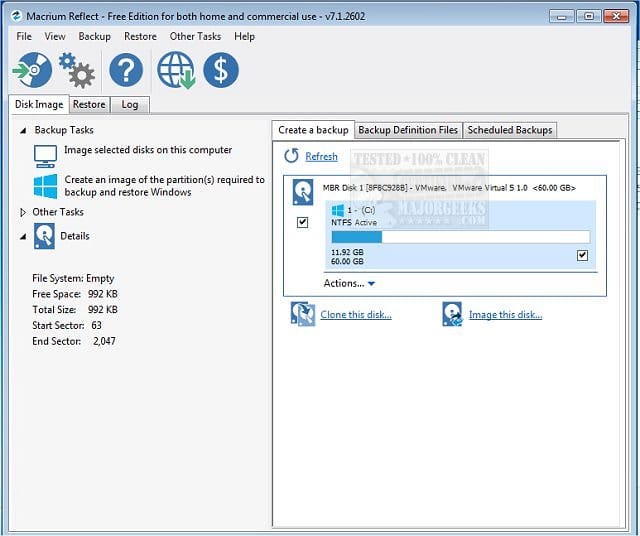
To get the desired normal partition order > create a Macrium backup image > clean install Windows 11 > restore only the C: partition

Macrium Software | Your Image is Everything


Backup and Restore with Macrium Reflect
 
Last edited:

My Computer

System One

  • OS
    Windows 10
    Computer type
    Laptop
    Manufacturer/Model
    HP
    CPU
    Intel(R) Core(TM) i7-4800MQ CPU @ 2.70GHz
    Motherboard
    Product : 190A Version : KBC Version 94.56
    Memory
    16 GB Total: Manufacturer : Samsung MemoryType : DDR3 FormFactor : SODIMM Capacity : 8GB Speed : 1600
    Graphics Card(s)
    NVIDIA Quadro K3100M; Intel(R) HD Graphics 4600
    Sound Card
    IDT High Definition Audio CODEC; PNP Device ID HDAUDIO\FUNC_01&VEN_111D&DEV_76E0
    Hard Drives
    Model Hitachi HTS727575A9E364
    Antivirus
    Microsoft Defender
    Other Info
    Mobile Workstation
This last post convinces me that my partition disorder is a result of starting with a legacy format and then using the mbr2gpt tool. It would probably continue to work fine, but I would rather the windows and recovery partitions be last in line. I will reinstall W11 from a GPT/UEFI media and report back.
Clean installed W11p again from Rufus but this time for a GPT/UEFI target and it produced the proper partition order without the odd extra 'basic data' partition, so no extra drive letter being assigned. The MSR partition is not visible here but it is present as partition 2, and visible in tools like Macrium, Gparted, Diskpart.


Screenshot 2025-11-06 171646.webp
 

My Computer

System One

  • OS
    W11p
    Computer type
    PC/Desktop
    Manufacturer/Model
    Dell 7010
    CPU
    i5 3470
    Memory
    8GB
    Graphics Card(s)
    integrated
    Hard Drives
    512GB SSD
Looks normal.
 

My Computer

System One

  • OS
    Windows 10
    Computer type
    Laptop
    Manufacturer/Model
    HP
    CPU
    Intel(R) Core(TM) i7-4800MQ CPU @ 2.70GHz
    Motherboard
    Product : 190A Version : KBC Version 94.56
    Memory
    16 GB Total: Manufacturer : Samsung MemoryType : DDR3 FormFactor : SODIMM Capacity : 8GB Speed : 1600
    Graphics Card(s)
    NVIDIA Quadro K3100M; Intel(R) HD Graphics 4600
    Sound Card
    IDT High Definition Audio CODEC; PNP Device ID HDAUDIO\FUNC_01&VEN_111D&DEV_76E0
    Hard Drives
    Model Hitachi HTS727575A9E364
    Antivirus
    Microsoft Defender
    Other Info
    Mobile Workstation
The Recovery partition should be at least 750M.
 

My Computers

System One System Two

  • OS
    Windows 11 Pro - Windows 7 HP 64 - Lubuntu
    Computer type
    PC/Desktop
    Manufacturer/Model
    custom build
    CPU
    i5 6600K - 800MHz to 4400MHz
    Motherboard
    GA-Z170-HD3P
    Memory
    4+4G GSkill DDR4 3000
    Graphics Card(s)
    IG - Intel 530
    Monitor(s) Displays
    Samsung 226BW
    Screen Resolution
    1680x1050
    Hard Drives
    (1) -1 SM951 – 128GB M.2 AHCI PCIe SSD drive for Win 11
    (2) -1 WD SATA 3 - 1T for Data
    (3) -1 WD SATA 3 - 1T for backup
    (4) -1 BX500 SSD - 256G for Windows 7 and Lubuntu
    PSU
    Thermaltake 450W TR2 gold
    Keyboard
    Old and good Chicony mechanical keyboard
    Mouse
    Logitech mX performance - 9 buttons (had to disable some)
    Internet Speed
    500 Mb/s
    Browser
    Firefox 64
  • Operating System
    Windows 11 Pro
    Computer type
    Laptop
    Manufacturer/Model
    Asus Q550LF
    CPU
    i7-4500U 800- 3000MHz
    Motherboard
    Asus Q550LF
    Memory
    (4+4)G DDR3 1600
    Graphics card(s)
    IG intel 4400 + NVIDIA GeForce GT 745M
    Sound Card
    Realtek
    Monitor(s) Displays
    LG Display LP156WF4-SPH1
    Screen Resolution
    1920 x 1080
    Hard Drives
    BX500 120G SSD for Windows and programs
    & 1T HDD for data
    Internet Speed
    500 Mb/s
    Browser
    Firefox 64
It looks better now.

Windows would have worked fine before as well, since the EFI system partition does not need to be the first partition on the disk.

In addition, the absence of a 16 MB Microsoft reserved partition (MSR) would not have affected functionality, because Windows does not use that partition for anything.
 

My Computers

System One System Two

  • OS
    Windows 11 Pro
    Computer type
    PC/Desktop
    CPU
    AMD Ryzen 9 9950X3D
    Motherboard
    ASRock B650E Taichi Lite
    Memory
    Kingston FURY Beast 64GB (2x32GB) DDR5 6000MT/s
    Graphics Card(s)
    ASUS TUF Gaming Radeon RX 9070 OC Edition 16GB GDDR6
    Hard Drives
    Solidigm P44 Pro 2TB M.2 NVMe SSD
  • Operating System
    Windows 11 Home
    Computer type
    Laptop
    Manufacturer/Model
    Lenovo Legion Pro 7i Gen 10 16"
    CPU
    Intel Core Ultra 9 275HX
    Memory
    64GB (2x 32GB) DDR5-6400
    Graphics card(s)
    NVIDIA GeForce RTX 5080 16GB GDDR7 Laptop GPU
    Hard Drives
    2x 1TB M.2 NVMe SSD (SK Hynix)
^ Windows uses the MSR for:
  • compatibility: It acts as a placeholder for features that used to rely on hidden sectors on older MBR disks. Microsoft can later shrink the MSR to create new partitions for these components.
  • basic partition management: It is used to remap damaged sectors on the drive.
  • advanced features: When a basic disk is converted to a dynamic disk, Windows shrinks the MSR and uses the freed space to create a partition to hold the dynamic disk database.
  • system support: It provides a dedicated space for system software that might need to create new partitions for its own use, such as boot and recovery processes.
 

My Computers

System One System Two

  • OS
    11 Home
    Computer type
    Laptop
    Manufacturer/Model
    Asus TUF Gaming F16 (2024)
    CPU
    i7 13650HX
    Memory
    16GB DDR5
    Graphics Card(s)
    GeForce RTX 4060 Mobile
    Sound Card
    Eastern Electric MiniMax DAC Supreme; Emotiva UMC-200; Astell & Kern AK240
    Monitor(s) Displays
    Sony Bravia XR-55X90J
    Screen Resolution
    3840×2160
    Hard Drives
    512GB SSD internal
    37TB external
    PSU
    Li-ion
    Cooling
    2× Arc Flow Fans, 4× exhaust vents, 5× heatpipes
    Keyboard
    Logitech K800
    Mouse
    Logitech G402
    Internet Speed
    30Mbit/s up, 500Mbit/s down
    Browser
    FF
    Antivirus
    What's an antivirus?
  • Operating System
    11 Home
    Computer type
    Laptop
    Manufacturer/Model
    Medion S15450
    CPU
    i5 1135G7
    Memory
    16GB DDR4
    Graphics card(s)
    Intel Iris Xe
    Sound Card
    Eastern Electric MiniMax DAC Supreme; Emotiva UMC-200; Astell & Kern AK240
    Monitor(s) Displays
    Sony Bravia XR-55X90J
    Screen Resolution
    3840×2160
    Hard Drives
    2TB SSD internal
    37TB external
    PSU
    Li-ion
    Keyboard
    Logitech K800
    Mouse
    Logitech G402
    Internet Speed
    30Mbit/s up, 500Mbit/s down
    Browser
    FF
If the MSR partition is absolutely necessary, why doesn't the MBR2GPT command create an MSR partition?

ChatGPT:

Why doesn’t MBR2GPT create an MSR partition, if the MSR is supposed to exist on GPT disks?

Because the MSR is not required for booting Windows, and MBR2GPT’s purpose is limited:
✅ convert the disk layout
✅ make Windows boot in UEFI mode
❌ not reorganize the disk to match the exact clean-install partition layout

Details

The Microsoft Reserved Partition (MSR) exists only on GPT disks used by Windows.
Its purpose is not to store files. Instead, it functions as internal workspace for the partitioning system — for example, to allow creating new partitions without needing to move metadata.
  • Windows Setup adds an MSR only during a clean install.
  • Windows never boots from the MSR, and Windows does not read/write user data there.
From Microsoft’s documentation:
The MSR is required for “proper partition management”, not for booting.

MBR2GPT.exe specifically

MBR2GPT’s job is narrow:
Convert the existing MBR partitions to GPT and add an EFI System Partition so the system can boot using UEFI.
It does not attempt to change your existing partition layout beyond what is absolutely required to boot.
Because Windows doesn’t need the MSR to boot, MBR2GPT skips creating it.
Or in simpler terms:
MSR is useful, but not required for Windows to function — therefore MBR2GPT doesn’t bother creating it.

So who is right — the “necessary” or the “not needed” people?

Both, depending on context:
ContextIs MSR required?
Clean install of Windows✅ Created automatically (recommended)
Booting and running Windows❌ Not required
Conversion using MBR2GPT❌ Not created, not needed
 

My Computers

System One System Two

  • OS
    Windows 11 Pro
    Computer type
    PC/Desktop
    CPU
    AMD Ryzen 9 9950X3D
    Motherboard
    ASRock B650E Taichi Lite
    Memory
    Kingston FURY Beast 64GB (2x32GB) DDR5 6000MT/s
    Graphics Card(s)
    ASUS TUF Gaming Radeon RX 9070 OC Edition 16GB GDDR6
    Hard Drives
    Solidigm P44 Pro 2TB M.2 NVMe SSD
  • Operating System
    Windows 11 Home
    Computer type
    Laptop
    Manufacturer/Model
    Lenovo Legion Pro 7i Gen 10 16"
    CPU
    Intel Core Ultra 9 275HX
    Memory
    64GB (2x 32GB) DDR5-6400
    Graphics card(s)
    NVIDIA GeForce RTX 5080 16GB GDDR7 Laptop GPU
    Hard Drives
    2x 1TB M.2 NVMe SSD (SK Hynix)
I have to agree with hdmi and aubergine
I always create the MSR partition. Is so small and MS says it's necessary, so why not?
A MS toll like mbr2gpt doesn't create the MSR partition so it suggest it is not necessary.
Anyway, when I use the mbr2gpt tool offline it is normally to convert Win 7 or Win 10 from MBR to GPT and It use a big System partition to create the EFI partition and I manually create on the remain unallocated space the MSR partition
 

My Computers

System One System Two

  • OS
    Windows 11 Pro - Windows 7 HP 64 - Lubuntu
    Computer type
    PC/Desktop
    Manufacturer/Model
    custom build
    CPU
    i5 6600K - 800MHz to 4400MHz
    Motherboard
    GA-Z170-HD3P
    Memory
    4+4G GSkill DDR4 3000
    Graphics Card(s)
    IG - Intel 530
    Monitor(s) Displays
    Samsung 226BW
    Screen Resolution
    1680x1050
    Hard Drives
    (1) -1 SM951 – 128GB M.2 AHCI PCIe SSD drive for Win 11
    (2) -1 WD SATA 3 - 1T for Data
    (3) -1 WD SATA 3 - 1T for backup
    (4) -1 BX500 SSD - 256G for Windows 7 and Lubuntu
    PSU
    Thermaltake 450W TR2 gold
    Keyboard
    Old and good Chicony mechanical keyboard
    Mouse
    Logitech mX performance - 9 buttons (had to disable some)
    Internet Speed
    500 Mb/s
    Browser
    Firefox 64
  • Operating System
    Windows 11 Pro
    Computer type
    Laptop
    Manufacturer/Model
    Asus Q550LF
    CPU
    i7-4500U 800- 3000MHz
    Motherboard
    Asus Q550LF
    Memory
    (4+4)G DDR3 1600
    Graphics card(s)
    IG intel 4400 + NVIDIA GeForce GT 745M
    Sound Card
    Realtek
    Monitor(s) Displays
    LG Display LP156WF4-SPH1
    Screen Resolution
    1920 x 1080
    Hard Drives
    BX500 120G SSD for Windows and programs
    & 1T HDD for data
    Internet Speed
    500 Mb/s
    Browser
    Firefox 64
Back
Top Bottom