W11 Start Menu updated?


Mark K

Well-known member
Member
Local time
6:23 AM
Posts
457
OS
Windows 11 Pro
I have no idea what happened, but the Windows 11 Start Menu just changed to the old style, but all my previous apps are no longer pinned. I'm not sure what updated, but after the restart of Windows the old style Start menu is back.
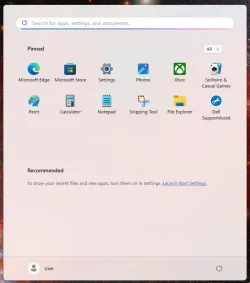
1775973094072.webp
 

My Computers My Computers

  • At a glance

    Windows 11 ProAMD Ryzen AI 7 350 w/ Radeon 860M 50 TOPS32GB LPDDR5X 7500 MT/sAMD Radeon 860M integrated (shared memory)
    OS
    Windows 11 Pro
    Computer type
    Laptop
    Manufacturer/Model
    Dell 16 Plus DB16255
    CPU
    AMD Ryzen AI 7 350 w/ Radeon 860M 50 TOPS
    Motherboard
    Dell 0PKMHG
    Memory
    32GB LPDDR5X 7500 MT/s
    Graphics Card(s)
    AMD Radeon 860M integrated (shared memory)
    Sound Card
    Stereo speakers (2.5 W x 2 = 5 W total peak)/Realtek SounzReal/Dolby Atmos
    Monitor(s) Displays
    Displays: 16" 1920 x 1200 (Full HD+/WUXGA) 300 nits 60Hz *** Samsung - 27” Odyssey FHD IPS 240Hz G-Sync Gaming Monitor
    Screen Resolution
    1920x1080 @ 60Hz
    Hard Drives
    EG6 KIOXIA 1TB NVME
    Case
    Ice Blue
    Cooling
    "dual-fan" or "enhanced" air-cooling system
    Mouse
    Logitech M650 Wireless/Bluetooth
    Internet Speed
    800/600 Fiber
  • Computer type
    Laptop
Is "User" your usual login profile name?
Your user profile may have had an issue and Windows loaded a Default User profile.
Browse to C:\Users\UserName your User files (ie) Desktop, Downloads, Documents ets should still be there.

If your pinned items are not showing on the Taskbar, try restarting Windows Explorer or clearing the icon cache. You can do this by opening Task Manager, ending the Windows Explorer task, and then restarting it.
 

My Computer My Computer

At a glance

Windows 11 Pro Insider 64 bit 25H2 26200.5742Intel Core i7 9700K 3.6016 GBnVidia GEForce RTX 2060 Super
OS
Windows 11 Pro Insider 64 bit 25H2 26200.5742
Computer type
PC/Desktop
Manufacturer/Model
Gigabyte Z390 UD
CPU
Intel Core i7 9700K 3.60
Motherboard
Gigabyte Z390 UD
Memory
16 GB
Graphics Card(s)
nVidia GEForce RTX 2060 Super
Sound Card
onboard
Monitor(s) Displays
Two 27" Dell 4K monitors
Screen Resolution
3840 x 2160
Hard Drives
M.2 NVME SSD, 500 GB; Two 2TB Mechanical HDD's
PSU
850w PSU
Case
Cyberpower PC
Cooling
Water cooled
Keyboard
Backlit Cyberpower gaming keyboard
Mouse
Backlit Cyberpower gaming mouse
Internet Speed
1 GB mbps
Browser
Brave
Antivirus
Windows Security
Is "User" your usual login profile name?

Yes, I have always used "user" for the profile name.

Your user profile may have had an issue and Windows loaded a Default User profile.
Browse to C:\Users\UserName your User files (ie) Desktop, Downloads, Documents ets should still be there.
All data is in the Desktop, Download, Document, etc. folder in the user profile.

If your pinned items are not showing on the Taskbar, try restarting Windows Explorer or clearing the icon cache. You can do this by opening Task Manager, ending the Windows Explorer task, and then restarting it.

Windows 11 has been restarted several times today and the old style Start menu is still there.

Even when I restart explorer.exe, the old style Start menu still shows. This also occurred on my other two Windows 11 systems today. One one of the systems the Start menu switched between the times I clicked on the Start menu button (within 15 minutes). All previous pinned apps/programs are gone. No big deal, I like the old style Start menu, but strange it happened all of sudden. The new Start menu is hideous.
 

My Computers My Computers

  • At a glance

    Windows 11 ProAMD Ryzen AI 7 350 w/ Radeon 860M 50 TOPS32GB LPDDR5X 7500 MT/sAMD Radeon 860M integrated (shared memory)
    OS
    Windows 11 Pro
    Computer type
    Laptop
    Manufacturer/Model
    Dell 16 Plus DB16255
    CPU
    AMD Ryzen AI 7 350 w/ Radeon 860M 50 TOPS
    Motherboard
    Dell 0PKMHG
    Memory
    32GB LPDDR5X 7500 MT/s
    Graphics Card(s)
    AMD Radeon 860M integrated (shared memory)
    Sound Card
    Stereo speakers (2.5 W x 2 = 5 W total peak)/Realtek SounzReal/Dolby Atmos
    Monitor(s) Displays
    Displays: 16" 1920 x 1200 (Full HD+/WUXGA) 300 nits 60Hz *** Samsung - 27” Odyssey FHD IPS 240Hz G-Sync Gaming Monitor
    Screen Resolution
    1920x1080 @ 60Hz
    Hard Drives
    EG6 KIOXIA 1TB NVME
    Case
    Ice Blue
    Cooling
    "dual-fan" or "enhanced" air-cooling system
    Mouse
    Logitech M650 Wireless/Bluetooth
    Internet Speed
    800/600 Fiber
  • Computer type
    Laptop
Windows 11 has been restarted several times today and the old style Start menu is still there.

And just like that (Forrest Gump).. the new Start menu returned.

I restarted Windows 11 this morning and got a black window showing "System Update..." where the system restarted again, and now the new Start menu is back.

Now the keyboard and mouse are experiencing problems. I had them on Bluetooth and moved them back to the USB receiver and now the mouse is acting up again. The mouse will move around highlighting text, or not do anything at all, and then sudden starts highlighting everything when the mouse is moved. The keyboard skips characters and if I wait a few seconds, those missing characters appear in the word again.

Microsoft Edge updated and wants me to log in with a Microsoft account. Usually I can close the window, but it will not close. I restarted Windows 11 again, and just the mouse is acting weird again. Re-connecting the USB receiver helps at times, but I'm waiting to see what happens next.
 

My Computers My Computers

  • At a glance

    Windows 11 ProAMD Ryzen AI 7 350 w/ Radeon 860M 50 TOPS32GB LPDDR5X 7500 MT/sAMD Radeon 860M integrated (shared memory)
    OS
    Windows 11 Pro
    Computer type
    Laptop
    Manufacturer/Model
    Dell 16 Plus DB16255
    CPU
    AMD Ryzen AI 7 350 w/ Radeon 860M 50 TOPS
    Motherboard
    Dell 0PKMHG
    Memory
    32GB LPDDR5X 7500 MT/s
    Graphics Card(s)
    AMD Radeon 860M integrated (shared memory)
    Sound Card
    Stereo speakers (2.5 W x 2 = 5 W total peak)/Realtek SounzReal/Dolby Atmos
    Monitor(s) Displays
    Displays: 16" 1920 x 1200 (Full HD+/WUXGA) 300 nits 60Hz *** Samsung - 27” Odyssey FHD IPS 240Hz G-Sync Gaming Monitor
    Screen Resolution
    1920x1080 @ 60Hz
    Hard Drives
    EG6 KIOXIA 1TB NVME
    Case
    Ice Blue
    Cooling
    "dual-fan" or "enhanced" air-cooling system
    Mouse
    Logitech M650 Wireless/Bluetooth
    Internet Speed
    800/600 Fiber
  • Computer type
    Laptop
Microsoft Edge updated and wants me to log in with a Microsoft account. Usually I can close the window, but it will not close. I restarted Windows 11 again, and just the mouse is acting weird again. Re-connecting the USB receiver helps at times, but I'm waiting to see what happens next.

I was away from the laptop for a little while and come back to find:
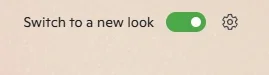
* Microsoft Edge connected to my Microsoft account; defaulting to the new look.
1776521600436.webp
* Microsoft Copilot installed (which I caught) in Windows 11.
* Microsoft OneDrive installed and linked to my Microsoft, no data sync'd.
* Microsoft Store logged in to the Microsoft account.
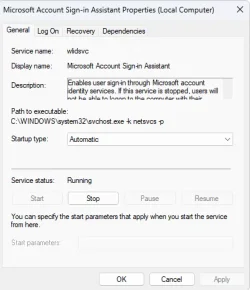
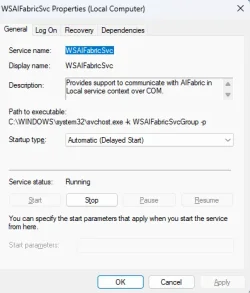
* The wlidsvc and WSAIFabricSvc services re-enabled and running in Windows 11; both of these were disabled:

1776521534502.webp1776521836529.webp

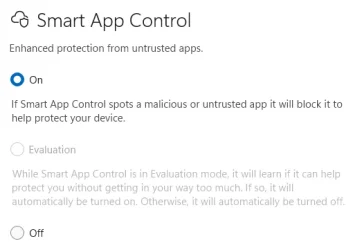
* Smart App Control is now turned on when it had been set to Off:
1776521652154.webp

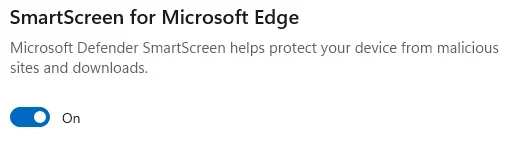
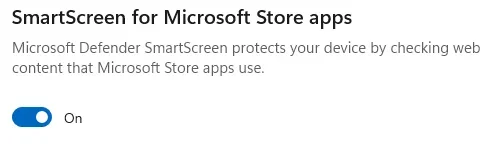
* SmartScreen enabled again for Microsoft Edge and Microsoft Store apps when these were OFF:
1776521719820.webp
1776521730739.webp

I am not sure what else changed. All these settings were disabled or turned off.

If Microsoft wants to control my computer, they need to pay me. LOL.
 

My Computers My Computers

  • At a glance

    Windows 11 ProAMD Ryzen AI 7 350 w/ Radeon 860M 50 TOPS32GB LPDDR5X 7500 MT/sAMD Radeon 860M integrated (shared memory)
    OS
    Windows 11 Pro
    Computer type
    Laptop
    Manufacturer/Model
    Dell 16 Plus DB16255
    CPU
    AMD Ryzen AI 7 350 w/ Radeon 860M 50 TOPS
    Motherboard
    Dell 0PKMHG
    Memory
    32GB LPDDR5X 7500 MT/s
    Graphics Card(s)
    AMD Radeon 860M integrated (shared memory)
    Sound Card
    Stereo speakers (2.5 W x 2 = 5 W total peak)/Realtek SounzReal/Dolby Atmos
    Monitor(s) Displays
    Displays: 16" 1920 x 1200 (Full HD+/WUXGA) 300 nits 60Hz *** Samsung - 27” Odyssey FHD IPS 240Hz G-Sync Gaming Monitor
    Screen Resolution
    1920x1080 @ 60Hz
    Hard Drives
    EG6 KIOXIA 1TB NVME
    Case
    Ice Blue
    Cooling
    "dual-fan" or "enhanced" air-cooling system
    Mouse
    Logitech M650 Wireless/Bluetooth
    Internet Speed
    800/600 Fiber
  • Computer type
    Laptop
I was away from the laptop for a little while and come back to find:
* Microsoft Edge connected to my Microsoft account; defaulting to the new look.
View attachment 169212

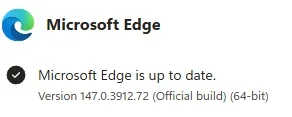
Which version of Microsoft Edge (at Settings, About Microsoft Edge)?
 

My Computer My Computer

At a glance

Windows 11
OS
Windows 11
Computer type
Laptop

My Computers My Computers

  • At a glance

    Windows 11 ProAMD Ryzen AI 7 350 w/ Radeon 860M 50 TOPS32GB LPDDR5X 7500 MT/sAMD Radeon 860M integrated (shared memory)
    OS
    Windows 11 Pro
    Computer type
    Laptop
    Manufacturer/Model
    Dell 16 Plus DB16255
    CPU
    AMD Ryzen AI 7 350 w/ Radeon 860M 50 TOPS
    Motherboard
    Dell 0PKMHG
    Memory
    32GB LPDDR5X 7500 MT/s
    Graphics Card(s)
    AMD Radeon 860M integrated (shared memory)
    Sound Card
    Stereo speakers (2.5 W x 2 = 5 W total peak)/Realtek SounzReal/Dolby Atmos
    Monitor(s) Displays
    Displays: 16" 1920 x 1200 (Full HD+/WUXGA) 300 nits 60Hz *** Samsung - 27” Odyssey FHD IPS 240Hz G-Sync Gaming Monitor
    Screen Resolution
    1920x1080 @ 60Hz
    Hard Drives
    EG6 KIOXIA 1TB NVME
    Case
    Ice Blue
    Cooling
    "dual-fan" or "enhanced" air-cooling system
    Mouse
    Logitech M650 Wireless/Bluetooth
    Internet Speed
    800/600 Fiber
  • Computer type
    Laptop
Thanks. I thought "Switch to a new look" was from an old version.
I thought that too, but Microsoft must have another new look update again.

Since I do majority of everything for myself in Linux, I just decided to keep Windows 11 Pro as it is now. Tired of undoing my changes all the time.
 

My Computers My Computers

  • At a glance

    Windows 11 ProAMD Ryzen AI 7 350 w/ Radeon 860M 50 TOPS32GB LPDDR5X 7500 MT/sAMD Radeon 860M integrated (shared memory)
    OS
    Windows 11 Pro
    Computer type
    Laptop
    Manufacturer/Model
    Dell 16 Plus DB16255
    CPU
    AMD Ryzen AI 7 350 w/ Radeon 860M 50 TOPS
    Motherboard
    Dell 0PKMHG
    Memory
    32GB LPDDR5X 7500 MT/s
    Graphics Card(s)
    AMD Radeon 860M integrated (shared memory)
    Sound Card
    Stereo speakers (2.5 W x 2 = 5 W total peak)/Realtek SounzReal/Dolby Atmos
    Monitor(s) Displays
    Displays: 16" 1920 x 1200 (Full HD+/WUXGA) 300 nits 60Hz *** Samsung - 27” Odyssey FHD IPS 240Hz G-Sync Gaming Monitor
    Screen Resolution
    1920x1080 @ 60Hz
    Hard Drives
    EG6 KIOXIA 1TB NVME
    Case
    Ice Blue
    Cooling
    "dual-fan" or "enhanced" air-cooling system
    Mouse
    Logitech M650 Wireless/Bluetooth
    Internet Speed
    800/600 Fiber
  • Computer type
    Laptop
My Start menu reverted to the old style too, without the automatic groupings at the bottom, although my pinned apps are all intact. I think this switching back and forth has happened to me more than a few times. At this point, I imagine whenever I hit the Start button, some monkey hiding behind the Start menu pops up with it, doing unknown, sometimes unspeakable things to it.
 

My Computer My Computer

At a glance

Windows 11 Pro 25H2
OS
Windows 11 Pro 25H2
Computer type
PC/Desktop
What build of Win 11 are you on? An insider or beta? These aren't as stable as the final release.

Also do you still see the 'Recommended' option to click on to see where that takes you?

Recommended.webp
 

My Computers My Computers

  • At a glance

    Windows 11 ProAMD Ryzen 9 8945HS32GB DDR5 SO-DIMMIntegrated AMD Radeon 780M (4.00 GHz)
    OS
    Windows 11 Pro
    Computer type
    PC/Desktop
    Manufacturer/Model
    GMKtec K11
    CPU
    AMD Ryzen 9 8945HS
    Memory
    32GB DDR5 SO-DIMM
    Graphics Card(s)
    Integrated AMD Radeon 780M (4.00 GHz)
    Monitor(s) Displays
    Benq 2250HM
    Screen Resolution
    1920 x 1080
    Hard Drives
    1 TB PCIe 4.0 NVMe M.2 SSD
  • At a glance

    Windows 11 HomeIntel® Core™ Ultra 7 - 255H processor16 GB LPDDR5 SDRAMIntel Arc 140T onboard graphics
    Operating System
    Windows 11 Home
    Computer type
    Laptop
    Manufacturer/Model
    ASUS Zenbook 14 OLED 14" Laptop - UX3405CA-QL192W
    CPU
    Intel® Core™ Ultra 7 - 255H processor
    Memory
    16 GB LPDDR5 SDRAM
    Graphics card(s)
    Intel Arc 140T onboard graphics
    Screen Resolution
    1920 x 1200 (16:10 WUXGA resolution) OLED Touchscreen
    Hard Drives
    1TB SSD
Here's my build info:
Edition Windows 11 Pro
Version 25H2
Installed on‎2024-‎12-‎27
OS build26200.8039
Experience Windows Feature Experience Pack 1000.26100.300.0

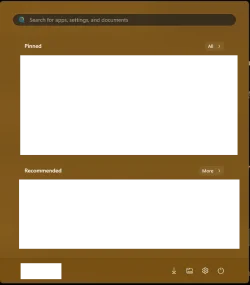
Here's what I see (with the proper icons, redacted):
1776596301975.webp
Here are my settings:

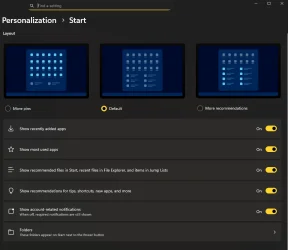
1776596385386.webp
 

My Computer My Computer

At a glance

Windows 11 Pro 25H2
OS
Windows 11 Pro 25H2
Computer type
PC/Desktop
My Start menu reverted to the old style too, without the automatic groupings at the bottom, although my pinned apps are all intact. I think this switching back and forth has happened to me more than a few times. At this point, I imagine whenever I hit the Start button, some monkey hiding behind the Start menu pops up with it, doing unknown, sometimes unspeakable things to it.
The Start menu keep switching the new and old style. Not sure why, but it seems Windows 11 Pro 26200.8246 may be the cause of the switching.
 

My Computers My Computers

  • At a glance

    Windows 11 ProAMD Ryzen AI 7 350 w/ Radeon 860M 50 TOPS32GB LPDDR5X 7500 MT/sAMD Radeon 860M integrated (shared memory)
    OS
    Windows 11 Pro
    Computer type
    Laptop
    Manufacturer/Model
    Dell 16 Plus DB16255
    CPU
    AMD Ryzen AI 7 350 w/ Radeon 860M 50 TOPS
    Motherboard
    Dell 0PKMHG
    Memory
    32GB LPDDR5X 7500 MT/s
    Graphics Card(s)
    AMD Radeon 860M integrated (shared memory)
    Sound Card
    Stereo speakers (2.5 W x 2 = 5 W total peak)/Realtek SounzReal/Dolby Atmos
    Monitor(s) Displays
    Displays: 16" 1920 x 1200 (Full HD+/WUXGA) 300 nits 60Hz *** Samsung - 27” Odyssey FHD IPS 240Hz G-Sync Gaming Monitor
    Screen Resolution
    1920x1080 @ 60Hz
    Hard Drives
    EG6 KIOXIA 1TB NVME
    Case
    Ice Blue
    Cooling
    "dual-fan" or "enhanced" air-cooling system
    Mouse
    Logitech M650 Wireless/Bluetooth
    Internet Speed
    800/600 Fiber
  • Computer type
    Laptop
Now, since the June 2026 patch, my menu has stuck to the new format—Pinned, Recommended, and All (automatically grouped)—permanently, without switching back mysteriously.
 

My Computer My Computer

At a glance

Windows 11 Pro 25H2
OS
Windows 11 Pro 25H2
Computer type
PC/Desktop
Back
Top Bottom