wandering brightness


joe2989

Well-known member
Member
Local time
4:14 AM
Posts
48
OS
windows 11 home
Hello,
This is a different laptop than I normally use but a WIN11 HP that is relatively
new and ran well, but i left it sit for a while and the battery evidently depleted,
upon startup a week ago it had a corrupted BIOS error pop up with a message
restoring the default BIOS or something to that effect, then it started and has
worked well ever since except the brightness diminishes as time goes on.

I went to system, display, brightness based on content OFF, night light OFF, I am wondering if a BIOS setting can be used to fix this minor issue.
I am not up on logging or anything too technical, I am just a normal user who knows enough about laptops to get by and that's about it.
Thank you.
BIOS AMI F-07, 7/19/2023
SMBIOS Version 3.3
BIOS Mode UEFI

HP Pavillion Laptop 14z-ec100
8GB DDR4
256GB SSD

Device name
Processor AMD Ryzen 5 5625U with Radeon Graphics (2.30 GHz)
Installed RAM 8.00 GB (7.34 GB usable)
Device ID 42568A98-D50A-4525-A7DC-DB654749E8E3
Product ID 00330-90004-58810-AB843
System type 64-bit operating system, x64-based processor
Pen and touch No pen or touch input is available for this display

Edition Windows 11 Pro
Version 25H2
Installed on ‎4/‎11/‎2025
OS build 26200.8037
Experience Windows Feature Experience Pack 1000.26100.300.0
 

My Computer My Computer

At a glance

windows 11 home12th gen Intel core 7-1260P8GB ram, 256GB SSDIntel Xe Graphics
OS
windows 11 home
Computer type
Laptop
Manufacturer/Model
HP Laptop 15t-dy500
CPU
12th gen Intel core 7-1260P
Motherboard
cannot find
Memory
8GB ram, 256GB SSD
Graphics Card(s)
Intel Xe Graphics
Sound Card
RealTek
Monitor(s) Displays
Integrated
Screen Resolution
1366 x 768
Hard Drives
SK hynix BC7111HEM HFM256GD31X013N
Keyboard
HID kepboard device
Mouse
elan
Internet Speed
223 download
Browser
several
Antivirus
windows security
can you show or transcribe the BIOS error?

Maybe you have auto brightness set?

Disable Adaptive Brightness via Settings

Go to Settings → System → Display.

Look for “Change brightness automatically when lighting changes” or “Automatically adjust brightness” and toggle it off.
 

My Computers My Computers

  • At a glance

    Windows 11 Pro 25H2 26200.9168AMD Ryzen 7 5825U with Radeon Graphics16GB
    OS
    Windows 11 Pro 25H2 26200.9168
    Computer type
    Laptop
    Manufacturer/Model
    Acemagic LX15PRO
    CPU
    AMD Ryzen 7 5825U with Radeon Graphics
    Motherboard
    BIOS CT_BI_AMI_LX15PRO_AB8139_A-004
    Memory
    16GB
    Screen Resolution
    1920 x 1080
    Hard Drives
    SSD 2TB
    Internet Speed
    30 Mbps
    Browser
    Brave
    Antivirus
    Webroot SecureAnywhere Complete beta
  • At a glance

    Windows 11 Pro 23H2 22631.2506Atom N450 1.66GHz2GB
    Operating System
    Windows 11 Pro 23H2 22631.2506
    Computer type
    Laptop
    Manufacturer/Model
    HP Mini 210-1090NR PC (bought in late 2009!)
    CPU
    Atom N450 1.66GHz
    Memory
    2GB
    Browser
    Brave
    Antivirus
    Webroot
  • Acer Swift SF114-34 laptop
    OS Windows 11 Pro 26200.8894
    CPU Pentium Silver N6000
    RAM 4GB
    BIOS v1.17
    SSD Samsung 970 EVO Plus SSD 2TB (an upgrade)
Thank you for the reply. I don't have the BIOS error other than I remember the machine waited unusually long to boot after a long nap, and came up with corrupted bios error then proceeded to restore BIOS on its own,
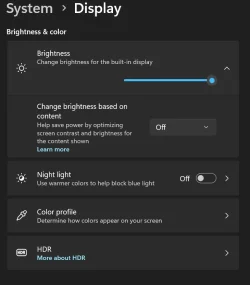
Here is a snip of the brightness settings I can find in system/display/
 

Attachments

  • brightness.webp
    brightness.webp
    27.6 KB · Views: 1

My Computer My Computer

At a glance

windows 11 home12th gen Intel core 7-1260P8GB ram, 256GB SSDIntel Xe Graphics
OS
windows 11 home
Computer type
Laptop
Manufacturer/Model
HP Laptop 15t-dy500
CPU
12th gen Intel core 7-1260P
Motherboard
cannot find
Memory
8GB ram, 256GB SSD
Graphics Card(s)
Intel Xe Graphics
Sound Card
RealTek
Monitor(s) Displays
Integrated
Screen Resolution
1366 x 768
Hard Drives
SK hynix BC7111HEM HFM256GD31X013N
Keyboard
HID kepboard device
Mouse
elan
Internet Speed
223 download
Browser
several
Antivirus
windows security
Those are the only settings I can find pertaining to brightness, for some reason.
 

My Computer My Computer

At a glance

windows 11 home12th gen Intel core 7-1260P8GB ram, 256GB SSDIntel Xe Graphics
OS
windows 11 home
Computer type
Laptop
Manufacturer/Model
HP Laptop 15t-dy500
CPU
12th gen Intel core 7-1260P
Motherboard
cannot find
Memory
8GB ram, 256GB SSD
Graphics Card(s)
Intel Xe Graphics
Sound Card
RealTek
Monitor(s) Displays
Integrated
Screen Resolution
1366 x 768
Hard Drives
SK hynix BC7111HEM HFM256GD31X013N
Keyboard
HID kepboard device
Mouse
elan
Internet Speed
223 download
Browser
several
Antivirus
windows security
Maybe it is in your power plan. When the screen dims, does plugging the power in make a difference?
 

My Computers My Computers

  • At a glance

    Windows 11 Pro 25H2 26200.9168AMD Ryzen 7 5825U with Radeon Graphics16GB
    OS
    Windows 11 Pro 25H2 26200.9168
    Computer type
    Laptop
    Manufacturer/Model
    Acemagic LX15PRO
    CPU
    AMD Ryzen 7 5825U with Radeon Graphics
    Motherboard
    BIOS CT_BI_AMI_LX15PRO_AB8139_A-004
    Memory
    16GB
    Screen Resolution
    1920 x 1080
    Hard Drives
    SSD 2TB
    Internet Speed
    30 Mbps
    Browser
    Brave
    Antivirus
    Webroot SecureAnywhere Complete beta
  • At a glance

    Windows 11 Pro 23H2 22631.2506Atom N450 1.66GHz2GB
    Operating System
    Windows 11 Pro 23H2 22631.2506
    Computer type
    Laptop
    Manufacturer/Model
    HP Mini 210-1090NR PC (bought in late 2009!)
    CPU
    Atom N450 1.66GHz
    Memory
    2GB
    Browser
    Brave
    Antivirus
    Webroot
  • Acer Swift SF114-34 laptop
    OS Windows 11 Pro 26200.8894
    CPU Pentium Silver N6000
    RAM 4GB
    BIOS v1.17
    SSD Samsung 970 EVO Plus SSD 2TB (an upgrade)
Plugged in all the time but i will go look at the plan....I forgot about checking that . thanks
 

My Computer My Computer

At a glance

windows 11 home12th gen Intel core 7-1260P8GB ram, 256GB SSDIntel Xe Graphics
OS
windows 11 home
Computer type
Laptop
Manufacturer/Model
HP Laptop 15t-dy500
CPU
12th gen Intel core 7-1260P
Motherboard
cannot find
Memory
8GB ram, 256GB SSD
Graphics Card(s)
Intel Xe Graphics
Sound Card
RealTek
Monitor(s) Displays
Integrated
Screen Resolution
1366 x 768
Hard Drives
SK hynix BC7111HEM HFM256GD31X013N
Keyboard
HID kepboard device
Mouse
elan
Internet Speed
223 download
Browser
several
Antivirus
windows security
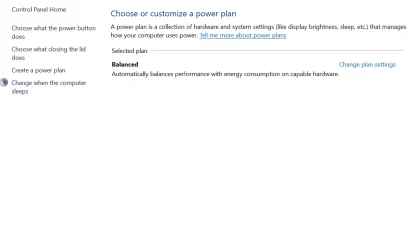
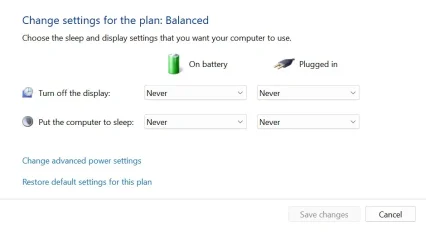
Here is what I have in control panel/power options :
 

Attachments

  • B1.webp
    B1.webp
    32.3 KB · Views: 1
  • B2.webp
    B2.webp
    22.8 KB · Views: 1

My Computer My Computer

At a glance

windows 11 home12th gen Intel core 7-1260P8GB ram, 256GB SSDIntel Xe Graphics
OS
windows 11 home
Computer type
Laptop
Manufacturer/Model
HP Laptop 15t-dy500
CPU
12th gen Intel core 7-1260P
Motherboard
cannot find
Memory
8GB ram, 256GB SSD
Graphics Card(s)
Intel Xe Graphics
Sound Card
RealTek
Monitor(s) Displays
Integrated
Screen Resolution
1366 x 768
Hard Drives
SK hynix BC7111HEM HFM256GD31X013N
Keyboard
HID kepboard device
Mouse
elan
Internet Speed
223 download
Browser
several
Antivirus
windows security
Its been a great little laptop used for occasionally tuning vehicles, the only other issue it has, and has had since day 1 is the battery depletes pretty fast in an hour or maybe 2 at the most unplugged no matter how many things i turn off based on the advice i get. But i just live with that
 

My Computer My Computer

At a glance

windows 11 home12th gen Intel core 7-1260P8GB ram, 256GB SSDIntel Xe Graphics
OS
windows 11 home
Computer type
Laptop
Manufacturer/Model
HP Laptop 15t-dy500
CPU
12th gen Intel core 7-1260P
Motherboard
cannot find
Memory
8GB ram, 256GB SSD
Graphics Card(s)
Intel Xe Graphics
Sound Card
RealTek
Monitor(s) Displays
Integrated
Screen Resolution
1366 x 768
Hard Drives
SK hynix BC7111HEM HFM256GD31X013N
Keyboard
HID kepboard device
Mouse
elan
Internet Speed
223 download
Browser
several
Antivirus
windows security
Its been a great little laptop used for occasionally tuning vehicles, the only other issue it has, and has had since day 1 is the battery depletes pretty fast in an hour or maybe 2 at the most unplugged no matter how many things i turn off based on the advice i get. But i just live with that
It is easy to fit a new battery and costs about £30
 

My Computers My Computers

  • At a glance

    Windows 11 Pro 25H2 26200.9168AMD Ryzen 7 5825U with Radeon Graphics16GB
    OS
    Windows 11 Pro 25H2 26200.9168
    Computer type
    Laptop
    Manufacturer/Model
    Acemagic LX15PRO
    CPU
    AMD Ryzen 7 5825U with Radeon Graphics
    Motherboard
    BIOS CT_BI_AMI_LX15PRO_AB8139_A-004
    Memory
    16GB
    Screen Resolution
    1920 x 1080
    Hard Drives
    SSD 2TB
    Internet Speed
    30 Mbps
    Browser
    Brave
    Antivirus
    Webroot SecureAnywhere Complete beta
  • At a glance

    Windows 11 Pro 23H2 22631.2506Atom N450 1.66GHz2GB
    Operating System
    Windows 11 Pro 23H2 22631.2506
    Computer type
    Laptop
    Manufacturer/Model
    HP Mini 210-1090NR PC (bought in late 2009!)
    CPU
    Atom N450 1.66GHz
    Memory
    2GB
    Browser
    Brave
    Antivirus
    Webroot
  • Acer Swift SF114-34 laptop
    OS Windows 11 Pro 26200.8894
    CPU Pentium Silver N6000
    RAM 4GB
    BIOS v1.17
    SSD Samsung 970 EVO Plus SSD 2TB (an upgrade)
I will have to see how the batteries go in these new type laptops I am not familiar with, with build in drives.
Thanks

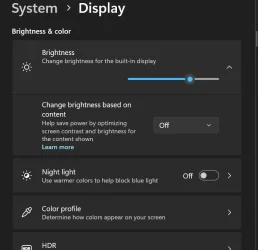
Ok, new info here.... the brightness held while machine was on and logged in, I turned it off for 15 minutes and it went to about 2/3rds brightness upon restart. The same as it did after i left it off all night, and always plugged in... so hmmmm
 

Attachments

  • Bnew.webp
    Bnew.webp
    26.4 KB · Views: 1

My Computer My Computer

At a glance

windows 11 home12th gen Intel core 7-1260P8GB ram, 256GB SSDIntel Xe Graphics
OS
windows 11 home
Computer type
Laptop
Manufacturer/Model
HP Laptop 15t-dy500
CPU
12th gen Intel core 7-1260P
Motherboard
cannot find
Memory
8GB ram, 256GB SSD
Graphics Card(s)
Intel Xe Graphics
Sound Card
RealTek
Monitor(s) Displays
Integrated
Screen Resolution
1366 x 768
Hard Drives
SK hynix BC7111HEM HFM256GD31X013N
Keyboard
HID kepboard device
Mouse
elan
Internet Speed
223 download
Browser
several
Antivirus
windows security
I wonder if this is down some HP software trying to eke out the battery?
 

My Computers My Computers

  • At a glance

    Windows 11 Pro 25H2 26200.9168AMD Ryzen 7 5825U with Radeon Graphics16GB
    OS
    Windows 11 Pro 25H2 26200.9168
    Computer type
    Laptop
    Manufacturer/Model
    Acemagic LX15PRO
    CPU
    AMD Ryzen 7 5825U with Radeon Graphics
    Motherboard
    BIOS CT_BI_AMI_LX15PRO_AB8139_A-004
    Memory
    16GB
    Screen Resolution
    1920 x 1080
    Hard Drives
    SSD 2TB
    Internet Speed
    30 Mbps
    Browser
    Brave
    Antivirus
    Webroot SecureAnywhere Complete beta
  • At a glance

    Windows 11 Pro 23H2 22631.2506Atom N450 1.66GHz2GB
    Operating System
    Windows 11 Pro 23H2 22631.2506
    Computer type
    Laptop
    Manufacturer/Model
    HP Mini 210-1090NR PC (bought in late 2009!)
    CPU
    Atom N450 1.66GHz
    Memory
    2GB
    Browser
    Brave
    Antivirus
    Webroot
  • Acer Swift SF114-34 laptop
    OS Windows 11 Pro 26200.8894
    CPU Pentium Silver N6000
    RAM 4GB
    BIOS v1.17
    SSD Samsung 970 EVO Plus SSD 2TB (an upgrade)
I don't allow most of that HP stuff to start, but it wouldn't surprise me. It didn't do this before the BIOS OD'd from sitting turned off too long.
 

My Computer My Computer

At a glance

windows 11 home12th gen Intel core 7-1260P8GB ram, 256GB SSDIntel Xe Graphics
OS
windows 11 home
Computer type
Laptop
Manufacturer/Model
HP Laptop 15t-dy500
CPU
12th gen Intel core 7-1260P
Motherboard
cannot find
Memory
8GB ram, 256GB SSD
Graphics Card(s)
Intel Xe Graphics
Sound Card
RealTek
Monitor(s) Displays
Integrated
Screen Resolution
1366 x 768
Hard Drives
SK hynix BC7111HEM HFM256GD31X013N
Keyboard
HID kepboard device
Mouse
elan
Internet Speed
223 download
Browser
several
Antivirus
windows security
I went to device manager and uninstalled AMD Radeon Graphics, no change on restart. I went to control panel /power settings / advanced, and put the throttle to the wood and no change on startup, still starts at 2/3rds brightness. So, i set it to factory default on plan settings except I reset display and drive to never sleep and will restart again.
 

My Computer My Computer

At a glance

windows 11 home12th gen Intel core 7-1260P8GB ram, 256GB SSDIntel Xe Graphics
OS
windows 11 home
Computer type
Laptop
Manufacturer/Model
HP Laptop 15t-dy500
CPU
12th gen Intel core 7-1260P
Motherboard
cannot find
Memory
8GB ram, 256GB SSD
Graphics Card(s)
Intel Xe Graphics
Sound Card
RealTek
Monitor(s) Displays
Integrated
Screen Resolution
1366 x 768
Hard Drives
SK hynix BC7111HEM HFM256GD31X013N
Keyboard
HID kepboard device
Mouse
elan
Internet Speed
223 download
Browser
several
Antivirus
windows security
By Gosh that reset power plan, then set everything to never same as before, took care of it. At least on 1 restart. I will make a note of this. Booted to full brightness.
Thanks for the ideas and the help !! Much appreciated.
 

My Computer My Computer

At a glance

windows 11 home12th gen Intel core 7-1260P8GB ram, 256GB SSDIntel Xe Graphics
OS
windows 11 home
Computer type
Laptop
Manufacturer/Model
HP Laptop 15t-dy500
CPU
12th gen Intel core 7-1260P
Motherboard
cannot find
Memory
8GB ram, 256GB SSD
Graphics Card(s)
Intel Xe Graphics
Sound Card
RealTek
Monitor(s) Displays
Integrated
Screen Resolution
1366 x 768
Hard Drives
SK hynix BC7111HEM HFM256GD31X013N
Keyboard
HID kepboard device
Mouse
elan
Internet Speed
223 download
Browser
several
Antivirus
windows security

Latest Support Threads

Back
Top Bottom