Was hoping I could get some Spotify assistance


riffwraith

Well-known member
Member
Local time
12:58 PM
Posts
109
OS
W10
Hi.

I load an artists page (this is not my playlist) and the first song starts playing. When done, instead of playing the next song in the list, it plays some other song from somewhere else.

I did some research, and the best I could come up with is turn on autoplay. So I go to Spotify's support page, and I see:

Desktop
Click your profile picture at the top, and select Settings.
Scroll down to Autoplay and switch it on Toggle switched on, or off Toggle switched off.

But that's wrong; "Autoplay" does not exist.

Any ideas?

Thanks in advance.
 

My Computer My Computer

At a glance

W10
OS
W10
I seem to have found a workaround, by going to 'recents'. When I do that, the que is on the right, and whatever is listed next plays. I would still like to hear from anyone who might have some more insight.
 

My Computer My Computer

At a glance

W10
OS
W10
If you're talking about the Desktop Windows app, I can't help as I only use the Spotify web player on my Laptop; there is no Autoplay feature in the web player.

On both the Android and iOS Apps, there is an Autoplay setting under the Playback tag.
 

My Computer My Computer

At a glance

windows 11 Pro11th Gen Intel(R) Core(TM) i7-11800H @ 2.30GH...16 GBNVIDIA GeForce RTX 3050 Ti
OS
windows 11 Pro
Computer type
Laptop
Manufacturer/Model
Dell XPS 15 9510
CPU
11th Gen Intel(R) Core(TM) i7-11800H @ 2.30GHz (16 CPUs
Memory
16 GB
Graphics Card(s)
NVIDIA GeForce RTX 3050 Ti
Hard Drives
512GB Solid State Drive
Browser
Firefox
Yeah you'll need to be very specific with what you're playing and how and what platform as trevo mentioned (web player, windows app, iOS, Android).

Some things that come to mind that will cause this behavior. The 'autoplay' setting will pick new content once you hit the end of your current selections (such as if you have only queued up a single song from an artist) or smart shuffle which will also pick similar content from different artists.
 

My Computer My Computer

At a glance

Linux Mint
OS
Linux Mint
Computer type
Laptop
Manufacturer/Model
System76 Lemur Pro
If you're talking about the Desktop Windows app, I can't help as I only use the Spotify web player on my Laptop; there is no Autoplay feature in the web player.

On both the Android and iOS Apps, there is an Autoplay setting under the Playback tag.

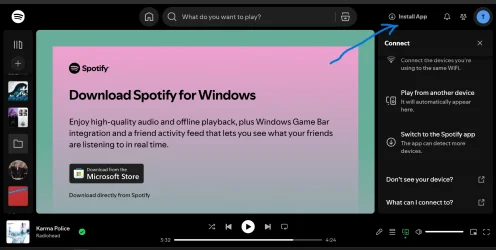
I am using the latest version of the Chrome web browser in Windows 11 Desktop. Correct, there is no Autoplay feature in the web player.

I dont see anything that says "smart shuffle"

Thank you.
 

My Computer My Computer

At a glance

W10
OS
W10
Hi,

in the PC app, click the three dots top left.
Then click Edit and then Preferences.
There you'll find Autoplay.

Ciao, Han.
 

My Computers My Computers

  • At a glance

    WIN 11 24H2i7-8550U16 GB lpddr3
    OS
    WIN 11 24H2
    Computer type
    Laptop
    Manufacturer/Model
    Lenovo Thinpad X1 Yoga 3gen
    CPU
    i7-8550U
    Memory
    16 GB lpddr3
    Screen Resolution
    2560x1440
    Hard Drives
    NVME SSD 2TB Samsung PM981
    Mouse
    Logitech M720
    Internet Speed
    350 Mbps down and up from 500 advertised on WiFi
    Browser
    Firefox
    Antivirus
    Windows Security, Malwarebytes
    Other Info
    Acronis TrueImage 2019
  • At a glance

    Win 11 24H2i7-8700T32 GB DDR4
    Operating System
    Win 11 24H2
    Computer type
    PC/Desktop
    Manufacturer/Model
    Lenovo Tiny M920x
    CPU
    i7-8700T
    Memory
    32 GB DDR4
    Sound Card
    MOTU M4
    Monitor(s) Displays
    DELL P2418D
    Screen Resolution
    2560 x 1440
    Hard Drives
    NVME SSD 2TB Samsung PM981a
    NVME SSD 1TB Samsung PM981a
    SSD Sandisk 1T Sata
    Mouse
    Logitech M590
    Browser
    Firefox
    Antivirus
    Windows Security, Malwarebytes
    Other Info
    Acronis TrueImage 2019
I am using the latest version of the Chrome web browser in Windows 11 Desktop. Correct, there is no Autoplay feature in the web player.

I dont see anything that says "smart shuffle"

Thank you.
If you download the Windows app, the additional features will be available and @han jansen has confirmed there is an Autoplay function.Screenshot (160).webp
 

My Computer My Computer

At a glance

windows 11 Pro11th Gen Intel(R) Core(TM) i7-11800H @ 2.30GH...16 GBNVIDIA GeForce RTX 3050 Ti
OS
windows 11 Pro
Computer type
Laptop
Manufacturer/Model
Dell XPS 15 9510
CPU
11th Gen Intel(R) Core(TM) i7-11800H @ 2.30GHz (16 CPUs
Memory
16 GB
Graphics Card(s)
NVIDIA GeForce RTX 3050 Ti
Hard Drives
512GB Solid State Drive
Browser
Firefox
No browser. The Spotify app for Windows is stand alone. It’s all in there.
 

My Computers My Computers

  • At a glance

    WIN 11 24H2i7-8550U16 GB lpddr3
    OS
    WIN 11 24H2
    Computer type
    Laptop
    Manufacturer/Model
    Lenovo Thinpad X1 Yoga 3gen
    CPU
    i7-8550U
    Memory
    16 GB lpddr3
    Screen Resolution
    2560x1440
    Hard Drives
    NVME SSD 2TB Samsung PM981
    Mouse
    Logitech M720
    Internet Speed
    350 Mbps down and up from 500 advertised on WiFi
    Browser
    Firefox
    Antivirus
    Windows Security, Malwarebytes
    Other Info
    Acronis TrueImage 2019
  • At a glance

    Win 11 24H2i7-8700T32 GB DDR4
    Operating System
    Win 11 24H2
    Computer type
    PC/Desktop
    Manufacturer/Model
    Lenovo Tiny M920x
    CPU
    i7-8700T
    Memory
    32 GB DDR4
    Sound Card
    MOTU M4
    Monitor(s) Displays
    DELL P2418D
    Screen Resolution
    2560 x 1440
    Hard Drives
    NVME SSD 2TB Samsung PM981a
    NVME SSD 1TB Samsung PM981a
    SSD Sandisk 1T Sata
    Mouse
    Logitech M590
    Browser
    Firefox
    Antivirus
    Windows Security, Malwarebytes
    Other Info
    Acronis TrueImage 2019

Latest Support Threads

Back
Top Bottom