WATCH OUT FOR RAM PRICES!


If microsoft really want people to stop using win10 when Ram/disk prices is like they are, so people cant afford upgrade to required hardware... Microsoft has the power to just change the installer so win11 can be installed on older hardware.
As long bypassing works, then its no real minimum requirements.. just preferred requirements.
That should be easy, Setup is almost there already. From 24H2 on if you use a few registry changes to bypass compatibility requirements it already has a 'disclaimer' ready that you need to accept before completing the upgrade or install.

1732493379749-webp.117524
 

My Computers My Computers

  • At a glance

    Windows 11 HomeAMD Athlon Silver 3050U8GBRadeon Graphics
    OS
    Windows 11 Home
    Computer type
    Laptop
    Manufacturer/Model
    Acer Aspire 3 A315-23-R9VY
    CPU
    AMD Athlon Silver 3050U
    Memory
    8GB
    Graphics Card(s)
    Radeon Graphics
    Monitor(s) Displays
    laptop screen
    Screen Resolution
    1366x768 native resolution, up to 2560x1440 with Radeon Virtual Super Resolution
    Hard Drives
    1TB Samsung EVO 870 SSD (from April 2026: 250GB EVO 850)
    Internet Speed
    150 Mbps
    Browser
    Edge, Firefox
    Antivirus
    Defender
    Other Info
    UPDATE - 11 April 2026: due to lid hinges starting to break up this laptop has been retired from active duty. The OS with all software and files has been migrated to my System Seven in 'Other systems' to carry on as my general purpose 'main machine'.

    I've now clean installed 25H2 and used Garlin's scripts to update Secure Boot to CA 2023 and revoke the PCA 2011 certificates. It's new role is to test secure boot issues.

    Info for 2021-2026:
    fully 'Windows 11 ready' laptop. Windows 10 C: partition migrated from my old unsupported 'main machine' then upgraded to 11. A test migration ran Insider builds for 2 months. When 11 was released on 5th October 2021 it was re-imaged back to 10 and was offered the upgrade in Windows Update on 20th October. Windows Update offered the 22H2 Feature Update on 20th September 2022. It got the 23H2 Feature Update on 4th November 2023 through Windows Update, 24H2 on 3rd October 2024 through Windows Update by setting the Target Release Version for 24H2, and 25H2 on 30th September 2025 through Windows Update by setting the Target Release Version for 25H2.
  • At a glance

    Windows 11 ProIntel® Core™ i5-520M8GB(integrated graphics) Intel HD Graphics
    Operating System
    Windows 11 Pro
    Computer type
    Laptop
    Manufacturer/Model
    Dell Latitude E4310
    CPU
    Intel® Core™ i5-520M
    Motherboard
    0T6M8G
    Memory
    8GB
    Graphics card(s)
    (integrated graphics) Intel HD Graphics
    Screen Resolution
    1366x768
    Hard Drives
    500GB Crucial MX500 SSD
    Browser
    Firefox, Edge
    Antivirus
    Defender
    Other Info
    unsupported machine: Legacy bios, MBR, TPM 1.2, upgraded from W10 to W11 using W10/W11 hybrid install media workaround.

    In-place upgrade to 22H2 using ISO and a workaround.
    Feature Update to 23H2 by manually installing the Enablement Package.
    In-place upgrade to 24H2 using hybrid 23H2/24H2 install media.
    Upgraded to 25H2 by Enablement Package.
    Upgraded to 26H2 by Enablement Package.

    Also running Insider Experimental 263xx and 29xxx builds and Windows 10 as native boot .vhdx.
  • My SYSTEM THREE is a Dell Latitude 5410, i7-10610U, 32GB RAM, 512GB NVMe ssd, supported device running Windows 11 Pro.

    My SYSTEM FOUR was a 2-in-1 convertible Lenovo Yoga 11e (1st gen) type 20DA, Celeron N2930, 8GB RAM, 256GB ssd. Unsupported device. This has now been sold. It has been replaced by my System Eight.

    My SYSTEM FIVE is a Dell Latitude 3190 2-in-1, Pentium Silver N5030, 8GB RAM, 1TB NVMe ssd, supported device running Windows 11 Pro, plus Insider Beta, Experimental 263xx and 29xxx builds (and a few others) as a native boot .vhdx.

    My SYSTEM SIX is a Dell Latitude 5550, Core Ultra 7 165H, 64GB RAM, 1TB NVMe SSD, supported device, Windows 11 Pro, Hyper-V host machine. Updated to 25H2 on 30th September 2025.

    My SYSTEM SEVEN is a Lenovo Thinkpad T580, 1920x1080 touchscreen, Intel Core i7-8650U, 16GB RAM, 512GB NVMe SSD + 2nd 512GB NVMe SSD, a supported device for Windows 11. This is my current general purpose 'main machine'. The installed Windows 11 Home from my System One has been migrated to this machine. As its new home has an existing digital licence for Pro I've been able to upgrade the migrated OS from Home to Pro.
    29 Sept. 2026 Feature Update to 26H2 through Windows Update.

    My SYSTEM EIGHT is a 2-in-1 convertible Lenovo Yoga 11e (5th gen) type 20LN, Celeron N4120, 8GB RAM, 512GB NVMe ssd, a supported device for Windows 11. Currently running Windows 11 Pro, plus Insider Beta, Experimental 263xx and 29xxx builds as native boot vhdx.
If microsoft really want people to stop using win10 when Ram/disk prices is like they are, so people cant afford upgrade to required hardware... Microsoft has the power to just change the installer so win11 can be installed on older hardware.
As long bypassing works, then its no real minimum requirements.. just preferred requirements.
Exactly, Marie.

The thing that has always made me believe these hardware 'restrictions' for Windows 11 are just a 'ploy' to get home users to buy new PC's or upgrade their hardware is the fact that none of these 'restrictions' apply to Windows 11 IoT Enterprise LTSC (or whatever it is called these days) for business which can be installed on older hardware (I don't know if the latest additions to the 'restricted' list - SSE4.2 and PopCnt - also apply here or not).

And this is probably the main reason why home users are still able to bypass these 'restrictions' in Home and Pro. For the time being, at least.

MS should just release a version of Windows 11 that works with anything for people with older hardware that they can't afford to or don't want to upgrade with the understanding (they could add it to their Windows EULA which no one reads anyway) that MS will not be responsible for any issues resulting from people using Windows 11 on any older hardware.

Edit: Ah, I see it has already been added to the EULA (thanks, Bree). As I said - no one usually reads it. I know I never have. :-)
 

My Computer My Computer

At a glance

Windows 11 Professional 26H211th Gen Intel(R) Core(TM) i5-11400 @ 2.60GHz...32GB (2x16GB) Kingston Fury RGB DDR4NVIDIA GeForce GTX 1650
OS
Windows 11 Professional 26H2
Computer type
PC/Desktop
Manufacturer/Model
Home Built
CPU
11th Gen Intel(R) Core(TM) i5-11400 @ 2.60GHz 2.59 GH
Motherboard
Gigabyte B560M D2V
Memory
32GB (2x16GB) Kingston Fury RGB DDR4
Graphics Card(s)
NVIDIA GeForce GTX 1650
Sound Card
Onboard Sound
Monitor(s) Displays
BenQ GL2460 (24 inch - oldie but a goodie)
Screen Resolution
1920x1080
Hard Drives
Samsung SSD 870 EVO x 2 (250GB and 500GB) plus several external Samsung SSD's.
PSU
Corsair HX 750
Case
DeepCool
Cooling
Stock CPU cooler. 5 case fans (2 front, 2 top and 1 rear)
Keyboard
Logitech
Mouse
Logitech
Internet Speed
500/40 Fibre
Browser
LibreWolf and Helium
Antivirus
Windows Security
Microsoft is absolved of all liability regardless if you are using old or new, compliant or non-compliant hardware. You use their OS at your own risk and you pay them to do so. That's the deal in a nutshell. A few years back I suggested the same things that CarlSD has shared here and was laughed to scorn for it. Not so many are laughing anymore. It's a gimmick and it always was a gimmick to get people to buy newer hardware and it was orchestrated by a consortium group that pretty much includes all the big names in compute. All of this can be easily researched and validated. MS is part of the consortium group so MS isn't about to change their policy. Today, we live in a technocracy where the Consortium calls the shots. Even the judges and politicians know it.
 

My Computer My Computer

At a glance

WIN 11, WIN 10, WIN 8.1, WIN 7 U, WIN 7 PRO, ...Intel i7 6900K and i9-7960X / AMD 3800X (8 core)128 GB CORSAIR DOMINATOR PLATINUM (B DIE)NVIDIA 1070 and RTX 3070
OS
WIN 11, WIN 10, WIN 8.1, WIN 7 U, WIN 7 PRO, WIN 7 HOME (32 Bit), LINUX MINT
Computer type
PC/Desktop
Manufacturer/Model
DIY, ASUS, and DELL
CPU
Intel i7 6900K and i9-7960X / AMD 3800X (8 core)
Motherboard
ASUS X99E-WS USB 3.1 and ASUS X299 SAGE
Memory
128 GB CORSAIR DOMINATOR PLATINUM (B DIE)
Graphics Card(s)
NVIDIA 1070 and RTX 3070
Sound Card
Crystal Sound (onboard)
Monitor(s) Displays
single Samsung 30" 4K and 8" aux monitor
Screen Resolution
4K and something equally attrocious. I'll be working on this.
Hard Drives
A, B, C, D, E, F, G, H, I, J, K, L, M, N, O, P, Q, R, S, T, U, V, W

Ports X, Y, and Z are reserved for USB access and removable drives.

Drive types consist of the following: Various mechanical hard drives bearing the brand names, Seagate, Toshiba, and Western Digital. Various NVMe drives bearing the brand names Kingston, Intel, Silicon Power, Crucial, Western Digital, and Team Group. Various SATA SSDs bearing various different brand names.

RAID arrays included:

LSI RAID 10 (WD Velociraptors) 1115.72 GB
LSI RAID 10 (WD SSDS) 463.80 GB

INTEL RAID 0 (KINGSTON HYPER X) System 447.14 GB
INTEL RAID 1 TOSHIBA ENTERPRIZE class Data 2794.52 GB
INTEL RAID 1 SEAGATE HYBRID 931.51 GB
PSU
SEVERAL. I prefer my Corsair Platinum HX1000i but I also like EVGA power supplies
Case
ThermalTake Level 10 GT (among others)
Cooling
Noctua is my favorite and I use it in my main. I also own various other coolers.
Keyboard
all kinds.
Mouse
all kinds
Internet Speed
360 mbps - 1 gbps (depending)
Browser
FIREFOX
Antivirus
KASPERSKY (no apologies)
Other Info
Gave Dell touch screen with Windows 11 to daughter and got me an OTVOC. Being a PC builder I own many desktop PCs as well. I am a father of five providing PCs, laptops, and tablets for all my family, most of which I have modified, rebuilt, or simply built from scratch. I do not own a cell phone, never have, never will.
I agree, I too am always using up to date hardware and software. However, there are some with very limited incomes that have no choice. They either use what they have, or they are no longer online.
And not just "very limited" incomes. Even the so-called middle class is being impacted hard by the current economic situation overall, and not just the datacenter build out; If the AI/datacenter hits some serious obstacles, that would have consequences for the entire US (and other countries') economies. It is hard to know what to wish for. You just might get it.
 

My Computer My Computer

At a glance

Windows 11 2H25AMD 9900X64 GBAMD 9070 XT
OS
Windows 11 2H25
Computer type
PC/Desktop
Manufacturer/Model
DIY
CPU
AMD 9900X
Motherboard
MSI X870E Carbon
Memory
64 GB
Graphics Card(s)
AMD 9070 XT
Sound Card
built-in
Monitor(s) Displays
Dell 24"
Hard Drives
Sabrent 1 TB NVMe, 4 x SSD (need to check models), 4 x 3.5" HDD, 8-16 TB, all WD
PSU
Seasonic 850
Case
Fractal Design North XL (which I likw)
Cooling
Corsair AIO for CPU, fans for case
Keyboard
Das Keyboard 4
Mouse
Corsair M65 (white)
Internet Speed
1 TB download
Browser
Firefox
Antivirus
Bitdefender
Other Info
Also have Lenovo T14S laptop (me) and Lenovo Slim 71 (wife)
Better yet, go back to this....

Decidedly not Word document compatible. 🤔
 

My Computers My Computers

  • At a glance

    Win 11 Pro 26H2, Build 26300.9711Intel Core i5 14500, 14th Generation64GB DDR4GeForce RTX 4060
    OS
    Win 11 Pro 26H2, Build 26300.9711
    Computer type
    PC/Desktop
    Manufacturer/Model
    Home Brew
    CPU
    Intel Core i5 14500, 14th Generation
    Motherboard
    Gigabyte B760M G P WIFI
    Memory
    64GB DDR4
    Graphics Card(s)
    GeForce RTX 4060
    Sound Card
    Chipset Realtek
    Monitor(s) Displays
    LG 45" Ultragear & Acer 24" 1080p
    Screen Resolution
    5120x1440 & 1920x1080
    Hard Drives
    Crucial P310 2TB 2280 PCIe Gen4 3D NAND NVMe M.2 SSD (O/S)
    Silicon Power 2TB US75 NVMe PCIe Gen4 M.2 2280 SSD (backup)
    Crucial BX500 2TB 3D NAND (2nd backup)
    Seagate 4TB Ironwolf, rotating HDD secondary backup
    External off-line backup Drives: 2 NVMe 4TB drives in external enclosures
    PSU
    Thermaltake Toughpower GF3 750W
    Case
    LIAN LI LANCOOL 216 E-ATX PC Case
    Cooling
    Lots of fans!
    Keyboard
    Microsoft Comfort Curve 2000
    Mouse
    Logitech G305
    Internet Speed
    Verizon FiOS 1GB
    Browser
    Firefox
    Antivirus
    MalwareBytes & Windows Defender Security
  • At a glance

    Win 11 Pro 25H2, Build 26300.9550Intel Core i5 1440032GB DDR5Intel 700 Embedded GPU
    Operating System
    Win 11 Pro 25H2, Build 26300.9550
    Computer type
    PC/Desktop
    Manufacturer/Model
    Home Brew
    CPU
    Intel Core i5 14400
    Motherboard
    Gigabyte B760M DS3H AX
    Memory
    32GB DDR5
    Graphics card(s)
    Intel 700 Embedded GPU
    Sound Card
    Realtek Embedded
    Monitor(s) Displays
    27" HP 1080p
    Screen Resolution
    1920x1080
    Hard Drives
    Crucial P310 2TB NVMe Gen4 SSD
    Samsung EVO 990 2TB NVMe Gen4 SSD
    Samsung 2TB SATA SSD
    Seagate 4TB Ironwolf, rotating HDD secondary backup
    PSU
    Thermaltake Smart BM3 650W
    Case
    Okinos Micro ATX Case
    Cooling
    Fans
    Keyboard
    Microsoft Comfort Curve 2000
    Mouse
    Logitech G305
    Internet Speed
    Verizon FiOS 1GB
    Browser
    Firefox
    Antivirus
    Malware Bytes & Windows Defender Security
  • Nimo N171 17" Laptop, (Intel i3-1215U, 16GB RAM, 2TB NVMe, Win11 Pro)
    Acemagic Vista Mini PC V1 (Intel N150, 16GB RAM, 1TB NVMe, Win11 Pro)
    HP ENVY h8-1540t, (24GB RAM, 2TB SSD, 2TB HDD, Win11 Pro)
Exactly, Marie.

The thing that has always made me believe these hardware 'restrictions' for Windows 11 are just a 'ploy' to get home users to buy new PC's or upgrade their hardware is the fact that none of these 'restrictions' apply to Windows 11 IoT Enterprise LTSC (or whatever it is called these days) for business which can be installed on older hardware (I don't know if the latest additions to the 'restricted' list - SSE4.2 and PopCnt - also apply here or not).

And this is probably the main reason why home users are still able to bypass these 'restrictions' in Home and Pro. For the time being, at least.

MS should just release a version of Windows 11 that works with anything for people with older hardware that they can't afford to or don't want to upgrade with the understanding (they could add it to their Windows EULA which no one reads anyway) that MS will not be responsible for any issues resulting from people using Windows 11 on any older hardware.

And what about the security offerred by TPM 2.0?
Edit: Ah, I see it has already been added to the EULA (thanks, Bree). As I said - no one usually reads it. I know I never have. :-)
Me neither. If I didn't agree, exactly what could I do about it, assuming I need the product? Bupkis. (look it up)
 

My Computer My Computer

At a glance

Windows 11 2H25AMD 9900X64 GBAMD 9070 XT
OS
Windows 11 2H25
Computer type
PC/Desktop
Manufacturer/Model
DIY
CPU
AMD 9900X
Motherboard
MSI X870E Carbon
Memory
64 GB
Graphics Card(s)
AMD 9070 XT
Sound Card
built-in
Monitor(s) Displays
Dell 24"
Hard Drives
Sabrent 1 TB NVMe, 4 x SSD (need to check models), 4 x 3.5" HDD, 8-16 TB, all WD
PSU
Seasonic 850
Case
Fractal Design North XL (which I likw)
Cooling
Corsair AIO for CPU, fans for case
Keyboard
Das Keyboard 4
Mouse
Corsair M65 (white)
Internet Speed
1 TB download
Browser
Firefox
Antivirus
Bitdefender
Other Info
Also have Lenovo T14S laptop (me) and Lenovo Slim 71 (wife)
Exactly, Marie.

The thing that has always made me believe these hardware 'restrictions' for Windows 11 are just a 'ploy' to get home users to buy new PC's or upgrade their hardware is the fact that none of these 'restrictions' apply to Windows 11 IoT Enterprise LTSC (or whatever it is called these days) for business which can be installed on older hardware (I don't know if the latest additions to the 'restricted' list - SSE4.2 and PopCnt - also apply here or not).
I'm pretty sure that SSE4.2 and PopCnt are required to run Windows 11, even bypassing the other requirements. Those requirements are hard coded into the Windows code now.
 

My Computers My Computers

  • At a glance

    Win 11 Pro 26H2, Build 26300.9711Intel Core i5 14500, 14th Generation64GB DDR4GeForce RTX 4060
    OS
    Win 11 Pro 26H2, Build 26300.9711
    Computer type
    PC/Desktop
    Manufacturer/Model
    Home Brew
    CPU
    Intel Core i5 14500, 14th Generation
    Motherboard
    Gigabyte B760M G P WIFI
    Memory
    64GB DDR4
    Graphics Card(s)
    GeForce RTX 4060
    Sound Card
    Chipset Realtek
    Monitor(s) Displays
    LG 45" Ultragear & Acer 24" 1080p
    Screen Resolution
    5120x1440 & 1920x1080
    Hard Drives
    Crucial P310 2TB 2280 PCIe Gen4 3D NAND NVMe M.2 SSD (O/S)
    Silicon Power 2TB US75 NVMe PCIe Gen4 M.2 2280 SSD (backup)
    Crucial BX500 2TB 3D NAND (2nd backup)
    Seagate 4TB Ironwolf, rotating HDD secondary backup
    External off-line backup Drives: 2 NVMe 4TB drives in external enclosures
    PSU
    Thermaltake Toughpower GF3 750W
    Case
    LIAN LI LANCOOL 216 E-ATX PC Case
    Cooling
    Lots of fans!
    Keyboard
    Microsoft Comfort Curve 2000
    Mouse
    Logitech G305
    Internet Speed
    Verizon FiOS 1GB
    Browser
    Firefox
    Antivirus
    MalwareBytes & Windows Defender Security
  • At a glance

    Win 11 Pro 25H2, Build 26300.9550Intel Core i5 1440032GB DDR5Intel 700 Embedded GPU
    Operating System
    Win 11 Pro 25H2, Build 26300.9550
    Computer type
    PC/Desktop
    Manufacturer/Model
    Home Brew
    CPU
    Intel Core i5 14400
    Motherboard
    Gigabyte B760M DS3H AX
    Memory
    32GB DDR5
    Graphics card(s)
    Intel 700 Embedded GPU
    Sound Card
    Realtek Embedded
    Monitor(s) Displays
    27" HP 1080p
    Screen Resolution
    1920x1080
    Hard Drives
    Crucial P310 2TB NVMe Gen4 SSD
    Samsung EVO 990 2TB NVMe Gen4 SSD
    Samsung 2TB SATA SSD
    Seagate 4TB Ironwolf, rotating HDD secondary backup
    PSU
    Thermaltake Smart BM3 650W
    Case
    Okinos Micro ATX Case
    Cooling
    Fans
    Keyboard
    Microsoft Comfort Curve 2000
    Mouse
    Logitech G305
    Internet Speed
    Verizon FiOS 1GB
    Browser
    Firefox
    Antivirus
    Malware Bytes & Windows Defender Security
  • Nimo N171 17" Laptop, (Intel i3-1215U, 16GB RAM, 2TB NVMe, Win11 Pro)
    Acemagic Vista Mini PC V1 (Intel N150, 16GB RAM, 1TB NVMe, Win11 Pro)
    HP ENVY h8-1540t, (24GB RAM, 2TB SSD, 2TB HDD, Win11 Pro)
Microsoft is absolved of all liability regardless if you are using old or new, compliant or non-compliant hardware. You use their OS at your own risk and you pay them to do so. That's the deal in a nutshell. A few years back I suggested the same things that CarlSD has shared here and was laughed to scorn for it. Not so many are laughing anymore. It's a gimmick and it always was a gimmick to get people to buy newer hardware and it was orchestrated by a consortium group that pretty much includes all the big names in compute. All of this can be easily researched and validated. MS is part of the consortium group so MS isn't about to change their policy. Today, we live in a technocracy where the Consortium calls the shots. Even the judges and politicians know it.
I think you're mixing two different issues.

It's fair to argue that Microsoft's Windows 11 requirements accelerated hardware replacement and benefited PC manufacturers, chip makers, and Microsoft. That's a reasonable opinion.

However, claiming there was some coordinated scheme by a "consortium" to force upgrades requires evidence. The fact that multiple companies benefit from a decision doesn't automatically prove they secretly orchestrated it.

Also, Microsoft's liability disclaimer isn't really relevant to whether the requirements are justified. Software companies have always limited their liability. The more relevant question is whether TPM 2.0, Secure Boot, and newer CPU requirements provide enough security and reliability benefits to justify leaving millions of otherwise functional Windows 10 PCs behind.

Personally, I think that's where the strongest criticism of Microsoft lies. There are many older systems that run Windows 11 perfectly well despite being officially unsupported. The existence of those systems makes it reasonable to question whether the hardware cutoff was set too aggressively.

But that's very different from saying "the Consortium controls everything" or that politicians and judges are taking orders from technology companies. Extraordinary claims require extraordinary evidence.
 

My Computers My Computers

  • At a glance

    Windows 11 ProIntel Series 3 Core Ultra X9 388H64GB LPDDR5x 9600 MT/sIntel Arc graphics B390 Panther Lake
    OS
    Windows 11 Pro
    Computer type
    Laptop
    Manufacturer/Model
    Dell XPS 16 DA16260
    CPU
    Intel Series 3 Core Ultra X9 388H
    Memory
    64GB LPDDR5x 9600 MT/s
    Graphics Card(s)
    Intel Arc graphics B390 Panther Lake
    Monitor(s) Displays
    16" 3.2K Tandem OLED Infinity Edge
    Screen Resolution
    3200 x 2000 16:10 236 PPI
    Hard Drives
    1 Terabyte M.2 PCIe NVMe SSD
    Case
    Black Anodized Aluminum
    Cooling
    Vapor Chamber Cooling
    Mouse
    None
    Internet Speed
    942 Mbps Netgear Mesh + 2 Satellites
    Browser
    Microsoft Edge (Chromium)
    Antivirus
    Windows Security (Defender)
    Other Info
    NPU delivering 67 TOPS
    Microsoft 365 subscription
    Microsoft Office 365
    Microsoft OneDrive 1TB Cloud
    Microsoft Visual Studio
    Microsoft Visual Studio Code
    Microsoft Sysinternals Suite
    Microsoft BitLocker
    Microsoft Copilot
    Dell Support Assist
    Dell Command | Update
    Macrium Reflect X subscription
    1Password Password Manager
    Amazon Kindle for PC
    Lightroom/Photoshop subscription
    Interactive Brokers Trader Workstation
  • At a glance

    Windows 11 ProSnapdragon® X Elite (12 Core) with Hexagon NP...32GB LPDDR5x 8448 MT/sIntegrated Adreno GPU
    Operating System
    Windows 11 Pro
    Computer type
    Laptop
    Manufacturer/Model
    Microsoft Surface Laptop 7
    CPU
    Snapdragon® X Elite (12 Core) with Hexagon NPU delivering 45 TOPS
    Memory
    32GB LPDDR5x 8448 MT/s
    Graphics card(s)
    Integrated Adreno GPU
    Sound Card
    Omnisonic speakers with Dolby Atmos spatial sound
    Monitor(s) Displays
    13.8″ PixelSense Flow touchscreen 120 Hz 600 NIT
    Screen Resolution
    2304 × 1536 (201 PPI), 3:2 aspect ratio
    Hard Drives
    1 TB PCIe NVMe Gen 4 SSD
    Case
    Black Anodized Aluminum
    Cooling
    Vapor Chamber Cooling
    Mouse
    None
    Internet Speed
    942 Mbps Netgear Mesh + 2 Satellites
    Browser
    Microsoft Edge (Chromium)
    Antivirus
    Windows Security (Defender)
    Other Info
    Microsoft 365 subscription (Office)
    Microsoft Office 365
    Microsoft OneDrive 1TB Cloud
    Microsoft Visual Studio 2026
    Microsoft Visual Studio Code
    Lightroom/Photoshop subscription
    1Password Password Manager
    Microsoft Sysinternals Suite
    Amazon Kindle for PC
    Microsoft BitLocker
    Microsoft Copilot
    Interactive Brokers Trader Workstation
And, it isn't as if MS doesn't have previous 'form' for things like this. I'm sure everyone remembers what happened with Windows Updates for Windows 7 (and 8.1) not long after Windows 10 was released. People with Windows 7 especially going to Windows Update and looking at "Checking for Updates" for hours and even days while Windows 10 had no problems with updates.

There was also the infamous "Unsupported Hardware" message people with 7th Generation and lower CPU's started getting when checking Windows Update a couple of years after Windows 10 was released. This turned out to be quite easy to bypass which proved there was no valid reason for it and it was only an(other) attempt to get more people onto Windows 10.

Speaking of older hardware, for the fun of it I've just finished cleaning and rebuilding a very old desktop PC for a friend of mine. It has an ASUS P5K-E/WIFI-AP motherboard from 2007, an Intel Core 2 Duo CPU and 8GB (4x2GB) sticks of DDR2 RAM. He originally had Windows 7 on it and at some point it was upgraded to Windows 10. He recently asked me if I could upgrade it to Windows 11 but because it doesn't have SSE4.2 and PopCnt you can't install anything past Windows 11 23H2.

Just recently it was booting into the BIOS when the PC was turned on (probably because the CR2032 motherboard battery was totally dead) and when he managed to get it into Windows 10 it would 'freeze up' or reboot after a few minutes.

I've sold him one of my 3 desktop PC's with a 12th Generation Intel CPU and 32GB of DDR4 RAM and Windows 11 Pro (bought long before the recent huge price increases) and I decided to disassemble and clean his old PC. It was so full of dust and dirt - especially the CPU heatsink and fan, it was probably overheating. And, having it on the floor for over 10 years wasn't the best place to put it as far as keeping it clean is concerned.

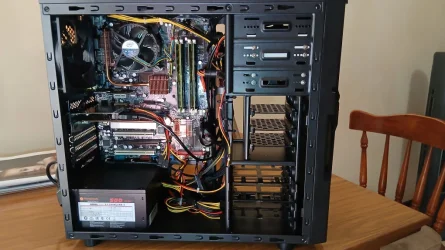
His old motherboard is now inside a new case with a new power supply and a SSD (attached image). I can't install anything past Windows 11 23H2 (using Rufus of course) which I have done and I've had it running perfectly (even if a bit slow by today's standards) for hours. Amazing what a good clean and CPU thermal paste replacement can do. I probably could put Linux on it but I'll be giving it back to him to keep as a spare and I don't think he will like using Linux, he has enough trouble using Windows sometimes. :lmao:
 

Attachments

  • 20261018_073852.webp
    20261018_073852.webp
    104.1 KB · Views: 1

My Computer My Computer

At a glance

Windows 11 Professional 26H211th Gen Intel(R) Core(TM) i5-11400 @ 2.60GHz...32GB (2x16GB) Kingston Fury RGB DDR4NVIDIA GeForce GTX 1650
OS
Windows 11 Professional 26H2
Computer type
PC/Desktop
Manufacturer/Model
Home Built
CPU
11th Gen Intel(R) Core(TM) i5-11400 @ 2.60GHz 2.59 GH
Motherboard
Gigabyte B560M D2V
Memory
32GB (2x16GB) Kingston Fury RGB DDR4
Graphics Card(s)
NVIDIA GeForce GTX 1650
Sound Card
Onboard Sound
Monitor(s) Displays
BenQ GL2460 (24 inch - oldie but a goodie)
Screen Resolution
1920x1080
Hard Drives
Samsung SSD 870 EVO x 2 (250GB and 500GB) plus several external Samsung SSD's.
PSU
Corsair HX 750
Case
DeepCool
Cooling
Stock CPU cooler. 5 case fans (2 front, 2 top and 1 rear)
Keyboard
Logitech
Mouse
Logitech
Internet Speed
500/40 Fibre
Browser
LibreWolf and Helium
Antivirus
Windows Security

My Computers My Computers

  • At a glance

    Win 11 Home 26H2 26300.9711AMD Ryzen 7 3700XG.Skill (F4-3200C14D-16GTZKW)EVGA RTX 2070 (08G-P4-2171-KR)
    OS
    Win 11 Home 26H2 26300.9711
    Computer type
    PC/Desktop
    Manufacturer/Model
    Built by Ghot® [May 2020]
    CPU
    AMD Ryzen 7 3700X
    Motherboard
    Asus Pro WS X570-ACE (BIOS 5302)
    Memory
    G.Skill (F4-3200C14D-16GTZKW)
    Graphics Card(s)
    EVGA RTX 2070 (08G-P4-2171-KR)
    Sound Card
    Realtek ALC1220P / ALC S1220A
    Monitor(s) Displays
    Dell U3011 30"
    Screen Resolution
    2560 x 1600
    Hard Drives
    2x Samsung 860 EVO 500GB,
    WD 4TB Black FZBX - SATA III,
    WD 8TB Black FZBX - SATA III,
    DRW-24B1ST CD/DVD Burner
    PSU
    PC Power & Cooling 750W Quad EPS12V
    Case
    Cooler Master ATCS 840 Tower
    Cooling
    CM Hyper 212 EVO (push/pull)
    Keyboard
    Ducky DK9008 Shine II Blue LED
    Mouse
    Logitech Optical M-100
    Internet Speed
    300/300
    Browser
    Firefox (latest)
    Antivirus
    Bitdefender Total Security
    Other Info
    Speakers: Klipsch Pro Media 2.1
  • At a glance

    Windows XP Pro 32bit w/SP3AMD Athlon 64 X2 5000+ (OC'd @ 3.2Ghz)TWIN2X2048-6400C4DHX (2 x 1GB, DDR2 800)EVGA 256-P2-N758-TR GeForce 8600GT SSC
    Operating System
    Windows XP Pro 32bit w/SP3
    Computer type
    PC/Desktop
    Manufacturer/Model
    Built by Ghot® (not in use)
    CPU
    AMD Athlon 64 X2 5000+ (OC'd @ 3.2Ghz)
    Motherboard
    ASUS M2N32-SLI Deluxe Wireless Edition
    Memory
    TWIN2X2048-6400C4DHX (2 x 1GB, DDR2 800)
    Graphics card(s)
    EVGA 256-P2-N758-TR GeForce 8600GT SSC
    Sound Card
    Onboard
    Monitor(s) Displays
    ViewSonic G90FB Black 19" Professional (CRT)
    Screen Resolution
    up to 2048 x 1536
    Hard Drives
    WD 36GB 10,000rpm Raptor SATA
    Seagate 80GB 7200rpm SATA
    Lite-On LTR-52246S CD/RW
    Lite-On LH-18A1P CD/DVD Burner
    PSU
    PC Power & Cooling Silencer 750 Quad EPS12V
    Case
    Generic Beige case, 80mm fans
    Cooling
    ZALMAN 9500A 92mm CPU Cooler
    Keyboard
    Logitech Classic Keybooard 200
    Mouse
    Logitech Optical M-BT96a
    Internet Speed
    300/300
    Browser
    Firefox 3.x ??
    Antivirus
    Symantec (Norton)
    Other Info
    Still assembled, still runs. Haven't turned it on for 15 years?
I probably could put Linux on it but I'll be giving it back to him to keep as a spare and I don't think he will like using Linux
Windows 10 LTSC IoT, security updates to 2031 ;-) (i think it was, i run W10 IoT)
 

My Computers My Computers

  • At a glance

    Linux: Debian, Kali-linux, Alma, Win:7,10IoT,...i3, i5 and i7 From 2gen to 9th gen... Server ...
    OS
    Linux: Debian, Kali-linux, Alma, Win:7,10IoT,2012R
    Manufacturer/Model
    HP Elitebook 840, AsusX53, Aspire E1-572. AsusUX32A, HP Pro3130mt+3010mt, HP Proliant ML150, 3xCustom-PC, i3, i5, i7
    CPU
    i3, i5 and i7 From 2gen to 9th gen... Server dual Xenon
    Hard Drives
    Sata, M.2, SAS
  • At a glance

    Retro: 2003server.XPpro, Win2000, Win98SE, Wi...Oldest intel 8088 up to P4 dual core
    Operating System
    Retro: 2003server.XPpro, Win2000, Win98SE, Win95, Win3.11, MS-DOS, IBM-DOS
    Manufacturer/Model
    Commodore, AST, Fujitsu, Compaq, etc etc. etc Around 15 desktops and 20 laptops in the collection
    CPU
    Oldest intel 8088 up to P4 dual core
    Hard Drives
    MFM, IDE, SCSI

My Computers My Computers

  • At a glance

    Windows 11 HomeAMD Athlon Silver 3050U8GBRadeon Graphics
    OS
    Windows 11 Home
    Computer type
    Laptop
    Manufacturer/Model
    Acer Aspire 3 A315-23-R9VY
    CPU
    AMD Athlon Silver 3050U
    Memory
    8GB
    Graphics Card(s)
    Radeon Graphics
    Monitor(s) Displays
    laptop screen
    Screen Resolution
    1366x768 native resolution, up to 2560x1440 with Radeon Virtual Super Resolution
    Hard Drives
    1TB Samsung EVO 870 SSD (from April 2026: 250GB EVO 850)
    Internet Speed
    150 Mbps
    Browser
    Edge, Firefox
    Antivirus
    Defender
    Other Info
    UPDATE - 11 April 2026: due to lid hinges starting to break up this laptop has been retired from active duty. The OS with all software and files has been migrated to my System Seven in 'Other systems' to carry on as my general purpose 'main machine'.

    I've now clean installed 25H2 and used Garlin's scripts to update Secure Boot to CA 2023 and revoke the PCA 2011 certificates. It's new role is to test secure boot issues.

    Info for 2021-2026:
    fully 'Windows 11 ready' laptop. Windows 10 C: partition migrated from my old unsupported 'main machine' then upgraded to 11. A test migration ran Insider builds for 2 months. When 11 was released on 5th October 2021 it was re-imaged back to 10 and was offered the upgrade in Windows Update on 20th October. Windows Update offered the 22H2 Feature Update on 20th September 2022. It got the 23H2 Feature Update on 4th November 2023 through Windows Update, 24H2 on 3rd October 2024 through Windows Update by setting the Target Release Version for 24H2, and 25H2 on 30th September 2025 through Windows Update by setting the Target Release Version for 25H2.
  • At a glance

    Windows 11 ProIntel® Core™ i5-520M8GB(integrated graphics) Intel HD Graphics
    Operating System
    Windows 11 Pro
    Computer type
    Laptop
    Manufacturer/Model
    Dell Latitude E4310
    CPU
    Intel® Core™ i5-520M
    Motherboard
    0T6M8G
    Memory
    8GB
    Graphics card(s)
    (integrated graphics) Intel HD Graphics
    Screen Resolution
    1366x768
    Hard Drives
    500GB Crucial MX500 SSD
    Browser
    Firefox, Edge
    Antivirus
    Defender
    Other Info
    unsupported machine: Legacy bios, MBR, TPM 1.2, upgraded from W10 to W11 using W10/W11 hybrid install media workaround.

    In-place upgrade to 22H2 using ISO and a workaround.
    Feature Update to 23H2 by manually installing the Enablement Package.
    In-place upgrade to 24H2 using hybrid 23H2/24H2 install media.
    Upgraded to 25H2 by Enablement Package.
    Upgraded to 26H2 by Enablement Package.

    Also running Insider Experimental 263xx and 29xxx builds and Windows 10 as native boot .vhdx.
  • My SYSTEM THREE is a Dell Latitude 5410, i7-10610U, 32GB RAM, 512GB NVMe ssd, supported device running Windows 11 Pro.

    My SYSTEM FOUR was a 2-in-1 convertible Lenovo Yoga 11e (1st gen) type 20DA, Celeron N2930, 8GB RAM, 256GB ssd. Unsupported device. This has now been sold. It has been replaced by my System Eight.

    My SYSTEM FIVE is a Dell Latitude 3190 2-in-1, Pentium Silver N5030, 8GB RAM, 1TB NVMe ssd, supported device running Windows 11 Pro, plus Insider Beta, Experimental 263xx and 29xxx builds (and a few others) as a native boot .vhdx.

    My SYSTEM SIX is a Dell Latitude 5550, Core Ultra 7 165H, 64GB RAM, 1TB NVMe SSD, supported device, Windows 11 Pro, Hyper-V host machine. Updated to 25H2 on 30th September 2025.

    My SYSTEM SEVEN is a Lenovo Thinkpad T580, 1920x1080 touchscreen, Intel Core i7-8650U, 16GB RAM, 512GB NVMe SSD + 2nd 512GB NVMe SSD, a supported device for Windows 11. This is my current general purpose 'main machine'. The installed Windows 11 Home from my System One has been migrated to this machine. As its new home has an existing digital licence for Pro I've been able to upgrade the migrated OS from Home to Pro.
    29 Sept. 2026 Feature Update to 26H2 through Windows Update.

    My SYSTEM EIGHT is a 2-in-1 convertible Lenovo Yoga 11e (5th gen) type 20LN, Celeron N4120, 8GB RAM, 512GB NVMe ssd, a supported device for Windows 11. Currently running Windows 11 Pro, plus Insider Beta, Experimental 263xx and 29xxx builds as native boot vhdx.

My Computers My Computers

  • At a glance

    Linux: Debian, Kali-linux, Alma, Win:7,10IoT,...i3, i5 and i7 From 2gen to 9th gen... Server ...
    OS
    Linux: Debian, Kali-linux, Alma, Win:7,10IoT,2012R
    Manufacturer/Model
    HP Elitebook 840, AsusX53, Aspire E1-572. AsusUX32A, HP Pro3130mt+3010mt, HP Proliant ML150, 3xCustom-PC, i3, i5, i7
    CPU
    i3, i5 and i7 From 2gen to 9th gen... Server dual Xenon
    Hard Drives
    Sata, M.2, SAS
  • At a glance

    Retro: 2003server.XPpro, Win2000, Win98SE, Wi...Oldest intel 8088 up to P4 dual core
    Operating System
    Retro: 2003server.XPpro, Win2000, Win98SE, Win95, Win3.11, MS-DOS, IBM-DOS
    Manufacturer/Model
    Commodore, AST, Fujitsu, Compaq, etc etc. etc Around 15 desktops and 20 laptops in the collection
    CPU
    Oldest intel 8088 up to P4 dual core
    Hard Drives
    MFM, IDE, SCSI
Decidedly not Word document compatible. 🤔

So who needs that. Make the world WordPerfect with DOS compatible. 😇

And what about the security offerred by TPM 2.0?

What about it. If it's a choice between convenience vs. security, guess which one's gonna win? Not that I agree with the outcome.

For non-tech people out there, they wouldn't know what TPM 2.0 is. I doubt it would be much of a selling point, but if more people find out about it, then it might bring even more unwanted attention to MS that they don't want. They'd think 2.0 was some kind of gimmick used to sell computers, made up the same way used car salesman do when they sell used cars.

Me neither. If I didn't agree, exactly what could I do about it, assuming I need the product? Bupkis. (look it up)

Well I guess people could pick "No" and then take the machine back for a refund since whatever you were doing before is now going to get permanently interrupted.

I'm pretty sure that SSE4.2 and PopCnt are required to run Windows 11, even bypassing the other requirements. Those requirements are hard coded into the Windows code now.

And maybe sinking themselves (MS and the end users) into a new hole that they can't get out of. What will happen is we will have less hardware security as OSes continue to go out of date on old, unsupported equipment, and people don't have any way to extend them. Or more than likely, they're not tech-savvy and just ignore any bubble warnings that appear about expirations and all that, and take their chances with infection.

And you know what Joe Dunderhead says:
If you can't update, then you ignore, by golly by gosh! The machine still runs! The machine still runs! And because of that, code like SSE4.2 and PopCnt can be ignored, by golly by gosh!

However, claiming there was some coordinated scheme by a "consortium" to force upgrades requires evidence. The fact that multiple companies benefit from a decision doesn't automatically prove they secretly orchestrated it.

Yeah, but it's all too coincidental. All following the same 'trend' at roughly the same time. :unsure:


The more relevant question is whether TPM 2.0, Secure Boot, and newer CPU requirements provide enough security and reliability benefits to justify leaving millions of otherwise functional Windows 10 PCs behind.

And do they? I'm supposed to take their word for it but part of me is unconvinced whether that really makes any difference or not. I get just as much malware as before.

Color me very skeptical... :nope:

-
 

My Computers My Computers

  • At a glance

    Windows 11 Pro 25H2 build: (26200.7623)32GB
    OS
    Windows 11 Pro 25H2 build: (26200.7623)
    Computer type
    Laptop
    Manufacturer/Model
    Microsoft Surface Pro
    Memory
    32GB
  • At a glance

    Microsoft 25H2 ProIntel Core Ultra 764GBIntel Integrated Graphics
    Operating System
    Microsoft 25H2 Pro
    Computer type
    Laptop
    Manufacturer/Model
    Dell Pro 14 - PC14250
    CPU
    Intel Core Ultra 7
    Memory
    64GB
    Graphics card(s)
    Intel Integrated Graphics
    Hard Drives
    Micron 1TB SSD
the fact that none of these 'restrictions' apply to Windows 11 IoT Enterprise LTSC (or whatever it is called these days) for business which can be installed on older hardware (I don't know if the latest additions to the 'restricted' list - SSE4.2 and PopCnt - also apply here or not).

Gee, wonder why... inquiring minds want to know... /s :nope:

~

lol, seriously, I did not know LTSC didn't have any of those restrictions. If you can install it on a Pentium 4 or a Core2Duo, then good luck. I hope it lasts.
 

My Computers My Computers

  • At a glance

    Windows 11 Pro 25H2 build: (26200.7623)32GB
    OS
    Windows 11 Pro 25H2 build: (26200.7623)
    Computer type
    Laptop
    Manufacturer/Model
    Microsoft Surface Pro
    Memory
    32GB
  • At a glance

    Microsoft 25H2 ProIntel Core Ultra 764GBIntel Integrated Graphics
    Operating System
    Microsoft 25H2 Pro
    Computer type
    Laptop
    Manufacturer/Model
    Dell Pro 14 - PC14250
    CPU
    Intel Core Ultra 7
    Memory
    64GB
    Graphics card(s)
    Intel Integrated Graphics
    Hard Drives
    Micron 1TB SSD
If microsoft really want people to stop using win10 when Ram/disk prices is like they are, so people cant afford upgrade to required hardware... Microsoft has the power to just change the installer so win11 can be installed on older hardware.
As long bypassing works, then its no real minimum requirements.. just preferred requirements.
They could have allowed a seamless Win10 to Win11 upgrade on most of the existing Win10 base of systems.
But IMHO Microsoft got greedy and likely worked behind the scenes with the system hardware vendors to push the new hardware 'required' for Win11.
But lots of customers balked, and thus the ESU path to keep running Win10.
Then system AI developers came in and with their massive demands for hardware that blew up the Win10 to Win11 hardware upgrade path,
making it impossible or prohibitively expensive to replace existing Win10 system with a new Win11 system.
Next year Microsoft is going to want you to ditch your Win11 system anyway and go out and replace it with a brand new AI enabled system.
 

My Computers My Computers

  • At a glance

    Win11 26H2 26300.9550Intel XEON W-2245 8c/16t128GB DDR4-2933 ECCNvidia Quadro K4200
    OS
    Win11 26H2 26300.9550
    Computer type
    PC/Desktop
    Manufacturer/Model
    Lenovo P520
    CPU
    Intel XEON W-2245 8c/16t
    Memory
    128GB DDR4-2933 ECC
    Graphics Card(s)
    Nvidia Quadro K4200
    Sound Card
    Bultin
    Monitor(s) Displays
    LCD 24in
    Screen Resolution
    1920x1200
    Hard Drives
    1TB SSD system, 16TB data 3.5in HDD, 16TB backup 3.5in HDD
    PSU
    900W
    Cooling
    Air
    Internet Speed
    1Gb
    Browser
    Firefox & Chrome
    Antivirus
    MalwareBytes
  • At a glance

    Win10 22H2Intel Core i7-3520m16GBintegrated CPU graphics
    Operating System
    Win10 22H2
    Computer type
    Laptop
    Manufacturer/Model
    Lenovo T530
    CPU
    Intel Core i7-3520m
    Memory
    16GB
    Graphics card(s)
    integrated CPU graphics
    Hard Drives
    1TB SSD
    Internet Speed
    1Gb
    Browser
    Fiefox & Chrome
    Antivirus
    Malwarebytes

Latest Support Threads

Latest Tutorials

Back
Top Bottom