"We sent your device a notification to connect" win 11 not working


randomdude

Member
Local time
4:57 AM
Posts
62
OS
Windows 11
Been trying all night trying to transfer my iphone photos to PC but it cant seem to read it. 3rd party app works though. not just the native photos app.

and yes itunes is installed. But can seem to make the native photos app detect the iphone storage. Anyone face the same issue?
 

My Computer My Computer

At a glance

Windows 11
OS
Windows 11
If your phone is an iphone, by default it takes photos as .heic files which Windows can not natively read. The files either have to be converted to jpeg or third party codecs installed in Windows. Rather than converting a bunch of photos, what I did was change my iphone settings to use jpeg when taking photos rather than using it's default format.

Discussion on Apple forum here: How to open HEIC file in Windows 10 witho… - Apple Community


My Computers My Computers

  • At a glance

    Windows 11 Pro 25H2 26200.8655i9-10900 10 core 20 threads32 gbnone-Intel UHD Graphics 630
    OS
    Windows 11 Pro 25H2 26200.8655
    Computer type
    PC/Desktop
    Manufacturer/Model
    Dell Optiplex 7080
    CPU
    i9-10900 10 core 20 threads
    Motherboard
    DELL 0J37VM
    Memory
    32 gb
    Graphics Card(s)
    none-Intel UHD Graphics 630
    Sound Card
    Integrated Realtek
    Monitor(s) Displays
    Benq 27
    Screen Resolution
    2560x1440
    Hard Drives
    2x1tb Solidigm m.2 nvme /External drives 512gb Samsung m.2 sata+2tb Kingston m2.nvme
    PSU
    500w
    Case
    MT
    Cooling
    Dell Premium
    Keyboard
    Logitech wired
    Mouse
    Logitech wireless
    Internet Speed
    so slow I'm too embarrassed to tell
    Browser
    #1 Edge #2 Firefox
    Antivirus
    Defender+MWB Premium
  • At a glance

    Windows 11 Pro 24H2 26200.8457AMD Ryzen 7 6800U32 gbintegrated
    Operating System
    Windows 11 Pro 24H2 26200.8457
    Computer type
    PC/Desktop
    Manufacturer/Model
    Beelink Mini PC SER5
    CPU
    AMD Ryzen 7 6800U
    Memory
    32 gb
    Graphics card(s)
    integrated
    Sound Card
    integrated
    Monitor(s) Displays
    Benq 27
    Screen Resolution
    2560x1440
    Hard Drives
    1TB Crucial nvme
    Keyboard
    Logitech wired
    Mouse
    Logitech wireless
    Internet Speed
    still too embarrassed to tell
    Browser
    Firefox
    Antivirus
    Defender
    Other Info
    System 3 is non compliant Dell 9020 i7-4770/24gb ram Win11 PRO 26200.8457
If your phone is an iphone, by default it takes photos as .heic files which Windows can not natively read. The files either have to be converted to jpeg or third party codecs installed in Windows. Rather than converting a bunch of photos, what I did was change my iphone settings to use jpeg when taking photos rather than using it's default format.

Discussion on Apple forum here: How to open HEIC file in Windows 10 witho… - Apple Community


I mean i have some JPEG files on here like screenshots and other stuff that is not HEIC, but PC cant read iphone. though it can read my android and the android device appears in the native photo app. so iphone is the problem?

oh and yeah its been on most compatible since last year.
 

My Computer My Computer

At a glance

Windows 11
OS
Windows 11
If you have 'most compatible' set, photos should be in jpg format. My iphone and ipad is set that way.
Right now my iphone is connected to my computer. In file explorer, it shows up as Apple iphone. I open internal storage folder, then DCIM, and all my photos are there and Windows photo app can read them. Do you not see that when you connect with usb?

As a test email one of the photos to yourself as an attachment. Then open the email in windows and save the attached photo to your computer. Does it save as jpg and open correctly using the photos app or do you have to use the 3rd party app to open it?
 

My Computers My Computers

  • At a glance

    Windows 11 Pro 25H2 26200.8655i9-10900 10 core 20 threads32 gbnone-Intel UHD Graphics 630
    OS
    Windows 11 Pro 25H2 26200.8655
    Computer type
    PC/Desktop
    Manufacturer/Model
    Dell Optiplex 7080
    CPU
    i9-10900 10 core 20 threads
    Motherboard
    DELL 0J37VM
    Memory
    32 gb
    Graphics Card(s)
    none-Intel UHD Graphics 630
    Sound Card
    Integrated Realtek
    Monitor(s) Displays
    Benq 27
    Screen Resolution
    2560x1440
    Hard Drives
    2x1tb Solidigm m.2 nvme /External drives 512gb Samsung m.2 sata+2tb Kingston m2.nvme
    PSU
    500w
    Case
    MT
    Cooling
    Dell Premium
    Keyboard
    Logitech wired
    Mouse
    Logitech wireless
    Internet Speed
    so slow I'm too embarrassed to tell
    Browser
    #1 Edge #2 Firefox
    Antivirus
    Defender+MWB Premium
  • At a glance

    Windows 11 Pro 24H2 26200.8457AMD Ryzen 7 6800U32 gbintegrated
    Operating System
    Windows 11 Pro 24H2 26200.8457
    Computer type
    PC/Desktop
    Manufacturer/Model
    Beelink Mini PC SER5
    CPU
    AMD Ryzen 7 6800U
    Memory
    32 gb
    Graphics card(s)
    integrated
    Sound Card
    integrated
    Monitor(s) Displays
    Benq 27
    Screen Resolution
    2560x1440
    Hard Drives
    1TB Crucial nvme
    Keyboard
    Logitech wired
    Mouse
    Logitech wireless
    Internet Speed
    still too embarrassed to tell
    Browser
    Firefox
    Antivirus
    Defender
    Other Info
    System 3 is non compliant Dell 9020 i7-4770/24gb ram Win11 PRO 26200.8457
If you have 'most compatible' set, photos should be in jpg format. My iphone and ipad is set that way.
Right now my iphone is connected to my computer. In file explorer, it shows up as Apple iphone. I open internal storage folder, then DCIM, and all my photos are there and Windows photo app can read them. Do you not see that when you connect with usb?

As a test email one of the photos to yourself as an attachment. Then open the email in windows and save the attached photo to your computer. Does it save as jpg and open correctly using the photos app or do you have to use the 3rd party app to open it?

Yes my iphone is connected but i cant access the internal storage on THIS PC, though i can access it by using a 3rd party app.
 

My Computer My Computer

At a glance

Windows 11
OS
Windows 11
Check your autoplay settings. Control Panel>autoplay
Set it like screenshot below. Save settings.
Unplug and re-plug your phone. Any difference?


Sorry to seem obtuse but small details matter and your first and last statements are somewhat different. Your first statement led me to believe the photos app would not open the photos. Now you say you can't access the internal storage which would point to a file explorer issue. We have to figure out where the process is breaking down. Please follow this flow and answer.

1. You plug in your phone. File explorer recognizes phone and assigns a drive letter to it. YES or NO.
(At this point, you get a message on your phone. You must allow. Only then will the DCIM folder show up under the drive letter. You have to do this each and every time you plug in your phone)

2. If yes, when you double click on the drive letter, will the drive expand so you are able to see DCIM folder YES or NO.

3. If yes, can you double-click the DCIM folder to expand it to show the folders/files inside? YES or NO.

4. If yes, tell me exactly what happens when you double click on one of the files. Any message or error?

If the answer to any of these questions was NO, it would point to a file explorer issue. Yet, you say the photos will open using a third party app. File explorer is used in conjunction with the app so that makes little sense to me. What app and exactly how are you opening the folders?

 

Attachments

  • Screenshot 2023-11-20 114111.png
    Screenshot 2023-11-20 114111.png
    15.9 KB · Views: 8

My Computers My Computers

  • At a glance

    Windows 11 Pro 25H2 26200.8655i9-10900 10 core 20 threads32 gbnone-Intel UHD Graphics 630
    OS
    Windows 11 Pro 25H2 26200.8655
    Computer type
    PC/Desktop
    Manufacturer/Model
    Dell Optiplex 7080
    CPU
    i9-10900 10 core 20 threads
    Motherboard
    DELL 0J37VM
    Memory
    32 gb
    Graphics Card(s)
    none-Intel UHD Graphics 630
    Sound Card
    Integrated Realtek
    Monitor(s) Displays
    Benq 27
    Screen Resolution
    2560x1440
    Hard Drives
    2x1tb Solidigm m.2 nvme /External drives 512gb Samsung m.2 sata+2tb Kingston m2.nvme
    PSU
    500w
    Case
    MT
    Cooling
    Dell Premium
    Keyboard
    Logitech wired
    Mouse
    Logitech wireless
    Internet Speed
    so slow I'm too embarrassed to tell
    Browser
    #1 Edge #2 Firefox
    Antivirus
    Defender+MWB Premium
  • At a glance

    Windows 11 Pro 24H2 26200.8457AMD Ryzen 7 6800U32 gbintegrated
    Operating System
    Windows 11 Pro 24H2 26200.8457
    Computer type
    PC/Desktop
    Manufacturer/Model
    Beelink Mini PC SER5
    CPU
    AMD Ryzen 7 6800U
    Memory
    32 gb
    Graphics card(s)
    integrated
    Sound Card
    integrated
    Monitor(s) Displays
    Benq 27
    Screen Resolution
    2560x1440
    Hard Drives
    1TB Crucial nvme
    Keyboard
    Logitech wired
    Mouse
    Logitech wireless
    Internet Speed
    still too embarrassed to tell
    Browser
    Firefox
    Antivirus
    Defender
    Other Info
    System 3 is non compliant Dell 9020 i7-4770/24gb ram Win11 PRO 26200.8457
Check your autoplay settings. Control Panel>autoplay
Set it like screenshot below. Save settings.
Unplug and re-plug your phone. Any difference?


Sorry to seem obtuse but small details matter and your first and last statements are somewhat different. Your first statement led me to believe the photos app would not open the photos. Now you say you can't access the internal storage which would point to a file explorer issue. We have to figure out where the process is breaking down. Please follow this flow and answer.

1. You plug in your phone. File explorer recognizes phone and assigns a drive letter to it. YES or NO.
(At this point, you get a message on your phone. You must allow. Only then will the DCIM folder show up under the drive letter. You have to do this each and every time you plug in your phone)

2. If yes, when you double click on the drive letter, will the drive expand so you are able to see DCIM folder YES or NO.

3. If yes, can you double-click the DCIM folder to expand it to show the folders/files inside? YES or NO.

4. If yes, tell me exactly what happens when you double click on one of the files. Any message or error?

If the answer to any of these questions was NO, it would point to a file explorer issue. Yet, you say the photos will open using a third party app. File explorer is used in conjunction with the app so that makes little sense to me. What app and exactly how are you opening the folders?

Hi i did what u asked and that appears.

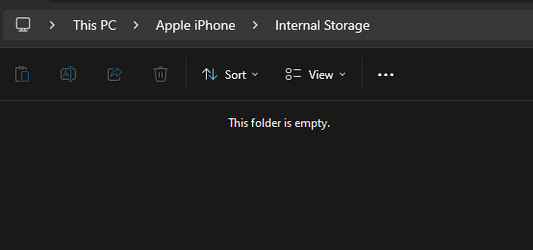
i can see my internal storage capacity but when i click on it its empty i tried ever possible way like updating drivers in device manager,

I used imazing and it detects the iphone and i can easily transfer photos and other stuff.
 

Attachments

  • Screenshot 2023-11-21 181202.png
    Screenshot 2023-11-21 181202.png
    2.8 KB · Views: 3

My Computer My Computer

At a glance

Windows 11
OS
Windows 11
So the problem is not with Photos app but with reading the DCIM folder. The only time that ever happened to me was the first time I did it. At the time my photos were stored in icloud rather than on my phone so the folder actually was empty.

See if there's anything in this article you haven't tried. How to Fix DCIM Folder Missing/Empty/Not Showing Photos

Other than that, I'm out of ideas. Sorry.
 

My Computers My Computers

  • At a glance

    Windows 11 Pro 25H2 26200.8655i9-10900 10 core 20 threads32 gbnone-Intel UHD Graphics 630
    OS
    Windows 11 Pro 25H2 26200.8655
    Computer type
    PC/Desktop
    Manufacturer/Model
    Dell Optiplex 7080
    CPU
    i9-10900 10 core 20 threads
    Motherboard
    DELL 0J37VM
    Memory
    32 gb
    Graphics Card(s)
    none-Intel UHD Graphics 630
    Sound Card
    Integrated Realtek
    Monitor(s) Displays
    Benq 27
    Screen Resolution
    2560x1440
    Hard Drives
    2x1tb Solidigm m.2 nvme /External drives 512gb Samsung m.2 sata+2tb Kingston m2.nvme
    PSU
    500w
    Case
    MT
    Cooling
    Dell Premium
    Keyboard
    Logitech wired
    Mouse
    Logitech wireless
    Internet Speed
    so slow I'm too embarrassed to tell
    Browser
    #1 Edge #2 Firefox
    Antivirus
    Defender+MWB Premium
  • At a glance

    Windows 11 Pro 24H2 26200.8457AMD Ryzen 7 6800U32 gbintegrated
    Operating System
    Windows 11 Pro 24H2 26200.8457
    Computer type
    PC/Desktop
    Manufacturer/Model
    Beelink Mini PC SER5
    CPU
    AMD Ryzen 7 6800U
    Memory
    32 gb
    Graphics card(s)
    integrated
    Sound Card
    integrated
    Monitor(s) Displays
    Benq 27
    Screen Resolution
    2560x1440
    Hard Drives
    1TB Crucial nvme
    Keyboard
    Logitech wired
    Mouse
    Logitech wireless
    Internet Speed
    still too embarrassed to tell
    Browser
    Firefox
    Antivirus
    Defender
    Other Info
    System 3 is non compliant Dell 9020 i7-4770/24gb ram Win11 PRO 26200.8457
My experience…. After being so frustrated with this, and the complete lack of response from anybody at MS or Apple about what is going on… and a lOT of yelling and screaming at both iPhone and PC… is that as glaskuter says, it is a problem reading the DCIM folder (and generally the file system on the iPhone. The answer for me was to WAIT… after that “message has been sent” screen, go away and make a cup of coffee. If you look on File Explorer, you will eventually see your phone appear in devices under My PC… if you click on it, you will see no files, but continue drinking your coffee. Eventually you will see “Apple File System” or similar appear on the right. Finally the little right arrow next to that should appear, and by the time you have finished your coffee you should be able to expand folders so that you can see more folders and files. NOW you can go back to the Windows Photo app, and (if the evil message is still there) click on retry, or click on “Import” again. For me, it then starts seeing pictures (about 150GB worth, it’s been finding them - not yet downloading, this is just creating a list of them) and after over half an hour, it’s up to about 30,000 and still counting. (This is an iPhone X.)

Hope this helps someone. The answer is, BE PATIENT.
 

My Computer My Computer

At a glance

win 11
OS
win 11
Computer type
PC/Desktop
Manufacturer/Model
Bitza

Latest Support Threads

Back
Top Bottom