- Local time
- 3:36 AM
- Posts
- 252
- OS
- Windows 11 Pro 22H2
I don't know if this is the correct question to ask on this thread section but let me know.
I had created a Windows Hello PIN passkey through my bank's security portal section and it worked fine for a couple of days or so and now when I sign in and use the Passkey to sign in using my Windows Hello PIN its asking to send an SMS code again even I created a Windows Hello passkey.
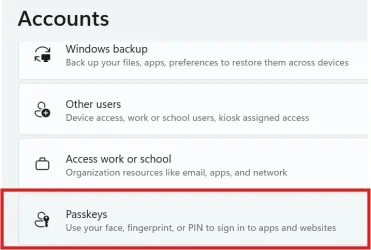
I can still see the entry for my bank's passkey from the Windows Settings Accounts and Passkey section but why is it still asking to send an SMS code again?
I tend to make a habit of deleting all cache files and history data from the Edge browser for every banking session that I do just to be safe and secure, would that wipe the Passkey file as well? But like I mentioned, it is still there as an entry under Accounts and Passkeys.
Or, is it something from my bank's end that they had changed recently?
I can still see this Passkey from here (see image)
I had created a Windows Hello PIN passkey through my bank's security portal section and it worked fine for a couple of days or so and now when I sign in and use the Passkey to sign in using my Windows Hello PIN its asking to send an SMS code again even I created a Windows Hello passkey.
I can still see the entry for my bank's passkey from the Windows Settings Accounts and Passkey section but why is it still asking to send an SMS code again?
I tend to make a habit of deleting all cache files and history data from the Edge browser for every banking session that I do just to be safe and secure, would that wipe the Passkey file as well? But like I mentioned, it is still there as an entry under Accounts and Passkeys.
Or, is it something from my bank's end that they had changed recently?
I can still see this Passkey from here (see image)
Attachments
My Computer
At a glance
Windows 11 Pro 22H2
- OS
- Windows 11 Pro 22H2