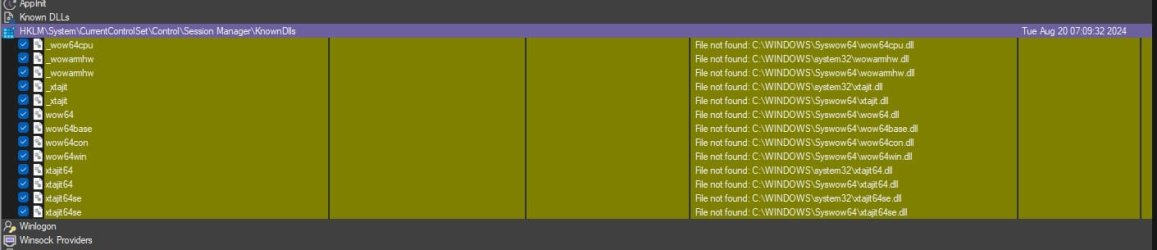
What are these tasks in Autoruns?


Steve C

Well-known member
Power User
VIP
Local time
3:21 PM
Posts
1,371
Location
North Yorkshire, UK
OS
Windows 11 Pro
My Dell Inspiron 7537 laptop is showing these Autoruns enries in yellow. What are they and can I delet them?
Screenshot 2024-08-23 113301.jpg
 

My Computer My Computer

At a glance

Windows 11 ProCore i7-13700K64 GB Kingston Fury Beast DDR5Gigabyte GeForce RTX 2060 Super Gaming OC 8G
OS
Windows 11 Pro
Computer type
PC/Desktop
Manufacturer/Model
Self build
CPU
Core i7-13700K
Motherboard
Asus TUF Gaming Plus WiFi Z790
Memory
64 GB Kingston Fury Beast DDR5
Graphics Card(s)
Gigabyte GeForce RTX 2060 Super Gaming OC 8G
Sound Card
Realtek S1200A
Monitor(s) Displays
Viewsonic VP2770 & Dell (secondary)
Screen Resolution
2560 x 1440
Hard Drives
Kingston KC3000 2TB NVME SSD & SATA HDDs & SSD
PSU
EVGA SuperNova G2 850W
Case
Nanoxia Deep Silence 1
Cooling
Noctua NH-D14
Keyboard
Microsoft Digital Media Pro
Mouse
Logitech Wireless
Internet Speed
80 Mb / s
Browser
Chrome
Antivirus
Defender, Malwarebytes Free & AdwCleaner
Some elements in Autoruns are highlighted with red or yellow: Yellow means that the item is exist in registry, but the file is not found. Red means that the item's in the registry, the file is in place, but the Publisher string is empty

You can delete it as the file does not exist.
 

My Computer My Computer

At a glance

Windows 11AMD Ryzen 7 5700GMicron Technology DDR4-3200 16GBNVIDIA GeForce RTX 3060
OS
Windows 11
Computer type
PC/Desktop
Manufacturer/Model
HP Pavilion
CPU
AMD Ryzen 7 5700G
Motherboard
Erica6
Memory
Micron Technology DDR4-3200 16GB
Graphics Card(s)
NVIDIA GeForce RTX 3060
Sound Card
Realtek ALC671
Monitor(s) Displays
Samsung SyncMaster U28E590
Screen Resolution
3840 x 2160
Hard Drives
SAMSUNG MZVLQ1T0HALB-000H1
You can delete it as the file does not exist.

The Colors Legend description is correct - that's what they mean. But Microsoft changed the path for some Windows files (personalized paths for each system) - while Autoruns still uses the old paths - since there's no path defined with their registry entry (right-click "Jump To Entry" in Autoruns). Thus, some files can appear in registry - while not in folder cause they're truly not there. BUT... they might still exist elsewhere.

For example: the old path for many of this yellow labeled files - used to be C:\Windows\SysWOW64 - that being the same path that still appears in Autoruns

Yet, Microsoft places this files in a personalized path which looks something like: C:\Windows\WinSxS\amd64_microsoft-windows-wow64_2kk4ll34l2h2j43_10.0.22621.2506_none_4700haket3x\r - the full path has a different entry on each PC - except for C:\Windows\WinSxS\amd64_microsoft-windows-wow64_ and 10.0.22621.2506

In theory, Autoruns could simply scan/search - and find the exact path - but some .exe/.dll can have 5 paths for same registry entry.

That being said, use a 64 bit Windows File Search app (like Everything) - and search for the files - to see if they still/actually exist before deleting them. This could be indeed a case of orphan registry entries.
 

My Computer My Computer

At a glance

WinDOS 25H2Intel & AMDSO-DIMM SK Hynix 15.8 GB Dual-Channel DDR4-26...nVidia RTX 2060 6GB Mobile GPU (TU106M)
OS
WinDOS 25H2
Computer type
Laptop
CPU
Intel & AMD
Memory
SO-DIMM SK Hynix 15.8 GB Dual-Channel DDR4-2666 (2 x 8 GB) 1329MHz (19-19-19-43)
Graphics Card(s)
nVidia RTX 2060 6GB Mobile GPU (TU106M)
Sound Card
Onbord Realtek ALC1220
Screen Resolution
1920 x 1080
Hard Drives
1x Samsung PM981 NVMe PCIe M.2 512GB / 1x Seagate Expansion ST1000LM035 1TB
Hi.
I also have them. Some can be deleted but they are later re-created. I stopped chasing them. They have not done any harm, I believe.
 

Attachments

  • autoruns1.jpg
    autoruns1.jpg
    29.1 KB · Views: 2
  • autoruns2.jpg
    autoruns2.jpg
    40.4 KB · Views: 2

My Computers My Computers

  • At a glance

    Windows 11 Pro build 26200.8524Intel i7-4790Teams DDR3-1600 4x4 GBMSI Nvidia GeForce GTX 1050Ti
    OS
    Windows 11 Pro build 26200.8524
    Computer type
    PC/Desktop
    Manufacturer/Model
    Home Built
    CPU
    Intel i7-4790
    Motherboard
    Asus H97 Pro Gamer with add-on TPM1.2 module
    Memory
    Teams DDR3-1600 4x4 GB
    Graphics Card(s)
    MSI Nvidia GeForce GTX 1050Ti
    Sound Card
    Realtek ALC1150
    Monitor(s) Displays
    Dell P2425D
    Screen Resolution
    2560 by 1440 pixels
    Hard Drives
    Corsair NVMe M.2 Core XT 1000 GB (Windows 11 v.25H2); Samsung SATA Evo 870 500 GB (Windows 11 v.25H2);
    PSU
    Corsair HX850
    Case
    Gigabyte Solo 210
    Cooling
    Zalman CNPS7X Tower
    Keyboard
    Microsoft AIO Wireless (includes touchpad)
    Mouse
    HP S1000 Plus Wireless
    Internet Speed
    500 Mb fiber optic
    Browser
    Chrome; MS Edge
    Antivirus
    Windows Defender
  • At a glance

    MacOS 12 MontereyIntel Core i58 GBIntel integrated
    Operating System
    MacOS 12 Monterey
    Computer type
    Laptop
    Manufacturer/Model
    Apple Macbook Air
    CPU
    Intel Core i5
    Memory
    8 GB
    Graphics card(s)
    Intel integrated
    Screen Resolution
    1440 by 900 pixels
    Hard Drives
    128 GB
    Keyboard
    Built-in
    Mouse
    Microsoft Wireless
    Internet Speed
    802.11 ac
    Browser
    Chrome; Safari
    Antivirus
    N/A
My Dell Inspiron 7537 laptop is showing these Autoruns enries in yellow. What are they and can I delet them?
View attachment 105872

I have these too. They are scheduled tasks and I have always suspected that this is the result of a Windows Update that moved or deleted the C:\WINDOWS\Syswow64\MusNotification.exe file without changing or deleting the tasks that need it. The tasks run using system privileges and can only be modified or deleted with software that can elevate you to that level, like PowerRun or Microsoft's PsExec.

PsExec - Sysinternals

Ben
 

My Computers My Computers

  • At a glance

    Windows 10 HomeIntel Core 2 Duo [email protected] GHz2 GB
    OS
    Windows 10 Home
    Computer type
    Laptop
    Manufacturer/Model
    HP Elitebook 2530p
    CPU
    Intel Core 2 Duo [email protected] GHz
    Memory
    2 GB
  • At a glance

    Windows 11 HomeIntel Core 2 Duo E75004 GB
    Operating System
    Windows 11 Home
    Computer type
    PC/Desktop
    Manufacturer/Model
    Dell Optiplex 330
    CPU
    Intel Core 2 Duo E7500
    Memory
    4 GB

Latest Support Threads

Back
Top Bottom