what are your tweaks?


smoothnobody

Well-known member
Local time
7:22 PM
Posts
137
OS
windows 11
i just found out i can remove the recycle bin from my desktop. mind blown. now my desktop is completely clean.

i like storage sense, daily drive optimization, dark mode, accent colors, single click, remove all the folder shortcuts from file explorer.

i wish there was a solution for recommend section, audio and network icons on taskbar, control panel and recycle bin on start folders.
 

My Computer

System One

  • OS
    windows 11
Hey!

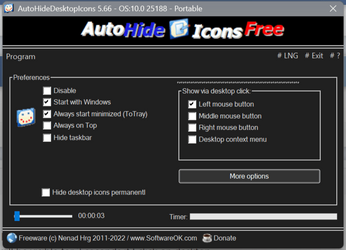
I use this program called Auto Hide Desktop Icons to hide my desktop icons
The best part is they will be visible for 3 seconds if I click on desktop ( you can customize it )
This way you can have your icons and clean desktop;-)
Btw it's just 109KB
Screenshot (26).png
 

My Computer

System One

  • OS
    Windows 11 Pro
    Computer type
    PC/Desktop
    Manufacturer/Model
    Custom
    CPU
    Intel Core i9 9900K
    Motherboard
    MSI MPG Z390 Gaming Pro Carbon AC
    Memory
    Corsair Vengeance RGB Pro 32GB [ 4 x 8GB ] DDR4 3600MHz CL18
    Graphics Card(s)
    Zotac GeForce RTX 4070 Super Trinity
    Monitor(s) Displays
    Samsung Odyssey G7 , 32" , 2560x1440 , VA , 240Hz , 1ms
    Screen Resolution
    QHD 2560x1440
    Hard Drives
    SSD: Samsung 980 Pro 250GB
    HDD: 2x Western Digital Blue 4TB
    PSU
    MSI MPG A1000G PCIE5
    Case
    Cooler Master MasterCase H500P Mesh ARGB
    Cooling
    DeepCool Gammaxx L360 v2
    Keyboard
    Corsair K95 RGB Platinum ( MX Speed ) [ SteelSeries PrismCaps ]
    Mouse
    Corsair Dark Core RGB Pro SE
    Internet Speed
    16 Mb/s ‌ ‌ | ‌ ‌ 1 Mb/s
    Browser
    Microsoft Edge
    Antivirus
    Windows Security
You can also right click on desktop,
select view > show desktop Icons
uncheck box to hide icons on desktop
 

My Computer

System One

  • OS
    Windows 11 Pro
    Computer type
    Laptop
    Manufacturer/Model
    ASUS ROG Strix
    CPU
    AMD Ryzen 9 S800HX with Radeon Graphics
    Motherboard
    Model 86C9 Version 56.33
    Memory
    16.00 GB
    Graphics Card(s)
    NVIDIA GeForce RTX 3050 Ti Laptop GPU
    Sound Card
    Realtek High Definition Audio
    Monitor(s) Displays
    1
    Screen Resolution
    1920 × 1080
    Hard Drives
    Solid State Drive -
    500GB
    PSU
    N/A
    Cooling
    Fan
    Keyboard
    Built-In
    Mouse
    Logitech Wireless
    Internet Speed
    200 Mbps
    Browser
    Chrome Browser
    Antivirus
    Windows Defender
    Other Info
    Windows 11 Pro
    Version 25H2
    Build 26200.8037
startallback +
registry with my customized metrics
Code:
Windows Registry Editor Version 5.00

; By Alex ASSR for 1080P Monitor Windows 11

; 19 x 10 icons

[HKEY_CURRENT_USER\Control Panel\Desktop\WindowMetrics]
"IconSpacing"="-1500"
"IconVerticalSpacing"="-1215"
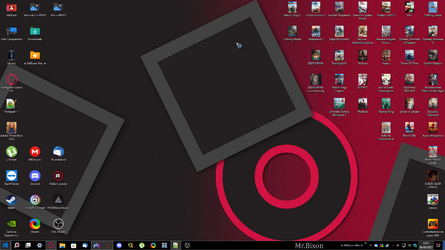
and wallpaper with customized taskbar details , startallback with 20% transparency.

1661885522994.png
and my custons icons and mouse pointer
 

My Computer

System One

  • OS
    Windows 11, Pro for Workstations, 22631.2861 (23H2)
    Computer type
    PC/Desktop
    Manufacturer/Model
    Custom
    CPU
    Amd Ryzen 5 5500 ("Zen 3") (3.6GHz,45-65W,L3:16M,6/12)
    Motherboard
    Asus Prime B450M Gaming/BR Chipset B450 AMD AM4 mATX DDR4 - BIOS 4002
    Memory
    DDR4 OLOy Owl Black, 8GB, 3200MHZ, (x2)
    Graphics Card(s)
    Colorful GeForce GTX 1650 Super
    Sound Card
    -
    Monitor(s) Displays
    Philips TV 43PFG5102/78
    Screen Resolution
    1920x1080
    Hard Drives
    SSD: 120GB, Sata III, Leitura 560MBs e Gravação 540MBs
    HD: Seagate Barracuda 1TB, Sata III, 7200RPM, 64MB
    PSU
    Corsair ATX CV550 550W, 80 Plus Bronze, PFC Ativo
    Case
    Wheel Jack, Mid Tower, Vidro Temperado, Black
    Cooling
    default
    Keyboard
    common
    Mouse
    commom
    Internet Speed
    600mb
    Browser
    Opera
    Antivirus
    Windows Defender
;)


My Computers

System One System Two

  • OS
    Windows 11 Pro for Workstations
    Computer type
    PC/Desktop
    Manufacturer/Model
    Custom self build
    CPU
    Intel i7-8700K 5 GHz
    Motherboard
    ASUS ROG Maximus XI Formula Z390
    Memory
    64 GB (4x16GB) G.SKILL TridentZ RGB DDR4 3600 MHz (F4-3600C18D-32GTZR)
    Graphics Card(s)
    ASUS ROG-STRIX-GTX1080TI-O11G-GAMING (11GB GDDR5X)
    Sound Card
    Integrated Digital Audio (S/PDIF)
    Monitor(s) Displays
    2 x Samsung Odyssey G75 27"
    Screen Resolution
    2560x1440
    Hard Drives
    1TB Samsung 990 PRO M.2,
    4TB Samsung 990 PRO M.2,
    TerraMaster F8 SSD Plus NAS
    PSU
    Seasonic Prime Titanium 850W
    Case
    Thermaltake Core P3 wall mounted
    Cooling
    Corsair Hydro H115i
    Keyboard
    Amazon Basics Wired Full Keyboard MD005
    Mouse
    Logitech MX Master 4
    Internet Speed
    2 Gbps Download and 100 Mbps Upload
    Browser
    Chrome and Edge
    Antivirus
    Microsoft Defender
    Other Info
    Logitech Z625 speaker system,
    Logitech BRIO 4K Pro webcam,
    HP Color LaserJet Pro MFP M477fdn,
    CyberPower CP1500PFCLCD
    Galaxy S23 Plus phone
  • Operating System
    Windows 11 Pro
    Computer type
    Laptop
    Manufacturer/Model
    Surface Laptop 7 Copilot+ PC
    CPU
    Snapdragon X Elite (12 core) 3.42 GHz
    Memory
    16 GB LPDDR5x-7467 MHz
    Monitor(s) Displays
    15" HDR
    Screen Resolution
    2496 x 1664
    Hard Drives
    1 TB SSD
    Internet Speed
    Wi-Fi 7 and Bluetooth 5.4
    Browser
    Chrome and Edge
    Antivirus
    Microsoft Defender
Brink's tutorials are excellent for customization tasks. I just finished creating a single batch file that performs probably something like 50 customizations to Windows. I used the tutorials to find all the registry or other command line options to get everything configured. Amazing how well this all works.
 

My Computers

System One System Two

  • OS
    Win11 Pro 25H2 (RTM+)
    Computer type
    PC/Desktop
    Manufacturer/Model
    Acemagic
    CPU
    Intel i7-14650HX
    Memory
    32 GB
    Graphics Card(s)
    No GPU - Built-in Intel Graphics
    Sound Card
    Integrated
    Monitor(s) Displays
    Varies as machine will often be moved to locations with different monitors
    Screen Resolution
    Varies
    Hard Drives
    1 x 1TB Gen 4 NVMe SSD
    PSU
    120W Power Brick
    Keyboard
    Corsair K70 Max RGB Magnetic Keyboard
    Mouse
    Logitech MX Master 3
    Internet Speed
    1Gb Up / 1 Gb Down
    Browser
    Edge
    Antivirus
    Windows Defender
  • Operating System
    Win11 Pro 25H2 (RTM+)
    Computer type
    Laptop
    Manufacturer/Model
    Lenovo ThinkBook 13x Gen 2
    CPU
    Intel i7-1255U
    Memory
    16 GB
    Graphics card(s)
    Intel Iris Xe Graphics
    Sound Card
    Realtek® ALC3306-CG codec
    Monitor(s) Displays
    13.3-inch IPS Display
    Screen Resolution
    WQXGA (2560 x 1600)
    Hard Drives
    2 TB 4 x 4 NVMe SSD
    PSU
    USB-C / Thunderbolt 4 Power / Charging
    Keyboard
    Backlit, spill resistant keyboard
    Mouse
    Buttonless Glass Precision Touchpad
    Internet Speed
    1Gb Up / 1Gb Down
    Browser
    Edge
    Antivirus
    Windows Defender
    Other Info
    WiFi 6e / Bluetooth 5.1 / Facial Recognition / Fingerprint Sensor / ToF (Time of Flight) Human Presence Sensor
Back
Top Bottom