what are your tweaks?


smoothnobody

Well-known member
Local time
6:17 AM
Posts
137
OS
windows 11
i just found out i can remove the recycle bin from my desktop. mind blown. now my desktop is completely clean.

i like storage sense, daily drive optimization, dark mode, accent colors, single click, remove all the folder shortcuts from file explorer.

i wish there was a solution for recommend section, audio and network icons on taskbar, control panel and recycle bin on start folders.
 

My Computer My Computer

At a glance

windows 11
OS
windows 11
Hey!

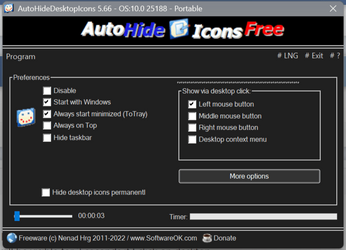
I use this program called Auto Hide Desktop Icons to hide my desktop icons
The best part is they will be visible for 3 seconds if I click on desktop ( you can customize it )
This way you can have your icons and clean desktop;-)
Btw it's just 109KB
Screenshot (26).png
 

My Computer My Computer

At a glance

Windows 11 ProIntel Core i9 9900KCorsair Vengeance RGB Pro 32GB [ 4 x 8GB ] DD...Zotac GeForce RTX 4070 Super Trinity
OS
Windows 11 Pro
Computer type
PC/Desktop
Manufacturer/Model
Custom
CPU
Intel Core i9 9900K
Motherboard
MSI MPG Z390 Gaming Pro Carbon AC
Memory
Corsair Vengeance RGB Pro 32GB [ 4 x 8GB ] DDR4 3600MHz CL18
Graphics Card(s)
Zotac GeForce RTX 4070 Super Trinity
Monitor(s) Displays
Samsung Odyssey G7 , 32" , 2560x1440 , VA , 240Hz , 1ms
Screen Resolution
QHD 2560x1440
Hard Drives
SSD: Samsung 980 Pro 250GB
HDD: 2x Western Digital Blue 4TB
PSU
MSI MPG A1000G PCIE5
Case
Cooler Master MasterCase H500P Mesh ARGB
Cooling
DeepCool Gammaxx L360 v2
Keyboard
Corsair K95 RGB Platinum ( MX Speed ) [ SteelSeries PrismCaps ]
Mouse
Corsair Dark Core RGB Pro SE
Internet Speed
16 Mb/s ‌ ‌ | ‌ ‌ 1 Mb/s
Browser
Microsoft Edge
Antivirus
Windows Security
You can also right click on desktop,
select view > show desktop Icons
uncheck box to hide icons on desktop
 

My Computer My Computer

At a glance

Windows 11 ProAMD Ryzen 9 S800HX with Radeon Graphics16.00 GBNVIDIA GeForce RTX 3050 Ti Laptop GPU
OS
Windows 11 Pro
Computer type
Laptop
Manufacturer/Model
ASUS ROG Strix
CPU
AMD Ryzen 9 S800HX with Radeon Graphics
Motherboard
Model 86C9 Version 56.33
Memory
16.00 GB
Graphics Card(s)
NVIDIA GeForce RTX 3050 Ti Laptop GPU
Sound Card
Realtek High Definition Audio
Monitor(s) Displays
1
Screen Resolution
1920 × 1080
Hard Drives
Solid State Drive -
500GB
PSU
N/A
Cooling
Fan
Keyboard
Built-In
Mouse
Logitech Wireless
Internet Speed
200 Mbps
Browser
Chrome Browser
Antivirus
Windows Defender
Other Info
Windows 11 Pro
Version 25H2
Build 26200.8037
startallback +
registry with my customized metrics
Code:
Windows Registry Editor Version 5.00

; By Alex ASSR for 1080P Monitor Windows 11

; 19 x 10 icons

[HKEY_CURRENT_USER\Control Panel\Desktop\WindowMetrics]
"IconSpacing"="-1500"
"IconVerticalSpacing"="-1215"
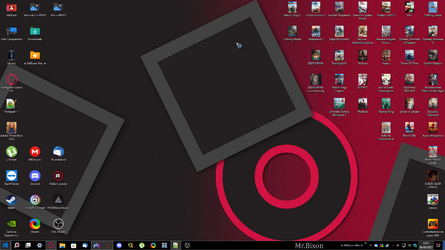
and wallpaper with customized taskbar details , startallback with 20% transparency.

1661885522994.png
and my custons icons and mouse pointer
 

My Computer My Computer

At a glance

Windows 10, Pro for Workstationscore 2 duo E74004G DDR2NVIDIA Geforce 6200 TurboCache
OS
Windows 10, Pro for Workstations
Computer type
PC/Desktop
Manufacturer/Model
Custom
CPU
core 2 duo E7400
Motherboard
MSI G31M3-L V2 (MS-7529)
Memory
4G DDR2
Graphics Card(s)
NVIDIA Geforce 6200 TurboCache
Sound Card
None
Monitor(s) Displays
Philips TV 43PFG5102/78
Screen Resolution
1920x1080
Hard Drives
HDD: Old 930gb, Second HDD 698gb
PSU
300W
Case
Goldship
Cooling
default
Keyboard
Exbom
Mouse
Exbom
Internet Speed
600mb
Browser
Opera
Antivirus
Windows Segurity
Other Info
I no longer have my old computer—the one with the Ryzen 5500, GeForce 1650 Super, and 16GB of DDR4 3200 MHz RAM.
;)


My Computers My Computers

  • At a glance

    Windows 11 Pro for WorkstationsIntel i7-8700K 5 GHz64 GB (4x16GB) G.SKILL TridentZ RGB DDR4 3600...ASUS ROG-STRIX-GTX1080TI-O11G-GAMING (11GB GD...
    OS
    Windows 11 Pro for Workstations
    Computer type
    PC/Desktop
    Manufacturer/Model
    Custom self build
    CPU
    Intel i7-8700K 5 GHz
    Motherboard
    ASUS ROG Maximus XI Formula Z390
    Memory
    64 GB (4x16GB) G.SKILL TridentZ RGB DDR4 3600 MHz (F4-3600C18D-32GTZR)
    Graphics Card(s)
    ASUS ROG-STRIX-GTX1080TI-O11G-GAMING (11GB GDDR5X)
    Sound Card
    Integrated Digital Audio (S/PDIF)
    Monitor(s) Displays
    2 x Samsung Odyssey G75 27"
    Screen Resolution
    2560x1440
    Hard Drives
    1TB Samsung 990 PRO M.2,
    4TB Samsung 990 PRO M.2,
    TerraMaster F8 SSD Plus NAS
    PSU
    Seasonic Prime Titanium 850W
    Case
    Thermaltake Core P3 wall mounted
    Cooling
    Corsair Hydro H115i
    Keyboard
    Amazon Basics Wired Full Keyboard MD005
    Mouse
    Logitech MX Master 4
    Internet Speed
    2 Gbps Download and 100 Mbps Upload
    Browser
    Chrome and Edge
    Antivirus
    Microsoft Defender
    Other Info
    Logitech Z625 speaker system,
    Logitech BRIO 4K Pro webcam,
    HP Color LaserJet Pro MFP M477fdn,
    CyberPower CP1500PFCLCD
    Galaxy S23 Plus phone
  • At a glance

    Windows 11 ProSnapdragon X Elite (12 core) 3.42 GHz16 GB LPDDR5x-7467 MHz
    Operating System
    Windows 11 Pro
    Computer type
    Laptop
    Manufacturer/Model
    Surface Laptop 7 Copilot+ PC
    CPU
    Snapdragon X Elite (12 core) 3.42 GHz
    Memory
    16 GB LPDDR5x-7467 MHz
    Monitor(s) Displays
    15" HDR
    Screen Resolution
    2496 x 1664
    Hard Drives
    1 TB SSD
    Internet Speed
    Wi-Fi 7 and Bluetooth 5.4
    Browser
    Chrome and Edge
    Antivirus
    Microsoft Defender
Brink's tutorials are excellent for customization tasks. I just finished creating a single batch file that performs probably something like 50 customizations to Windows. I used the tutorials to find all the registry or other command line options to get everything configured. Amazing how well this all works.
 

My Computers My Computers

  • At a glance

    Win11 Pro 26H2 (Release Preview)Intel i7-14650HX32 GBNo GPU - Built-in Intel Graphics
    OS
    Win11 Pro 26H2 (Release Preview)
    Computer type
    PC/Desktop
    Manufacturer/Model
    Acemagic Matrix M5
    CPU
    Intel i7-14650HX
    Memory
    32 GB
    Graphics Card(s)
    No GPU - Built-in Intel Graphics
    Sound Card
    Integrated
    Monitor(s) Displays
    Varies as machine will often be moved to locations with different monitors
    Screen Resolution
    Varies
    Hard Drives
    1 x 1TB Gen 4 NVMe SSD
    PSU
    120W Power Brick
    Keyboard
    Corsair K70 Max RGB Magnetic Keyboard
    Mouse
    Logitech MX Master 3
    Internet Speed
    1Gb Up / 1 Gb Down
    Browser
    Edge
    Antivirus
    Windows Defender
  • At a glance

    Win11 Pro 26H2 (Release Preview)Intel i7-1255U16 GBIntel Iris Xe Graphics
    Operating System
    Win11 Pro 26H2 (Release Preview)
    Computer type
    Laptop
    Manufacturer/Model
    Lenovo ThinkBook 13x Gen 2
    CPU
    Intel i7-1255U
    Memory
    16 GB
    Graphics card(s)
    Intel Iris Xe Graphics
    Sound Card
    Realtek® ALC3306-CG codec
    Monitor(s) Displays
    13.3-inch IPS Display
    Screen Resolution
    WQXGA (2560 x 1600)
    Hard Drives
    4 TB 4 x 4 NVMe SSD
    PSU
    USB-C / Thunderbolt 4 Power / Charging Using an Anker 160W Charger
    Keyboard
    Backlit, spill resistant keyboard
    Mouse
    Buttonless Glass Precision Touchpad
    Internet Speed
    1Gb Up / 1Gb Down
    Browser
    Edge
    Antivirus
    Windows Defender
    Other Info
    WiFi 6e / Bluetooth 5.1 / Facial Recognition / Fingerprint Sensor / ToF (Time of Flight) Human Presence Sensor

Latest Support Threads

Back
Top Bottom