
Solved What causing defender to display this message ?


William654

Well-known member
Member
VIP
Local time
1:04 PM
Posts
740
OS
Windows 11
Hi

Every start of windows 11 I get this message and when I click on it or view protection history it is always empty. How I know the reason of this message ?
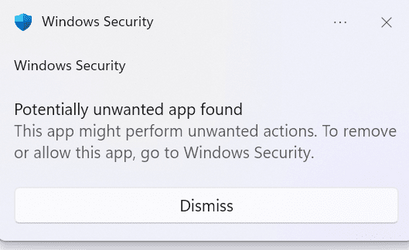
1703257660445.png
 

My Computer My Computer

At a glance

Windows 115900x32 GB G.SkillRX 6800 XT
OS
Windows 11
Computer type
PC/Desktop
CPU
5900x
Motherboard
MAG X570S TOMAHAWK MAX WIFI
Memory
32 GB G.Skill
Graphics Card(s)
RX 6800 XT
Sound Card
Creative Sound Blaster Z
Monitor(s) Displays
BENQ and AOC QHD 120Hz
Screen Resolution
QHD
Hard Drives
2TB Intel 660p and 2TB Sabrent Rokect 4 plus nvme, 4TB HDD HGST
PSU
Corsair RM750
Case
Bloody rage
Cooling
Water cooling gamdias 240
Keyboard
razer ornata
Mouse
razer da v2
Browser
FF and Chrome
Antivirus
Malwarebytes
Open computer management (compmgmt.msc) as Administrator and expand event viewer then navigate to:
Applications and services logs -> Microsoft -> Windows -> Windows Defender -> operational

Here search for time when you booted your system and around this time click each entry until you find one matching your screenshot.
The event should tell you which program was blocked or detected.
 

My Computer My Computer

At a glance

Windows 11 Pro 23H2Intel i3 8100 @3.6Ghz1 x 16GB DDR4 @2400 MHzNvidia GeForce GT 1030 2GB SDDR4
OS
Windows 11 Pro 23H2
Computer type
PC/Desktop
Manufacturer/Model
MSI / MS-7B29
CPU
Intel i3 8100 @3.6Ghz
Motherboard
H310M PRO-VDH (MS-7B29)
Memory
1 x 16GB DDR4 @2400 MHz
Graphics Card(s)
Nvidia GeForce GT 1030 2GB SDDR4
Sound Card
Realtek VEN_10EC&DEV_0887 / NVIDIA VEN_10DE&DEV_0081
Monitor(s) Displays
Acer V226HQL
Screen Resolution
1920 x 1080
Hard Drives
SSD 500 GB Crucial MX500 / HDD 1 TB TOSHIBA DT01ACA100
PSU
ATX, details unknown
Case
Everest 551B
Cooling
details unknown
Keyboard
Mechanical Gaming Hydra R7 - Rampage
Mouse
Logitech G703
Internet Speed
Down: 28Mbps / Up: 19Mbps
Browser
Microsoft Edge
Antivirus
Microsoft Defender Antivirus
Other Info
Bluetooth: TP Link 5.0 Nano USB adapter UB500
WLAN: D-Link 150 Pico USB adapter, N standard
Web camera: Logitech C270 HD 720p @30fps
Microphone: Trust MICO, model 23790

My Computer My Computer

At a glance

Windows 11AMD Ryzen 7 5700GMicron Technology DDR4-3200 16GBNVIDIA GeForce RTX 3060
OS
Windows 11
Computer type
PC/Desktop
Manufacturer/Model
HP Pavilion
CPU
AMD Ryzen 7 5700G
Motherboard
Erica6
Memory
Micron Technology DDR4-3200 16GB
Graphics Card(s)
NVIDIA GeForce RTX 3060
Sound Card
Realtek ALC671
Monitor(s) Displays
Samsung SyncMaster U28E590
Screen Resolution
3840 x 2160
Hard Drives
SAMSUNG MZVLQ1T0HALB-000H1
Open computer management (compmgmt.msc) as Administrator and expand event viewer then navigate to:
Applications and services logs -> Microsoft -> Windows -> Windows Defender -> operational

Here search for time when you booted your system and around this time click each entry until you find one matching your screenshot.
The event should tell you which program was blocked or detected.
Thanks I found what I want. What a way to see simple info like that.
 

My Computer My Computer

At a glance

Windows 115900x32 GB G.SkillRX 6800 XT
OS
Windows 11
Computer type
PC/Desktop
CPU
5900x
Motherboard
MAG X570S TOMAHAWK MAX WIFI
Memory
32 GB G.Skill
Graphics Card(s)
RX 6800 XT
Sound Card
Creative Sound Blaster Z
Monitor(s) Displays
BENQ and AOC QHD 120Hz
Screen Resolution
QHD
Hard Drives
2TB Intel 660p and 2TB Sabrent Rokect 4 plus nvme, 4TB HDD HGST
PSU
Corsair RM750
Case
Bloody rage
Cooling
Water cooling gamdias 240
Keyboard
razer ornata
Mouse
razer da v2
Browser
FF and Chrome
Antivirus
Malwarebytes
Thanks I found what I want. What a way to see simple info like that.
Glad to hear it helped!
Same applies to windows firewall, there is event group for it named "Windows firewall with advanced security" just below Windows defender folder.
You can add both to "Custom Views" for easy access to monitor your system.
 

My Computer My Computer

At a glance

Windows 11 Pro 23H2Intel i3 8100 @3.6Ghz1 x 16GB DDR4 @2400 MHzNvidia GeForce GT 1030 2GB SDDR4
OS
Windows 11 Pro 23H2
Computer type
PC/Desktop
Manufacturer/Model
MSI / MS-7B29
CPU
Intel i3 8100 @3.6Ghz
Motherboard
H310M PRO-VDH (MS-7B29)
Memory
1 x 16GB DDR4 @2400 MHz
Graphics Card(s)
Nvidia GeForce GT 1030 2GB SDDR4
Sound Card
Realtek VEN_10EC&DEV_0887 / NVIDIA VEN_10DE&DEV_0081
Monitor(s) Displays
Acer V226HQL
Screen Resolution
1920 x 1080
Hard Drives
SSD 500 GB Crucial MX500 / HDD 1 TB TOSHIBA DT01ACA100
PSU
ATX, details unknown
Case
Everest 551B
Cooling
details unknown
Keyboard
Mechanical Gaming Hydra R7 - Rampage
Mouse
Logitech G703
Internet Speed
Down: 28Mbps / Up: 19Mbps
Browser
Microsoft Edge
Antivirus
Microsoft Defender Antivirus
Other Info
Bluetooth: TP Link 5.0 Nano USB adapter UB500
WLAN: D-Link 150 Pico USB adapter, N standard
Web camera: Logitech C270 HD 720p @30fps
Microphone: Trust MICO, model 23790

Latest Support Threads

Back
Top Bottom




