- Local time
- 2:21 AM
- Posts
- 762
- OS
- Windows 11 Pro build 26200.8524
I wanted to replace my Wi-Fi adapter (Intel Wireless-AC 8265) in my notebook HP EliteBook 840 G5 from early 2019. This is the original Wi-Fi adapter that came with the notebook.
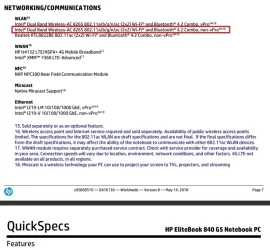
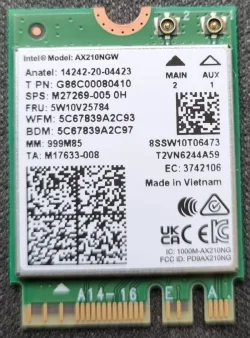
For this reason, I bought an Intel Wireless-AX 210 adapter.
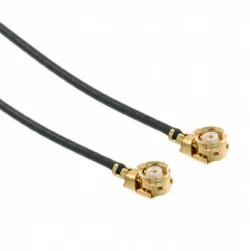
When I opened the bottom cover to take out the old Wi-Fi adapter and fit in the new one, I came across a problem. I could not fit the antenna connector to the new Wi-Fi adapter. Then I noticed something. A cylindrical piece was stuck in the antenna cable head. It was interfering with the antenna connector on the new Wi-Fi adapter socket. I took the broken piece out. Then I could fit the antenna head back in place.
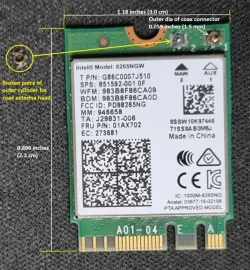
After checking the old adapter, I saw that main antenna socket outer cylinder (ground wire) was completely broken. The auxiliary antenna socket outer cylinder was also partly damaged.
I do not think I caused the damage on antenna sockets.
What I want to say is, the antenna sockets on the Wi-Fi adapter are so tiny and fragile that most probably the sockets were damaged during when the notebook was assembled in HP factory.
I hope this post helps forum members who wish to replace their INTEL Wi-Fi adapters in their notebooks.
Happy computing, everyone.
For this reason, I bought an Intel Wireless-AX 210 adapter.
When I opened the bottom cover to take out the old Wi-Fi adapter and fit in the new one, I came across a problem. I could not fit the antenna connector to the new Wi-Fi adapter. Then I noticed something. A cylindrical piece was stuck in the antenna cable head. It was interfering with the antenna connector on the new Wi-Fi adapter socket. I took the broken piece out. Then I could fit the antenna head back in place.
After checking the old adapter, I saw that main antenna socket outer cylinder (ground wire) was completely broken. The auxiliary antenna socket outer cylinder was also partly damaged.
I do not think I caused the damage on antenna sockets.
What I want to say is, the antenna sockets on the Wi-Fi adapter are so tiny and fragile that most probably the sockets were damaged during when the notebook was assembled in HP factory.
I hope this post helps forum members who wish to replace their INTEL Wi-Fi adapters in their notebooks.
Happy computing, everyone.
My Computers
-
At a glance
Windows 11 Pro build 26200.8524Intel i7-4790Teams DDR3-1600 4x4 GBMSI Nvidia GeForce GTX 1050Ti- OS
- Windows 11 Pro build 26200.8524
- Computer type
- PC/Desktop
- Manufacturer/Model
- Home Built
- CPU
- Intel i7-4790
- Motherboard
- Asus H97 Pro Gamer with add-on TPM1.2 module
- Memory
- Teams DDR3-1600 4x4 GB
- Graphics Card(s)
- MSI Nvidia GeForce GTX 1050Ti
- Sound Card
- Realtek ALC1150
- Monitor(s) Displays
- Dell P2425D
- Screen Resolution
- 2560 by 1440 pixels
- Hard Drives
- Corsair NVMe M.2 Core XT 1000 GB (Windows 11 v.25H2); Samsung SATA Evo 870 500 GB (Windows 11 v.25H2);
- PSU
- Corsair HX850
- Case
- Gigabyte Solo 210
- Cooling
- Zalman CNPS7X Tower
- Keyboard
- Microsoft AIO Wireless (includes touchpad)
- Mouse
- HP S1000 Plus Wireless
- Internet Speed
- 500 Mb fiber optic
- Browser
- Chrome; MS Edge
- Antivirus
- Windows Defender
-
At a glance
MacOS 12 MontereyIntel Core i58 GBIntel integrated- Operating System
- MacOS 12 Monterey
- Computer type
- Laptop
- Manufacturer/Model
- Apple Macbook Air
- CPU
- Intel Core i5
- Memory
- 8 GB
- Graphics card(s)
- Intel integrated
- Screen Resolution
- 1440 by 900 pixels
- Hard Drives
- 128 GB
- Keyboard
- Built-in
- Mouse
- Microsoft Wireless
- Internet Speed
- 802.11 ac
- Browser
- Chrome; Safari
- Antivirus
- N/A