Windows IT Pro Blog:
July delivered a wide range of Windows updates for IT admins, with new capabilities across security, device management, Windows Server, Windows 365, accessibility, and lifecycle planning. In this edition of Windows news you can use, find the changes most likely to affect your planning and operations. This includes AI-powered vulnerability management and passkeys in Microsoft Entra ID, Windows settings backup, RDP Multipath, Arc-enabled hotpatch updates, and new Windows 11 experiences.
New in Windows update and device management
- [WINDOWS 365] [AI] – New details are available to help you explore Windows 365 for Agents. Learn more about building secure, managed Cloud PC environments that extend enterprise identity, security, compliance, and governance controls to agentic workloads.
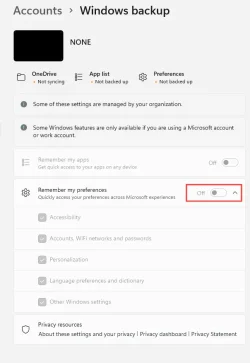
- [BACKUP] – Windows 11, version 26H2 will enable Windows settings backup by default on eligible devices. Improve resiliency by automatically backing up user settings and Microsoft Store app lists. Unfamiliar with the Windows settings backup and restore experience? Take a quick video tour.
- [INTUNE] – As of July 1, advanced Microsoft Intune Suite capabilities are included in Microsoft 365 E5, with select capabilities available in Microsoft 365 E3.
- [INTUNE] – The updated per-device sync experience in the Intune admin center now shows progress. Confirm more easily that actions are running and understand where they are in the process.
- [WINDOWS 365] [AZURE VIRTUAL DESKTOP] [NETWORKING] – Windows 365 and Azure Virtual Desktop now support RDP Multipath with redundant TCP. Check out a more resilient remote desktop experience with improved connectivity and fewer disconnects.
- [SERVICING] – Looking for a quick refresh on monthly update types and release schedules? To help you make informed decisions about your update management strategy, check out Understanding Windows monthly updates: Servicing explained.
- [TOOLS] – The latest Sysinternals updates add new tools. These include JPEG and WEBP snip support for ZoomIt and a new timeout option for ProcDump. Additionally, security protections in LiveKD help prevent non-administrators from viewing potentially sensitive debugging data in dump files.
New in Windows security
- [AI] – As AI accelerates vulnerability discovery, Windows is investing in AI-powered tools. They can identify security issues earlier, accelerate remediation, help strengthen validation processes, and deliver fast, high-quality security updates.
- [SSO] – A new Windows policy gives you greater control over sign-in experiences. You can now automatically accept single sign-on (SSO) permissions on managed devices.
- [PASSKEYS] [ENTRA] – Microsoft Entra ID is updating its authentication experience by making passkeys the default phishing-resistant authentication method. This lets you reduce reliance on phishable methods such as SMS and voice.
- [KMS] [TPM] – Upcoming KMS enhancements use TPM-backed hardware attestation to strengthen activation integrity by tying activation to a trusted host rather than only to a software configuration. TPM attestation helps prove that the KMS host is a real, trusted server and has not been tampered with before it is allowed to activate Windows devices.
- [AI] – Microsoft introduces Project Perception, a next-generation security platform that uses AI to continuously perceive, reason about, and respond to threats. With it, defenders can better keep pace with the speed and scale of AI-era attacks. For details on how Microsoft is using AI to proactively identify security risks, strengthen platform defenses, and advance quantum-safe security across products and services, check out the latest Secure Future Initiative report.
New in Windows Server
For the latest features and improvements for Windows Server, see the Windows Server 2025 release notes and Windows Server, version 23H2 release notes.- [HOTPATCH] – Arc-enabled hotpatch updates for Windows Server 2025 are now available at no additional cost. Use them to apply most security updates without restarting servers. This feature helps reduce downtime while maintaining security compliance through Azure Arc and Azure Update Manager.
- [TPM] – Trusted Launch for virtual machines (TVMs) is now available in the Windows Server Insider Program. Strengthen VM security with Secure Boot and vTPM protections against sophisticated firmware and boot attacks.
- [SECURITY] – New guidance is available for managing RDP file security through Group Policy. Help your organization reduce phishing risks by controlling which .rdp files users can open.
- [HARDENING] – The July 2026 security update introduces a security hardening change that enforces TDI transport registration requirements. As applications that use sockets over unregistered third-party TDI transports might stop working after installing this update, learn how to determine if you’re affected and manage the behavior.
- [HARDENING] – Starting with the October 2026 security update, AD FS Distributed Key Manager (DKM) container ACL hardening remediations will run by default on supported versions of Windows Server.
New in productivity and collaboration
Install the July 2026 security update for Windows 11, versions 25H2 and 24H2 to get these and other capabilities, which will be rolling out gradually:- [START] – A redesigned Start menu is available on commercial and managed Windows devices. Customize the experience for your organization using the Start Policy CSP and Start policy settings.
- [ACCESSIBILITY] – Accessibility improvements make it easier for people to work their way. Now available are the new full-screen color overlay for greater visual comfort, more precise zoom controls in Magnifier, and expanded voice access and voice typing support in French, German, and Spanish.
- [WIDGETS] – A quieter, more focused Widgets experience helps reduce interruptions and improves default settings and notification controls.
- [NETWORKING] – Connections used by apps and system features, such as the NetUseAdd function, now work more reliably, including unauthenticated (null session) connections. This makes it easier for devices to access shared network resources.
- [FILE EXPLORER] – File sizes in the Details view now display using appropriate units (KB, MB, GB) instead of KB-only. We hope it helps you understand them easier at a glance.
- [ACCESSIBILITY] – Voice Access now features Voice Isolation. As such, it recognizes your voice better by reducing interference from other speakers and background noise. Voice Access also now supports Korean.
- [SECURITY] – Windows Hello Enhanced Sign-in Security (ESS) support for peripheral fingerprint sensor is now beginning to roll out. Start using fingerprint sensors for desktops and other Windows 11 PCs, including Copilot+ PCs.
Lifecycle reminders
- [W11] [24H2] – On October 13, 2026, Windows 11, version 24H2 Home and Pro editions will reach end of updates. After this date, devices running these editions will no longer receive monthly security and non-security preview updates containing protections from the latest security threats. Enterprise and Education editions remain supported until October 12, 2027.
- [W10] [LSTB] - On October 13, 2026, Windows 10 Enterprise LTSB 2016 will reach end of updates. We recommend updating to the latest LTSC release, Windows 11 Enterprise LTSC 2024. If you need additional time to complete the transition, Extended Security Updates (ESU)will be available.
- [SERVER] [2022] – On October 13, 2026, Windows Server 2022 will reach end of mainstream support. After this date, Windows Server 2022 will transition to extended support, which includes security updates at no additional cost. These devices will continue to receive monthly security updates through October 14, 2031. For detailed information, see the Windows Server 2022 lifecycle page.
Additional resources
Looking for the latest news and previews for Windows, Copilot, Copilot+ PCs, the Windows and Windows Server Insider Programs? Find out this and more through the following resources:- Windows Roadmap for new Windows features – filter by platform, version, status, and channel or search by feature name
- Microsoft 365 Copilot release notes for latest features and improvements
- Windows Insider Blog for what’s available in the Beta and Experimental channels
- Windows Server Insider for feature preview opportunities
- Understanding update history for Windows Insider preview features, fixes, and changes to learn about the types of updates for Windows Insiders
Source: