
I was poking around advanced system properties (I forget why actually, the domino effect), and I ran into Account Unknown. That led me to look at C:\Users to see if it had that long name S-1-... which indicates Account Unknown is a Windows thing. I didn't see it. But I did see User 1 with a long named owner:
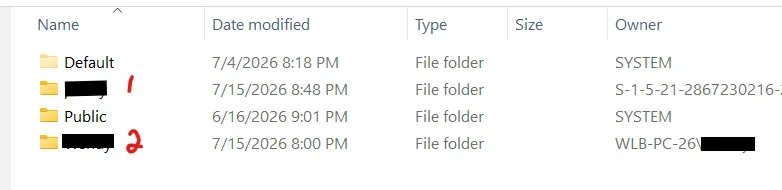
QUESTION1:
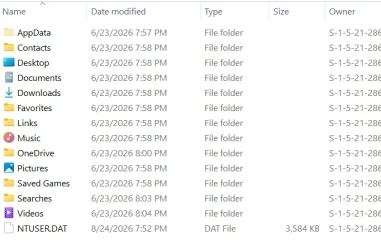
User1 is my dogs name but I have no recollection of creating that account. When I first set up this PC, I had a MS account for a minute (sadly I never saw an option to go straight to Local Account.. I looked). I think my MS account email name starts with the same letters as User1. The only thing in User1 folders is MS Edge in the Desktop folder and AppData with mostly empty folders dated 6-23-2026 Does that seem to align with the fact that User1 is associated with my MS Account somehow? (all MS apps are signed out)
Also properties on User1 folder yields this. There are 2 Account Unknowns. Are they both ok? Why 2?
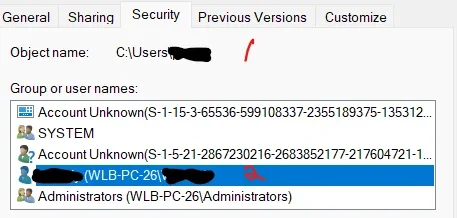
Now I can't recall where I first saw the single "Account Unknown". If pressed maybe I can.
QUESTION2:
What is the Public account for? Seems some software installs dropped shortcuts there. Can I get rid of this "feature" safely?

QUESTION1:
User1 is my dogs name but I have no recollection of creating that account. When I first set up this PC, I had a MS account for a minute (sadly I never saw an option to go straight to Local Account.. I looked). I think my MS account email name starts with the same letters as User1. The only thing in User1 folders is MS Edge in the Desktop folder and AppData with mostly empty folders dated 6-23-2026 Does that seem to align with the fact that User1 is associated with my MS Account somehow? (all MS apps are signed out)
Also properties on User1 folder yields this. There are 2 Account Unknowns. Are they both ok? Why 2?
Now I can't recall where I first saw the single "Account Unknown". If pressed maybe I can.
QUESTION2:
What is the Public account for? Seems some software installs dropped shortcuts there. Can I get rid of this "feature" safely?
My Computers
-
At a glance
Windows 11 ProIntel Ultra 516GB- OS
- Windows 11 Pro
- Computer type
- PC/Desktop
- Manufacturer/Model
- Dell Pro Slim QCS1250
- CPU
- Intel Ultra 5
- Memory
- 16GB
-
At a glance
Windows 7 UltimateI78GB- Operating System
- Windows 7 Ultimate
- Computer type
- PC/Desktop
- Manufacturer/Model
- Dell XPS 8000 Studio
- CPU
- I7
- Memory
- 8GB
-
Windows 10 Dell Inspiron laptop






