Solved What is the easiest way to create scheduled system restore point ?


William654

Well-known member
Member
VIP
Local time
10:14 PM
Posts
740
OS
Windows 11
Hi

I can not find an app to do that so I used Windows task schedule and tried to use powershell like in this article:

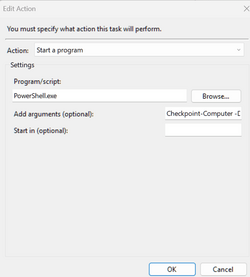
So I created the task like this:
1703008198930.png

arguments are: Checkpoint-Computer -Description "Restore Point" -RestorePointType "MODIFY_SETTINGS"
I test by run this task manually but nothing was created why is that ?

Also how I retain only last 3 restore points and delete the other older points ?
 

My Computer My Computer

At a glance

Windows 115900x32 GB G.SkillRX 6800 XT
OS
Windows 11
Computer type
PC/Desktop
CPU
5900x
Motherboard
MAG X570S TOMAHAWK MAX WIFI
Memory
32 GB G.Skill
Graphics Card(s)
RX 6800 XT
Sound Card
Creative Sound Blaster Z
Monitor(s) Displays
BENQ and AOC QHD 120Hz
Screen Resolution
QHD
Hard Drives
2TB Intel 660p and 2TB Sabrent Rokect 4 plus nvme, 4TB HDD HGST
PSU
Corsair RM750
Case
Bloody rage
Cooling
Water cooling gamdias 240
Keyboard
razer ornata
Mouse
razer da v2
Browser
FF and Chrome
Antivirus
Malwarebytes
Hello William, :alien:

Double check to make sure you set the System Restore Point Creation Frequency to "0" to allow unlimited creation up to your max size.


In addition, you can reference the tutorial below to help make sure the task was created properly.


My Computers My Computers

  • At a glance

    Windows 11 Pro for WorkstationsIntel i7-8700K 5 GHz64 GB (4x16GB) G.SKILL TridentZ RGB DDR4 3600...ASUS ROG-STRIX-GTX1080TI-O11G-GAMING (11GB GD...
    OS
    Windows 11 Pro for Workstations
    Computer type
    PC/Desktop
    Manufacturer/Model
    Custom self build
    CPU
    Intel i7-8700K 5 GHz
    Motherboard
    ASUS ROG Maximus XI Formula Z390
    Memory
    64 GB (4x16GB) G.SKILL TridentZ RGB DDR4 3600 MHz (F4-3600C18D-32GTZR)
    Graphics Card(s)
    ASUS ROG-STRIX-GTX1080TI-O11G-GAMING (11GB GDDR5X)
    Sound Card
    Integrated Digital Audio (S/PDIF)
    Monitor(s) Displays
    2 x Samsung Odyssey G75 27"
    Screen Resolution
    2560x1440
    Hard Drives
    1TB Samsung 990 PRO M.2,
    4TB Samsung 990 PRO M.2,
    TerraMaster F8 SSD Plus NAS
    PSU
    Seasonic Prime Titanium 850W
    Case
    Thermaltake Core P3 wall mounted
    Cooling
    Corsair Hydro H115i
    Keyboard
    Amazon Basics Wired Full Keyboard MD005
    Mouse
    Logitech MX Master 4
    Internet Speed
    2 Gbps Download and 100 Mbps Upload
    Browser
    Chrome and Edge
    Antivirus
    Microsoft Defender
    Other Info
    Logitech Z625 speaker system,
    Logitech BRIO 4K Pro webcam,
    HP Color LaserJet Pro MFP M477fdn,
    CyberPower CP1500PFCLCD
    Galaxy S23 Plus phone
  • At a glance

    Windows 11 ProSnapdragon X Elite (12 core) 3.42 GHz16 GB LPDDR5x-7467 MHz
    Operating System
    Windows 11 Pro
    Computer type
    Laptop
    Manufacturer/Model
    Surface Laptop 7 Copilot+ PC
    CPU
    Snapdragon X Elite (12 core) 3.42 GHz
    Memory
    16 GB LPDDR5x-7467 MHz
    Monitor(s) Displays
    15" HDR
    Screen Resolution
    2496 x 1664
    Hard Drives
    1 TB SSD
    Internet Speed
    Wi-Fi 7 and Bluetooth 5.4
    Browser
    Chrome and Edge
    Antivirus
    Microsoft Defender
Hello William, :alien:

Double check to make sure you set the System Restore Point Creation Frequency to "0" to allow unlimited creation up to your max size.


In addition, you can reference the tutorial below to help make sure the task was created properly.

Yes "SystemRestorePointCreationFrequency" is set to 0
 

My Computer My Computer

At a glance

Windows 115900x32 GB G.SkillRX 6800 XT
OS
Windows 11
Computer type
PC/Desktop
CPU
5900x
Motherboard
MAG X570S TOMAHAWK MAX WIFI
Memory
32 GB G.Skill
Graphics Card(s)
RX 6800 XT
Sound Card
Creative Sound Blaster Z
Monitor(s) Displays
BENQ and AOC QHD 120Hz
Screen Resolution
QHD
Hard Drives
2TB Intel 660p and 2TB Sabrent Rokect 4 plus nvme, 4TB HDD HGST
PSU
Corsair RM750
Case
Bloody rage
Cooling
Water cooling gamdias 240
Keyboard
razer ornata
Mouse
razer da v2
Browser
FF and Chrome
Antivirus
Malwarebytes
I tried again now it work after I used these arguments
Code:
-ExecutionPolicy Bypass -Command "Checkpoint-Computer -Description \"Automatic Restore Point\" -RestorePointType \"MODIFY_SETTINGS\""

How to retain only last 3 points ?
 

My Computer My Computer

At a glance

Windows 115900x32 GB G.SkillRX 6800 XT
OS
Windows 11
Computer type
PC/Desktop
CPU
5900x
Motherboard
MAG X570S TOMAHAWK MAX WIFI
Memory
32 GB G.Skill
Graphics Card(s)
RX 6800 XT
Sound Card
Creative Sound Blaster Z
Monitor(s) Displays
BENQ and AOC QHD 120Hz
Screen Resolution
QHD
Hard Drives
2TB Intel 660p and 2TB Sabrent Rokect 4 plus nvme, 4TB HDD HGST
PSU
Corsair RM750
Case
Bloody rage
Cooling
Water cooling gamdias 240
Keyboard
razer ornata
Mouse
razer da v2
Browser
FF and Chrome
Antivirus
Malwarebytes

My Computers My Computers

  • At a glance

    Windows 11 Pro for WorkstationsIntel i7-8700K 5 GHz64 GB (4x16GB) G.SKILL TridentZ RGB DDR4 3600...ASUS ROG-STRIX-GTX1080TI-O11G-GAMING (11GB GD...
    OS
    Windows 11 Pro for Workstations
    Computer type
    PC/Desktop
    Manufacturer/Model
    Custom self build
    CPU
    Intel i7-8700K 5 GHz
    Motherboard
    ASUS ROG Maximus XI Formula Z390
    Memory
    64 GB (4x16GB) G.SKILL TridentZ RGB DDR4 3600 MHz (F4-3600C18D-32GTZR)
    Graphics Card(s)
    ASUS ROG-STRIX-GTX1080TI-O11G-GAMING (11GB GDDR5X)
    Sound Card
    Integrated Digital Audio (S/PDIF)
    Monitor(s) Displays
    2 x Samsung Odyssey G75 27"
    Screen Resolution
    2560x1440
    Hard Drives
    1TB Samsung 990 PRO M.2,
    4TB Samsung 990 PRO M.2,
    TerraMaster F8 SSD Plus NAS
    PSU
    Seasonic Prime Titanium 850W
    Case
    Thermaltake Core P3 wall mounted
    Cooling
    Corsair Hydro H115i
    Keyboard
    Amazon Basics Wired Full Keyboard MD005
    Mouse
    Logitech MX Master 4
    Internet Speed
    2 Gbps Download and 100 Mbps Upload
    Browser
    Chrome and Edge
    Antivirus
    Microsoft Defender
    Other Info
    Logitech Z625 speaker system,
    Logitech BRIO 4K Pro webcam,
    HP Color LaserJet Pro MFP M477fdn,
    CyberPower CP1500PFCLCD
    Galaxy S23 Plus phone
  • At a glance

    Windows 11 ProSnapdragon X Elite (12 core) 3.42 GHz16 GB LPDDR5x-7467 MHz
    Operating System
    Windows 11 Pro
    Computer type
    Laptop
    Manufacturer/Model
    Surface Laptop 7 Copilot+ PC
    CPU
    Snapdragon X Elite (12 core) 3.42 GHz
    Memory
    16 GB LPDDR5x-7467 MHz
    Monitor(s) Displays
    15" HDR
    Screen Resolution
    2496 x 1664
    Hard Drives
    1 TB SSD
    Internet Speed
    Wi-Fi 7 and Bluetooth 5.4
    Browser
    Chrome and Edge
    Antivirus
    Microsoft Defender
Q: What is the easiest way to create scheduled system restore point ?

A: Use backup software.
 

My Computers My Computers

  • At a glance

    Win 11 Home ♦♦♦26200.8655 ♦♦♦♦♦♦♦25H2AMD Ryzen 7 3700XG.Skill (F4-3200C14D-16GTZKW)EVGA RTX 2070 (08G-P4-2171-KR)
    OS
    Win 11 Home ♦♦♦26200.8655 ♦♦♦♦♦♦♦25H2
    Computer type
    PC/Desktop
    Manufacturer/Model
    Built by Ghot® [May 2020]
    CPU
    AMD Ryzen 7 3700X
    Motherboard
    Asus Pro WS X570-ACE (BIOS 5302)
    Memory
    G.Skill (F4-3200C14D-16GTZKW)
    Graphics Card(s)
    EVGA RTX 2070 (08G-P4-2171-KR)
    Sound Card
    Realtek ALC1220P / ALC S1220A
    Monitor(s) Displays
    Dell U3011 30"
    Screen Resolution
    2560 x 1600
    Hard Drives
    2x Samsung 860 EVO 500GB,
    WD 4TB Black FZBX - SATA III,
    WD 8TB Black FZBX - SATA III,
    DRW-24B1ST CD/DVD Burner
    PSU
    PC Power & Cooling 750W Quad EPS12V
    Case
    Cooler Master ATCS 840 Tower
    Cooling
    CM Hyper 212 EVO (push/pull)
    Keyboard
    Ducky DK9008 Shine II Blue LED
    Mouse
    Logitech Optical M-100
    Internet Speed
    300/300
    Browser
    Firefox (latest)
    Antivirus
    Bitdefender Total Security
    Other Info
    Speakers: Klipsch Pro Media 2.1
  • At a glance

    Windows XP Pro 32bit w/SP3AMD Athlon 64 X2 5000+ (OC'd @ 3.2Ghz)TWIN2X2048-6400C4DHX (2 x 1GB, DDR2 800)EVGA 256-P2-N758-TR GeForce 8600GT SSC
    Operating System
    Windows XP Pro 32bit w/SP3
    Computer type
    PC/Desktop
    Manufacturer/Model
    Built by Ghot® (not in use)
    CPU
    AMD Athlon 64 X2 5000+ (OC'd @ 3.2Ghz)
    Motherboard
    ASUS M2N32-SLI Deluxe Wireless Edition
    Memory
    TWIN2X2048-6400C4DHX (2 x 1GB, DDR2 800)
    Graphics card(s)
    EVGA 256-P2-N758-TR GeForce 8600GT SSC
    Sound Card
    Onboard
    Monitor(s) Displays
    ViewSonic G90FB Black 19" Professional (CRT)
    Screen Resolution
    up to 2048 x 1536
    Hard Drives
    WD 36GB 10,000rpm Raptor SATA
    Seagate 80GB 7200rpm SATA
    Lite-On LTR-52246S CD/RW
    Lite-On LH-18A1P CD/DVD Burner
    PSU
    PC Power & Cooling Silencer 750 Quad EPS12V
    Case
    Generic Beige case, 80mm fans
    Cooling
    ZALMAN 9500A 92mm CPU Cooler
    Keyboard
    Logitech Classic Keybooard 200
    Mouse
    Logitech Optical M-BT96a
    Internet Speed
    300/300
    Browser
    Firefox 3.x ??
    Antivirus
    Symantec (Norton)
    Other Info
    Still assembled, still runs. Haven't turned it on for 15 years?
  • Like
Reactions: OAT
Q: What is the easiest way to create scheduled system restore point ?

A: Use backup software.
No dont want to use full backup
 

My Computer My Computer

At a glance

Windows 115900x32 GB G.SkillRX 6800 XT
OS
Windows 11
Computer type
PC/Desktop
CPU
5900x
Motherboard
MAG X570S TOMAHAWK MAX WIFI
Memory
32 GB G.Skill
Graphics Card(s)
RX 6800 XT
Sound Card
Creative Sound Blaster Z
Monitor(s) Displays
BENQ and AOC QHD 120Hz
Screen Resolution
QHD
Hard Drives
2TB Intel 660p and 2TB Sabrent Rokect 4 plus nvme, 4TB HDD HGST
PSU
Corsair RM750
Case
Bloody rage
Cooling
Water cooling gamdias 240
Keyboard
razer ornata
Mouse
razer da v2
Browser
FF and Chrome
Antivirus
Malwarebytes

My Computer My Computer

At a glance

Windows 115900x32 GB G.SkillRX 6800 XT
OS
Windows 11
Computer type
PC/Desktop
CPU
5900x
Motherboard
MAG X570S TOMAHAWK MAX WIFI
Memory
32 GB G.Skill
Graphics Card(s)
RX 6800 XT
Sound Card
Creative Sound Blaster Z
Monitor(s) Displays
BENQ and AOC QHD 120Hz
Screen Resolution
QHD
Hard Drives
2TB Intel 660p and 2TB Sabrent Rokect 4 plus nvme, 4TB HDD HGST
PSU
Corsair RM750
Case
Bloody rage
Cooling
Water cooling gamdias 240
Keyboard
razer ornata
Mouse
razer da v2
Browser
FF and Chrome
Antivirus
Malwarebytes
How I know the average size of a single restore point ?

Is there a way not to display the progress of create system restore point ?
I don't think the task shows anything. The scheduled task just runs to create the restore point in the background if I remember correctly.

The size of a restore point will vary, so you'll have to do some testing and playing with the max size to see how many restore points you end up with compared to how much of the max size you used.


My Computers My Computers

  • At a glance

    Windows 11 Pro for WorkstationsIntel i7-8700K 5 GHz64 GB (4x16GB) G.SKILL TridentZ RGB DDR4 3600...ASUS ROG-STRIX-GTX1080TI-O11G-GAMING (11GB GD...
    OS
    Windows 11 Pro for Workstations
    Computer type
    PC/Desktop
    Manufacturer/Model
    Custom self build
    CPU
    Intel i7-8700K 5 GHz
    Motherboard
    ASUS ROG Maximus XI Formula Z390
    Memory
    64 GB (4x16GB) G.SKILL TridentZ RGB DDR4 3600 MHz (F4-3600C18D-32GTZR)
    Graphics Card(s)
    ASUS ROG-STRIX-GTX1080TI-O11G-GAMING (11GB GDDR5X)
    Sound Card
    Integrated Digital Audio (S/PDIF)
    Monitor(s) Displays
    2 x Samsung Odyssey G75 27"
    Screen Resolution
    2560x1440
    Hard Drives
    1TB Samsung 990 PRO M.2,
    4TB Samsung 990 PRO M.2,
    TerraMaster F8 SSD Plus NAS
    PSU
    Seasonic Prime Titanium 850W
    Case
    Thermaltake Core P3 wall mounted
    Cooling
    Corsair Hydro H115i
    Keyboard
    Amazon Basics Wired Full Keyboard MD005
    Mouse
    Logitech MX Master 4
    Internet Speed
    2 Gbps Download and 100 Mbps Upload
    Browser
    Chrome and Edge
    Antivirus
    Microsoft Defender
    Other Info
    Logitech Z625 speaker system,
    Logitech BRIO 4K Pro webcam,
    HP Color LaserJet Pro MFP M477fdn,
    CyberPower CP1500PFCLCD
    Galaxy S23 Plus phone
  • At a glance

    Windows 11 ProSnapdragon X Elite (12 core) 3.42 GHz16 GB LPDDR5x-7467 MHz
    Operating System
    Windows 11 Pro
    Computer type
    Laptop
    Manufacturer/Model
    Surface Laptop 7 Copilot+ PC
    CPU
    Snapdragon X Elite (12 core) 3.42 GHz
    Memory
    16 GB LPDDR5x-7467 MHz
    Monitor(s) Displays
    15" HDR
    Screen Resolution
    2496 x 1664
    Hard Drives
    1 TB SSD
    Internet Speed
    Wi-Fi 7 and Bluetooth 5.4
    Browser
    Chrome and Edge
    Antivirus
    Microsoft Defender
I don't think the task shows anything. The scheduled task just runs to create the restore point in the background if I remember correctly.
it show progress bar in ps terminal window
 

My Computer My Computer

At a glance

Windows 115900x32 GB G.SkillRX 6800 XT
OS
Windows 11
Computer type
PC/Desktop
CPU
5900x
Motherboard
MAG X570S TOMAHAWK MAX WIFI
Memory
32 GB G.Skill
Graphics Card(s)
RX 6800 XT
Sound Card
Creative Sound Blaster Z
Monitor(s) Displays
BENQ and AOC QHD 120Hz
Screen Resolution
QHD
Hard Drives
2TB Intel 660p and 2TB Sabrent Rokect 4 plus nvme, 4TB HDD HGST
PSU
Corsair RM750
Case
Bloody rage
Cooling
Water cooling gamdias 240
Keyboard
razer ornata
Mouse
razer da v2
Browser
FF and Chrome
Antivirus
Malwarebytes
I'm not sure you can stop the progress window, but is should automatically close soon afterwards.
 

My Computers My Computers

  • At a glance

    Windows 11 Pro for WorkstationsIntel i7-8700K 5 GHz64 GB (4x16GB) G.SKILL TridentZ RGB DDR4 3600...ASUS ROG-STRIX-GTX1080TI-O11G-GAMING (11GB GD...
    OS
    Windows 11 Pro for Workstations
    Computer type
    PC/Desktop
    Manufacturer/Model
    Custom self build
    CPU
    Intel i7-8700K 5 GHz
    Motherboard
    ASUS ROG Maximus XI Formula Z390
    Memory
    64 GB (4x16GB) G.SKILL TridentZ RGB DDR4 3600 MHz (F4-3600C18D-32GTZR)
    Graphics Card(s)
    ASUS ROG-STRIX-GTX1080TI-O11G-GAMING (11GB GDDR5X)
    Sound Card
    Integrated Digital Audio (S/PDIF)
    Monitor(s) Displays
    2 x Samsung Odyssey G75 27"
    Screen Resolution
    2560x1440
    Hard Drives
    1TB Samsung 990 PRO M.2,
    4TB Samsung 990 PRO M.2,
    TerraMaster F8 SSD Plus NAS
    PSU
    Seasonic Prime Titanium 850W
    Case
    Thermaltake Core P3 wall mounted
    Cooling
    Corsair Hydro H115i
    Keyboard
    Amazon Basics Wired Full Keyboard MD005
    Mouse
    Logitech MX Master 4
    Internet Speed
    2 Gbps Download and 100 Mbps Upload
    Browser
    Chrome and Edge
    Antivirus
    Microsoft Defender
    Other Info
    Logitech Z625 speaker system,
    Logitech BRIO 4K Pro webcam,
    HP Color LaserJet Pro MFP M477fdn,
    CyberPower CP1500PFCLCD
    Galaxy S23 Plus phone
  • At a glance

    Windows 11 ProSnapdragon X Elite (12 core) 3.42 GHz16 GB LPDDR5x-7467 MHz
    Operating System
    Windows 11 Pro
    Computer type
    Laptop
    Manufacturer/Model
    Surface Laptop 7 Copilot+ PC
    CPU
    Snapdragon X Elite (12 core) 3.42 GHz
    Memory
    16 GB LPDDR5x-7467 MHz
    Monitor(s) Displays
    15" HDR
    Screen Resolution
    2496 x 1664
    Hard Drives
    1 TB SSD
    Internet Speed
    Wi-Fi 7 and Bluetooth 5.4
    Browser
    Chrome and Edge
    Antivirus
    Microsoft Defender
@Brink
There is a little script, that forces (creates) a new Restore Point. If someone were to put that script in their "Startup" folder, then they would get a new restore point every time the PC is booted up.
Currently, I incorporate that little fix into every new Windows install (Setup).
By setting the max size of the space that restore points take up, one can thus limit the number of restore points that are saved on the HD.
And, I've always got a Fresh Restore Point when I need one.
Windows and its Startup folder takes care of the scheduling.

Merry Christmas,
TM :cool:
PS: I'll attach that script for creating a restore point, in Windows 11.
 

Attachments

Re the OP first post:
What is the difference between this:
Create System Restore Point in Windows 11 Tutorial

versus this:
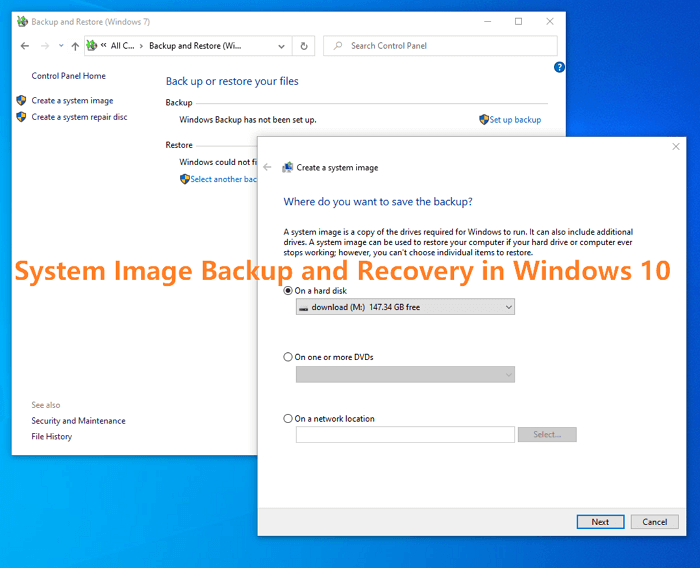
Control Panel\All Control Panel Items\Backup and Restore (Windows 7)

I have been using the latter for a number of years and was unacquainted with the former. Some advantage to the former?

I am able to set an scheduled/automatic backup with the 'Windows 7" route.
 

My Computer My Computer

At a glance

Windows 11 25H2 26200.86552.10GHz Intel 12th Gen Core i7-1270016GBNVIDIA GeForce 3050
OS
Windows 11 25H2 26200.8655
Computer type
PC/Desktop
Manufacturer/Model
HP Envy Desktop TE02-0xxx
CPU
2.10GHz Intel 12th Gen Core i7-12700
Motherboard
HP 'BlizzardU' 894B 10; Chipset Intel ADL Z690
Memory
16GB
Graphics Card(s)
NVIDIA GeForce 3050
Sound Card
Realtek Audio
Monitor(s) Displays
HP27er
Screen Resolution
1920x1080
Hard Drives
256GB NVMe SSD
2TB HDD
PSU
600W
Case
Desktop Tower
Cooling
Air
Keyboard
Logitech K350
Mouse
Logitech M510
Internet Speed
25Mps (Max)
Browser
Chrome
Antivirus
Windows native security
Other Info
HP replaced SSD under warranty in November, 2023.
No VPN.
Re the OP first post:
What is the difference between this:
Create System Restore Point in Windows 11 Tutorial

versus this:
Control Panel\All Control Panel Items\Backup and Restore (Windows 7)

I have been using the latter for a number of years and was unacquainted with the former. Some advantage to the former?

I am able to set an scheduled/automatic backup with the 'Windows 7" route.
Here an article to know the difference

You better move to Hasleo Backup Suite it is free and has all the options
 

My Computer My Computer

At a glance

Windows 115900x32 GB G.SkillRX 6800 XT
OS
Windows 11
Computer type
PC/Desktop
CPU
5900x
Motherboard
MAG X570S TOMAHAWK MAX WIFI
Memory
32 GB G.Skill
Graphics Card(s)
RX 6800 XT
Sound Card
Creative Sound Blaster Z
Monitor(s) Displays
BENQ and AOC QHD 120Hz
Screen Resolution
QHD
Hard Drives
2TB Intel 660p and 2TB Sabrent Rokect 4 plus nvme, 4TB HDD HGST
PSU
Corsair RM750
Case
Bloody rage
Cooling
Water cooling gamdias 240
Keyboard
razer ornata
Mouse
razer da v2
Browser
FF and Chrome
Antivirus
Malwarebytes
System restore takes a snapshot before apps, drivers, updates and their associated registry entries are changed. It does not affect a user account and cannot help for issues within the user account.
Backup Restore Windows 7 is a long deprecated feature. MS themselves has recommended that users use third party software specifically designed for backup and imaging purposes rather than use this feature. Backup restore Windows 7 will not image program files.
 

My Computers My Computers

  • At a glance

    Windows 11 Pro 25H2 26200.8655i9-10900 10 core 20 threads32 gbnone-Intel UHD Graphics 630
    OS
    Windows 11 Pro 25H2 26200.8655
    Computer type
    PC/Desktop
    Manufacturer/Model
    Dell Optiplex 7080
    CPU
    i9-10900 10 core 20 threads
    Motherboard
    DELL 0J37VM
    Memory
    32 gb
    Graphics Card(s)
    none-Intel UHD Graphics 630
    Sound Card
    Integrated Realtek
    Monitor(s) Displays
    Benq 27
    Screen Resolution
    2560x1440
    Hard Drives
    2x1tb Solidigm m.2 nvme /External drives 512gb Samsung m.2 sata+2tb Kingston m2.nvme
    PSU
    500w
    Case
    MT
    Cooling
    Dell Premium
    Keyboard
    Logitech wired
    Mouse
    Logitech wireless
    Internet Speed
    so slow I'm too embarrassed to tell
    Browser
    #1 Edge #2 Firefox
    Antivirus
    Defender+MWB Premium
  • At a glance

    Windows 11 Pro 24H2 26200.8457AMD Ryzen 7 6800U32 gbintegrated
    Operating System
    Windows 11 Pro 24H2 26200.8457
    Computer type
    PC/Desktop
    Manufacturer/Model
    Beelink Mini PC SER5
    CPU
    AMD Ryzen 7 6800U
    Memory
    32 gb
    Graphics card(s)
    integrated
    Sound Card
    integrated
    Monitor(s) Displays
    Benq 27
    Screen Resolution
    2560x1440
    Hard Drives
    1TB Crucial nvme
    Keyboard
    Logitech wired
    Mouse
    Logitech wireless
    Internet Speed
    still too embarrassed to tell
    Browser
    Firefox
    Antivirus
    Defender
    Other Info
    System 3 is non compliant Dell 9020 i7-4770/24gb ram Win11 PRO 26200.8457
System restore takes a snapshot before apps, drivers, updates and their associated registry entries are changed. It does not affect a user account and cannot help for issues within the user account.
Backup Restore Windows 7 is a long deprecated feature. MS themselves has recommended that users use third party software specifically designed for backup and imaging purposes rather than use this feature. Backup restore Windows 7 will not image program files.
Out of curiosity, will it cause a problem to do both System Restore and Backup Restore Windows 7?
 

My Computer My Computer

At a glance

Windows 11 25H2 26200.86552.10GHz Intel 12th Gen Core i7-1270016GBNVIDIA GeForce 3050
OS
Windows 11 25H2 26200.8655
Computer type
PC/Desktop
Manufacturer/Model
HP Envy Desktop TE02-0xxx
CPU
2.10GHz Intel 12th Gen Core i7-12700
Motherboard
HP 'BlizzardU' 894B 10; Chipset Intel ADL Z690
Memory
16GB
Graphics Card(s)
NVIDIA GeForce 3050
Sound Card
Realtek Audio
Monitor(s) Displays
HP27er
Screen Resolution
1920x1080
Hard Drives
256GB NVMe SSD
2TB HDD
PSU
600W
Case
Desktop Tower
Cooling
Air
Keyboard
Logitech K350
Mouse
Logitech M510
Internet Speed
25Mps (Max)
Browser
Chrome
Antivirus
Windows native security
Other Info
HP replaced SSD under warranty in November, 2023.
No VPN.
No it shouldn't cause a problem.
 

My Computers My Computers

  • At a glance

    Windows 11 Pro 25H2 26200.8655i9-10900 10 core 20 threads32 gbnone-Intel UHD Graphics 630
    OS
    Windows 11 Pro 25H2 26200.8655
    Computer type
    PC/Desktop
    Manufacturer/Model
    Dell Optiplex 7080
    CPU
    i9-10900 10 core 20 threads
    Motherboard
    DELL 0J37VM
    Memory
    32 gb
    Graphics Card(s)
    none-Intel UHD Graphics 630
    Sound Card
    Integrated Realtek
    Monitor(s) Displays
    Benq 27
    Screen Resolution
    2560x1440
    Hard Drives
    2x1tb Solidigm m.2 nvme /External drives 512gb Samsung m.2 sata+2tb Kingston m2.nvme
    PSU
    500w
    Case
    MT
    Cooling
    Dell Premium
    Keyboard
    Logitech wired
    Mouse
    Logitech wireless
    Internet Speed
    so slow I'm too embarrassed to tell
    Browser
    #1 Edge #2 Firefox
    Antivirus
    Defender+MWB Premium
  • At a glance

    Windows 11 Pro 24H2 26200.8457AMD Ryzen 7 6800U32 gbintegrated
    Operating System
    Windows 11 Pro 24H2 26200.8457
    Computer type
    PC/Desktop
    Manufacturer/Model
    Beelink Mini PC SER5
    CPU
    AMD Ryzen 7 6800U
    Memory
    32 gb
    Graphics card(s)
    integrated
    Sound Card
    integrated
    Monitor(s) Displays
    Benq 27
    Screen Resolution
    2560x1440
    Hard Drives
    1TB Crucial nvme
    Keyboard
    Logitech wired
    Mouse
    Logitech wireless
    Internet Speed
    still too embarrassed to tell
    Browser
    Firefox
    Antivirus
    Defender
    Other Info
    System 3 is non compliant Dell 9020 i7-4770/24gb ram Win11 PRO 26200.8457
Out of curiosity, will it cause a problem to do both System Restore and Backup Restore Windows 7?
Not a problem. They complement each other.
 

My Computers My Computers

  • At a glance

    Win7,Win11i7-97002x16gb 3600mhz
    OS
    Win7,Win11
    Computer type
    PC/Desktop
    CPU
    i7-9700
    Motherboard
    gigabyte b365m ds3h
    Memory
    2x16gb 3600mhz
    Monitor(s) Displays
    benq gw2480
    PSU
    bequiet pure power 11 400CM
    Cooling
    cryorig m9i
  • At a glance

    win7,win11i5-84002x8gb 3200
    Operating System
    win7,win11
    Computer type
    PC/Desktop
    CPU
    i5-8400
    Motherboard
    gigabyte b365m ds3h
    Memory
    2x8gb 3200
    PSU
    xfx pro 450

My Computer My Computer

At a glance

Windows 11 25H2 26200.86552.10GHz Intel 12th Gen Core i7-1270016GBNVIDIA GeForce 3050
OS
Windows 11 25H2 26200.8655
Computer type
PC/Desktop
Manufacturer/Model
HP Envy Desktop TE02-0xxx
CPU
2.10GHz Intel 12th Gen Core i7-12700
Motherboard
HP 'BlizzardU' 894B 10; Chipset Intel ADL Z690
Memory
16GB
Graphics Card(s)
NVIDIA GeForce 3050
Sound Card
Realtek Audio
Monitor(s) Displays
HP27er
Screen Resolution
1920x1080
Hard Drives
256GB NVMe SSD
2TB HDD
PSU
600W
Case
Desktop Tower
Cooling
Air
Keyboard
Logitech K350
Mouse
Logitech M510
Internet Speed
25Mps (Max)
Browser
Chrome
Antivirus
Windows native security
Other Info
HP replaced SSD under warranty in November, 2023.
No VPN.
Back
Top Bottom