What is this drive called RUFUS BOOT after creating ISO installation with Rufus?


win11freak

Well-known member
Member
Local time
1:30 PM
Posts
281
OS
Windows 11 Pro 22H2
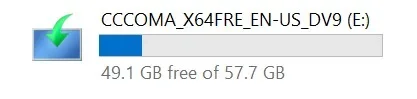
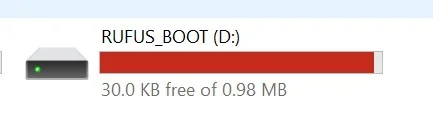
After creating the Windows 11 26H2 ISO using Rufus, I noticed this drive called RUFUS BOOT.
What is this?

The other drive called CCCOMA_X64FRE_EN-US_DV9 (E:) is normal, that's the one with the main Windows 11 ISO files inside of it.

But this RUFUS BOOT is concerning because it also shows a red line that the drive capacity is getting low.
 

Attachments
  • Screenshot 2026-10-18 115334.webp
    Screenshot 2026-10-18 115334.webp
    3.9 KB · Views: 1
  • Screenshot 2026-10-18 115320.webp
    Screenshot 2026-10-18 115320.webp
    5.2 KB · Views: 1

My Computer My Computer

At a glance

Windows 11 Pro 22H2
OS
Windows 11 Pro 22H2
Rufus supports booting from NTFS in native UEFI mode through its UEFI:NTFS feature. When Rufus uses NTFS, it creates a small FAT partition labeled RUFUS_BOOT (previously UEFI_NTFS) containing the UEFI:NTFS bootloader. The firmware boots from this small FAT partition; UEFI:NTFS then loads an NTFS driver and launches the Windows UEFI bootloader from the main NTFS partition. This allows Rufus to use NTFS for Windows installation media when the ISO contains an install.esd or install.wim larger than FAT32's 4 GB maximum file size.

The UEFI bootloader and NTFS driver used by current versions of Rufus are Secure Boot signed, so Secure Boot normally does not need to be disabled to use UEFI.

Disk Management.webp


The screenshots below show USB installation media created using Rufus.
The first screenshot shows the Rufus UEFI:NTFS bootloader.

Rufus UEFI-NTFS bootloader.webp


Select location to install Windows 11 - Rufus.webp


The Media Creation Tool works differently: when it creates a FAT32 USB flash drive, it can split a large Windows image into install.swm, install2.swm, and so on. This keeps each split image file below FAT32's 4 GB maximum file size.

The screenshot below shows USB installation media created using the Media Creation Tool.

Select location to install Windows 11 - MCT.webp
 
Last edited:

My Computers My Computers

  • At a glance

    Windows 11 ProAMD Ryzen 9 9950X3DKingston FURY Beast 64GB (2x32GB) DDR5 6000MT/sASUS TUF Gaming Radeon RX 9070 OC Edition 16G...
    OS
    Windows 11 Pro
    Computer type
    PC/Desktop
    CPU
    AMD Ryzen 9 9950X3D
    Motherboard
    ASRock B650E Taichi Lite
    Memory
    Kingston FURY Beast 64GB (2x32GB) DDR5 6000MT/s
    Graphics Card(s)
    ASUS TUF Gaming Radeon RX 9070 OC Edition 16GB GDDR6
    Hard Drives
    Solidigm P44 Pro 2TB M.2 NVMe SSD
  • At a glance

    Windows 11 HomeIntel Core Ultra 9 275HX64GB (2x 32GB) DDR5-6400NVIDIA GeForce RTX 5080 16GB GDDR7 Laptop GPU
    Operating System
    Windows 11 Home
    Computer type
    Laptop
    Manufacturer/Model
    Lenovo Legion Pro 7i Gen 10 16"
    CPU
    Intel Core Ultra 9 275HX
    Memory
    64GB (2x 32GB) DDR5-6400
    Graphics card(s)
    NVIDIA GeForce RTX 5080 16GB GDDR7 Laptop GPU
    Hard Drives
    2x 1TB M.2 NVMe SSD (SK Hynix)
Did you wrote that .ISO to an USB-stick? The USB contains 2 partitions. A small one with a FAT32 boot partition to boot from and to call the larger partition to install Windows. Normally you should see only one: Partition 2. Partition 1 is normally hidden. When you reboot your system and enter the bootmenu of the motherboard (With an ASUS motherboard that is F8, with other brands an other key) you will notice 2 partitions with the same name and size. The top one is always the boot partition. The second one below it is the Windows (NTFS) partition. Windows can not boot from a NTFS partition only from an FAT32 partition. If you want to install Windows select the bottom one (partition 2) and Windows will start to install.

In case of Rufus v4.15 this is now normal behavior. I have also wrote an .ISO with Rufus to an USB-stick (Zorin-OS) and this is wat I see also when I attach the USB stick into my system: (If you don't want to see that boot-partition: Use diskpart to make that partition hidden)


Rufus USB disk1.webp

So this is normal behavior.....
 

My Computers My Computers

  • At a glance

    Win 11 Pro 26H2 Build 26300.9550, Zorin OS ProIntel® Core™ i7-12700KF 12th Gen. (S1700)32GB DDR5 5600-36 Vengeance (2x16)PCIe4.0 Asus NVIDIA RTX3060Ti
    OS
    Win 11 Pro 26H2 Build 26300.9550, Zorin OS Pro
    Computer type
    PC/Desktop
    Manufacturer/Model
    Self built
    CPU
    Intel® Core™ i7-12700KF 12th Gen. (S1700)
    Motherboard
    ASUS Prime Z690-A, BIOS v4505 (Z690 Intel Chipset)
    Memory
    32GB DDR5 5600-36 Vengeance (2x16)
    Graphics Card(s)
    PCIe4.0 Asus NVIDIA RTX3060Ti
    Sound Card
    Onboard; Realtek
    Monitor(s) Displays
    34" LG 34UC79G-B Curved 21:9 144Hz
    Screen Resolution
    2560x1080 (No HDR)
    Hard Drives
    250Gb Samsung 870PRO NVMe (Win 11 Pro)
    1Tb Samsung 980PRO NVMe
    1Tb Samsung 970EVO NVMe
    2Tb Samsung 990PRO NVMe with heatsink.
    4Tb WDC WD40EZRZ Blue SATA (Int.)
    4Tb WDC WD40EZRZ Blue SATA (Int.)
    3Tb WDC WD30EFRZ Red SATA (Int.)
    256Gb Samsung 840PRO SSD (RHEL 9,5)
    256Gb Samsung 850PRO SSD (Zorin OS Pro 18)
    PSU
    Coolermaster 850W V2 Gold with internal 12cm exaust fan
    Case
    Be-Quiet Pure Base 600.
    Cooling
    3x Be-Quiet! 12/14cm "Silent Wings 4" casefans, 1x Arctic Freezer i35 CPU towerblock with fan.
    Keyboard
    Steelseries APEX 7 keyboard.
    Mouse
    Logitech G-502 Hero
    Internet Speed
    1Gb
    Browser
    Brave
    Antivirus
    F-Secure
    Other Info
    No Noise system.
    256Gb Kingston Travler USB 3.0 drive.
    64Gb Sandisk USB 3.2 drive. (Ventoy)
    8Gb Philips USB 3.0 drive. (Win. Inst.)
    8Gb Philips USB 3.0 drive. (Rescue disk)
    2Tb WD USB 3.0 Passport drive.
    USB Ext. 500Gb WD SATA drive.
    External USB 3.0 C.A. CD/DVD* burner.
  • At a glance

    Windows 11 Pro 26H2Intel® Core™ i7-6700K 6th Gen. (S1151)32Gb DDR4 2400 Corsair Vengeance (4x8)ASUS GeForce GTX1080
    Operating System
    Windows 11 Pro 26H2
    Computer type
    PC/Desktop
    Manufacturer/Model
    Selfbuild
    CPU
    Intel® Core™ i7-6700K 6th Gen. (S1151)
    Motherboard
    ASUS Maximus VIII Ranger (Intel Chipset Z170)
    Memory
    32Gb DDR4 2400 Corsair Vengeance (4x8)
    Graphics card(s)
    ASUS GeForce GTX1080
    Sound Card
    Onboard; Realtek
    Monitor(s) Displays
    LG IPS277L 27" WideLED, IPS
    Screen Resolution
    1920x1080
    Hard Drives
    Samsung 850 Pro SSD
    PSU
    Zalman ZM600-HP with internal exhaust fan. Heatpipes & Modular cables.
    Case
    Cooler Master Aero
    Cooling
    Scythe Mugen 4 dual fan towerblock.
    Keyboard
    Red Dragon
    Mouse
    Red Dragon
    Internet Speed
    1Gb
    Browser
    Brave
    Antivirus
    F-Secure

Latest Tutorials

Back
Top Bottom