
What's this? PCI Data Acquisition and Signal Processing Controller


tfwul

Well-known member
Member
Local time
10:28 AM
Posts
19
OS
Windows 11 Pro x64
Does anyone out there know what this is

PCI Data Acquisition and Signal Processing Controller
PCI\VEN_8086&DEV_AD03&SUBSYS_88EF1043&REV_01\3&11583659&0&20

as well as 2 unknown devices located on: on Intel(R) Serial IO I2C Host Controller - 7F4E
referring to: ACPI\RTK5439\0

the other unknown device is the same but then ACPI\RTK5400\0

In case it is a matter of drivers then where to find the official one(s). I prefer to abstain from 'drivers sites'.

thanks!

SnagIt-28042026 111245.webp
 

My Computer

System One

  • OS
    Windows 11 Pro x64
    Computer type
    PC/Desktop
    CPU
    Intel Core Ultra 9 285K, S1851
    Motherboard
    Asus ProArt Z890 Creator WiFi
    Memory
    32GB (DDR5-5600)
    Graphics Card(s)
    Asus GeForce RTX 5060 Ti, 8GB, Dual OC
    Monitor(s) Displays
    Asus ProArt OLED PA32UCDM
    Screen Resolution
    3840 x 2160
    Hard Drives
    1x Samsung 9100 Pro 1TB, PCIe 5.0 NVMe M.2, 2x Samsung 9100 Pro 4TB, PCIe 5.0 NVMe M.2
    PSU
    Corsair RM850e (2025)
    Case
    Corsair 5000T
    Cooling
    be quiet! Dark Rock Pro 5, 4x Noctua NF-A14x25 G2 LS-PWM (140mm)
    Keyboard
    Das Keyboard 4 Pro
    Mouse
    Logitech MX Master 4
    Internet Speed
    1Gbps
    Browser
    Microsoft Edge (Default)
    Antivirus
    Windows Security/Microsoft Defender
Looks like the chipset driver isn't installed. You can grab it from here,


My Computer

System One

  • OS
    Windows 11
    Computer type
    PC/Desktop
    CPU
    Ryzen 5 5600
    Motherboard
    MSI B550 Tomahawk
    Memory
    T-Force Vulcan Z - 32 GB (2x16) @ 3600 MHz
    Graphics Card(s)
    Sapphire RX 7600
    Monitor(s) Displays
    Sansui ES-G27F2Q
    Screen Resolution
    2560 x 1440P
    Hard Drives
    XPG SX8200 240GB M.2 PCIe Gen3x4 NVMe
    Samsung 850 EVO 250 GB
    Adata SU800 1 TB
    WD Black SN750 500GB
    PSU
    EVGA SuperNOVA 650 G3
    Case
    Deepcool CK500WH
    Cooling
    Thermalright Frozen Warframe 240 SE, plus 3 140 MM case fans (2 in front, 1 in rear)
    Keyboard
    Logitech G213 Prodigy
    Mouse
    Logitech ERGO M575
Could also be the serial io driver. I'd install (at least) the chipset, mei and serial io drivers (in that order)
 

My Computer

System One

  • OS
    11-25h2
    CPU
    amd 9850x3d
    Motherboard
    asus x870e apex
    Memory
    64gb g.skill @6000cl26
    Graphics Card(s)
    pny 5090 argb oc
    Sound Card
    creative x5
    Monitor(s) Displays
    dell aw3225qf
    Screen Resolution
    4k@240
    Hard Drives
    4tb samsung 9100 pro
    4tb samsung 990 pro
    4tb wd black sn850x
    2tb samsung 980 pro (usb)
    PSU
    phanteks 1600w
    Case
    antec flux pro
    Cooling
    phanteks 420x2
    Keyboard
    logitech gpx tkl
    Mouse
    logitech gpx2 ss
Please run the V2 log collector > post a share link


My Computer

System One

  • OS
    Windows 10
    Computer type
    Laptop
    Manufacturer/Model
    HP
    CPU
    Intel(R) Core(TM) i7-4800MQ CPU @ 2.70GHz
    Motherboard
    Product : 190A Version : KBC Version 94.56
    Memory
    16 GB Total: Manufacturer : Samsung MemoryType : DDR3 FormFactor : SODIMM Capacity : 8GB Speed : 1600
    Graphics Card(s)
    NVIDIA Quadro K3100M; Intel(R) HD Graphics 4600
    Sound Card
    IDT High Definition Audio CODEC; PNP Device ID HDAUDIO\FUNC_01&VEN_111D&DEV_76E0
    Hard Drives
    Model Hitachi HTS727575A9E364
    Antivirus
    Microsoft Defender
    Other Info
    Mobile Workstation
Sorry for the delay. Many thanks for the feedback.

I installed following drivers
1-Intel chipset V10.1.20378.8757 (inf driver V10.1.51.10) for Windows 10-11 64-bit (ARL only)
2-Intel ME V2552.8.10.0 (SW 2553.8.58.0) for Windows 10 64-bit and Windows 11 64-bit
3-Intel Management Engine Interface V2540.8.7.0 (SW 2541.8.41.0) for Windows 10-11 64-bit
4-Intel Serial IO V30.100.2529.2 for Windows 10-11 64-bit (ARL only)

ARL = Arrow Lake
CPU Intel Core Ultra 9 285K
Update BIOS to the last version (3103) this morning.

Now another 'Unknown' Device is added...

2026-04-30_15-43-43.webp
 

My Computer

System One

  • OS
    Windows 11 Pro x64
    Computer type
    PC/Desktop
    CPU
    Intel Core Ultra 9 285K, S1851
    Motherboard
    Asus ProArt Z890 Creator WiFi
    Memory
    32GB (DDR5-5600)
    Graphics Card(s)
    Asus GeForce RTX 5060 Ti, 8GB, Dual OC
    Monitor(s) Displays
    Asus ProArt OLED PA32UCDM
    Screen Resolution
    3840 x 2160
    Hard Drives
    1x Samsung 9100 Pro 1TB, PCIe 5.0 NVMe M.2, 2x Samsung 9100 Pro 4TB, PCIe 5.0 NVMe M.2
    PSU
    Corsair RM850e (2025)
    Case
    Corsair 5000T
    Cooling
    be quiet! Dark Rock Pro 5, 4x Noctua NF-A14x25 G2 LS-PWM (140mm)
    Keyboard
    Das Keyboard 4 Pro
    Mouse
    Logitech MX Master 4
    Internet Speed
    1Gbps
    Browser
    Microsoft Edge (Default)
    Antivirus
    Windows Security/Microsoft Defender
FWIW Just updated to the latest Intel Chipset driver
"Intel Chipset driver V10.1.20473.8812 for Windows 11 64-bit"
(when downloading it shows ARL in the ZIP file name, though ARL not added to file name on the Asus site)

Reboot.
No change, regretfully so.
 

My Computer

System One

  • OS
    Windows 11 Pro x64
    Computer type
    PC/Desktop
    CPU
    Intel Core Ultra 9 285K, S1851
    Motherboard
    Asus ProArt Z890 Creator WiFi
    Memory
    32GB (DDR5-5600)
    Graphics Card(s)
    Asus GeForce RTX 5060 Ti, 8GB, Dual OC
    Monitor(s) Displays
    Asus ProArt OLED PA32UCDM
    Screen Resolution
    3840 x 2160
    Hard Drives
    1x Samsung 9100 Pro 1TB, PCIe 5.0 NVMe M.2, 2x Samsung 9100 Pro 4TB, PCIe 5.0 NVMe M.2
    PSU
    Corsair RM850e (2025)
    Case
    Corsair 5000T
    Cooling
    be quiet! Dark Rock Pro 5, 4x Noctua NF-A14x25 G2 LS-PWM (140mm)
    Keyboard
    Das Keyboard 4 Pro
    Mouse
    Logitech MX Master 4
    Internet Speed
    1Gbps
    Browser
    Microsoft Edge (Default)
    Antivirus
    Windows Security/Microsoft Defender
I think that is part of the intel innovation platform driver. Install that too. Been a while since i used my z790. Forgot how many drivers are needed
 

My Computer

System One

  • OS
    11-25h2
    CPU
    amd 9850x3d
    Motherboard
    asus x870e apex
    Memory
    64gb g.skill @6000cl26
    Graphics Card(s)
    pny 5090 argb oc
    Sound Card
    creative x5
    Monitor(s) Displays
    dell aw3225qf
    Screen Resolution
    4k@240
    Hard Drives
    4tb samsung 9100 pro
    4tb samsung 990 pro
    4tb wd black sn850x
    2tb samsung 980 pro (usb)
    PSU
    phanteks 1600w
    Case
    antec flux pro
    Cooling
    phanteks 420x2
    Keyboard
    logitech gpx tkl
    Mouse
    logitech gpx2 ss
It took some time, but finally figured out how to proceed.

In this case I solved the matter as follows:
1. Launch Device manager
2. Right click the 'exclamation' device, select properties
3. Select tab 'Details', select 'Device instance path' in the drop down menu
4. Note the value - for example:
ACPI\RTK5400\0, OR
ACPI\RTK5439\0, OR
ACPI\INTC1041, OR
PCI\VEN_8086&DEV_AD03&SUBSYS_88EF1043&REV_01\3&11583659&0&20 (PCI Data Acquisition and Signal Processing Controller)

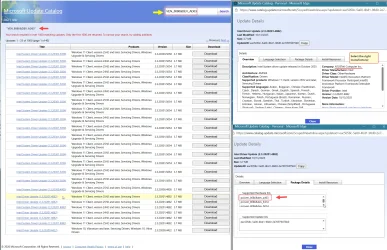
5. Then go to Microsoft Update Catalog
6. In the search box: search for
RTK5400, RTK5439, INTC1041, or VEN_8086&DEV_AD03
7. From the list, select and open each entry, until you have found the latest driver from your motherbord manufacturer
(for example Windows 25H2, from ASUSTek)
8. Download and extract the driver (.cab file)
9. In Device Manager, right click the device, properties, tab driver
10. update driver and select browse my computer for drivers and select the respective driver.

This worked for me - no unknown devices.
Note: personally I prefer not to use 'drivers sites', but only from legitimate sites, i.e. either Asus, or Intel or Microsoft.

Later:
One might also add the motherboard manufacturer to the search string, so, for example:
Asustek INTC1041
this will reduce the number of hits.
 

Attachments

  • Microsoft Update Catalog-Search and download driver-05-03_06-36-13.webp
    Microsoft Update Catalog-Search and download driver-05-03_06-36-13.webp
    378.3 KB · Views: 2
Last edited:

My Computer

System One

  • OS
    Windows 11 Pro x64
    Computer type
    PC/Desktop
    CPU
    Intel Core Ultra 9 285K, S1851
    Motherboard
    Asus ProArt Z890 Creator WiFi
    Memory
    32GB (DDR5-5600)
    Graphics Card(s)
    Asus GeForce RTX 5060 Ti, 8GB, Dual OC
    Monitor(s) Displays
    Asus ProArt OLED PA32UCDM
    Screen Resolution
    3840 x 2160
    Hard Drives
    1x Samsung 9100 Pro 1TB, PCIe 5.0 NVMe M.2, 2x Samsung 9100 Pro 4TB, PCIe 5.0 NVMe M.2
    PSU
    Corsair RM850e (2025)
    Case
    Corsair 5000T
    Cooling
    be quiet! Dark Rock Pro 5, 4x Noctua NF-A14x25 G2 LS-PWM (140mm)
    Keyboard
    Das Keyboard 4 Pro
    Mouse
    Logitech MX Master 4
    Internet Speed
    1Gbps
    Browser
    Microsoft Edge (Default)
    Antivirus
    Windows Security/Microsoft Defender
It's great that you were able to solve the problem, though I am surprised that you had to jump through that many hoops. My devices were fine just installing the drivers from Gigabyte and Intel. No muss, no fuss. Maybe it's an ASUS thing, but you should have been able to just D/L the drivers from the ASUS website and voila! It should work. Maybe it's a new thing with them.

Anyway, it's great that it is solved.
 

My Computer

System One

  • OS
    Win 11 Pro 25H2
    Computer type
    PC/Desktop
    Manufacturer/Model
    Self build
    CPU
    Intel i7 13700KF
    Motherboard
    Gigabyte Z790 UD AC
    Memory
    32 GB Team Group DDR5 - 6000 CL 30
    Graphics Card(s)
    ASUS TUF GAMING RTX 3070 Ti
    Sound Card
    On board Realtek
    Monitor(s) Displays
    ACER 34 inch
    Screen Resolution
    4K
    Hard Drives
    1 TB Samsung 980 Pro Nvme, 1 TB Samsung 970 EVO Nvme, 2 x Samsung 970 2TB SSD SATA
    PSU
    EVGA 1000Q
    Case
    Rosewill something or other
    Cooling
    Noctua NH-D15. A whole schwak of Noctua case fans. $$$
    Keyboard
    Logitech G815
    Mouse
    Logitech G502 Hero
    Internet Speed
    700 up, 600 down
    Browser
    Firefox
    Antivirus
    MalwareBytes
Funny thing is...

All necessary drivers are/were available indeed (Microsoft Update Catalog).
In fact Windows 'knows' all the hardware and missing drivers.
So basically, when performing a 'Check for updates', then Windows should be able install the missing drivers from the update catalog.

Question is: why not??

It seems... that the manufacturer (in this case Asus) should specifically take steps to 'publish' the drivers so that they can/will be installed in the Windows update.
(Search for "Publish a driver to Windows Update")
If drivers is not 'published', then they will not be available for the update, hence not applied.

Users should try and figure this out themselves then.

Could the that other mfrs are paying more attention to this 'publishing' thing.
 

My Computer

System One

  • OS
    Windows 11 Pro x64
    Computer type
    PC/Desktop
    CPU
    Intel Core Ultra 9 285K, S1851
    Motherboard
    Asus ProArt Z890 Creator WiFi
    Memory
    32GB (DDR5-5600)
    Graphics Card(s)
    Asus GeForce RTX 5060 Ti, 8GB, Dual OC
    Monitor(s) Displays
    Asus ProArt OLED PA32UCDM
    Screen Resolution
    3840 x 2160
    Hard Drives
    1x Samsung 9100 Pro 1TB, PCIe 5.0 NVMe M.2, 2x Samsung 9100 Pro 4TB, PCIe 5.0 NVMe M.2
    PSU
    Corsair RM850e (2025)
    Case
    Corsair 5000T
    Cooling
    be quiet! Dark Rock Pro 5, 4x Noctua NF-A14x25 G2 LS-PWM (140mm)
    Keyboard
    Das Keyboard 4 Pro
    Mouse
    Logitech MX Master 4
    Internet Speed
    1Gbps
    Browser
    Microsoft Edge (Default)
    Antivirus
    Windows Security/Microsoft Defender
I can't speak for ASUS, but for my Gigabyte board it was easy-peasy. Maybe you're right about the publishing.
 

My Computer

System One

  • OS
    Win 11 Pro 25H2
    Computer type
    PC/Desktop
    Manufacturer/Model
    Self build
    CPU
    Intel i7 13700KF
    Motherboard
    Gigabyte Z790 UD AC
    Memory
    32 GB Team Group DDR5 - 6000 CL 30
    Graphics Card(s)
    ASUS TUF GAMING RTX 3070 Ti
    Sound Card
    On board Realtek
    Monitor(s) Displays
    ACER 34 inch
    Screen Resolution
    4K
    Hard Drives
    1 TB Samsung 980 Pro Nvme, 1 TB Samsung 970 EVO Nvme, 2 x Samsung 970 2TB SSD SATA
    PSU
    EVGA 1000Q
    Case
    Rosewill something or other
    Cooling
    Noctua NH-D15. A whole schwak of Noctua case fans. $$$
    Keyboard
    Logitech G815
    Mouse
    Logitech G502 Hero
    Internet Speed
    700 up, 600 down
    Browser
    Firefox
    Antivirus
    MalwareBytes
Normally, most drivers presented by WU (or the Update Catalog) are WHQL certified. Which is an elaborate qualification process to prevent crappy drivers from showing up. Getting certification requires testing, and it's not a fast process between MS and the vendor.

Giant vendors like NVIDIA, who have large teams of devs, can put up with certification process and crank out tons of driver updates to the Catalog. A smaller company may not want to deal with the hassle and will submit driver updates at a slower pace. For them, they'd prefer you look at their support pages than search the Catalog for a newer driver. They choose to submit less updates to MS.

In short, there isn't a lot of uniformity when it comes to driver selection in the Update Catalog. It's up to the vendors.
 

My Computer

System One

  • OS
    Windows 7

Latest Support Threads

Back
Top Bottom






