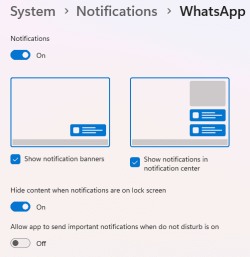
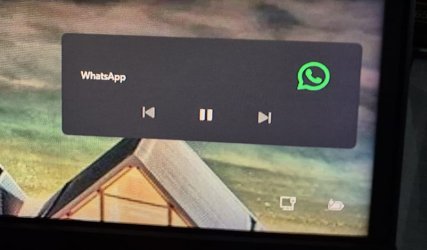
I've noticed that in recent weeks, when I wake up my PC from its slumber, the lock screen shows a Whatsapp "player" widget. It shows back/pause/forward buttons. Like what you'd have on your phone's lock screen if you were playing media on it. The thing is, the Whatsapp desktop app isn't playing any audio/video, it's just sat there waiting for messages like it always has.
I've looked in the Whatsapp desktop app settings and there's nothing about the lock screen there.
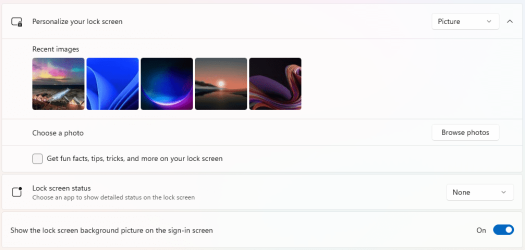
I've also looked in the Windows 11 -> Settings -> Lock Screen and there's nothing there about Whatsapp.
Anyone know what the deal is?
I've looked in the Whatsapp desktop app settings and there's nothing about the lock screen there.
I've also looked in the Windows 11 -> Settings -> Lock Screen and there's nothing there about Whatsapp.
Anyone know what the deal is?
- Windows Build/Version
- latest Win 11 Home
My Computer
At a glance
Win11 Pro 25H2Intel Core Ultra 9 275HX32GBNVIDIA® GeForce RTX™ 5060 Laptop GPU
- OS
- Win11 Pro 25H2
- Computer type
- Laptop
- Manufacturer/Model
- Lenovo ThinkBook 16p G6 IAX
- CPU
- Intel Core Ultra 9 275HX
- Memory
- 32GB
- Graphics Card(s)
- NVIDIA® GeForce RTX™ 5060 Laptop GPU
- Monitor(s) Displays
- 3 external monitors, Samsung 43" super widescreen (providing 2x 1080p via separate inputs), 1x LG 27" 1080p
- Screen Resolution
- 2560x1600 and 3x 1920x1080
- Hard Drives
- 1TB SSD internal, 2x4TB SSD external
- Keyboard
- Logitech illuminated and silent thing
- Mouse
- Traditional MS Intellimouse
- Internet Speed
- 256Mb down/50Mb up
- Browser
- Chrome mostly, Edge for PDF's, Brave for YouTube
- Antivirus
- MalwareBytes/Defender
- Other Info
- Also an m4 Mac Mini for work dev stuff that I operate remotely via HelpWire.