Whatsapp widget on the lock screen, don't know why


d4005

Well-known member
Member
Local time
1:41 PM
Posts
115
OS
Win11 Pro 25H2
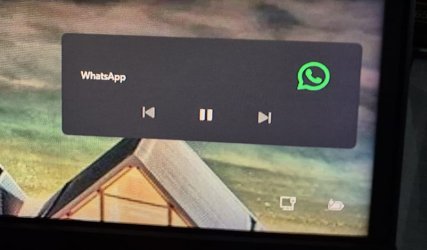
I've noticed that in recent weeks, when I wake up my PC from its slumber, the lock screen shows a Whatsapp "player" widget. It shows back/pause/forward buttons. Like what you'd have on your phone's lock screen if you were playing media on it. The thing is, the Whatsapp desktop app isn't playing any audio/video, it's just sat there waiting for messages like it always has.

I've looked in the Whatsapp desktop app settings and there's nothing about the lock screen there.
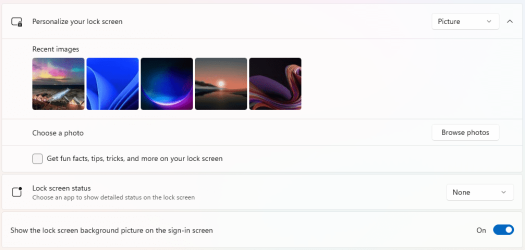
I've also looked in the Windows 11 -> Settings -> Lock Screen and there's nothing there about Whatsapp.

Anyone know what the deal is?
2024-06-22 09.03.27.jpg

lock.png
 
Windows Build/Version
latest Win 11 Home

My Computer

System One

  • OS
    Win11 Pro 25H2
    Computer type
    Laptop
    Manufacturer/Model
    Lenovo ThinkBook 16p G6 IAX
    CPU
    Intel Core Ultra 9 275HX
    Memory
    32GB
    Graphics Card(s)
    NVIDIA® GeForce RTX™ 5060 Laptop GPU
    Monitor(s) Displays
    3 external monitors, Samsung 43" super widescreen (providing 2x 1080p via separate inputs), 1x LG 27" 1080p
    Screen Resolution
    2560x1600 and 3x 1920x1080
    Hard Drives
    1TB SSD internal, 2x4TB SSD external
    Keyboard
    Logitech illuminated and silent thing
    Mouse
    Traditional MS Intellimouse
    Internet Speed
    256Mb down/50Mb up
    Browser
    Chrome mostly, Edge for PDF's, Brave for YouTube
    Antivirus
    MalwareBytes/Defender
    Other Info
    Also an m4 Mac Mini for work dev stuff that I operate remotely via HelpWire.
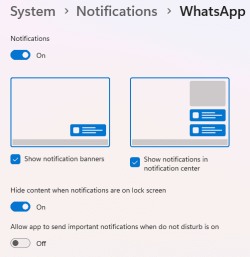
Disable notifications for the Lock Screen. It’s probably always showing because WhatsApp has access to your microphone
 

My Computer

System One

  • OS
    Windows 11 Pro
Disable notifications for the Lock Screen. It’s probably always showing because WhatsApp has access to your microphone
Thanks for the suggestion. I checked, WhatsApp Web doesn't have access to my Camera or Mic.
whatsapp-cam.png

I checked the notification settings for WhatsApp and they were on because I do generally want the notification center to show them when the machine is fully awake, but as a test, I turned them fully off, locked the computer with Windows-L and that weird widget is still there.
whatsapp-not.png

Weirdly, I took a screenshot and cropped it to just the WhatsApp media player widget and did a google image search and it didn't find anything. I seem to be the only person in the world seeing this. My mother was right, I am special :cool:
Untitled-1.jpg

Btw, that pause button does in fact change to a play button (and vice versa) when you click on it. I don't know what it thinks it's pausing and unpausing.
 

My Computer

System One

  • OS
    Win11 Pro 25H2
    Computer type
    Laptop
    Manufacturer/Model
    Lenovo ThinkBook 16p G6 IAX
    CPU
    Intel Core Ultra 9 275HX
    Memory
    32GB
    Graphics Card(s)
    NVIDIA® GeForce RTX™ 5060 Laptop GPU
    Monitor(s) Displays
    3 external monitors, Samsung 43" super widescreen (providing 2x 1080p via separate inputs), 1x LG 27" 1080p
    Screen Resolution
    2560x1600 and 3x 1920x1080
    Hard Drives
    1TB SSD internal, 2x4TB SSD external
    Keyboard
    Logitech illuminated and silent thing
    Mouse
    Traditional MS Intellimouse
    Internet Speed
    256Mb down/50Mb up
    Browser
    Chrome mostly, Edge for PDF's, Brave for YouTube
    Antivirus
    MalwareBytes/Defender
    Other Info
    Also an m4 Mac Mini for work dev stuff that I operate remotely via HelpWire.
Back
Top Bottom