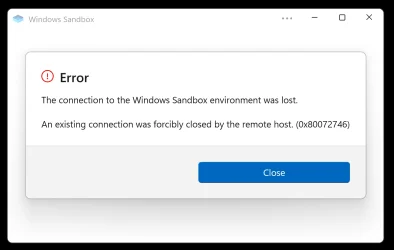
When I run Windows Sandbox for the second time after closing it, it will never work again until reboot


br_web

New member
Local time
1:28 PM
Posts
12
OS
Windows 11
I have a brand new installation of Windows 11 24H2, I added Windows Sandbox, when I run Sandbox for the first time after a fresh reboot, it will launch without any problem, if I close it after, and try to open it again it will fail with the message attached, I removed Sandbox added it again, same behavior, any idea how I can fix this? Thanks
1740344011996.webp
 

My Computer My Computer

At a glance

Windows 11Intel Lunar Lake 258V32GB
OS
Windows 11
Computer type
Laptop
Manufacturer/Model
Dell
CPU
Intel Lunar Lake 258V
Memory
32GB
You have to turn off Windows Sandbox and restart the computer, and then turn it back on when you want to use it again.
 

My Computer My Computer

At a glance

Windows 11 Pro Insider 64 bit 25H2 26200.5742Intel Core i7 9700K 3.6016 GBnVidia GEForce RTX 2060 Super
OS
Windows 11 Pro Insider 64 bit 25H2 26200.5742
Computer type
PC/Desktop
Manufacturer/Model
Gigabyte Z390 UD
CPU
Intel Core i7 9700K 3.60
Motherboard
Gigabyte Z390 UD
Memory
16 GB
Graphics Card(s)
nVidia GEForce RTX 2060 Super
Sound Card
onboard
Monitor(s) Displays
Two 27" Dell 4K monitors
Screen Resolution
3840 x 2160
Hard Drives
M.2 NVME SSD, 500 GB; Two 2TB Mechanical HDD's
PSU
850w PSU
Case
Cyberpower PC
Cooling
Water cooled
Keyboard
Backlit Cyberpower gaming keyboard
Mouse
Backlit Cyberpower gaming mouse
Internet Speed
1 GB mbps
Browser
Brave
Antivirus
Windows Security
You have to turn off Windows Sandbox and restart the computer, and then turn it back on when you want to use it again.
Thank you for the feedback, the whole process to remove/add the Sandbox (I have done it 5 times already) including the double reboot takes more than 15min, especially the add part, it doesn't make sense to follow this route.

I have another Windows device where I can close and open the Sandbox as many times as I want, without reboots or turn on/off the module from Control Panel.

There is something else going on here, I need to figure it out.
 

My Computer My Computer

At a glance

Windows 11Intel Lunar Lake 258V32GB
OS
Windows 11
Computer type
Laptop
Manufacturer/Model
Dell
CPU
Intel Lunar Lake 258V
Memory
32GB
Thank you for the feedback, the whole process to remove/add the Sandbox (I have done it 5 times already) including the double reboot takes more than 15min, especially the add part, it doesn't make sense to follow this route.

I have another Windows device where I can close and open the Sandbox as many times as I want, without reboots or turn on/off the module from Control Panel.

There is something else going on here, I need to figure it out.
You can also try ensuring your bios is up to date and that virtualization is turned on.

In task manager under cpu, it should show virtualization is enabled.
 

My Computers My Computers

  • At a glance

    Windows 11 ProRyzen 7 5700 X3D64 GB DDR4 3600mhz Gskill Ripjaws VRTX 4070 Super , 12GB VRAM Asus EVO Overclock
    OS
    Windows 11 Pro
    Computer type
    PC/Desktop
    Manufacturer/Model
    Custom Built
    CPU
    Ryzen 7 5700 X3D
    Motherboard
    MSI MPG B550 GAMING PLUS
    Memory
    64 GB DDR4 3600mhz Gskill Ripjaws V
    Graphics Card(s)
    RTX 4070 Super , 12GB VRAM Asus EVO Overclock
    Monitor(s) Displays
    Gigabyte M27Q (rev. 2.0) 2560 x 1440 @ 170hz HDR
    Hard Drives
    2TB Samsung nvme ssd
    4TB Western Digital nvme ssd
    PSU
    CORSAIR RMx SHIFT Series™ RM750x 80 PLUS Gold Fully Modular ATX Power Supply
    Case
    CORSAIR 3500X ARGB Mid-Tower ATX PC Case – Black
    Cooling
    ID-COOLING FROSTFLOW X 240 CPU Water Cooler
    Keyboard
    Logitech G213
    Mouse
    Logitech G203
    Internet Speed
    1.2gbps Fiber 😎
  • At a glance

    Chrome OSIntel Pentium Quad Core4GB LPDDR4
    Operating System
    Chrome OS
    Computer type
    Laptop
    Manufacturer/Model
    HP Chromebook
    CPU
    Intel Pentium Quad Core
    Memory
    4GB LPDDR4
    Monitor(s) Displays
    14 Inch HD SVA anti glare micro edge display
    Hard Drives
    64 GB emmc
You can also try ensuring your bios is up to date and that virtualization is turned on.

In task manager under cpu, it should show virtualization is enabled.
Thank you, I have already checked all of that, if Virtualization wasn't enable Sandbox wouldn't work normally after a reboot
 

My Computer My Computer

At a glance

Windows 11Intel Lunar Lake 258V32GB
OS
Windows 11
Computer type
Laptop
Manufacturer/Model
Dell
CPU
Intel Lunar Lake 258V
Memory
32GB
Thank you, I have already checked all of that, if Virtualization wasn't enable Sandbox wouldn't work normally after a reboot
My tiredness is showing. Sorry I missed that.

When I launched mine today it has updates that installed. Wonder if you got that update?
 

My Computers My Computers

  • At a glance

    Windows 11 ProRyzen 7 5700 X3D64 GB DDR4 3600mhz Gskill Ripjaws VRTX 4070 Super , 12GB VRAM Asus EVO Overclock
    OS
    Windows 11 Pro
    Computer type
    PC/Desktop
    Manufacturer/Model
    Custom Built
    CPU
    Ryzen 7 5700 X3D
    Motherboard
    MSI MPG B550 GAMING PLUS
    Memory
    64 GB DDR4 3600mhz Gskill Ripjaws V
    Graphics Card(s)
    RTX 4070 Super , 12GB VRAM Asus EVO Overclock
    Monitor(s) Displays
    Gigabyte M27Q (rev. 2.0) 2560 x 1440 @ 170hz HDR
    Hard Drives
    2TB Samsung nvme ssd
    4TB Western Digital nvme ssd
    PSU
    CORSAIR RMx SHIFT Series™ RM750x 80 PLUS Gold Fully Modular ATX Power Supply
    Case
    CORSAIR 3500X ARGB Mid-Tower ATX PC Case – Black
    Cooling
    ID-COOLING FROSTFLOW X 240 CPU Water Cooler
    Keyboard
    Logitech G213
    Mouse
    Logitech G203
    Internet Speed
    1.2gbps Fiber 😎
  • At a glance

    Chrome OSIntel Pentium Quad Core4GB LPDDR4
    Operating System
    Chrome OS
    Computer type
    Laptop
    Manufacturer/Model
    HP Chromebook
    CPU
    Intel Pentium Quad Core
    Memory
    4GB LPDDR4
    Monitor(s) Displays
    14 Inch HD SVA anti glare micro edge display
    Hard Drives
    64 GB emmc
My tiredness is showing. Sorry I missed that.

When I launched mine today it has updates that installed. Wonder if you got that update?
I already tried a full wipe and a fresh install of Windows and Sandbox, same problem, I give up, thanks
 

My Computer My Computer

At a glance

Windows 11Intel Lunar Lake 258V32GB
OS
Windows 11
Computer type
Laptop
Manufacturer/Model
Dell
CPU
Intel Lunar Lake 258V
Memory
32GB
I already tried a full wipe and a fresh install of Windows and Sandbox, same problem, I give up, thanks
that's so strange. Looking online I did not find many fixes to people that had this problem either. Very odd.

It is working fine on my machines here that have 24H2.

It would be worth trying to update your bios since reinstalling windows should resolve any software issues....
 

My Computers My Computers

  • At a glance

    Windows 11 ProRyzen 7 5700 X3D64 GB DDR4 3600mhz Gskill Ripjaws VRTX 4070 Super , 12GB VRAM Asus EVO Overclock
    OS
    Windows 11 Pro
    Computer type
    PC/Desktop
    Manufacturer/Model
    Custom Built
    CPU
    Ryzen 7 5700 X3D
    Motherboard
    MSI MPG B550 GAMING PLUS
    Memory
    64 GB DDR4 3600mhz Gskill Ripjaws V
    Graphics Card(s)
    RTX 4070 Super , 12GB VRAM Asus EVO Overclock
    Monitor(s) Displays
    Gigabyte M27Q (rev. 2.0) 2560 x 1440 @ 170hz HDR
    Hard Drives
    2TB Samsung nvme ssd
    4TB Western Digital nvme ssd
    PSU
    CORSAIR RMx SHIFT Series™ RM750x 80 PLUS Gold Fully Modular ATX Power Supply
    Case
    CORSAIR 3500X ARGB Mid-Tower ATX PC Case – Black
    Cooling
    ID-COOLING FROSTFLOW X 240 CPU Water Cooler
    Keyboard
    Logitech G213
    Mouse
    Logitech G203
    Internet Speed
    1.2gbps Fiber 😎
  • At a glance

    Chrome OSIntel Pentium Quad Core4GB LPDDR4
    Operating System
    Chrome OS
    Computer type
    Laptop
    Manufacturer/Model
    HP Chromebook
    CPU
    Intel Pentium Quad Core
    Memory
    4GB LPDDR4
    Monitor(s) Displays
    14 Inch HD SVA anti glare micro edge display
    Hard Drives
    64 GB emmc
that's so strange. Looking online I did not find many fixes to people that had this problem either. Very odd.

It is working fine on my machines here that have 24H2.

It would be worth trying to update your bios since reinstalling windows should resolve any software issues....
Thanks, BIOS is up to date, I have already tried 2 fresh Windows install, same problem, the only difference between this laptop (Dell XPS 9520) with the issue and the other one with identical Windows 11 24H2 fresh install that doesn't have the problem (Dell XPS 9350), is that the 9520 has an NVIDIA card, that could be causing the issue, the other difference is that the 9520 is a 12th gen Intel cpu and the 9350 is a Lunar Lake cpu.
 

My Computer My Computer

At a glance

Windows 11Intel Lunar Lake 258V32GB
OS
Windows 11
Computer type
Laptop
Manufacturer/Model
Dell
CPU
Intel Lunar Lake 258V
Memory
32GB
hmmm..........try this


Use the disable reg
 

My Computers My Computers

  • At a glance

    Windows 11 ProRyzen 7 5700 X3D64 GB DDR4 3600mhz Gskill Ripjaws VRTX 4070 Super , 12GB VRAM Asus EVO Overclock
    OS
    Windows 11 Pro
    Computer type
    PC/Desktop
    Manufacturer/Model
    Custom Built
    CPU
    Ryzen 7 5700 X3D
    Motherboard
    MSI MPG B550 GAMING PLUS
    Memory
    64 GB DDR4 3600mhz Gskill Ripjaws V
    Graphics Card(s)
    RTX 4070 Super , 12GB VRAM Asus EVO Overclock
    Monitor(s) Displays
    Gigabyte M27Q (rev. 2.0) 2560 x 1440 @ 170hz HDR
    Hard Drives
    2TB Samsung nvme ssd
    4TB Western Digital nvme ssd
    PSU
    CORSAIR RMx SHIFT Series™ RM750x 80 PLUS Gold Fully Modular ATX Power Supply
    Case
    CORSAIR 3500X ARGB Mid-Tower ATX PC Case – Black
    Cooling
    ID-COOLING FROSTFLOW X 240 CPU Water Cooler
    Keyboard
    Logitech G213
    Mouse
    Logitech G203
    Internet Speed
    1.2gbps Fiber 😎
  • At a glance

    Chrome OSIntel Pentium Quad Core4GB LPDDR4
    Operating System
    Chrome OS
    Computer type
    Laptop
    Manufacturer/Model
    HP Chromebook
    CPU
    Intel Pentium Quad Core
    Memory
    4GB LPDDR4
    Monitor(s) Displays
    14 Inch HD SVA anti glare micro edge display
    Hard Drives
    64 GB emmc

Latest Support Threads

Back
Top Bottom