where are the dll files located for changing the buttons in windows 11?


Local time
1:32 PM
Posts
74
OS
windows11 21h2
hello, im making my own custom version of windows11. i figuerd out how to change the boot animation. now im wanting to figuer out how to change the buttons with in windows to have a custom theme. i know photo shop. and visual studio is requierd to have this done. im wanting to know where are the dll files located to change the buttons in the file explorer and in the form boxes and for the windows 11 setup screen i have made my own backround already for the setup installer. i just need to know where the buttons for the installer are located.
 

My Computer My Computer

At a glance

windows11 21h2
OS
windows11 21h2
The icon files you are used to, such as system32.dll, now silently redirect to corresponding system32.dll.mun files in C:\Windows\SystemResources which now contain the icons so it's the latter you need to work on.
- You'll need to rename system32.dll.mun back to system32.dll before many icon utilities can read the file correctly so you'll need to do your work in that state then add the .mun back before putting them back in place.

This change has been progressing since about Windows 10 version 1803.

And some "icons" are no longer icons but png files. The Calculator app provides an example and there is a discussion of this in How do I change the icon for the Windows 10 calculator app? - TenForums

Denis
 
Last edited:

My Computer My Computer

At a glance

Windows 11 Home x64 Version 25H2 Build 26200....
OS
Windows 11 Home x64 Version 25H2 Build 26200.8037
So will this allow me to change the buttons in the windows installer then?
 

My Computer My Computer

At a glance

windows11 21h2
OS
windows11 21h2
If Microsoft wasn't evil... they'd be in the.... Buttons folder. 8-)
 

My Computers My Computers

  • At a glance

    Win 11 Home ♦♦♦26200.8737 ♦♦♦♦♦♦♦25H2AMD Ryzen 7 3700XG.Skill (F4-3200C14D-16GTZKW)EVGA RTX 2070 (08G-P4-2171-KR)
    OS
    Win 11 Home ♦♦♦26200.8737 ♦♦♦♦♦♦♦25H2
    Computer type
    PC/Desktop
    Manufacturer/Model
    Built by Ghot® [May 2020]
    CPU
    AMD Ryzen 7 3700X
    Motherboard
    Asus Pro WS X570-ACE (BIOS 5302)
    Memory
    G.Skill (F4-3200C14D-16GTZKW)
    Graphics Card(s)
    EVGA RTX 2070 (08G-P4-2171-KR)
    Sound Card
    Realtek ALC1220P / ALC S1220A
    Monitor(s) Displays
    Dell U3011 30"
    Screen Resolution
    2560 x 1600
    Hard Drives
    2x Samsung 860 EVO 500GB,
    WD 4TB Black FZBX - SATA III,
    WD 8TB Black FZBX - SATA III,
    DRW-24B1ST CD/DVD Burner
    PSU
    PC Power & Cooling 750W Quad EPS12V
    Case
    Cooler Master ATCS 840 Tower
    Cooling
    CM Hyper 212 EVO (push/pull)
    Keyboard
    Ducky DK9008 Shine II Blue LED
    Mouse
    Logitech Optical M-100
    Internet Speed
    300/300
    Browser
    Firefox (latest)
    Antivirus
    Bitdefender Total Security
    Other Info
    Speakers: Klipsch Pro Media 2.1
  • At a glance

    Windows XP Pro 32bit w/SP3AMD Athlon 64 X2 5000+ (OC'd @ 3.2Ghz)TWIN2X2048-6400C4DHX (2 x 1GB, DDR2 800)EVGA 256-P2-N758-TR GeForce 8600GT SSC
    Operating System
    Windows XP Pro 32bit w/SP3
    Computer type
    PC/Desktop
    Manufacturer/Model
    Built by Ghot® (not in use)
    CPU
    AMD Athlon 64 X2 5000+ (OC'd @ 3.2Ghz)
    Motherboard
    ASUS M2N32-SLI Deluxe Wireless Edition
    Memory
    TWIN2X2048-6400C4DHX (2 x 1GB, DDR2 800)
    Graphics card(s)
    EVGA 256-P2-N758-TR GeForce 8600GT SSC
    Sound Card
    Onboard
    Monitor(s) Displays
    ViewSonic G90FB Black 19" Professional (CRT)
    Screen Resolution
    up to 2048 x 1536
    Hard Drives
    WD 36GB 10,000rpm Raptor SATA
    Seagate 80GB 7200rpm SATA
    Lite-On LTR-52246S CD/RW
    Lite-On LH-18A1P CD/DVD Burner
    PSU
    PC Power & Cooling Silencer 750 Quad EPS12V
    Case
    Generic Beige case, 80mm fans
    Cooling
    ZALMAN 9500A 92mm CPU Cooler
    Keyboard
    Logitech Classic Keybooard 200
    Mouse
    Logitech Optical M-BT96a
    Internet Speed
    300/300
    Browser
    Firefox 3.x ??
    Antivirus
    Symantec (Norton)
    Other Info
    Still assembled, still runs. Haven't turned it on for 15 years?
So will this allow me to change the buttons in the windows installer then?
I know nothing about setting up an installer.
What I described is the new set of files involved in choosing icons since Windows 10 Version 1803 as each Version has moved more & more icons across to the .dll.mun files from the .dlls where they used to be held.

Denis
 

My Computer My Computer

At a glance

Windows 11 Home x64 Version 25H2 Build 26200....
OS
Windows 11 Home x64 Version 25H2 Build 26200.8037
The buttons you're speaking of I'm currently changing myself. they are not in a dll file they are in the .msstyle theme files found at C:\windows\resources\themes (possibly just resources)
there are two that come with Windows 11 "aero.msstyle" and "aerolite.msstyle" they contain most of the UI images. one is for the light theme one is for the dark theme. I haven't found a way to open these these particular two files but you can download/acquire alternative versions that are in the same format as a dll. but you'll want to install the "Ultra UX Theme Patcher" to use the different formatted files once you've done that just swap them out. Once inside the file the image for the window or message dialog buttons along with most of the UI (I can't remember what number, but that's part of the fun right) are in the "image" of directory. the close, maximize and minimize buttons are one of the 3 image located in the "streams" directory.

All of the images are PNG format.

There's also a few UI images (but not a lot) located in the shellstyle.dll in around the same directories in resources.

Most of your system icons are going to be found split between (the big one) imageres.dll.mum and (the small one) shell32.dll.mun .
These are just dll files mun is a Microsoft stand-in extension it's used for a lot of things. They can be found at found at C:\Windows\systemresources .

These are all ICO format
a PNG can't be an icon file because all icons have 7 to 9 resolution layers for displaying at the multiple sizes in which they viewed in, and the PNG format can't be layered.

As for The Dll's in the previous System32 location... at first glance you'd think these are the real file but if you look at their file size "12KB" isn't enough to space to hold a single icon. these are system shortcuts that redirect the system's queries to the current location of the file.

I'm sure there's more dlls but I'm in the process of unlocking Microsoft's Secrets as well good luck.
 
Last edited:

My Computer My Computer

At a glance

Custom Windows 11 Pro The Phoenix Lite OS Neo...Core i3 3220 Overclocked (circuit level hardw...8Gb DDR3 made by some random manufacturer mos...Intel HD 3000 dual display Integrated (using ...
OS
Custom Windows 11 Pro The Phoenix Lite OS Neon Gamer Edition
Computer type
PC/Desktop
Manufacturer/Model
(Modified) Dell Optiplex 3010 SFF
CPU
Core i3 3220 Overclocked (circuit level hardware hack)
Motherboard
OEM
Memory
8Gb DDR3 made by some random manufacturer most likely Samsung
Graphics Card(s)
Intel HD 3000 dual display Integrated (using an unsigned driver by choice)
Sound Card
OEM
Monitor(s) Displays
Genaric 20in HDTV as Main and HP 2009m LCD Monitor as second
Screen Resolution
1920x1080 main and 1024x1816 (Vertical with custom Resolution) for second
Hard Drives
120Gb Kingston SATA SSD, 1Tb Toshiba SATA HDD and 4Tb Western Digital usb storage
PSU
gesundheit
Case
A Small one
Cooling
I don't know some fan it spins
Keyboard
Run of the mill wireless Logitech
Mouse
Razer - Naga Classic Edition 19 Button Programable w\LED Effects
Internet Speed
don't know but i seen it pull 7Ms so fast I guess
Browser
Brave Beta
Antivirus
No we dont do that. I find that antivirus and antimalware software is more damaging and evasive than most of the thing they remove.
Other Info
Do not fear the registry, for contains all of the answers.
The buttons you're speaking of I'm currently changing myself. they are not in a dll file they are in the .msstyle theme files found at C:\windows\resources\themes (possibly just resources)

There are two that come with Windows 11 "aero.msstyle" and "aerolite.msstyle" they contain most of the UI images. one is for the light theme one is for the dark theme. I haven't found a way to open these these particular two files but you can download/acquire alternative versions that are in the same format as a dll. but you'll want to install the "Ultra UX Theme Patcher" to use the different formatted files once you've done that just swap them out.

Once inside the file, the image for the window or message dialog buttons along with most of the UI (I can't remember what number, but that's part of the fun right) is in the "images" directory. The close, maximize and minimize buttons are one of the 3 image located in the streams directory.

There's also a few UI images (but not a lot) located in the shellstyle.dll in around the same directories in resources.

All the images here are PNG format.

Most of your system icons are going to be found split between (the big one) imageres.dll.mum and (the small one) shell32.dll.mun .

These are just renamed dll files mun is a Microsoft stand-in extension it's used for a lot of things. They can be found at found at C:\Windows\systemresources .

All the Icons are Ico format.

A PNG cannot be an icon because all icons have 7 to 9 resolution layers, for displaying at the multiple sizes they get viewed at.

As for the Dll's at the previous location "System 32" at first glance you think these are the files, but if you look at their size "12KB" isn't enough to space to hold a single icon. these are system shortcuts that redirect the system's queries to the real files current location.

And I'm sure there's more dlls but I'm in the process of unlocking Microsoft's Secrets as well good luck.
 

My Computer My Computer

At a glance

Custom Windows 11 Pro The Phoenix Lite OS Neo...Core i3 3220 Overclocked (circuit level hardw...8Gb DDR3 made by some random manufacturer mos...Intel HD 3000 dual display Integrated (using ...
OS
Custom Windows 11 Pro The Phoenix Lite OS Neon Gamer Edition
Computer type
PC/Desktop
Manufacturer/Model
(Modified) Dell Optiplex 3010 SFF
CPU
Core i3 3220 Overclocked (circuit level hardware hack)
Motherboard
OEM
Memory
8Gb DDR3 made by some random manufacturer most likely Samsung
Graphics Card(s)
Intel HD 3000 dual display Integrated (using an unsigned driver by choice)
Sound Card
OEM
Monitor(s) Displays
Genaric 20in HDTV as Main and HP 2009m LCD Monitor as second
Screen Resolution
1920x1080 main and 1024x1816 (Vertical with custom Resolution) for second
Hard Drives
120Gb Kingston SATA SSD, 1Tb Toshiba SATA HDD and 4Tb Western Digital usb storage
PSU
gesundheit
Case
A Small one
Cooling
I don't know some fan it spins
Keyboard
Run of the mill wireless Logitech
Mouse
Razer - Naga Classic Edition 19 Button Programable w\LED Effects
Internet Speed
don't know but i seen it pull 7Ms so fast I guess
Browser
Brave Beta
Antivirus
No we dont do that. I find that antivirus and antimalware software is more damaging and evasive than most of the thing they remove.
Other Info
Do not fear the registry, for contains all of the answers.
Tried to edit it and it created a whole new one funny
 

My Computer My Computer

At a glance

Custom Windows 11 Pro The Phoenix Lite OS Neo...Core i3 3220 Overclocked (circuit level hardw...8Gb DDR3 made by some random manufacturer mos...Intel HD 3000 dual display Integrated (using ...
OS
Custom Windows 11 Pro The Phoenix Lite OS Neon Gamer Edition
Computer type
PC/Desktop
Manufacturer/Model
(Modified) Dell Optiplex 3010 SFF
CPU
Core i3 3220 Overclocked (circuit level hardware hack)
Motherboard
OEM
Memory
8Gb DDR3 made by some random manufacturer most likely Samsung
Graphics Card(s)
Intel HD 3000 dual display Integrated (using an unsigned driver by choice)
Sound Card
OEM
Monitor(s) Displays
Genaric 20in HDTV as Main and HP 2009m LCD Monitor as second
Screen Resolution
1920x1080 main and 1024x1816 (Vertical with custom Resolution) for second
Hard Drives
120Gb Kingston SATA SSD, 1Tb Toshiba SATA HDD and 4Tb Western Digital usb storage
PSU
gesundheit
Case
A Small one
Cooling
I don't know some fan it spins
Keyboard
Run of the mill wireless Logitech
Mouse
Razer - Naga Classic Edition 19 Button Programable w\LED Effects
Internet Speed
don't know but i seen it pull 7Ms so fast I guess
Browser
Brave Beta
Antivirus
No we dont do that. I find that antivirus and antimalware software is more damaging and evasive than most of the thing they remove.
Other Info
Do not fear the registry, for contains all of the answers.
hello, im making my own custom version of windows11. i figuerd out how to change the boot animation. now im wanting to figuer out how to change the buttons with in windows to have a custom theme. i know photo shop. and visual studio is requierd to have this done. im wanting to know where are the dll files located to change the buttons in the file explorer and in the form boxes and for the windows 11 setup screen i have made my own backround already for the setup installer. i just need to know where the buttons for the installer are located.
Hi there

also @Zantetsuken

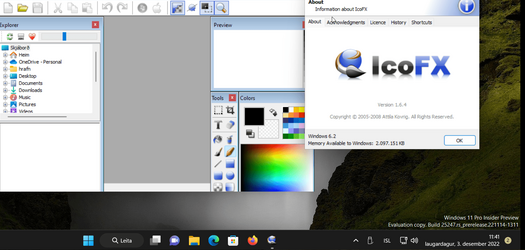
How about icofx which is a great program which can create icons of the relevant size -- current version is not free but there are archives of the last free version

e.g from here -- download the correct program though sometimes these sites obfuscate the download file with other spurious links !!!!


Screenshot_20221203_114122.png
Then when you've created your .ico file you can then use the properties of the application you want to change the icon of and use your custom one. Not sure on how it works for "Modern UI apps" though although this is a start as it works on "standard type apps" . Seems easier than hunting for and trying to replace .dll files.

Cheers
jimbo
 
Last edited:

My Computer My Computer

At a glance

Windows XP,11 Linux Fedora Rawhide pre-releas...2 X Intel i7
OS
Windows XP,11 Linux Fedora Rawhide pre-release 45
Computer type
PC/Desktop
CPU
2 X Intel i7
Screen Resolution
4KUHD X 2
Hi folks

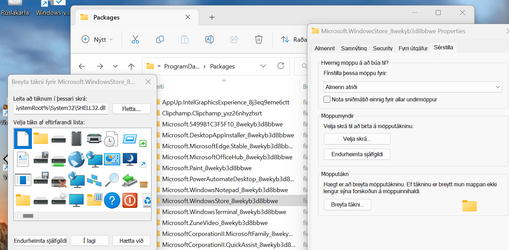
Doing some more work on this one some of the "Store" type apps can get icons accessed

You need to open up hidden files

then properties icons etc and then point to your icon file

I´ll replicate this screenshot on an ENG version of Windows later but I think this is on the right track .


Screenshot 2022-12-03 123934.png


cheers
jimbo
 

My Computer My Computer

At a glance

Windows XP,11 Linux Fedora Rawhide pre-releas...2 X Intel i7
OS
Windows XP,11 Linux Fedora Rawhide pre-release 45
Computer type
PC/Desktop
CPU
2 X Intel i7
Screen Resolution
4KUHD X 2
  • Like
Reactions: OAT
Yes @jimbo45, it is a good fun little application. I got it with Deskscapes as a package.
Sadly, it does not work for metro Apps; those are self-contained & secured, and any update would overwrite the icons you may have created.
It works well for standard executables and shell content though.
 

My Computers My Computers

  • At a glance

    All Branches but ReleaseAMD Ryzen 7 7735HS 3200-4500 Mhz 8 cores x 232 GB DDR5Radeon Graphic / NVIDIA GeForce RTX 4060 8 GB...
    OS
    All Branches but Release
    Computer type
    Laptop
    Manufacturer/Model
    Acer Nitro ANV15-51
    CPU
    AMD Ryzen 7 7735HS 3200-4500 Mhz 8 cores x 2
    Motherboard
    Sportage_RBH
    Memory
    32 GB DDR5
    Graphics Card(s)
    Radeon Graphic / NVIDIA GeForce RTX 4060 8 GB GDDR6
    Sound Card
    AMD/Realtek(R) Audio
    Monitor(s) Displays
    Integrated Monitor (15.3"vis)
    Screen Resolution
    FHD 1920X1080 16:9 144Hz
    Hard Drives
    KINGSTON OM8SEP4512Q-AA 1TB
    Western Digital 256GB
    PSU
    19V DC 6.32 A 120 W
    Cooling
    Dual Fans
    Mouse
    MS Bluetooth
    Internet Speed
    Fiber 1GB Cox -us & 1GB Orange-fr
    Browser
    Edge Canary- Firefox Nightly-Chrome Dev-Chrome Dev
    Antivirus
    Windows Defender
  • At a glance

    Windows 11 BetaAMD A9-94208 GB of DDR4AMD Radeon R5
    Operating System
    Windows 11 Beta
    Computer type
    Laptop
    Manufacturer/Model
    Asus X751BP
    CPU
    AMD A9-9420
    Memory
    8 GB of DDR4
    Graphics card(s)
    AMD Radeon R5
    Screen Resolution
    1600x900
    Hard Drives
    Seagate 1 TB
Yes @jimbo45, it is a good fun little application. I got it with Deskscapes as a package.
Sadly, it does not work for metro Apps; those are self-contained & secured, and any update would overwrite the icons you may have created.
It works well for standard executables and shell content though.
Hi there
Thanks for the info
On my system I don´t run any AFAIK metro apps I use firefox as browser, Office 2021 and other programs that are "standard apps and executables" but I'm sure metro apps must be hackable some where for those minded to do it.

Cheers
jimbo
 

My Computer My Computer

At a glance

Windows XP,11 Linux Fedora Rawhide pre-releas...2 X Intel i7
OS
Windows XP,11 Linux Fedora Rawhide pre-release 45
Computer type
PC/Desktop
CPU
2 X Intel i7
Screen Resolution
4KUHD X 2
I've currently been been using a few useful program to tear windows down. theirs "Resource Hacker" for extracting and replacing resources from dll and exe files. If the file is being stubborn or I just want to dump the entire content I use "Universal Extractor 2" for editing/creating resource images and icon files nothing beats full featured imaging software I use "Gimp". and two must have programs windows 11 should never be without are "Startallback" and "WinaeroTweaker". and if you find your being blocked to much by windows or I should say by the Trusted Installer try "CTIEXE", it launches programs as The Trusted Installer extremely useful for programs like the Task Scheduler and the Registry Editor (fun tip shut down Explorer and relaunch it as Trust Installer). But you throw all this together and its pretty good little windows 11 editing outfit.
 

My Computer My Computer

At a glance

Custom Windows 11 Pro The Phoenix Lite OS Neo...Core i3 3220 Overclocked (circuit level hardw...8Gb DDR3 made by some random manufacturer mos...Intel HD 3000 dual display Integrated (using ...
OS
Custom Windows 11 Pro The Phoenix Lite OS Neon Gamer Edition
Computer type
PC/Desktop
Manufacturer/Model
(Modified) Dell Optiplex 3010 SFF
CPU
Core i3 3220 Overclocked (circuit level hardware hack)
Motherboard
OEM
Memory
8Gb DDR3 made by some random manufacturer most likely Samsung
Graphics Card(s)
Intel HD 3000 dual display Integrated (using an unsigned driver by choice)
Sound Card
OEM
Monitor(s) Displays
Genaric 20in HDTV as Main and HP 2009m LCD Monitor as second
Screen Resolution
1920x1080 main and 1024x1816 (Vertical with custom Resolution) for second
Hard Drives
120Gb Kingston SATA SSD, 1Tb Toshiba SATA HDD and 4Tb Western Digital usb storage
PSU
gesundheit
Case
A Small one
Cooling
I don't know some fan it spins
Keyboard
Run of the mill wireless Logitech
Mouse
Razer - Naga Classic Edition 19 Button Programable w\LED Effects
Internet Speed
don't know but i seen it pull 7Ms so fast I guess
Browser
Brave Beta
Antivirus
No we dont do that. I find that antivirus and antimalware software is more damaging and evasive than most of the thing they remove.
Other Info
Do not fear the registry, for contains all of the answers.
I've currently been been using a few useful program to tear windows down. theirs "Resource Hacker" for extracting and replacing resources from dll and exe files. If the file is being stubborn or I just want to dump the entire content I use "Universal Extractor 2" for editing/creating resource images and icon files nothing beats full featured imaging software I use "Gimp". and two must have programs windows 11 should never be without are "Startallback" and "WinaeroTweaker". and if you find your being blocked to much by windows or I should say by the Trusted Installer try "CTIEXE", it launches programs as The Trusted Installer extremely useful for programs like the Task Scheduler and the Registry Editor (fun tip shut down Explorer and relaunch it as Trust Installer). But you throw all this together and its pretty good little windows 11 editing outfit.
where can i find the "CTIEXE" program?
 

My Computer My Computer

At a glance

windows11 21h2
OS
windows11 21h2

My Computers My Computers

  • At a glance

    All Branches but ReleaseAMD Ryzen 7 7735HS 3200-4500 Mhz 8 cores x 232 GB DDR5Radeon Graphic / NVIDIA GeForce RTX 4060 8 GB...
    OS
    All Branches but Release
    Computer type
    Laptop
    Manufacturer/Model
    Acer Nitro ANV15-51
    CPU
    AMD Ryzen 7 7735HS 3200-4500 Mhz 8 cores x 2
    Motherboard
    Sportage_RBH
    Memory
    32 GB DDR5
    Graphics Card(s)
    Radeon Graphic / NVIDIA GeForce RTX 4060 8 GB GDDR6
    Sound Card
    AMD/Realtek(R) Audio
    Monitor(s) Displays
    Integrated Monitor (15.3"vis)
    Screen Resolution
    FHD 1920X1080 16:9 144Hz
    Hard Drives
    KINGSTON OM8SEP4512Q-AA 1TB
    Western Digital 256GB
    PSU
    19V DC 6.32 A 120 W
    Cooling
    Dual Fans
    Mouse
    MS Bluetooth
    Internet Speed
    Fiber 1GB Cox -us & 1GB Orange-fr
    Browser
    Edge Canary- Firefox Nightly-Chrome Dev-Chrome Dev
    Antivirus
    Windows Defender
  • At a glance

    Windows 11 BetaAMD A9-94208 GB of DDR4AMD Radeon R5
    Operating System
    Windows 11 Beta
    Computer type
    Laptop
    Manufacturer/Model
    Asus X751BP
    CPU
    AMD A9-9420
    Memory
    8 GB of DDR4
    Graphics card(s)
    AMD Radeon R5
    Screen Resolution
    1600x900
    Hard Drives
    Seagate 1 TB
Yeah it works quite well. Because the developer said its the windows equivalent to God mode in a first person shooter. I changed the icon in it to the original God mode Doom-guy face sprite with the yellow eyes. And yeah, every time I mention it I accidentally reverse the spelling. Curse this dyslexia!!. I feel like It should have more flashy name anyway like "NT service Commander" or something
 
Last edited:

My Computer My Computer

At a glance

Custom Windows 11 Pro The Phoenix Lite OS Neo...Core i3 3220 Overclocked (circuit level hardw...8Gb DDR3 made by some random manufacturer mos...Intel HD 3000 dual display Integrated (using ...
OS
Custom Windows 11 Pro The Phoenix Lite OS Neon Gamer Edition
Computer type
PC/Desktop
Manufacturer/Model
(Modified) Dell Optiplex 3010 SFF
CPU
Core i3 3220 Overclocked (circuit level hardware hack)
Motherboard
OEM
Memory
8Gb DDR3 made by some random manufacturer most likely Samsung
Graphics Card(s)
Intel HD 3000 dual display Integrated (using an unsigned driver by choice)
Sound Card
OEM
Monitor(s) Displays
Genaric 20in HDTV as Main and HP 2009m LCD Monitor as second
Screen Resolution
1920x1080 main and 1024x1816 (Vertical with custom Resolution) for second
Hard Drives
120Gb Kingston SATA SSD, 1Tb Toshiba SATA HDD and 4Tb Western Digital usb storage
PSU
gesundheit
Case
A Small one
Cooling
I don't know some fan it spins
Keyboard
Run of the mill wireless Logitech
Mouse
Razer - Naga Classic Edition 19 Button Programable w\LED Effects
Internet Speed
don't know but i seen it pull 7Ms so fast I guess
Browser
Brave Beta
Antivirus
No we dont do that. I find that antivirus and antimalware software is more damaging and evasive than most of the thing they remove.
Other Info
Do not fear the registry, for contains all of the answers.
  • Like
Reactions: OAT
This sounds like the place I need to be to alter my folder and live folder icons to the custom ones I just lost to the Win11 upgrade. Would I be correct in thinking I can use Resource Hacker to alter imageres.dll / imageres.dll.mun in order to get my system back to the look I want just like I did back in Win10?
 

My Computer My Computer

At a glance

Windows 11 ProAMD Ryzen 5 5600x @4.5GHzKlevv CRAS (SK Hynix) 32GB DDR4 @ 3600MT/sGigabyte RTX 3070 Ti Gaming OC 8G
OS
Windows 11 Pro
Computer type
PC/Desktop
Manufacturer/Model
Custom
CPU
AMD Ryzen 5 5600x @4.5GHz
Motherboard
Gigabyte B550 Aorus Elite V2
Memory
Klevv CRAS (SK Hynix) 32GB DDR4 @ 3600MT/s
Graphics Card(s)
Gigabyte RTX 3070 Ti Gaming OC 8G
Sound Card
RealTek ALC1200 HD Audio (Onboard Mobo)
Monitor(s) Displays
LG 24UD58B 4K Monitor / LG 24MP58VQ 1080p Monitor
Screen Resolution
4K (Primary) / 1080p (Secondary)
Hard Drives
WD Black SN750 1TB NVME (Primary OS)
TC Sunbow X3 1TB SSD (Backup OS)
SeaGate 2TB Barracuda HDD (Bulk)
SeaGate 4TB Barracuda HDD (Backup)
PSU
Corsair RM850 Full Modular
Case
Antec 1200 V3 (Modified)
Cooling
5x CoolerMaster MF120 Halo (3x Front & 2x Rear) / 2x Arctic P12 on CoolerMaster Hyper 212 Black Edition / Aerocool Duo 200mm (Top Mount)
Keyboard
SteelSeries Apex M800
Mouse
SteelSeries Rival 500
Internet Speed
50mbps
Browser
Firefox
Antivirus
Windows Defender
Other Info
I've had a charley horse since the Renaissance.
To have it replaced at the next sfc or patch/update.
If you want to do that, then explore away.
 

My Computers My Computers

  • At a glance

    All Branches but ReleaseAMD Ryzen 7 7735HS 3200-4500 Mhz 8 cores x 232 GB DDR5Radeon Graphic / NVIDIA GeForce RTX 4060 8 GB...
    OS
    All Branches but Release
    Computer type
    Laptop
    Manufacturer/Model
    Acer Nitro ANV15-51
    CPU
    AMD Ryzen 7 7735HS 3200-4500 Mhz 8 cores x 2
    Motherboard
    Sportage_RBH
    Memory
    32 GB DDR5
    Graphics Card(s)
    Radeon Graphic / NVIDIA GeForce RTX 4060 8 GB GDDR6
    Sound Card
    AMD/Realtek(R) Audio
    Monitor(s) Displays
    Integrated Monitor (15.3"vis)
    Screen Resolution
    FHD 1920X1080 16:9 144Hz
    Hard Drives
    KINGSTON OM8SEP4512Q-AA 1TB
    Western Digital 256GB
    PSU
    19V DC 6.32 A 120 W
    Cooling
    Dual Fans
    Mouse
    MS Bluetooth
    Internet Speed
    Fiber 1GB Cox -us & 1GB Orange-fr
    Browser
    Edge Canary- Firefox Nightly-Chrome Dev-Chrome Dev
    Antivirus
    Windows Defender
  • At a glance

    Windows 11 BetaAMD A9-94208 GB of DDR4AMD Radeon R5
    Operating System
    Windows 11 Beta
    Computer type
    Laptop
    Manufacturer/Model
    Asus X751BP
    CPU
    AMD A9-9420
    Memory
    8 GB of DDR4
    Graphics card(s)
    AMD Radeon R5
    Screen Resolution
    1600x900
    Hard Drives
    Seagate 1 TB
This sounds like the place I need to be to alter my folder and live folder icons to the ones I just lost to the Win11 upgrade. Would I be correct in thinking I can use Resource Hacker to alter imageres.dll / imageres.dll.mun in order to get my system back to the look I want just like I did back in Win10?
"Imagesres.dll" the one founded c:\windows\system32 leave that alone it's just a system redirect that's why everything in the registry and system still points to that as the file when it's not.
But "imageres.dll.mun" in C:\wimdows\systemresources that's your target, it's the one that's the one that contains most of the system icons.
If you feel like it the other files within system resources are kind of worth checking out too they contain some of the other icons found within the system.
Yeah Resources Hacker is good for viewing and replacing the icons. If you want to view all of the icons at once a good program for that would be Green fish icon editor it's free. Now for the ability to dump all of the contents to a folder your best bet is Universal Extractor 2. This is a powerful tool that can dump the content of not only Dll and EXE, but just about any other type of file or archive containing multiple items. it can even dump individual layers of .ICO and .GIF files. But remember when replacing the icons within the dlls it's always a good practice to match the original icons resolution layer Count and Order.

As for an update replacing them. Unless your completely changing your windows version (like from 10 to 11) or Microsoft randomly finds the need to change something about the icon archives in an update, your safe.
I've had plenty of updates since I started doing this and I've never had my icons over written.
 
Last edited:

My Computer My Computer

At a glance

Custom Windows 11 Pro The Phoenix Lite OS Neo...Core i3 3220 Overclocked (circuit level hardw...8Gb DDR3 made by some random manufacturer mos...Intel HD 3000 dual display Integrated (using ...
OS
Custom Windows 11 Pro The Phoenix Lite OS Neon Gamer Edition
Computer type
PC/Desktop
Manufacturer/Model
(Modified) Dell Optiplex 3010 SFF
CPU
Core i3 3220 Overclocked (circuit level hardware hack)
Motherboard
OEM
Memory
8Gb DDR3 made by some random manufacturer most likely Samsung
Graphics Card(s)
Intel HD 3000 dual display Integrated (using an unsigned driver by choice)
Sound Card
OEM
Monitor(s) Displays
Genaric 20in HDTV as Main and HP 2009m LCD Monitor as second
Screen Resolution
1920x1080 main and 1024x1816 (Vertical with custom Resolution) for second
Hard Drives
120Gb Kingston SATA SSD, 1Tb Toshiba SATA HDD and 4Tb Western Digital usb storage
PSU
gesundheit
Case
A Small one
Cooling
I don't know some fan it spins
Keyboard
Run of the mill wireless Logitech
Mouse
Razer - Naga Classic Edition 19 Button Programable w\LED Effects
Internet Speed
don't know but i seen it pull 7Ms so fast I guess
Browser
Brave Beta
Antivirus
No we dont do that. I find that antivirus and antimalware software is more damaging and evasive than most of the thing they remove.
Other Info
Do not fear the registry, for contains all of the answers.
Also when replacing dll/mun or other files of this nature that are in constant use by the system, apart from needing to take ownership of the files the Explorer shell must be terminated as well. because it is holding on to those files and you cannot replace them with this happening.
Here's the easiest way I found to do it. (step by step overly detailed instructions)


First take your new "imagesres.dll.mun" remove the last letter in its name by renaming it to "imagesres.dll.mu" and place it in the "systemresource" directory (C:\windows\systemresources) with the original. It's always a good idea to make a backup of the original as well.


Then open task manager go to the processes section find "Windows Explorer" right click on it and select end task.
Everything will disappear at that point leaving you only for the most part with task manager left (but don't freak out it's supposed to happen).


At the top of task manager you'll see the "run new task" option click it when the "Create new task" window pops up click browse (we are not looking to run a program with it, we're going to use this window as a temporary file Explorer).


At the bottom change the file type option from Programs to All files.


Navigate to to the system resource directory (C:\windows\systemresources) scroll to the to "imagesres" files they should both be right next to each other.


Right click on the original and delete it ( again backups good idea)
right click on your new replacement and click rename and replace that last letter that you removed before making it once again "imagesres.dll.mun"


Close the window by clicking "X" at the top. And with the "Create new task" box that still should be opened type in the word... Explorer. to Restart the system UI and resume normal operation.


This process can be used when replacing other files the Explorer won't let go of.


I have seen in some instances where the original file becomes once again held on to by the task manager itself if this happens you're going to want to do all of the steps above but when it comes to deleting the original you'll need a program that can explore files that has an independent UI like "WINRAR" just have it running before you terminate Explorer and close the task manager before deleting the file. then use ctrl+alt+delete to reopen task manager afterwards to restore the UI.
 
Last edited:

My Computer My Computer

At a glance

Custom Windows 11 Pro The Phoenix Lite OS Neo...Core i3 3220 Overclocked (circuit level hardw...8Gb DDR3 made by some random manufacturer mos...Intel HD 3000 dual display Integrated (using ...
OS
Custom Windows 11 Pro The Phoenix Lite OS Neon Gamer Edition
Computer type
PC/Desktop
Manufacturer/Model
(Modified) Dell Optiplex 3010 SFF
CPU
Core i3 3220 Overclocked (circuit level hardware hack)
Motherboard
OEM
Memory
8Gb DDR3 made by some random manufacturer most likely Samsung
Graphics Card(s)
Intel HD 3000 dual display Integrated (using an unsigned driver by choice)
Sound Card
OEM
Monitor(s) Displays
Genaric 20in HDTV as Main and HP 2009m LCD Monitor as second
Screen Resolution
1920x1080 main and 1024x1816 (Vertical with custom Resolution) for second
Hard Drives
120Gb Kingston SATA SSD, 1Tb Toshiba SATA HDD and 4Tb Western Digital usb storage
PSU
gesundheit
Case
A Small one
Cooling
I don't know some fan it spins
Keyboard
Run of the mill wireless Logitech
Mouse
Razer - Naga Classic Edition 19 Button Programable w\LED Effects
Internet Speed
don't know but i seen it pull 7Ms so fast I guess
Browser
Brave Beta
Antivirus
No we dont do that. I find that antivirus and antimalware software is more damaging and evasive than most of the thing they remove.
Other Info
Do not fear the registry, for contains all of the answers.
Back
Top Bottom