- Local time
- 7:10 PM
- Posts
- 5,949
- Location
- Hafnarfjörður IS
- OS
- Windows XP,11 Linux Fedora Rawhide pre-release 46
Hi folks
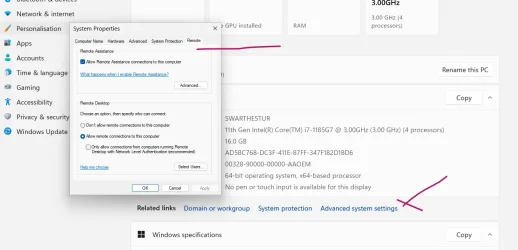
edited : added screenshot of missing bit -- this works on Canary 26H1 BTW
seems an important piece is missing here on 25H2 26220.7344
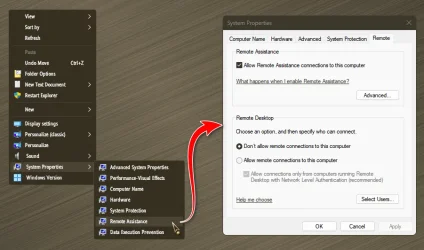
I can't find the thing that used to be in device manager -- the Remote pane which then specified Allow remote connections to this computer.
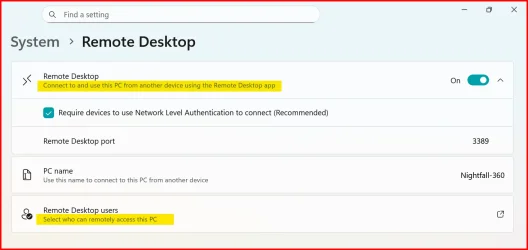
There's Remote desktop connection but that's for connecting THIS computer to others.
Any ideas -- I need this as you can also specify users etc etc.
Sometimes "simplyfying things too much" just makes things worse if you actually need to change or fix something -- even though for 95% of standard users it's probably a good idea to simplyfy things.
However I'd imagine most people using things like Canary or Dev type builds aren't "bog standard" users - or not normally !!!.
Cheers
jimbo
edited : added screenshot of missing bit -- this works on Canary 26H1 BTW
seems an important piece is missing here on 25H2 26220.7344
I can't find the thing that used to be in device manager -- the Remote pane which then specified Allow remote connections to this computer.
There's Remote desktop connection but that's for connecting THIS computer to others.
Any ideas -- I need this as you can also specify users etc etc.
Sometimes "simplyfying things too much" just makes things worse if you actually need to change or fix something -- even though for 95% of standard users it's probably a good idea to simplyfy things.
However I'd imagine most people using things like Canary or Dev type builds aren't "bog standard" users - or not normally !!!.
Cheers
jimbo
Last edited:
My Computer
At a glance
Windows XP,11 Linux Fedora Rawhide pre-releas...2 X Intel i7
- OS
- Windows XP,11 Linux Fedora Rawhide pre-release 46
- Computer type
- PC/Desktop
- CPU
- 2 X Intel i7
- Screen Resolution
- 4KUHD X 2